Hardware Hacker’s Marie Kondo: How Many LM386s Is Too Many?

We’re running a contest on Making Tech at Home: building projects out of whatever you’ve got around the house. As a hacker who’s never had a lab outside of my apartment, house, or hackerspace, I had to laugh at the premise. Where the heck else would I hack?

The idea is that you’re constrained to whatever parts you’ve got on hand. But at the risk of sounding like Scrooge McDuck sitting on a mountain of toilet paper, I’ve got literally hundreds of potentiometers in my closet, a couple IMUs, more microcontrollers than you can shake a stick at, and 500 ml of etching solution waiting for me in the bathroom. Switches, motors, timing belts, nichrome wire…maybe I should put in an order for another kilogram of 3D printer filament. In short, unless it’s a specialty part or an eBay module, I’m basically set.

But apparently not everyone is so well endowed. I’ve heard rumors of people who purchase all of the parts for a particular project. That ain’t me. The guru of household minimalism asks us to weigh each object in our possession and ask “does it spark joy?”. And the answer, when I pull out the needed 3.3 V low-dropout regulator and get the project built now instead of three days from now, is “yes”.

And I’m not even a hoarder. (I keep telling myself.) The rule that keeps me on this side of sanity: I have a box for each type of part, and they are essentially fixed. When no more motors fit in the motor box, no more motors are ordered, no matter how sexy, until some project uses enough of them to free up space. It’s worked for the last 20 years, long before any of us had even heard of Marie Kondo.

So if you also sit atop a heap of VFD displays like Smaug under the Lonely Mountain, we want to see what you can do. If you do win, Digi-Key is sending you a $500 goodie box to replenish your stash. But even if you don’t win, you’ve freed up space in the “Robot Stuff” box. That’s like winning, and you deserve some new servos. Keep on hacking!

This article is part of the Hackaday.com newsletter, delivered every seven days for each of the last 200+ weeks. It also includes our favorite articles from the last seven days that you can see on the web version of the newsletter.

Want this type of article to hit your inbox every Friday morning? You should sign up!

Roll Your Own Automation With ESPHome

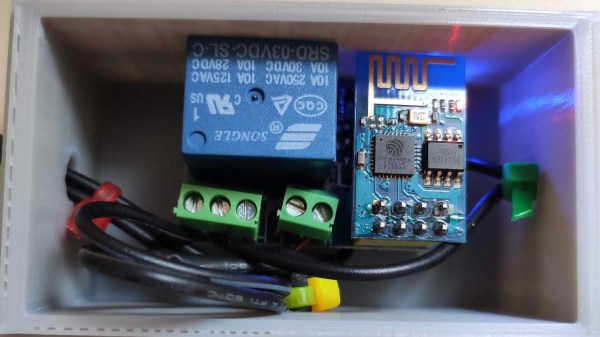
There are several different paths to a smart home, and [Marcus] eventually settled on using ESPHome and ESP8266/ESP32 based devices to create a complete DIY smart home solution which covers his garage door, sprinklers, LED strips, light bulbs, and outlets. There’s even an experimental (and very economical) ESP32-CAM based camera, shown here.

In fact, [Marcus]’s write-up could double as a sort of reference design. If you’re curious about ESPHome, be sure to read what he has to say because he explains exactly how he configured each device and any challenges he encountered in the process.

Beyond the software guidance, the post is also a great resource on how to flash a new firmware onto several different smart devices. [Marcus] provides nicely labeled images of the boards that show where you need to connect your programmer, which just might save you some trouble down the line. Though he did manage to set fire to one of the bulbs, so keep an eye out for that.

Tasmota is another open source option for controlling ESP8266-based devices, and if you’d like to explore that direction don’t forget that flashing Sonoff devices with Tasmota firmware recently got much, much easier.

DIY Magsafe Charger Feeds Off 12 V Solar Battery

[Steve Chamberlin] has a spiffy solar-charged 12 V battery that he was eager to use to power his laptop, but ran into a glitch. His MacBook Pro uses Apple’s MagSafe 2 connector for power, but plugging the AC adapter into the battery via a 110 VAC inverter seemed awfully inefficient. It would be much better to plug it into the battery directly, but that also was a problem. While Apple has a number of DC power adapters intended for automotive use, none exist for the MagSafe 2 connector [Steve]’s mid-2014 MacBook Pro uses. His solution was to roll his own MagSafe charger with 12 VDC input.

Since MagSafe connectors are proprietary, his first duty was to salvage one from a broken wall charger. After cleaning up the wires and repairing any frayed bits, it was time to choose a DC-DC converter to go between the MagSafe connector and the battery. The battery is nominally 12 volts, so the input of the DC-DC converter was easy to choose, but the output was a bit uncertain. Figuring out what the MagSafe connector expects took a little educated guesswork.

The original AC adapter attached to the charger claimed an output of 20 volts, another Apple adapter claimed a 14.85 V output, and a third-party adapter said 16.5 volts. [Steve] figured that the MagSafe connectors seemed fine with anything in the 15 to 20 V range, so it would be acceptable to use a 12 V to 19 V DC-DC boost converter which he had available. The result worked just fine, and [Steve] took measurements to verify that it is in fact much more efficient than had he took the easy way out with the inverter.

MagSafe has been displaced by USB-C nowadays, but there are plenty of MagSafe devices still kicking around. In a pinch, keep in mind that a little bit of filing or grinding is all that’s needed to turn MagSafe 1 into MagSafe 2.

Impractical Switches For The Bored Maker

Cabin fever: the inability to socialize with other humans does weird things to the human brain. Then again some of us are born to stand out, and one such amazing maker, [Lee], is spending time making weird switches from basically anything.

So what would you consider weird? How about using a piece of pasta? How about using the conductivity of an empty sink? There is even an experiment with breakfast cereal, though we do not recommend it for production use. [Lee] continues to pour experiments into Twitter and recently has gotten some conductive tape. Stick some on a game joystick and you got yourself an instant switch on a switch.

These experiments prove that there is a lot you can do with the stuff you have around your house and the other end of the circuit doesn’t necessarily need to be a humble LED. You could get more interesting results with adding the likes of a microcontroller like an ATtiny. Coupling it with a DIY LED badge would be a great idea and we’d love to see what you come up with.

36C3: Build Your Own Quantum Computer At Home

In any normal situation, if you’d read an article that about building your own quantum computer, a fully understandable and natural reaction would be to call it clickbaity poppycock. But an event like the Chaos Communication Congress is anything but a normal situation, and you never know who will show up and what background they will come from. A case in point: security veteran [Yann Allain] who is in fact building his own quantum computer in his garage.

Starting with an introduction to quantum computing itself, and what makes it so powerful also in the context of security, [Yann] continues to tell about his journey of building a quantum computer on his own. His goal was to build a stable computer he could “easily” create by himself in his garage, which will work at room temperature, using trapped ion technology. After a few iterations, he eventually created a prototype with KiCad that he cut into an empty ceramic chip carrier with a hobbyist CNC router, which will survive when placed in a vacuum chamber. While he is still working on a DIY laser system, he feels confident to be on the right track, and his estimate is that his prototype will achieve 10-15 qubits with a single ion trap, aiming to chain several ion traps later on.

As quantum computing is often depicted as cryptography’s doomsday device, it’s of course of concern that someone might just build one in their garage, but in order to improve future cryptographic systems, it also requires to fully understand — also on a practical level — quantum computing itself. Whether you want to replicate one yourself, at a rough cost of “below 15k Euro so far” is of course a different story, but who knows, maybe [Yann] might become the Josef Prusa of quantum computers one day.

Continue reading “36C3: Build Your Own Quantum Computer At Home”

Learn Arduino In Time And In Tune For Christmas

If you’re one of the lucky ten thousand today who still haven’t tried programming electronics with the Arduino platform, this detailed guide by [Dafna Mordechai] should hopefully give you enough incentive to pick it up now and make a simple bit of Christmas-themed decoration with it.

The guide isn’t exactly aimed at complete ground-up beginners but it does give some pointers on where to look up whatever information you don’t have in order to follow along. Other than that, it’s very simple and has well-detailed steps, showing you how to turn a breadboard into a simple animated arrangement of LEDs in the shape of a Christmas tree, along with a piezo buzzer playing “Jingle Bells”. If you’ve never done this sort of stuff before, [Dafna] explains in pretty good detail which part of the code does what, making it pretty simple if you want to play around with it and customize it to your taste.

Once you’ve gotten the hang of the basics of Arduino, why not try a project that’s a little more elaborate? Without having to stray too far from your comfort zone, you can easily build a kid’s toy full of switches and lights or even a very extra clock that has no shortage of lights and dials.

An Open Assistive Robotic Arm To Help People Feed Themselves

Despite being otherwise capable, not everyone is able to feed themselves. [Julien]’s robot arm project aims to bring this crucial independence back to those people. Assistive devices in this space do exist, but as always they’re prohibitively expensive and the approval process is a nightmare. The development of the arm started by working closely with people who needed it at a local hospital. We note with approval, quite a few cardboard mock-ups to get the size and shape right before more formal work was done in CAD.

The robot arm only has to support a very light payload so its construction can be quite light. A frame of steel rods or plywood is all that’s required. We like how the motion is transferred from stepper motors to the joints of the arm by generously sized timing belts allowing the weight of the arm to remain towards the base. The team behind the project has gotten it to a point, but they’re hoping it will inspire community involvement as they move forward with it.

It’s worth noting, this is not the first assistive eating aid we’ve covered.