Reprogramming Cheap WiFi Outlets

If you want to retrofit your home with smart outlets and lightbulbs, bust out your wallet. You can easily spend forty dollars for a smart light bulb at your local home supply store, and strips of smart sockets could cost sixty. When [coogle] found a WiFi-enabled four-outlet power strip on Amazon, he couldn’t resist. Sure, the no-name strip would be locked down behind a stupid iPhone interface and will probably turn your house into a botnet, but never mind that: you can easily reprogram these power strips to be whatever you want.

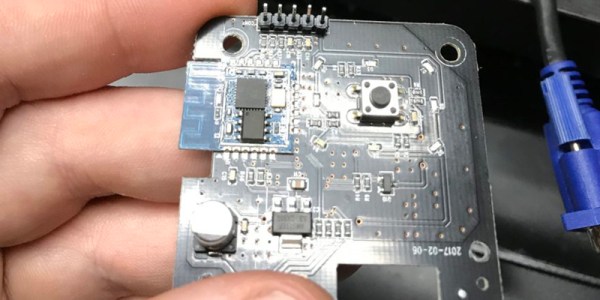
After receiving these power strips and tearing them open, [coogle] found exactly what you would expect from a no-name white goods manufacturer. There’s a board with an Espressif chip and a WiFi antenna, and a second board with a few relays, with a few wires connecting the two. You only need to browse AliExpress for a few minutes to figure out what’s going on here. The brains of the outfit are in the ESP8266, and if you can control that, you have your own Internet of Power Strips.

The problem, then, was reprogramming the ESP8266. This was a version of the chip [coogle] hadn’t seen before, but a quick query with the Google Mother Brain revealed it was a WT8266-S1 module, with all the pins required for programming easily accessible on a convenient header. After connecting this header up to an ESP programming board, [coogle] had all the relevant information including the capacity of the Flash. There’s still a bit more work to make this a functional WiFi power outlet, namely figuring out which GPIOs and wires connect to which relays, but this is effectively a completely Open IoT device right now. All you have to do is bring your own firmware.
Mc Lighting Takes The Pain Out Of Blinking

If you want to blink a ton of WS2812-alike LED pixels over WiFi, the hardware side of things is easy enough: an LED strip, and ESP8266 unit, and a beefy enough power supply to feed them. But the software side — that’s where it can be a bit of a pain.

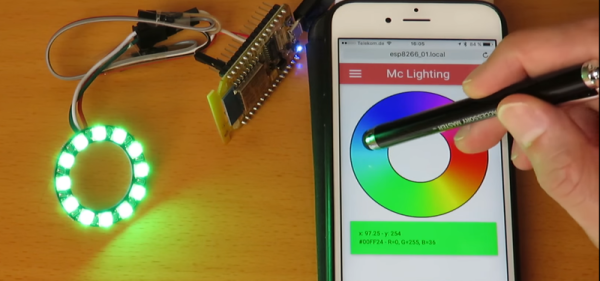
Enter Mc Lighting. It makes the software side of things idiot-proof. Flash the firmware onto the ESP8266, and you’ve got your choice of REST, WebSockets, or MQTT to get the data in. This means that it’ll work with Homekit, NodeRed, or an ESP-hosted web interface that you can pull up from any smartphone.

The web interface is particularly swell, and has a bunch of animations built in. (Check out the video below.) This means that you can solder some wires, flash an ESP, and your least computer-savvy relatives can be controlling the system in no time. And speaking of videos, Mc Lighting’s author [Tobias] has compiled a playlist of projects that use the library, also just below. The docs on GitHub are great, and also check out the wiki.

So what are you waiting for? Do you or your loved ones need some blink in your life? And while you’re ordering LED strips, get two. You’re going to want to build TWANG! as well.

Continue reading “Mc Lighting Takes The Pain Out Of Blinking”

Audio Hacking With The ESP8266

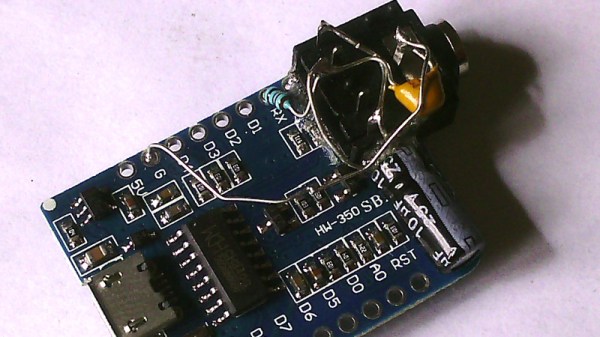
If you study the specifications of the ESP8266 WiFi-enabled microcontroller, you will notice that it features an I2S audio interface. This is a high-speed serial port designed to deliver 16-bit audio data in a standard format, and has its origins in consumer audio products such as CD players. It would be usual to attach a dedicated DAC to an I2S interface to produce audio, but [Jan Ostman]’s synthesiser projects eschew that approach, and instead do the job in software. His I2S interface pushes out a pulse density modulated data stream in the same manner as a 1-bit DAC, meaning that the only external components required to produce audio are a simple low-pass filter. He’s posted a video of the synth in action, which we’ve placed below the break.

The example he gives us is a basic clone of a Roland 909 drum machine, and he takes us through the code with extensive examples including MIDI. He’s using the Wemos D1 Mini board, but the same could be replicated with many other ESP8266 platforms.

We’ve featured [Jan]’s work many times before, from his minimalist Atmel-based devices through to small but perfectly-formed complete instruments.

Continue reading “Audio Hacking With The ESP8266”

Need A Thousand Extra PWM Pins?

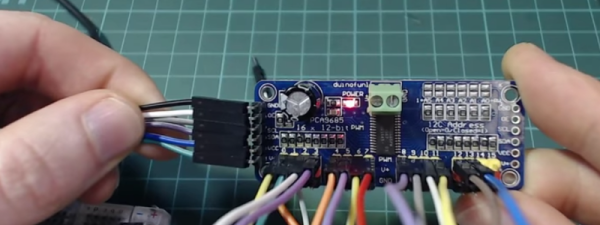
If your Arduino runs out of I/O lines, you can always add one of the several I/O expander chips that takes a serial interface to set its several pins. Or perhaps you could buy something like an Arduino Mega, with its extra sockets to fulfil your needs. But what would you do if you really needed more pins, say a thousand of them? Perhaps [Brian Lough] has the answer. OK, full disclosure: If you really need a thousand, the video isn’t exactly for you, as he shows you how to add up to 992 PWM outputs. The chip he uses works with any microcontroller (the video shows an ESP8266), and we suppose you could use two daisy chains of them and break the 1,000 barrier handily.

We like how short the video is (just two minutes; see below) as it gets right to the point. The PCA9685 chip gives you 16 12-bit PWM channels via an I2C interface. You can daisy chain up to 62 of the boards to get the 992 outputs promised.

Continue reading “Need A Thousand Extra PWM Pins?”

Kniwwelino Is An ESP8266 Micro:Bit

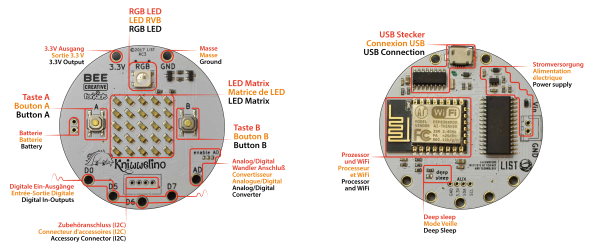
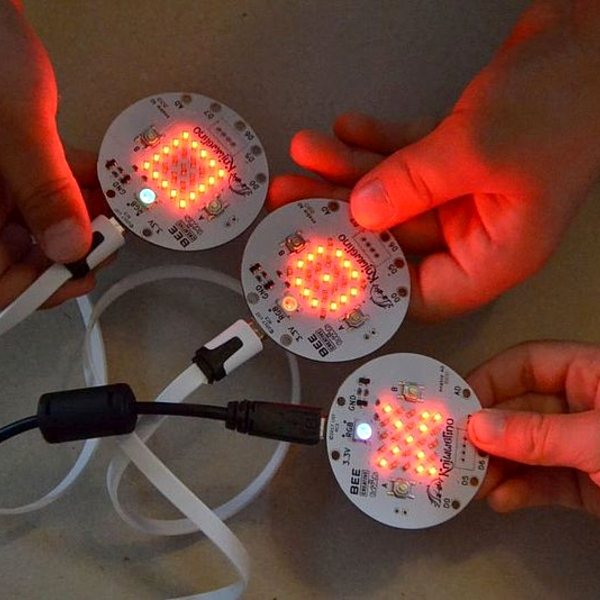
Kniwwelino is the latest in a line of micro:bit-inspired projects that we’ve seen, but this one comes with a twist: it uses an ESP8266 and WiFi at the core instead of the nR51 ARM/BTLE chip. That means that students can connect via laptop, cellphone, or anything else that can get onto a network.

That’s not the only tradeoff, though. In order to get the price down, the Kniwwelino drops the accelerometer/magnetometer of the micro:bit for a programmable RGB LED. With fewer pins to break out, the Kniwwelino is able to ditch the love-it-or-hate-it card-edge connector of the micro:bit as well. In fact, with all these changes, it’s hard to call this a micro:bit clone at all — it’s more like a super-blinky ESP8266 development kit.

So what have they got left in common? The iconic 5×5 LED matrix in the center, and a Blockly visual programming dialect dedicated to the device. Based on the ESP8266, the Kniwwelino naturally also has an Arduino dialect that students can “graduate” to when they’re tired of moving around colored blobs, and of course you could flash the chip with anything else that runs on an ESP8266.

We don’t have one in our hands, but we like the idea. An RGB LED is a lot of fun on Day One, and the fact that the Kniwwelino fits so neatly into existing bodies of code makes the transition from novice to intermediate programmer a lot easier. These things are personal preference, but WiFi beats Bluetooth LE in our book, for sheer ubiquity and interoperability. Finally, the Kniwwelino comes in at about half the manufacturing cost of a micro:bit, which makes it viable in schools without large manufacturer subsidies. They’re estimating $5 per unit. (Retail is higher.) On the other hand, the Kniwwelino is going to use more juice than its ARM-based competitor, and doesn’t have an accelerometer.

Kniwwelino is apparently derived from a luxembourgish word “kniwweln” that apparently means to craft something. The German Calliope Mini is named after Zeus’ daughter, the programmer’s muse. We’re stoked to see so many cute dev boards getting into the hands of students, no matter what you call them.

Persistence Of Phosphorescence Clock Displays YouTube Stats Too

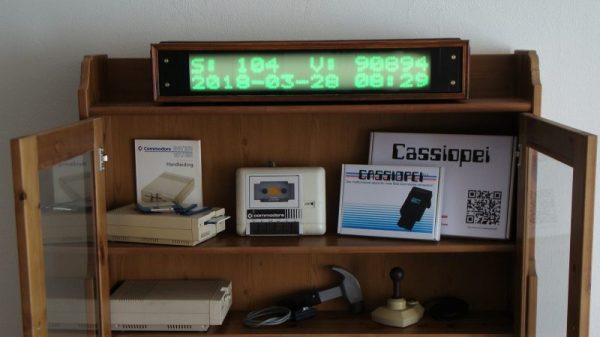
Looking for an eye-catching and unique way to display the time and date? Want the flexibility to add other critical information, like the number of YouTube subs you’ve got? Care to be able to read it from half a block away, at least at night? Then this scrolling glow-in-the-dark dot-matrix display could be right up your alley.

Building on his previous Morse code transcriber using a similar display, [Jan Derogee] took the concept and went big. The idea is to cover a PVC pipe with phosphorescent tape and rotate it past a row of 100 UV LEDs. The LEDs are turned on as the glow-in-the-dark surface passes over them, charging up a row of spots. The display is built up to two rows of 16 characters by the time it rotates into view, and the effect seems to last for quite a while. An ESP8266 takes care of driving the display and fetching NTP time and YouTube stats.

We’ve seen “persistence of phosphorescence” clocks before, but not as good looking and legible as this one. We like the approach, and we can’t help but think of other uses for glow-in-the-dark displays.

Continue reading “Persistence Of Phosphorescence Clock Displays YouTube Stats Too”

Assess Your Output With A Cheap DIY Urine Flowmeter

Some things about the human body are trivial to measure. Height, weight, blood pressure, pulse, temperature — these are all easily quantifiable with the simplest of instruments and can provide valuable insights into our state of health. Electrical activity in the heart and the brain can be captured with more complex instruments, too, and all manner of scopes can be inserted into various orifices to obtain actionable information about what’s going on.

But what about, err, going? Urine flow can be an important leading indicator for a host of diseases and conditions, but it generally relies on subjective reports from the patient. Is there a way to objectively measure how well urine is flowing? Of course there is.

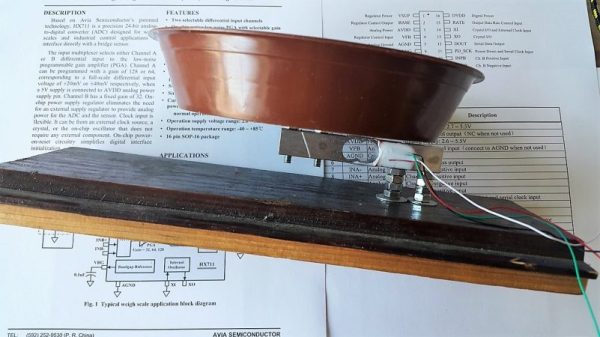
The goal for [GreenEyedExplorer]’s simple uroflowmeter is simple: provide a cheap, easy to use instrument that any patient can use to quantify the rate of urine flow while voiding. Now, we know what you’re thinking — isn’t liquid flow usually measured in a closed system with a paddlewheel or something extending into the stream? Wouldn’t such a device for urine flow either be invasive or messy, or both? Rest assured, this technique is simple and tidy. A small load cell is attached to an ESP8266 through an HX711 load cell amp. A small pan on the load cell receives urine while voiding, and the force of the urine striking the pan is assessed by the software. Reports can be printed to share with your doctor, and records are kept to see how flow changes over time.

All kidding aside, this could be an important diagnostic tool, and at 10€ to build, it empowers anyone to take charge of their health. And since [GreenEyedExplorer] is actually a urologist, we’re taking this one seriously.

Continue reading “Assess Your Output With A Cheap DIY Urine Flowmeter”