Building A Supersized Game Boy Advance

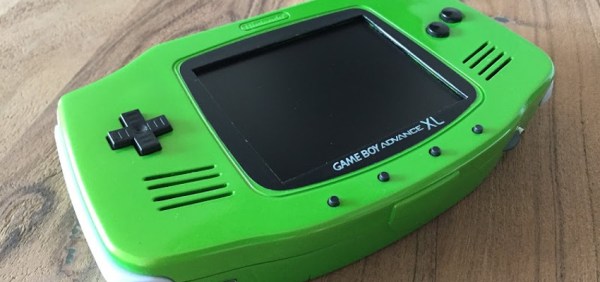
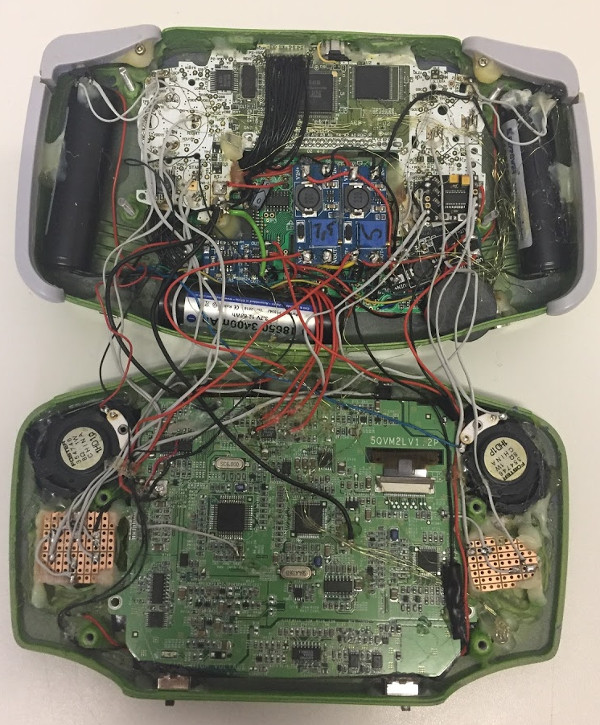
Unless you really look closely at the image above, you might not realize you aren’t looking at a normal Game Boy Advance; which is sort of the point. Even though it retains the looks of the iconic Nintendo handheld, this version built by [Akira] is supersized for adult hands. How big is it? To give you an idea, that screen is 5 inches, compared to the 2.9 inch screen the original sported.

Unlike most of the portable gaming hacks we’ve covered recently, this big-boy GBA isn’t powered by a Raspberry Pi. Internally it’s packing a genuine GBA motherboard, which has been wired into a portable screen originally intended for the PlayStation.

Though that may be understating things a bit, as getting the round PCB of the original screen into the rectangular shape of the GBA meant it had to be cut down and the traces recreated with jumper wires. The original CCFL backlight of the screen had to go in the name of battery life, and in its place is the backlight system pulled from a Nintendo DSi XL.

But where did [Akira] get a giant GBA case to begin with? No, it isn’t 3D printed. It’s actually a hard carrying case that was sold for the GBA. The carrying case obviously didn’t have a cartridge slot or openings for buttons, so those sections were grafted from a donor GBA case. So despite the system overall being so much bigger than the original, the D-Pad, face buttons, and cartridge slot on the back are at normal GBA scale.

The GBA XL is really a labor of love; browsing through the build log you can see that [Akira] actually started the project back in 2014, but it kept getting shelved until more research could be done on how to pack all the desired features into the final device.

While this may be the most historically accurate attempt at making a bigger Game Boy, it certainly isn’t the first. There seems to be a fascination with turning the quintessential pocket game system into something that’s quite the opposite.

Continue reading “Building A Supersized Game Boy Advance”

Reverse Engineering The Nintendo Wavebird

Readers who were firmly on Team Nintendo in the early 2000’s or so can tell you that there was no accessory cooler for the Nintendo GameCube than the WaveBird. Previous attempts at wireless game controllers had generally either been sketchy third-party accessories or based around IR, and in both cases the end result was that the thing barely worked. The WaveBird on the other hand was not only an official product by Nintendo, but used 2.4 GHz to communicate with the system. Some concessions had to be made with the WaveBird; it lacked rumble, was a bit heavier than the stock controllers, and required a receiver “dongle”, but on the whole the WaveBird represented the shape of things to come for game controllers.

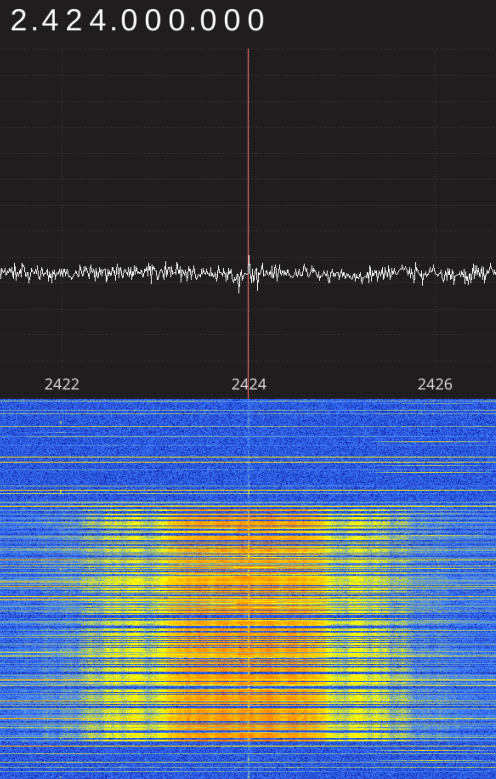
Finding the center frequency for the WaveBird

Given the immense popularity of the WaveBird, [Sam Edwards] was somewhat surprised to find very little information on how the controller actually worked. Looking for a project he could use his HackRF on, [Sam] decided to see if he could figure out how his beloved WaveBird communicated with the GameCube. This moment of curiosity on his part spawned an awesome 8 part series of guides that show the step by step process he used to unlock the wireless protocol of this venerable controller.

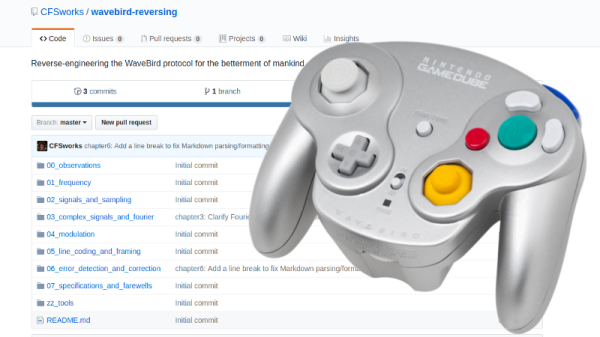
Even if you’ve never seen a GameCube or its somewhat pudgy wireless controller, you’re going to want to read though the incredible amount of information [Sam] has compiled in his GitHub repository for this project.

Starting with defining what a signal is to begin with, [Sam] walks the reader though Fourier transforms, the different types of modulations, decoding packets, and making sense of error correction. In the end, [Sam] presents a final summation of the wireless protocol, as well as a simple Python tool that let’s the HackRF impersonate a WaveBird and send button presses and stick inputs to an unmodified GameCube.

This amount of work is usually reserved for those looking to create their own controllers from the ground up, so we appreciate the effort [Sam] has gone through to come up with something that can be used on stock hardware. His research could have very interesting applications in the world of “tool-assisted speedruns” or even automating mindless stat-grinding.

The King Of All Game Genies In An Arduino

While Nintendo is making a killing on nostalgic old consoles, there is a small but dedicated group of hackers still working with the original equipment. Since the original NES was rolled out in the 80s, though, there are a few shortcomings with the technology. Now, though, we have Arduinos, cheap memory, and interesting toolchains. What can we do with this? Absolutely anything we want, like playing modern video games on this antiquated system. [uXe] added dual-port memory to his ancient NES console, opening up the door to using the NES as a sort of video terminal for an Arduino. Of course, this is now also the King of All Game Genies and an interesting weekend project to boot.

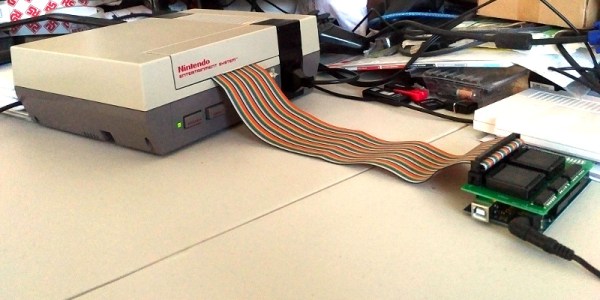
Most NES cartridges have two bits of memory, the PRG and CHR ROMs. [uXe] is breaking out the cartridge connector onto an exceptionally wide rainbow ribbon cable, and bringing it into a custom Arduino Mega shield loaded up with two 16K dual-port RAM chips. These RAM chips effectively replace the PRG and CHR ROMs Since these are dual-port RAM chips, they can be written to by the Arduino and read by the NES simultaneously.

The NES sees one port of the RAM and can read and write from it while the Arduino still has access to make changes to the other post while that’s happening. A trick like this opens up a whole world of possibilities, most obviously with tiling and other graphics tricks that can push beyond the console’s original capabilities. [uXe] is currently playing Arduboy games on the NES — a really neat trick to pull off. Well done [uXe]!

Be sure to check out the video below of the NES running some games from the Arduboy system. It seems to integrate seamlessly into the hardware, so if you’ve always had a burning desire to fix crappy graphics on some of your favorite games, or run some special piece of software on an NES, now might just be your time to shine.

Continue reading “The King Of All Game Genies In An Arduino”

Raspberry Pi Compute Module 3 In A GameBoy Original

[Kite] has been making custom PCBs for GameBoys for a long time. Long enough, in fact, that other people have used his work to build even more feature-rich GameBoy platforms. Unfortunately some of their work had stagnated, so [Kite] picked it up and completed a new project: a GameBoy that uses a Raspberry Pi running on his upgraded GameBoy PCB.

At its core the build uses a Raspberry Pi 3, but one that has been shrunk down to the shape of a memory module, known as the Compute Module 3. (We featured the original build by [inches] before, but [Kite] has taken it over since then.) The upgrade frees up precious space in the GameBoy case to fit the custom PCB that was originally built by [Kite], and also eliminates the need to cut up a Raspberry Pi and solder it to the old version of his PCB. The build is very clean, and runs RetroPie like a champ. It has some additional features as well, such as having an HDMI output.

For anyone looking for that retro GameBoy feel but who wants important upgrades like a backlit color screen, or the ability to play PSP games, this might be the build for you. The video below goes into details about how it all fits together. If you’re looking for more of a challenge in your GameBoy hacks, though, there’s an ongoing challenge to build the tiniest GameBoy possible as well.

Continue reading “Raspberry Pi Compute Module 3 In A GameBoy Original”

Mega Game & Watch Octopus

Mega Game & Watch: True Multiplayer Game

Today we’re used to handheld game consoles like the Nintendo Switch, that let you roam around in 3D worlds which include not only 3D players but more terrain than many people walk around in real life in a week. But back in the early 1980s Nintendo’s handheld offering was the Game & Watch, which used a segmented LCD display. An entire segment could be used to represent the player, with player segments spread throughout the display. To move the player, the previous player segment would be turned off while another adjacent one would be on. That also meant that a console could play only one game. Despite these limitations they were very popular for their time.

[Thomas Tilley] decided to improve on the old Game & Watch in a different way, by making it bigger, much bigger. So big in fact that even many teenage players can’t reach both the button to move left and the button to move right in time, turning it into a highly co-operative two-player game. Judging by the video below, that made playing it double the fun. The game he chose to tackle is the Game & Watch Octopus, or Mysteries of the Sea and Mysteries of the Deep in the UK.

Continue reading “Mega Game & Watch: True Multiplayer Game”

Homebrew SNES Mini Aims For Historical Accuracy

While “normies” are out fighting in the aisles of Walmart to snap up one of the official “Classic Mini” consoles that Nintendo lets slip out onto the market every once and awhile, hackers have been perfecting their own miniature versions of these classic gaming systems. The “Classic Mini” line is admittedly a very cool way to capitalize on nostalgic masses who have now found themselves at the age where they have disposable income, but the value proposition is kind of weak. Rather than being stuck with the handful of generation-limited games that Nintendo packed into the official products, these homebrew consoles can play thousands of ROMs from systems that stretch across multiple generations and manufacturers.

But for those old enough to remember playing on one of these systems when they first came out, these modern reincarnations always lack a certain something. It never feels quite right. That vaguely uncomfortable feeling is exactly what [ElBartoME] is aiming to eliminate with his very slick miniature SNES build. His 3D printed case doesn’t just nail the aesthetics of the original (PAL) console, but the system also uses real SNES controllers in addition to NFC “cartridges” to load different ROMs.

The project’s page on Thingiverse has all the wiring diagrams and kernel configuration info to get the internal Raspberry Pi 3 to read an original SNES controller via the GPIO pins. He also gives a full rundown on the hardware and software required to get the NFC-enabled cartridges working with EmulationStation to launch the appropriate game when inserted. Though he does admit this is quite a bit trickier than the controller setup.

[ElBartoME] has put a video up on YouTube that shows him inserting his mock cartridges and navigating the menus with an original SNES controller. If it wasn’t for the fact that the console is the size of a smartphone and the on-screen display is generations beyond what the SNES could pull off, you’d think he was playing on the real thing.

We’ve seen some incredibly impressive emulation boxes based on the Raspberry Pi, and builds which tried to embrace original hardware components, but this particular project may represent the best of both worlds.

Continue reading “Homebrew SNES Mini Aims For Historical Accuracy”

Reverse Engineering The Nintendo Switch Joy-Cons

The Switch is Nintendo’s latest effort in the console world. One of its unique features is the Joy-Cons, a pair of controllers that can either attach directly to the console’s screen or be removed and used individually. But how do they work? [dekuNukem] decided to find out.

The reverse engineering efforts begin with disassembly. Surprisingly, there is no silkscreen present on the board to highlight test points or part numbers. This is likely to conflate intended to stymie community efforts to work with the hardware, as different teams may create their own designations for components. Conversely, the chips inside still have their identifying markings present, which does ease identification somewhat.

There are some interesting choices made – the majority of the buttons are scanned in a matrix configuration by the on-board microcontroller, making it harder to spoof button presses. The controllers communicate over Bluetooth, switching to a physical serial connection when attached directly to the screen. This runs at a blistering 3,125,000 BPS after the initial handshake is completed.

Overall it’s a fairly comprehensive reverse engineering effort, and [dekuNukem] has provided excellent detail in the writeup for anyone else looking to get involved. There’s still some work left to do, like investigating the rumble messages, but it’s an excellent start and very comprehensive.

Perhaps you’re more interested in older Nintendo hardware? Check out this comprehensive effort to figure out NES console-to-cartridge security methods.