Why Blobs Are Important, And Why You Should Care

We are extraordinarily fortunate to live at a time in which hardware with astounding capabilities can be had for only a few dollars. Systems that would once have taken an expensive pile of chips and discretes along with months of development time to assemble are now integrated onto commodity silicon. Whether it is a Linux-capable system-on-chip or a microcontroller, such peripherals as WiFi, GPUs, Bluetooth, or USB stacks now come as part of the chip, just another software library rather than a ton of extra hardware.

Beware The Blob!

An ESP-01 module
The cheapest of chips still comes with a blob.

If there is a price to be paid for this convenience, it comes in the form of the blob. A piece of pre-compiled binary software that does the hard work of talking to the hardware and which presents a unified API to the software. Whether you’re talking to the ESP32 WiFi through an Arduino library or booting a Raspberry Pi with a Linux distribution, while your code may be available or even maybe open source, the blob it relies upon to work is closed source and proprietary. This presents a challenge not only to Software Libre enthusiasts in search of a truly open source computer, but also to the rest of us because we are left reliant upon the willingness of the hardware manufacturer to update and patch their blobs.

An open-source advocate would say that the solution is easy, the manufacturers should simply make their blobs open-source. And it’s true, were all blobs open-source then the Software Libre crowd would be happy and their open-source nature would ease the generation of those updates and patches. So why don’t manufacturers release their blobs as open-source? In some cases that may well be due to a closed-source mindset of never releasing anything to the world to protect company intellectual property, but to leave it at that is not a full answer. To fully understand why that is the case it’s worth looking at how our multifunctional chips are made.

Continue reading “Why Blobs Are Important, And Why You Should Care”

What’s The Deal With Chromium On Linux? Google At Odds With Package Maintainers

Linux users are more likely than most to be familiar with Chromium, Google’s the free and open source web project that serves as the basis for their wildly popular Chrome. Since the project’s inception over a decade ago, users have been able to compile the BSD licensed code into a browser that’s almost the same as the closed-source Chrome. As such, most distributions offer their own package for the browser and some even include it in the base install. Unfortunately, that may be changing soon.

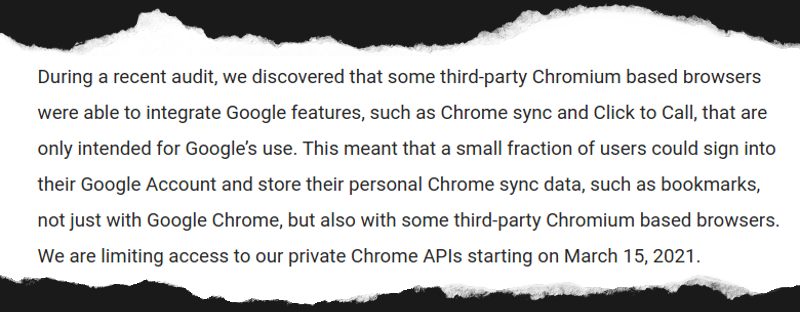
A post made earlier this month to the official Chromium Blog explained that an audit had determined “third-party Chromium based browsers” were using APIs that were intended only for Google’s internal use. In response, any browser attempting to access features such as Chrome Sync with an unofficial API key would be prevented from doing so after March 15th.

To the average Chromium user, this doesn’t sound like much of a problem. In fact, you might even assume it doesn’t apply to you. The language used in the post makes it sound like Google is referring to browsers which are spun off of the Chromium codebase, and at least in part, they are. But the search giant is also using this opportunity to codify their belief that the only official Chromium builds are the ones that they provide themselves. With that simple change, anyone using a distribution-specific build of Chromium just became persona non grata.

Unhappy with the idea of giving users a semi-functional browser, the Chromium maintainers for several distributions such as Arch Linux and Fedora have said they’re considering pulling the package from their respective repositories altogether. With a Google representative confirming the change is coming regardless of community feedback, it seems likely more distributions will follow suit.

Continue reading “What’s The Deal With Chromium On Linux? Google At Odds With Package Maintainers”

How The Gates (Almost) Stole Christmas

‘Twas the night before Christmas and all through the house
Blue screens were everywhere; no response from the mouse
Windows, it seems, had decided to die
Because it had updated; we didn’t know why
But Santa had a plan while we were all in bed
He reformatted our server and installed Linux instead
In the morning we rushed in and what did we see?
Programs were running, and most of them free!
There was Chrome and Open Office and emacs for me
Not a penny was going to Mr. Gates’ fee
Now we have no more blue screens, ever, of course
Because Santa turned us on to that sweet open source

Blue Pill As A Nerdy Swiss Army Knife

Not everyone can afford an oscilloscope, and some of us can’t find a USB logic analyzer half the time. But we can usually get our hands on a microcontroller kit, which can be turned into a makeshift instrument if given the appropriate code. A perfect example is buck50 developed by [Mark Rubin], an open source firmware to turn a STM32 “Blue Pill” into a multi-purpose test and measurement instrument.

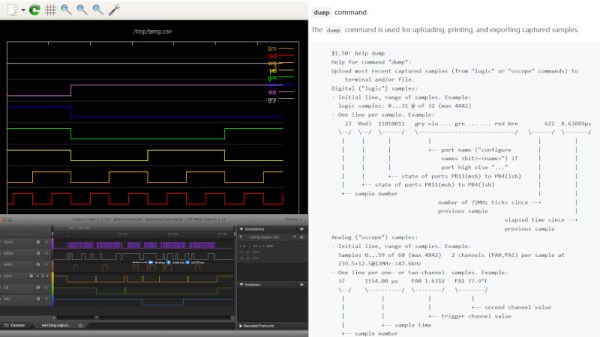
buck50 comes with a plethora of functionality built in which includes an oscilloscope, logic analyzer, and bus monitor. The device is a two way street and also comes with GPIO control as well as PWM output. There’s really a remarkable amount of functionality crammed into the project. [Mark] provides a Python application that exposes a text based UI for configuring and using the device though commands and lots of commands which makes this really nerdy. There are a number of options to visualize the data captured which includes gnuplot, gtk wave and PulseView to name a few.

[Mark] does a fantastic job not only with the firmware but also with the documentation, and we really think this makes the project stand out. Commands are well documented and everything is available on [GitHub] for your hacking pleasure. And if you are about to order a Blue Pill online, you might want to check out the nitty-gritty of the clones that are floating around.

Thanks [JohnU] for the tip!

Vizy “AI Camera” Wants To Make Machine Vision Less Complex

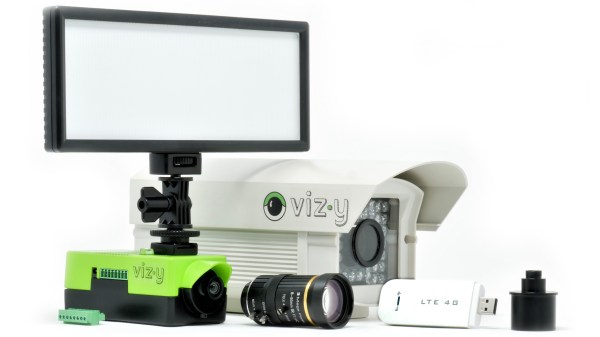
Vizy, a new machine vision camera from Charmed Labs, has blown through their crowdfunding goal on the promise of making machine vision projects both easier and simpler to deploy. The camera, which starts around $250, integrates a Raspberry Pi 4 with built-in power and shutdown management, and comes with a variety of pre-installed applications so one can dive right in.

The Sony IMX477 camera sensor is the same one found in the Raspberry Pi high quality camera, and supports capture rates of up to 300 frames per second (under the right conditions, anyway.) Unlike the usual situation faced by most people when a Raspberry Pi is involved, there’s no need to worry about adding a real-time clock, enclosure, or ensuring shutdowns happen properly; it’s all taken care of.

‘Birdfeeder’ application can automatically identify and upload images of visitors.

Charmed Labs are the same folks behind the Pixy and Pixy 2 cameras, and Vizy goes further in the sense that everything required for a machine vision project has been put onboard and made easy to use and deploy, even the vision processing functions work locally and have no need for a wireless data connection (though one is needed for things like automatic uploading or sharing.) For outdoor or remote applications, there’s a weatherproof enclosure option, and wireless connectivity in areas with no WiFi can be obtained by plugging in a USB cellular modem.

A few of the more hacker-friendly hardware features are things like a high-current I/O header and support for both C/CS and M12 lenses for maximum flexibility. The IR filter can also be enabled or disabled via software, so no more swapping camera modules for ones with the IR filter removed. On the software side, applications are all written in Python and use open software like Tensorflow and OpenCV for processing.

The feature list looks good, but Vizy also seems to have a clear focus. It looks best aimed at enabling projects with the following structure:

Detect Things (people, animals, cars, text, insects, and more) and/or Measure Things (size, speed, duration, color, count, angle, brightness, etc.)

Perform an Action (for example, push a notification or enable a high-current I/O) and/or Record (save images, video, or other data locally or remotely.)

The Motionscope application tracking balls on a pool table. (Click to enlarge)

A good example of this structure is the Birdfeeder application which comes pre-installed. With the camera pointed toward a birdfeeder, animals coming for a snack are detected. If the visitor is a bird, Vizy identifies the species and uploads an image. If the animal is not a bird (for example, a squirrel) then Vizy can detect that as well and, using the I/O header, could briefly turn on a sprinkler to repel the hungry party-crasher. A sample Birdfeeder photo stream is here on Google Photos.

Motionscope is a more unusual but very interesting-looking application, and its purpose is to capture moving objects and measure the position, velocity, and acceleration of each. A picture does a far better job of explaining what Motionscope does, so here is a screenshot of the results of watching some billiard balls and showing what it can do.

Paying It Forward

It’s all those little things. A month ago, I was working on the axes for a foam-cutting machine. (Project stalled, will pick back up soon!) A week ago, somewhere else on the Internet, people were working on sliders that would ride directly on aluminum rails, a problem I was personally experiencing, and recommended using drawer-glide tape — a strip of PTFE or UHMW PE with adhesive backing on one side. Slippery plastic tape solves the metal-on-metal problem. It’s brilliant, it’s cheap, and it’s just a quick trip to the hardware store.

Just a few days ago, we covered another awesome linear-motion mechanical build in the form of a DIY camera rig that uses a very similar linear motion system to the one I had built as well: a printed trolley that slides on skate bearings over two rails of square-profile extruded aluminum. He had a very nice system of anchoring the spacers that hold the two rails apart, one of the sticking points in my build. I thought I’d glue things together, but his internal triangle nut holders are a much better solution because epoxy doesn’t like to stick to anodized aluminum. (And Alexandre, if you’re reading, that UHMW PE tape is just what you need to prevent bearing wear on your aluminum axes.)

Between these events, I got a message thanking me for an article that I wrote four years ago on debugging SPI busses. Apparently, it helped a small company to debug a problem and get their product out the door. Hooray!

So in one week, I got help from two different random strangers on a project that neither of them knew I was working on, and I somehow saved a startup. What kind of crazy marvelous world is this? It’s become so normal to share our ideas and experience, at least in our little corner of the Internet, that I sometimes fail to be amazed. But it’s entirely amazing. I know we’ve said it before, but we are living in the golden era of sharing ideas.

Thanks to all of you out there, and Read More Hackaday!

Ask Hackaday: Is Windows XP Source Code Leak A Bad Thing?

News comes overnight that the Windows XP source code has been leaked. The Verge says they have “verified the material as legitimate” and that the leak also includes Windows Server 2003 and some DOS and CE code as well. The thing is, it has now been more than six years since Microsoft dropped support for XP, does it really matter if the source code is made public?

The Poison Pill

As Erin Pinheiro pointed out in her excellent article on the Nintendo IP leak earlier this year (perhaps the best Joe Kim artwork of the year on that one, by the way), legitimate developers can’t really make use of leaked code since it opens them up to potential litigation. Microsoft has a formidable legal machine that would surely go after misuse of the code from a leak like this. Erin mentions in her article that just looking at the code is the danger zone for competitors.

Even if other software companies did look at the source code and implement their own improvements without crossing the legal line, how much is there still to gain? Surely companies with this kind of motivation would have reverse engineered the secret sauce of the long dead OS by now, right?

Spy vs. Spy

The next thing that comes to mind are the security implications. At the time of writing, statcount pegs Windows XP at a 0.82% market share which is still going to be a very large number of machines. Perhaps a better question to consider is what types of machines are still running it? I didn’t find any hard data to answer this question, however there are dedicated machines like MRIs that don’t have easy upgrade paths and still use the OS and there is an embedded version of XP that runs on point-of-sale, automated teller machines, set-top boxes, and other long-life hardware that are notorious for not being upgraded by their owners.

Continue reading “Ask Hackaday: Is Windows XP Source Code Leak A Bad Thing?”