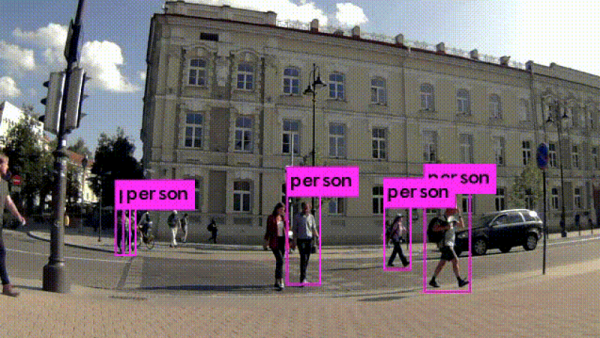
Project Shows How To Use Machine Learning To Detect Pedestrians

Most people are familiar with the idea that machine learning can be used to detect things like objects or people, but for anyone who’s not clear on how that process actually works should check out [Kurokesu]’s example project for detecting pedestrians. It goes into detail on exactly what software is used, how it is configured, and how to train with a dataset.

The application uses a USB camera and the back end work is done with Darknet, which is an open source framework for neural networks. Running on that framework is the YOLO (You Only Look Once) real-time object detection system. To get useful results, the system must be trained on large amounts of sample data. [Kurokesu] explains that while pre-trained networks can be used, it is still necessary to fine-tune the system by adding a dataset which more closely models the intended application. Training is itself a bit of a balancing act. A system that has been overly trained on a model dataset (or trained on too small of a dataset) will suffer from overfitting, a condition in which the system ends up being too picky and unable to usefully generalize. In terms of pedestrian detection, this results in false negatives — pedestrians that don’t get flagged because the system has too strict of an idea about what a pedestrian should look like.

[Kurokesu]’s walkthrough on pedestrian detection is great, but for those interested in taking a step further back and rolling their own projects, this fork of Darknet contains YOLO for Linux and Windows and includes practical notes and guides on installing, using, and training from a more general perspective. Interested in learning more about machine learning basics? Don’t forget Google has a free online crash course to get you up to speed.


Your Face Is Going Places You May Not Like

Many Chinese cities, among them Ningbo, are investing heavily in AI and facial recognition technology. Uses range from border control — at Shanghai’s international airport and the border crossing with Macau — to the trivial: shaming jaywalkers.

In Ningbo, cameras oversee the intersections, and use facial-recognition to shame offenders by putting their faces up on large displays for all to see, and presumably mutter “tsk-tsk”. So it shocked Dong Mingzhu, the chairwoman of China’s largest air conditioner firm, to see her own face on the wall of shame when she’d done nothing wrong. The AIs had picked up her face off of an ad on a passing bus.
False positives in detecting jaywalkers are mostly harmless and maybe even amusing, for now. But the city of Shenzhen has a deal in the works with cellphone service providers to identify the offenders personally and send them a text message, and eventually a fine, directly to their cell phone. One can imagine this getting Orwellian pretty fast.

Facial recognition has been explored for decades, and it is now reaching a tipping point where the impacts of the technology are starting to have real consequences for people, and not just in the ways dystopian sci-fi has portrayed. Whether it’s racist, inaccurate, or easily spoofed, getting computers to pick out faces correctly has been fraught with problems from the beginning. With more and more companies and governments using it, and having increasing impact on the public, the stakes are getting higher.

Continue reading “Your Face Is Going Places You May Not Like” →

Turning LEGO Blocks Into Music With OpenCV

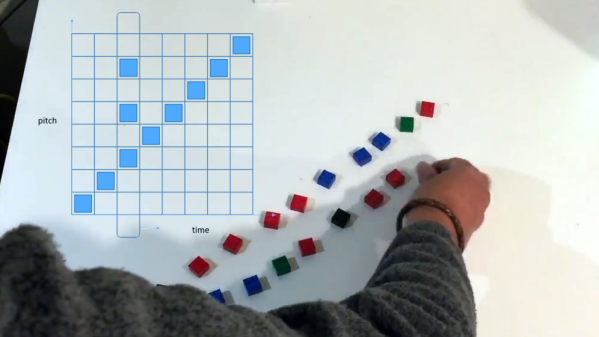
We’re not sure what it is, but something about LEGO and music go together like milk and cookies when it comes to DIY musical projects. [Paul Wallace]’s Lego Music project is a sequencer that uses the colorful plastic pieces to build and control sound, but there’s a twist. The blocks aren’t snapped onto anything; the system is entirely visual. A computer running OpenCV uses a webcam to watch the arrangement of blocks, and overlays them onto a virtual grid where the positions of the pieces are used as inputs for the sequencer. The Y axis represents pitch, and the X axis represents time.

Embedded below are two videos. The first demonstrates how the music changes based on which blocks are placed, and where. The second is a view from the software’s perspective, and shows how the vision system processes the video by picking out the colored blocks, then using their positions to change different values which has an effect on the composition as a whole.

Continue reading “Turning LEGO Blocks Into Music With OpenCV” →

An Over-engineered LED Sign Board

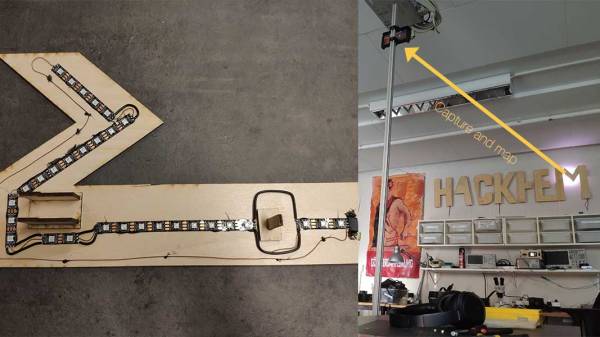
Never underestimate the ability of makers in over thinking and over-engineering the simplest of problems and demonstrating human ingenuity. The RGB LED sign made by [Hans and team] over at the [Hackheim hackerspace] in Trondheim is a testament to this fact.

As you would expect, the WS2812 RGB LEDs illuminate the sign. In this particular construction, an individual strip is responsible for each character. Powered by an ESP32 running FreeRTOS, the sign communicates using MQTT and each letter gets a copy of the 6 x 20 framebuffer which represents the color pattern that is expected to be displayed. A task on the ESP32 calculates the color value to be displayed by each LED.

The real question is, how to calibrate the distributed strings of LEDs such that LEDs on adjacent letters of the sign display an extrapolated value? The answer is to use OpenCV to create a map of the LEDs from their two-dimensional layout to a lookup table. The Python script sends a command to illuminate a single LED and the captured image with OpenCV records the position of the signal. This is repeated for all LEDs to generate a map that is used in the ESP32 firmware. How cool is that?

And if you are wondering about the code, it is up on [Github], and we would love to see someone take this up a level. The calibration code, as well as the Remote Client and ESP32 codes, are all there for your hacking pleasure.

Its been a while since we have seen OpenCV in action like with the Motion Tracking Turret and Face Recognition. The possibilities seem endless. Continue reading “An Over-engineered LED Sign Board” →

Robot Sorts Beads By Color

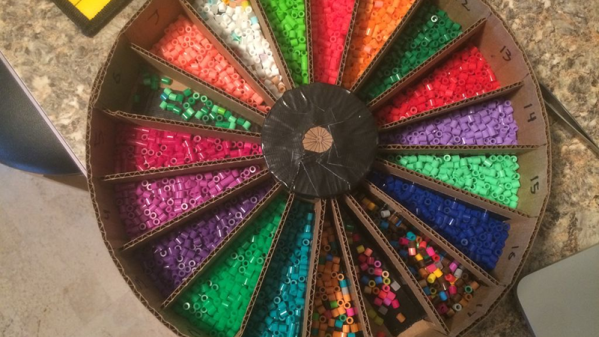
If you know anyone who does crafts, they probably have a drawer with a  few million beads loose and mixed together. You’ll sort them out one day, right? Probably not. Unless, of course, you build a robot to do the dirty work for you. That’s what [Kalfalfa] did, using some Phidgets boards, a camera and Open CV. You can see a video of the cardboard machine doing its thing below.

Maybe it is because we are more electronics-minded, but we were impressed with the mechanism to grab just one bead at a time from the hopper. If you watch the video, you’ll see what we mean. However, sometimes a bead jams and a magnetic sensor figures that out so the controller can reverse a bit and try again.

Continue reading “Robot Sorts Beads By Color” →

Real Or Fake? Robot Uses AI To Find Waldo

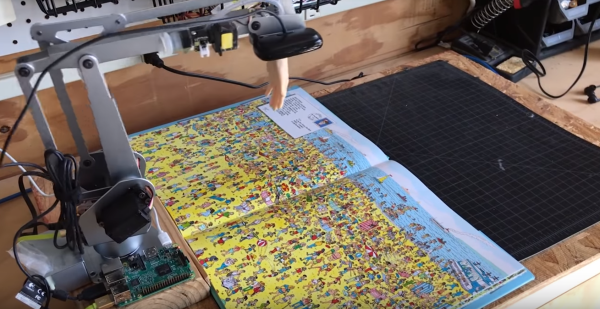
The last few weeks have seen a number of tech sites reporting on a robot which can find and point out Waldo in those “Where’s Waldo” books. Designed and built by Redpepper, an ad agency. The robot arm is a UARM Metal, with a Raspberry Pi controlling the show.

A Logitech c525 webcam captures images, which are processed by the Pi with OpenCV, then sent to Google’s cloud-based AutoML Vision service. AutoML is trained with numerous images of Waldo, which are used to attempt a pattern match.  If a pattern is found, the coordinates are fed to PYUARM, and the UARM will literally point Waldo out.

While this is a totally plausible project, we have to admit a few things caught our jaundiced eye. The Logitech c525 has a field of view (FOV) of 69°. While we don’t have dimensions of the UARM Metal, it looks like the camera is less than a foot in the air. Amazon states that “Where’s Waldo Delux Edition” is 10″ x 0.2″ x 12.5″ inches. That means the open book will be 10″ x 25″. The robot is going to have a hard time imaging a surface that large in a single image. What’s more, the c525 is a 720p camera, so there isn’t a whole lot of pixel density to pattern match. Finally, there’s the rubber hand the robot uses to point out Waldo. Wouldn’t that hand block at least some of the camera’s view to the left?

We’re not going to jump out and call this one fake just yet — it is entirely possible that the robot took a mosaic of images and used that to pattern match. Redpepper may have used a bit of movie magic to make the process more interesting. What do you think? Let us know down in the comments!

Replace Your Calipers With A Microscope And Image Analysis

Getting a good measurement is a matter of using the right tool for the job. A tape measure and a caliper are both useful tools, but they’re hardly interchangeable for every task. Some jobs call for a hands-off, indirect way to measure small distances, which is where this image analysis measuring technique can come in handy.

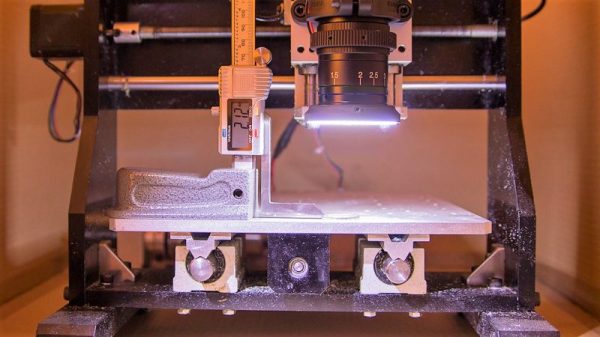
Although it appears [Saulius Lukse] purpose-built this rig, which consists of a microscopic lens on a digital camera mounted to the Z-axis of a small CNC machine, we suspect that anything capable of accurately and smoothly transitioning a camera vertically could be used. The idea is simple: the height of the camera over the object to be measured is increased in fine increments, with an image acquired in OpenCV at each stop. A Laplace transformation is performed to assess the sharpness of each image, which when plotted against the frame number shows peaks where the image is most in focus. If you know the distance the lens traveled between peaks, you can estimate the height of the object. [Salius] measured a coin using this technique and it was spot on compared to a caliper. We could see this method being useful for getting an accurate vertical profile of a more complex object.

From home-brew lidar to detecting lightning in video, [Saulius] has an interesting skill set at the intersection of optics and electronics. We’re looking forward to what he comes up with next.