IPhone Controlled TV Lift

pcb

[William] sent in this project where he’s using his iPhone to control his TV lift. He’s made a custom PCB with a pic18f122 microprocessor to communicate with the lift. He says it connects to the lift controls via a serial port.  You can see a video of it in action after the break. We really think the shadow turning into an arrow is cool. That was a lucky accident.

Continue reading “IPhone Controlled TV Lift”

Speech Controlled Garbage Can

[youtube=http://www.youtube.com/watch?v=–BIlxKVCYk]

This speech controlled garbage can was sent in via the tip line by [Amnon]. The garbage can will come to you following a black line and stopping when it sees a cross in the line, then waits for another voice command. It can then return to where it belongs or go outside following the line. The system is based on a microchip PIC 18F4431 and uses three 18 volts cordless drill motors and their batteries as the power source. “In the near future the line sensors will be replaced with UV line sensors and the black line will be replaced with clear UV color.”

When you call the system “Pach Zevel ” (garbage can in Hebrew) the system go to standby and the LED’s light up.  After the previous stage if you say “ELAY” (to me in Hebrew) it will drive on the black line till the first crossing.
This adds new meaning to taking the trash out.

AXiS-49 Teardown

cthruteardown

We touched on harmonic table MIDI controllers when [aris] was building one. [Ken Rushton] has one of C-Thru’s commercial keypads, the AXiS-49, and disassembled the device to show how it works. A PIC18F2450 microcontroller provides the USB interface and is connected to a dsPIC33FJ128GP310 digital signal controller which decodes the keypresses. The membrane buttons are made with two concentric graphite disks that touch gold contacts. The microcontroller measures the time between the two points contacting to determine the button velocity. monome button clones also use circular contact pads, but cannot calculate velocity because they only have one element.

[via Matrixsynth]

Bounty On Bus Pirate Features, Get A Free V2 PCB

bpv2

We’re putting a bounty on two high-priority Bus Pirate features. You can get a free PCB for the upcoming Bus Pirate V2 by writing a bit of code. Hack a Day has a varied and talented group of readers, and we know someone out there has the experience to make these changes with minimal difficulty.

  • The latest code integrates the PIC24F bootloader for easy updates without a programmer. We’d like to add a protocol snooper, but that requires interrupts. With the bootloader, however, interrupts are relocated and we’ve yet to fully grasp how that works. We’ll send a PCB and PIC 24F to the first person who modifies the code to demonstrate UART, SPI, or change notification interrupts with the boot loader. Microchip’s 24F bootloader app note is available here. Complete.
  • The current frequency measurement feature is a hack that uses a counter and a timer. Be the first to implement the input capture peripheral instead, and get a free PCB. See the function bpFreq(void) in base.c. Complete.

The latest Bus Pirate code and compiled firmware can be checked-out from Google Code SVN. Submit your code via the comments below or buspirate@hackaday.com.

UPDATE: Both issues were resolved. Thanks for your suggestions.

Programmable Scientific Calculator Watch

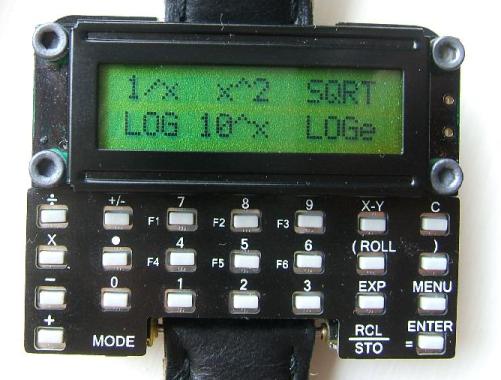
When the band support on [David]’s Casio CFX-400 Scientific Calculator Watch finally broke after 10 years of use, he found it almost impossible to find another watch with the same functionality. Like any good engineer, [David] decided to design a watch to meet his needs. The result of his endeavors was the µWatch, a programmable watch based on a PIC24 with both RPN and Algebraic calculation modes. The watch runs open source software and is expandable thanks to a serial port, an ICSP programming port, and a spot for an infrared LED on the board. On his site, [David] shows how he made the first µWatch and offers kits for anyone who wants to build their own. We’ve been told that the next batch of kits will be made available in 1-2 weeks and are expected to sell out fast.

[Thanks Tomesz]

CUIduino, Arduino With True USB Support

cuiduinotop

The CREATE USB Interface (CUI) was a project that came out of UC Santa Barbara around the same time the Arduino was being developed. It has a USB port, a PIC18F4550, and a prototyping area. It was designed to enable easy interfacing with the real would through many A/D inputs and general I/O ports. It supports both OSC and MIDI-over-USB natively. The biggest difference between the CUI and the Arduino is its USB support. The Arduino uses an FTDI chip to create a serial interface to its onboard AVR. The CUI’s PIC has native support for USB. That means you can have the CUI appear to be any USB HID device you want: keyboard, mouse, game controller, etc.

The Arduino has a friendly development environment and a large following though. CUI create [Dan Overholt] decided to add an ATmega168 to his board to get the best of both worlds, the CUIduino (scroll down). It can be programmed just like any other Arduino compatible device, but the having the CUI parent means your Arduino project can behave like a native USB HID gadget.

[Thanks Peter]

Smart Attic Fan

fan

[Andrew] lives in Hawaii where the climate usually doesn’t necessitate heating and cooling systems. Usually, some open windows and doors will cool the house down enough. This relies on the breeze though, and that isn’t always there. [Andrew] came up with the solution of automating an attic fan to circulate air depending on outside temperature. Sure, he could have just installed a fan with a switch, but he wanted it to do all the work itself. He used a PIC16F877 as the brains and made the pretty control panel shown above.