Laser-Cut Clock Kicks Your CAD Tools To The Curb And Opts For Python

In a world deprived of stock hardware other than #6-32 bolts and sheets and sheets of acrylic, [Lawrence Kesteloot] took it upon himself to design and build a laser-cut pendulum clock. No Pricey CAD programs? No Problem. In a world where many fancy CAD tools can auto-generate gear models, [Lawrence] went back to first principles and wrote scripts to autogenerate the gear profiles. Furthermore, not only can these scripts export SVG files for the entire model for easy laser cutting, they can also render a 3D model within the browser using Javascript.

Given the small selection of materials, the entire project is a labor of love. Even the video (after the break) glosses over the careful selection of bearings, bolt-hole spacing, and time-sensitive gear ratios, each of which may be an easy macro in other CAD programs that [Lawrence], in this case, needed to add himself.

Finally, the entire project is open source and up for download on the Githubs. It’s not every day we can build ourselves a pendulum clock with a simple command-line-incantation to

make cut

Thanks for the tip, [Bartgrantham]!

Continue reading “Laser-Cut Clock Kicks Your CAD Tools To The Curb And Opts For Python”
IoT Chameleon Lamp Does It With Python

If this Internet of Things thing is gonna leave the launchpad, it will need the help of practical and semi-practical project ideas for smartifying everyday items. Part of getting those projects off the ground is overcoming the language barrier between humans that want to easily prototype complex ideas and hardware that wants specific instructions. A company called Things on Internet [TOI] has created a system called VIPER to easily program any Spark Core, UDOO or Arduino Due with Python by creating a virtual machine on the board.

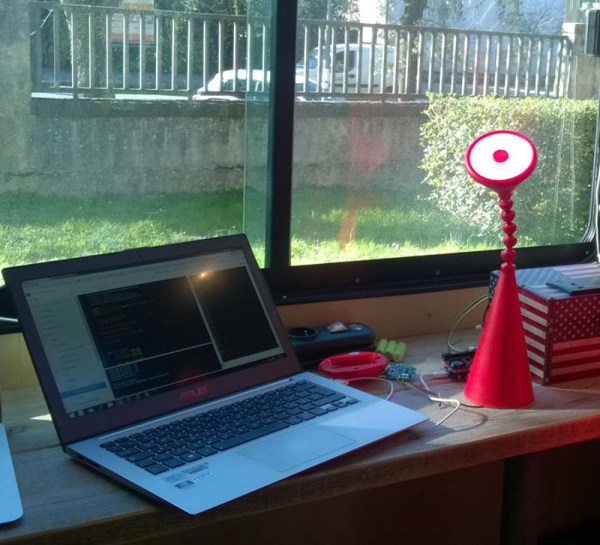
The suite includes a shield, an IDE, and the app. By modifying a simple goose neck IKEA lamp, [TOI] demonstrates VIPER (Viper Is Python Embedded in Realtime). They opened the lamp and added an 24-LED Adafruit NeoPixel ring, which can be controlled remotely by smartphone using the VIPER app. To demonstrate the capacitive sensing capabilities of the VIPER shield, they lined the head of the lamp with foil. This code example will change the NeoPixels to a random color each time the button is pressed in the app.

Check out the lamp demonstration after the break and stay for the RC car.

Continue reading “IoT Chameleon Lamp Does It With Python”

Convert A Rotary Phone To VOIP Using Raspberry Pi

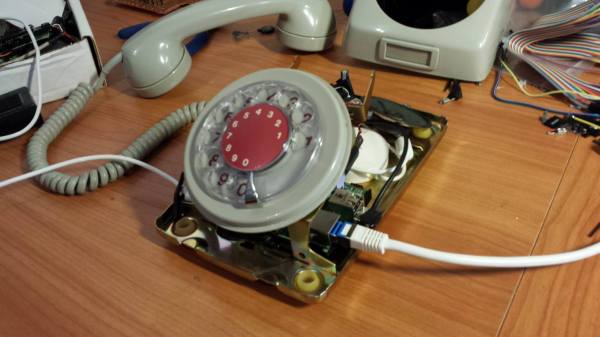
There’s something so nostalgic about the rotary phone that makes it a fun thing to hack and modernize. [Voidon] put his skills to the test and converted one to VoIP using a Raspberry Pi. He used the RasPi’s GPIO pins to read pulses from the rotary dial – a functional dial is always a welcome feature in rotary phone hacks. An old USB sound card was perfect for the microphone and handset audio.

As with any build, there were unexpected size issues that needed to be worked around. While the RasPi fit inside the case well, there was no room for the USB power jack or an ethernet cable, let alone a USB power bank for portability. The power bank idea was scrapped. [voidon] soldered the power cord to the RasPi before the polyfuse to preserve the surge protection, used a mini-USB wifi dongle, and soldered a new USB connector to the sound card. [Voidon] also couldn’t get the phone’s original ringer to work, so he used the Raspberry Pi’s internal sound card to play ringtones.

The VoIP (SIP) was managed by some Python scripting, available at GitHub. [voidon] has some experience in using Asterisk at his day job, so it will be interesting to see if he incorporates it in the future.

[via Reddit]


Automated Etch-a-Sketch Re-Produces Famous Artwork

Unless you’re some incredibly gifted individual with more dexterity than a fighter jet pilot, making anything on a Etch-a-Sketch is hard. So [Evan] decided to motorize it, and cheat a little bit.

She’s using an Arduino Uno to control two stepper motors that she has bound to the Etch-a-Sketch knobs using a short piece of rubber tube and Gorilla Glue. She 3D printed some custom motor mounts to allow the motors to be positioned directly above the knobs, and a ULN2803 to switch the 12V required for the steppers.

After she had the hardware all setup, she coded a simple Python script to take in .PNGs and produce vector art to be sent through the Arduino. In case you’re wondering, an Etch-a-Sketch has approximately 550 x 370 pixels, or about 500 x 320 for the “safe zone”.

Due to the limitations of the Etch-a-Sketch, like its inability to stop writing, some images might require some editing before sending it off to your new Etch-a-Sketch printer.

Continue reading “Automated Etch-a-Sketch Re-Produces Famous Artwork”

A Camera With Computer Vision

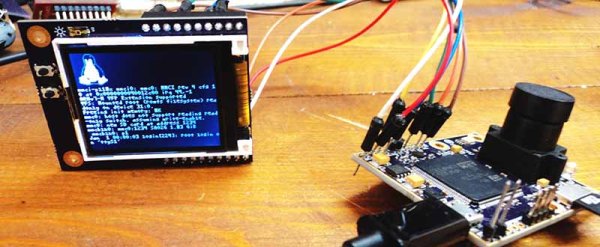
Computer vision is a tricky thing to stuff into a small package, but last year’s Hackaday Prize had an especially interesting project make it into the 50 top finalists. The OpenMV is a tiny camera module with a powerful microcontroller that will detect faces, take a time-lapse, record movies, and detect specific markers or colors. Like a lot of the great projects featured in last year’s Hackaday Prize, this one made it to Kickstarter and is, by far, the least expensive computer vision module available today.

[Ibrahim] began this project more than a year ago when he realized simple serial JPEG cameras were ludicrously expensive, and adding even simple machine vision tasks made the price climb even higher. Camera modules that go in low-end cell phones don’t cost that much, and high-power ARM microcontrollers are pretty cheap as well. The OpenMV project started, and now [Ibrahim] has a small board with a camera that runs Python and can be a master or slave to Arduinos or any other microcontroller board.

The design of the OpenMV is extraordinarily clever, able to serve as a simple camera module for a microcontroller project, or something that can do image processing and toggle a few pins according to logic at the same time. If you’ve ever wanted a camera that can track an object and control a pan/tilt servo setup by itself, here you go. It’s a very interesting accessory for robotics platforms, and surely something that could be used in a wide variety of projects.

Learning Python With Tron Radio

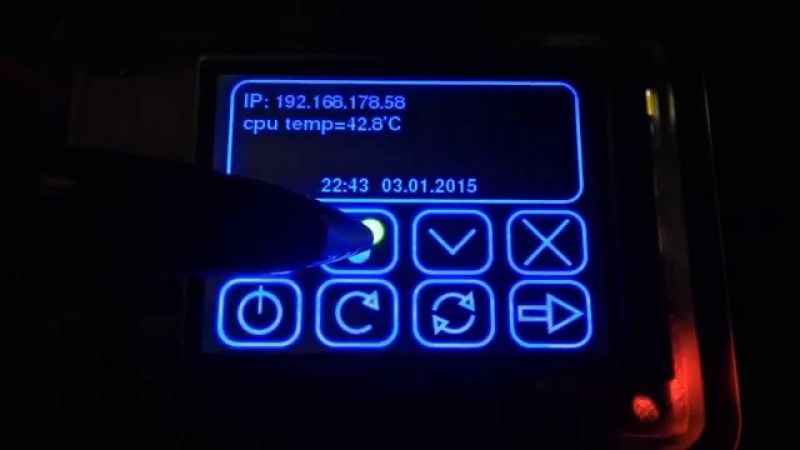
[5 Volt Junkie] has built his share of Arduino projects, but never anything with Python, and certainly never anything with a GUI. After listening to Internet radio one day, a new idea for a project was born: a Raspberry Pi with a small touchscreen display for a UI and displaying soma.fm tracks. It’s finally finished, and it’s a great introduction to Python, Pygame, and driving tiny little displays with the Pi.

Playing soma.fm streams was handled by mpd and mpc, while the task of driving a 2.8″ TFT LCD was handled by the fbtft Linux framebuffer driver. This left [5 Volt Junkie] with the task of creating a GUI, some buttons, and working out how to play a few streams. This meant drawing some buttons in Inkscape, but these were admittedly terrible, so [5 Volt Junkie] gave up and turned on the TV. Tron Legacy was playing, giving him the inspiration to complete his Tron-themed music player.

The result of [5 Volt Junkie]’s work is a few hundred lines of Python with Pygame and a few multicolor skins all wrapped up in a Tron theme. It looks great, it works great, and it’s a great introduction to Python and Pygame.

Continue reading “Learning Python With Tron Radio”

Reverse Engineering The Kayak Mobile API

The travel meta-search website Kayak apparently used to have a public API which is no longer available. We can’t say we mourn the loss of the interface we’d never known about. If you are someone who was automating their searches for that perfect vacation getaway deal, there’s still hope. But either way you’ll like this one. [Shubhro Saha] figured out how to access the API used by the Kayak mobile app. We like that he details how to sniff the traffic between an app and the internet and make sense of what is found.

His tool of choice is the Python package Mitmproxy. We haven’t heard of it but we have heard of Wireshark and [Shabhro] makes the case that Mitmproxy is superior for this application. As the name suggests, you set it up on your computer and use that box’s IP as the proxy connection for your phone. After using the app for a bit, there is enough data to start deconstructing what’s going on between the app and remote server which which it communicates. We could have a lot of fun with this, like seeing what info those free apps are sending home, or looking for security flaws in your own creations.

[Thanks Juan via Twitter]