RGB LEDs: How To Master Gamma And Hue For Perfect Brightness

You would think that there’s nothing to know about RGB LEDs: just buy a (strip of) WS2812s with integrated 24-bit RGB drivers and start shuffling in your data. If you just want to make some shinies, and you don’t care about any sort of accurate color reproduction or consistent brightness, you’re all set.

But if you want to display video, encode data in colors, or just make some pretty art, you might want to think a little bit harder about those RGB values that you’re pushing down the wires. Any LED responds (almost) linearly to pulse-width modulation (PWM), putting out twice as much light when it’s on for twice as long, but the human eye is dramatically nonlinear. You might already know this from the one-LED case, but are you doing it right when you combine red, green, and blue?

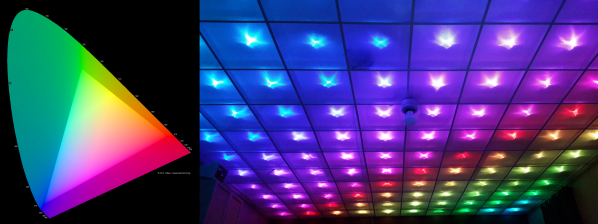
It turns out that even getting a color-fade “right” is very tricky. Surprisingly, there’s been new science done on color perception in the last twenty years, even though both eyes and colors have been around approximately forever. In this shorty, I’ll work through just enough to get things 95% right: making yellows, magentas, and cyans about as bright as reds, greens, and blues. In the end, I’ll provide pointers to getting the last 5% right if you really want to geek out. If you’re ready to take your RGB blinkies to the next level, read on!

Continue reading “RGB LEDs: How To Master Gamma And Hue For Perfect Brightness”
Compact EPaper Business Card

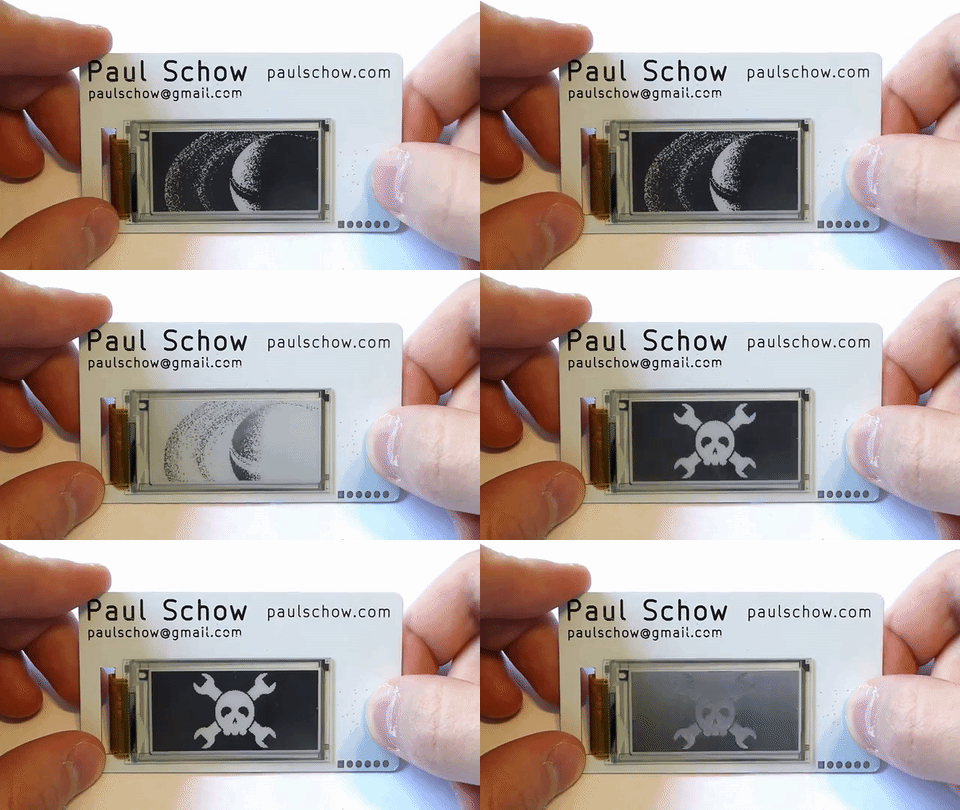
Is your business card flashy? Is it useful in a pinch? Do they cost $32 each and come with an ePaper display? No? Well, then feast your eyes on this over-the-top business card with an ePaper display by [Paul Schow]. Looking to keep busy and challenge himself with a low-power circuit in a small package, he set about making a business card that can be updated every couple of months instead of buying a new stack whenever he updated his information.

Having worked with ePaper before, it seemed to be the go-to option for [Schow] in fulfilling the ultra-low power criteria of his project — eventually deciding on a 2″ display. Also looking to execute this project at speed, he designed the board in KiCad over a few hours after cutting it down to simply the power control, the 40-pin connector and a handful of resistors and capacitors. In this case, haste made waste in the shape of the incorrect orientation of the 40-pin connector and a few other mistakes besides. Version 2.0, however, came together as a perfect proof-of-concept, while 3.0 looks sleek and professional.

Continue reading “Compact EPaper Business Card”

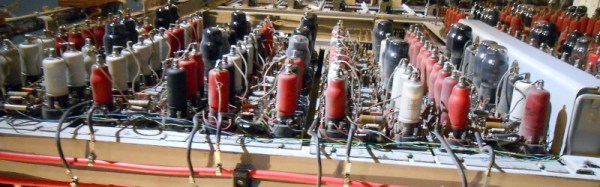
Colossus: Face To Face With The First Electronic Computer

When the story of an invention is repeated as Received Opinion for the younger generation it is so often presented as a single one-off event, with a named inventor. Before the event there was no invention, then as if by magic it was there. That apple falling on Isaac Newton’s head, or Archimedes overflowing his bath, you’ve heard the stories. The inventor’s name will sometimes differ depending on which country you are in when you hear the story, which provides an insight into the flaws in the simple invention tales. The truth is in so many cases an invention does not have a single Eureka moment, instead the named inventor builds on the work of so many others who have gone before and is the lucky engineer or scientist whose ideas result in the magic breakthrough before anyone else’s.

The history of computing is no exception, with many steps along the path that has given us the devices we rely on for so much today. Blaise Pascal’s 17th century French mechanical calculator, Charles Babbage and Ada, Countess Lovelace’s work in 19th century Britain, Herman Hollerith’s American tabulators at the end of that century, or Konrad Zuse’s work in prewar Germany represent just a few of them.

So if we are to search for an inventor in this field we have to be a little more specific than “Who invented the first computer?”, because there are so many candidates. If we restrict the question to “Who invented the first programmable electronic digital computer?” we have a much simpler answer, because we have ample evidence of the machine in question. The Received Opinion answer is therefore “The first programmable electronic digital computer was Colossus, invented at Bletchley Park in World War Two by Alan Turing to break the Nazi Enigma codes, and it was kept secret until the 1970s”.

It’s such a temptingly perfect soundbite laden with pluck and derring-do that could so easily be taken from a 1950s Eagle comic, isn’t it. Unfortunately it contains such significant untruths as to be rendered useless. Colossus is the computer you are looking for, it was developed in World War Two and kept secret for many years afterwards, but the rest of the Received Opinion answer is false. It wasn’t invented at Bletchley, its job was not the Enigma work, and most surprisingly Alan Turing’s direct involvement was only peripheral. The real story is much more interesting.

Continue reading “Colossus: Face To Face With The First Electronic Computer”

DIY Pressure Regulator For Exciting SCUBA

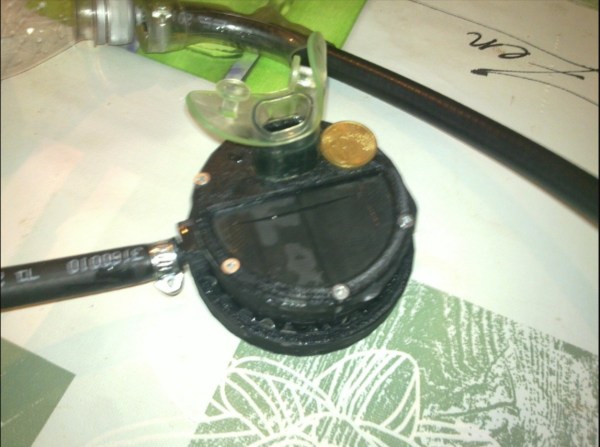
To get a SCUBA certification, a prospective diver will need to find a dive shop and take a class. Afterwards, some expensive rental equipment is in order. That is, unless you’re [biketool] who has found a way to build some of his own equipment. If you’re looking for a little bit of excitement on your next dive, this second stage regulator build might be just the thing for you.

It’s worth noting that [biketool] makes it explicitly clear that this shouldn’t be used on any living being just yet. The current test, though, was at 120 PSI using some soda bottles and some scrap bike parts. The OpenSCAD-designed regulator seems to work decently well for something that’s been homemade using some 3D-printed parts and other things available to most tinkerers/makers/hackers. [biketool] also goes over some issues with the regulator leaking and discusses porosity issues inherent in FDM printing but overall this project looks promising. Whether or not you want a pressurized 3D printed vessel that close to your face is rife for debate.

We don’t see a lot of SCUBA-related hacks around here. After all, it’s one thing to power an air horn with SCUBA tanks, but it’s a completely different thing to build something that keeps you from drowning.

Thanks to [dave] for the tip!

Commanding Kerbals With A Physical Interface

Kerbal Space Program will have you hurling little green men into the wastes of outer space, landing expended boosters back on the launchpad, and using resources on the fourth planet from the Sun to bring a crew back home. Kerbal is the greatest space simulator ever created, teaches orbital mechanics better than the Air Force textbook, but it is missing one thing: switches and blinky LEDs.

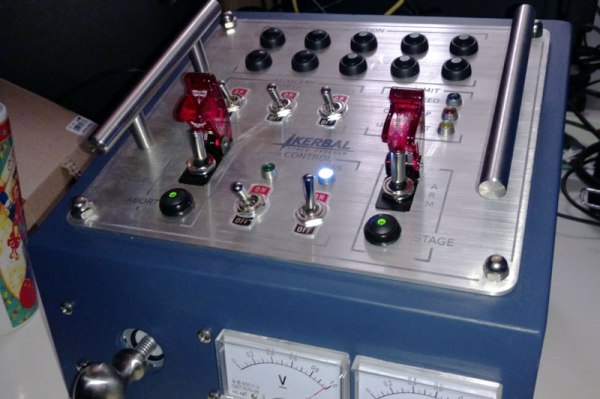
[SgtNoodle] felt this severe oversight by the creators of Kerbal could be remedied by building his Kerbal Control Panel, which adds physical buttons, switches, and a real 6-axis joystick for roleplaying as an Apollo astronaut.

The star of this build is the custom six-axis joystick, used for translation control when docking, maneuvering, or simply puttering around in space. Four axis joysticks are easy, but to move forward and backward, [SgtNoodle] replaced the shaft of a normal arcade joystick with a carriage bolt, added a washer on one end, and used two limit switches to give this MDF cockpit Z+ and Z- control.

The rest of the build is equally well detailed, with a CNC’d front panel, toggle switches and missile switch covers, with everything connected to an Arduino Mega. This Arduino interfaces the switches to the game with the kRPC mod, which creates a script-driven interface to the game. So, toggling the landing gear switch, for instance, triggers a script which interfaces with KSP to lower your landing gear prior to a nice, safe landing. Or, more likely, a terrifying crash.

Hackaday Prize Entry: A CPU For Balloons

Launching a high altitude balloon requires a wide breadth of knowledge. To do it right, you obviously need to know electronics and programming to get temperature, pressure, and GPS data. You’ll have to research which cameras will take good pictures and are easily programmable. It’s cold up there, and that means you need some insulation to keep the batteries warm. If you ever want to find your payload, you’ll also need an amateur radio license.

There’s a lot of work that goes into launching high altitude balloons, and for his Hackaday Prize entry, [Jeremy] designed a simple embedded data recorder capable of flying over 100,000 feet.

This flight data recorder for balloons is based on the ever popular ATMega328, and includes humidity, temperature, pressure, accelerometer, gyroscope, and magnetometer sensors. All of this data is recorded to an SD card. The Real Engineers™ who are wont to criticize design decisions they disagree with might laugh at the use of a 7805 voltage regulator, but in this case it makes a lot of sense. The power wasted by a linear regulator isn’t. It’s turned into heat which keeps the batteries alive a little bit longer.

This balloon data recorder has already flown, and [Jeremy] got some great pictures out of it. It’s a great piece of the puzzle for an exceptionally multidisciplinary project, and a great entry for the Hackaday Prize.

MagicShifter 3000: An Over-Engineered POV Stick With A 15-Year Journey

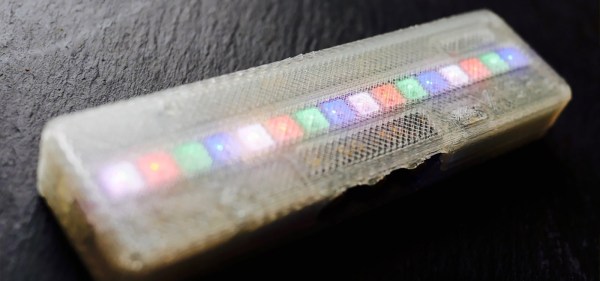
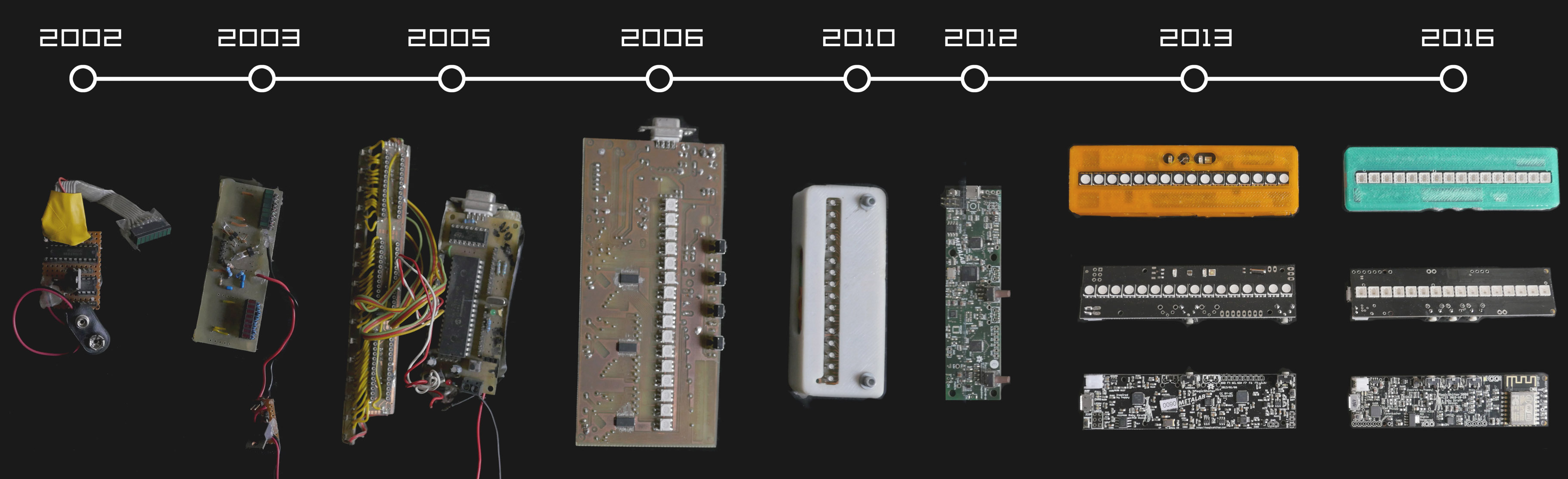
3 hackers, 16 LEDs, 15 years of development, one goal: A persistence of vision display stick that fits into your pocket. That’s the magicShifter 3000. When waved, the little, 10 cm (4 inches) long handheld device draws stable images in midair using the persistence of vision effect. Now, the project has reached another milestone: production.

The design has evolved since it started with a green LED bargraph around 2002. The current version features 16 APA102 (aka DotStar) RGB LEDs, an ESP-12E WiFi module, an NXP accelerometer/magnetometer, the mandatory Silabs USB interface, as well as a LiPo battery and charger with an impressive portion of power management. An Arduino-friendly firmware implements image stabilization as well as a React-based web interface for uploading and drawing images.

After experimenting with Seeedstudio for their previous prototypes, the team manufactured 500 units in Bulgaria. Their project took them on a roundtrip through hardware manufacturing. From ironing out minuscule flaws for a rock-solid design, over building test rigs and writing test procedures, to yield management. All magicShifter enclosures are — traditionally — 3D printed, so [Overflo] and [Martin] are working in shifts to start the 500 prints, which take about 50 minutes each to complete. The printers are still buzzing, but assembled units can be obtained in their shop.

Over all the years, the magicShifter has earned fame and funding as the over-engineered open hardware pocket POV stick. If you’re living in Europe, chances are that you either already saw one of the numerous prototype units or ran into [Phillip Tiefenbacher] aka [wizard23] on a random hacker event to be given a brief demo of the magicShifter. The project always documented the status quo of hardware hacking: Every year, it got a bit smaller, better, and reflected what parts happened to be en vogue.

magicshifter-timeline

The firmware and 3D-printable enclosure are still open source and the schematics for the latest design can be found on GitHub. Although, you will search in vain for layout or Gerber files. The risk of manufacturing large batches and then being put out of business by cheap clones put its mark on the project, letting the magicShifter reflect the current, globalized status of hardware hacking once more. Nevertheless, we’re glad the bedrock of POV projects still persists. Check out the catchy explanatory video below.

Continue reading “MagicShifter 3000: An Over-Engineered POV Stick With A 15-Year Journey”