Sprucing Up A Bell & Howell Model 34 Oscilloscope

We’ll admit it, in an era when you can get a four channel digital storage oscilloscope with protocol decoding for a few hundred bucks, it can be hard not to see the appeal of analog CRT scopes from decades past. Sure they’re heavy, harder to use, and less capable, but they just look so cool. Who could say no to having one of these classic pieces of gear on their bench?
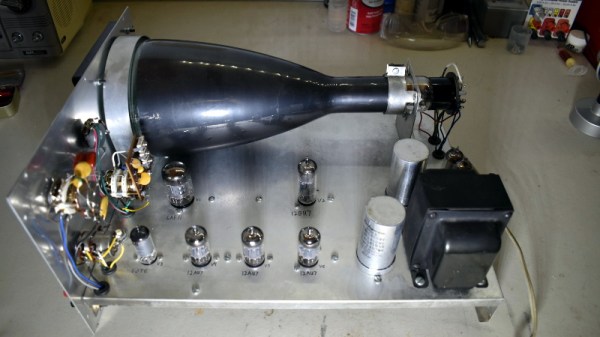
[Cody Nybo] certainly couldn’t. Despite the fact that he already has a digital scope, he couldn’t pass up the chance to add a Bell & Howell Schools Model 34 from circa 1973 to his collection. It needed a bit of TLC before it could be brought back into service, but now it’s all fixed up and ready to put in some work. Not bad for a piece of gear with nearly a half-century on the clock.

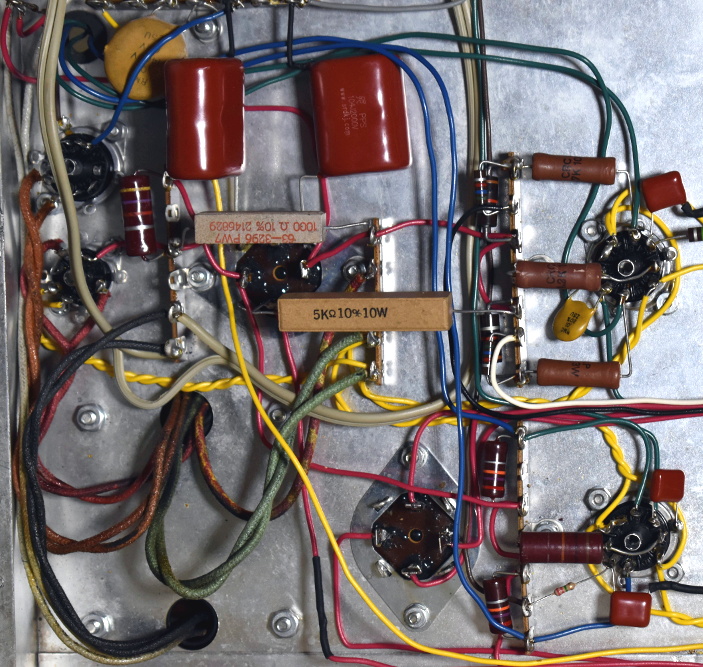
The restoration of the Model 34 was aided by the fact that [Cody] got the original manual and schematics for the scope in the deal, which he was kind enough to scan and upload for the rest of the class to enjoy. Those of you who have worked on older electronics can already guess where the scope needed the most love: all the capacitors needed to be swapped out for fresh ones. He also found a few resistors that were out of spec, and the occasional bad solder joint here and there.

Even if you’re not looking to repair your own middle-aged oscilloscope, his pictures of the inside of Model 34 are fascinating. The scope was sold as a kit, so the construction is surprisingly simple and almost entirely point-to-point. Of course, there’s something of a trade-off at work: [Cody] says it won’t display much more than 2.5 MHz before things start getting wonky. But then again, that’s a more than reasonable frequency ceiling for audio work and most hobbyist projects.

Oscilloscopes have come a long way since the days when they had to draw out their readings on a piece of paper. While newer devices have all but buried the classic analog scope, a beauty like this would still have a place of honor in our lab.
A Briefcase Pentesting Rig For The Discerning Hacker

In the movies, the most-high tech stuff is always built into a briefcase. It doesn’t whether whether it’s some spy gear or the command and control system for a orbiting weapons platform; when an ordinary-looking briefcase is opened up and there’s an LCD display in the top half, you know things are about to get interesting. So is it any surprise that hackers in the real-world would emulate the classic trope?

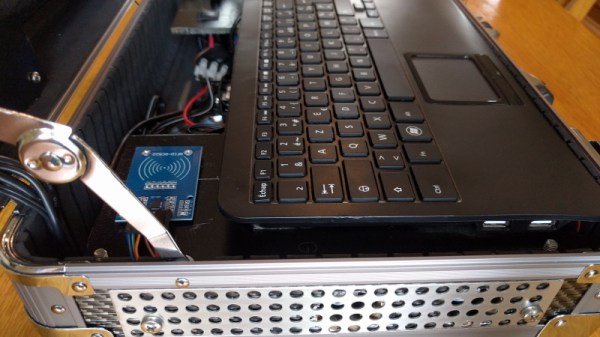
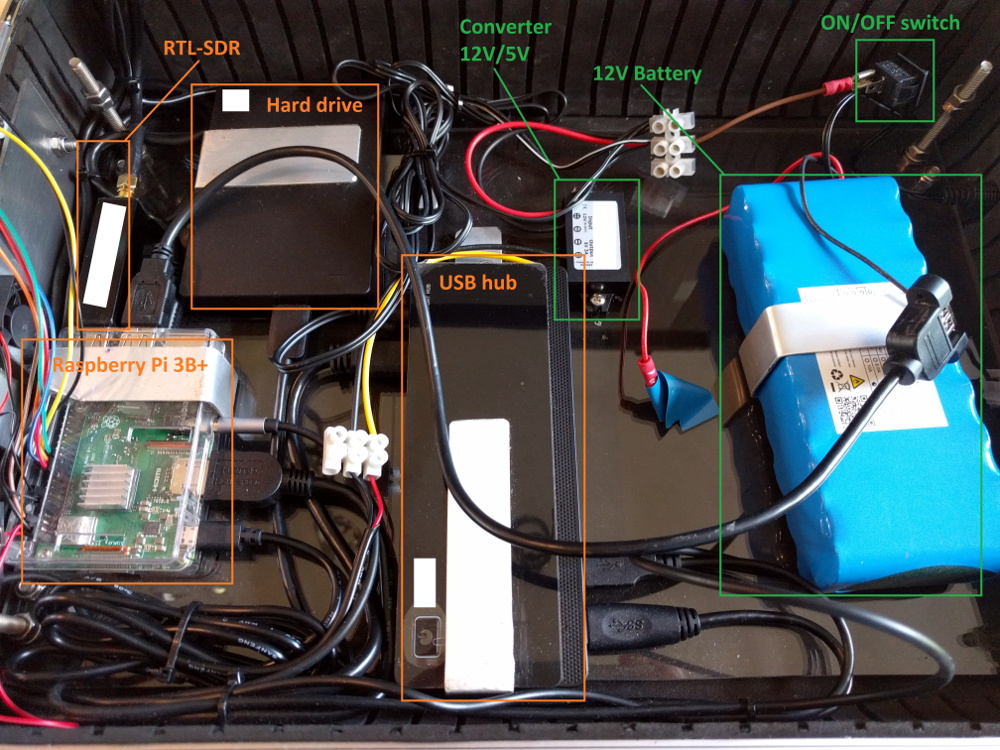
As an example, take a look at the NightPi by [Sekhan]. This all-in-one mobile penetration testing rig has everything you need to peek and poke where you aren’t supposed to, all while maintaining the outward appearance of an regular briefcase. Well, admittedly a rather utilitarian aluminum briefcase…with antennas sticking out. OK, so it might not be up to 007’s fashion standards, but it’s still pretty good.

[Sekhan] has crammed a lot of gear into the NightPi beyond the eponymous Raspberry Pi 3B+. There’s an RFID reader, an RTL-SDR dongle, an external HDD, plus the 12V battery and 5V converter to power everything. All told, it cost about $500 USD to build, though that figure is going to vary considerably depending on what your parts bins look like.

To keep things cool, [Sekhan] has smartly added some vent holes along the side of the briefcase, and a couple of fans to get the air circulating. With these cooling considerations, we imagine you should be able to run the NightPi with the lid closed without any issue. That could let you hide it under a table while you interact with its suite of tools from your phone, making the whole thing much less conspicuous. The NightPi is running Kali Linux with a smattering of additional cools to do everything from gathering data from social media to trying to capture keystrokes from mechanical keyboards with the microphone; so there’s no shortage of things to play with.

If you like the idea of carrying around a Pi-powered security Swiss Army knife but aren’t too concerned with how suspicious you look, then the very impressive SIGINT tablet we covered recently might be more your speed. Not that we think you’d have any better chance making it through the TSA unscathed with this whirring briefcase full of wires, of course.

Amiga In The MiST Gets Online With An ESP8266

While he couldn’t quite come up with the cash to buy one in their hayday, [Bruno Antunes] has always been fascinated with the Amiga. When PCs got fast enough he used emulators like UAE to get a taste of the experience, but it was never quite the same thing. Not until he found the MiST anyway, which uses an FPGA to implement several retro computers such as the Apple II, Atari, and of course his beloved Amiga.

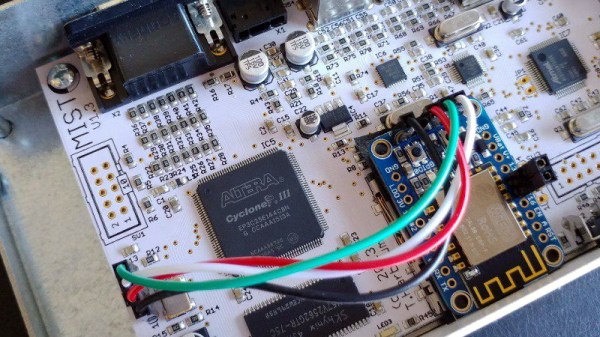
The only downside for [Bruno] was that the MiST has no network interfaces. To get onto the Internet, he had to install an ESP8266 inside the device and spend some quality time tweaking various software settings to get everything talking to each other. The end result is a BBS hosted on an Amiga 1200, that’s running on an FPGA, that’s connected to WiFi via an ESP8266. What a time to be alive.

Adding the ESP8266 to the MiST was actually quite straightforward, as there’s an unpopulated serial port header right on the board. Though [Bruno] cautions this header has been removed as of version 1.4 of the device, so if you’re in the market for an FPGA retro box and might want to get it online at some point, that may be a detail to keep in mind. The ESP is running a firmware which implements Serial Line IP (SLIP); which allows you to use TCP/IP over a serial port, albeit very slowly.

The hardware implant went well enough, but unfortunately [Bruno] found the ESP8266 was unable to communicate through the thick metal case of the MiST. He enlisted his girlfriend to make a new papercraft enclosure for the MiST that the ESP could talk though, and it even has the added benefit of glowing thanks to the internal LEDs. We probably would have just got one of the ESP modules that includes an external antenna, but to each their own.

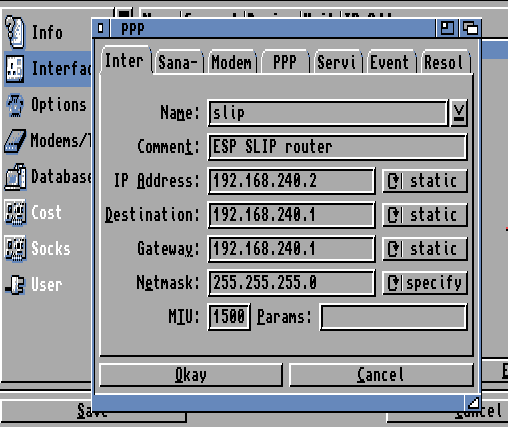
With the hardware taken care of, the rest of the considerable write-up details how he got the Amiga operating system to talk to the Internet through the SLIP connection. He goes over everything from setting the system time with NTP to getting a Telnet daemon installed. As you might expect, this involves installing a number of additional software packages, but [Bruno] is kind enough to provide links for everything you’ll need.

We’ve seen the ESP8266 used to get other retro computers onto the modern Internet before, but it’s usually through the use of an external device. This internal modification is very clean, and seems like a no-brainer for anyone who owns a MiST and a soldering iron.

Continue reading “Amiga In The MiST Gets Online With An ESP8266”

School’s In Session With Arduboy Curriculum

It’s hard not to be impressed by the Arduboy. In just a few short years, [Kevin Bates] went from proof of concept to a successful commercial product without compromising on his original open source goals. Today, anyone can develop a game for the Arduboy and have it distributed to owners all over the world for free. If you’ve ever dreamt of being a game developer, the Arduboy community is for you.

Realizing the low-cost hardware and open source software of the Arduboy makes it an excellent way to learn programming, [Kevin] is now trying to turn his creation into a legitimate teaching tool. He’s kicking off this new chapter in the Arduboy’s life with a generous offer: giving out free hardware to educators all over the world. Anyone who wants to be considered for the program just needs to write-up a few paragraphs on how they’d utilize the handheld game system in their class.

[Kevin] already knows the Arduboy has been used to teach programming, but those have all been one-off endeavours. They relied on a teacher that was passionate enough about the Arduboy to put in their own time and effort to create a lesson plan around it. So one of the main goals right now is getting an official curriculum put together so educators won’t have to start from scratch. The community has already developed 16 free lessons, but they’re looking for help in creating more and translating them into other languages.

While the details are still up in the air, [Kevin] also plans to travel to schools personally and help them get their Arduboy classes off the ground. He’s especially interested in developing countries and other areas that are disadvantaged educationally. Believing that the Arduboy is as much a way to teach effective leadership and teambuilding as it is programming, he thinks this program can truly make a difference.

Since [Kevin] first Rickrolled us with his prototype in 2014, we’ve seen the Arduboy project spread like wildfire through the hacker community. From figuring out how to play its games on other gadgets to developing an expansion cartridge for the real thing, the Arduboy has already done its fair share of inspiring. Here’s hoping it has just as much of an impact on the next generation of hackers once they get their hands on it.

NASA’s “Green” Fuel Seeks Safer Spaceflight By Finally Moving Off Toxic Hydrazine

Spaceflight is inherently dangerous. It takes a certain type of person to willingly strap into what’s essentially a refined bomb and hope for the best. But what might not be so obvious is that the risks involved aren’t limited to those who are personally making the trip. The construction and testing of space-bound vehicles poses just as much danger to engineers here on the ground as it does to the astronauts in orbit. Arguably, more so. Far more individuals have given their lives developing rocket technology than have ever died in the cockpit of one of them.

Reddish brown exhaust of hydrazine thrusters

Ultimately, this is because of the enormous amount of energy stored in the propellants required to make a rocket fly. Ground support personnel need to exercise great care even when dealing with “safe” propellants, such as the classic combination of kerosene and liquid oxygen. On the other end of the spectrum you have chemicals that are so unstable and toxic that they can’t be handled without special training and equipment.

One of the most dangerous chemicals ever used in rocket propulsion is hydrazine; and yet from the Second World War to the present day, it’s been considered something of an occupational hazard of spaceflight. While American launch vehicles largely moved away from using it as a primary propellant, hydrazine is still commonly used for smaller thrusters on spacecraft.

When SpaceX’s Crew Dragon exploded in April during ground tests, the release of approximately one and a half tons of hydrazine and nitrogen tetroxide propellants required an environmental cleanup at the site.

But soon, that might change. NASA has been working on a project they call the Green Propellant Infusion Mission (GPIM) which is specifically designed to reduce modern spacecraft’s dependency on hydrazine. In collaboration with the Air Force Research Laboratory at California’s Edwards Air Force Base, the space agency has spearheaded the development of a new propellant that promises to not just replace hydrazine, but in some scenarios even outperform it.

So what’s so good about this new wonder fuel, called AF-M315E? To really understand why NASA is so eager to power future craft with something new, we first have to look at the situation we’re in currently.

Continue reading “NASA’s “Green” Fuel Seeks Safer Spaceflight By Finally Moving Off Toxic Hydrazine”

Nuclear Reactor Simulator Is The Project Of A Lifetime

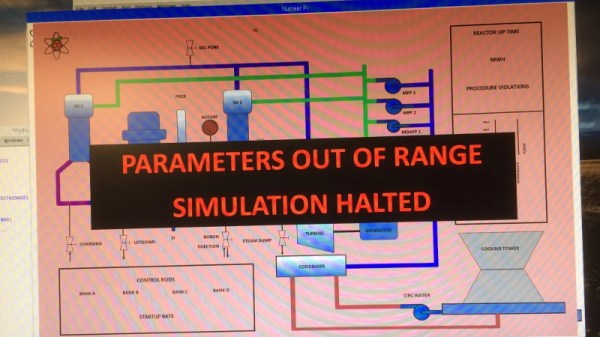
Have you been watching Chernobyl? Well, so has everyone else. Right now it seems the whole Internet is comprised of armchair dosimetrists counting roentgens in their sleep, but [Mark Wright] doesn’t need a high-budget TV show to tell him about the challenges of wrangling the atom with 1980s technology. He’s done it for real. His memories of working at a Westinghouse Pressurized Water Reactor over 30 years ago are so sharp that he’s been building a nuclear reactor “simulator” running on the Raspberry Pi that looks nearly as stressful as sitting in control room of the real thing.

The simulator software is written in Python, and is responsible for displaying a simplified overview of the reactor and ancillary systems on the screen. Here all the information required to operate the “nuclear plant” can be seen at a glance, from the utilization of individual pumps to the position of the control rods.

Continue reading “Nuclear Reactor Simulator Is The Project Of A Lifetime”

How Do You Get PCI-E On The Atomic Pi? Very Carefully.

At this point, you’ve almost certainly heard about the Atomic Pi. The diminutive board that once served as the guts of a failed robot now lives on as a powerful x86 SBC available at a fire sale price. How long you’ll be able to buy them and what happens when the initial stock runs out is another story entirely, but there’s no denying that folks are already out there doing interesting things with them.

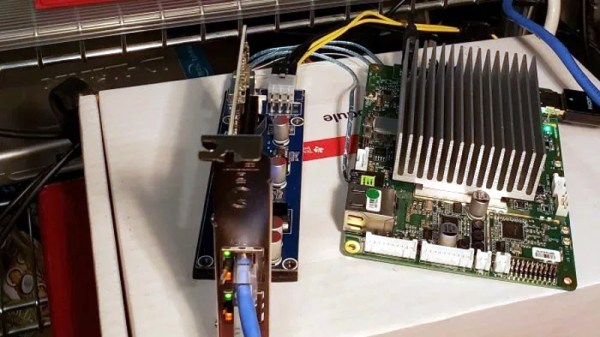
One of them is [Jason Gin], who recently completed an epic quest to add a PCI Express (PCI-E) slot to his Atomic Pi. Things didn’t exactly go according to plan and the story arguably has more lows than highs, but in the end he emerged victorious. He doesn’t necessarily recommend you try the same modification on your own Atomic Pi, but he does think this sets the stage for the development of a more refined upgrade down the line.

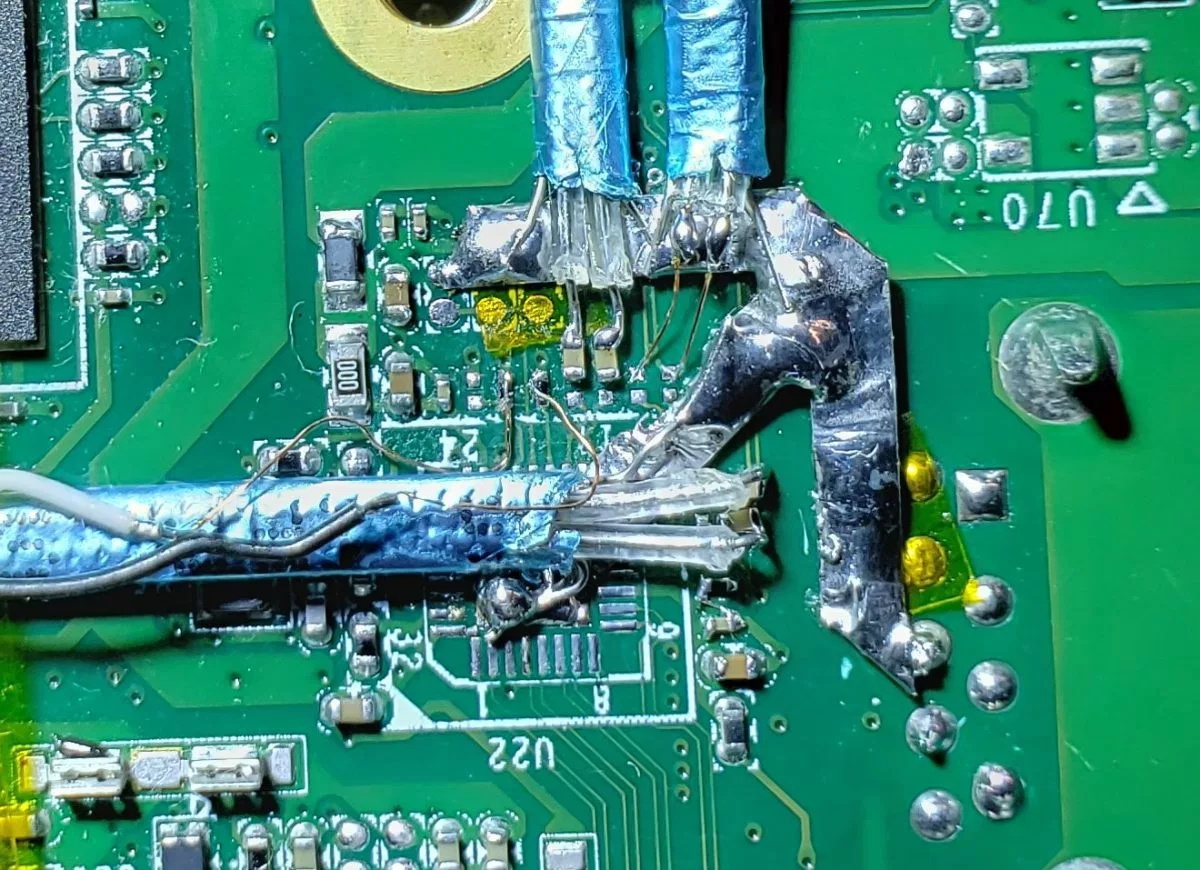
[Jason] explains that the board’s Ethernet controller was already communicating with the Intel Atom x5-Z8350 SoC over PCI-E, so there was never a question about whether or not the modification was possible. In theory, all you needed to do was disable the Ethernet controller and tack on an external PCI-E socket so you could plug in whatever you want. The trick is pulling off the extremely fine-pitch soldering such a modification required, especially considering how picky the PCI Express standard is.

In practice, it took several attempts with different types of wire before [Jason] was able to get the Atomic Pi to actually recognize something plugged into it. Along the way, he managed to destroy the Ethernet controller somehow, but that wasn’t such a great loss as he planned on disabling it anyway. The final winning combination was 40 gauge magnet wire going between the PCB and a thin SATA cable that is mechanically secured to the board with a piece of metal to keep anything from flexing.

At this point, [Jason] has tested enough external devices connected to his hacked-on port to know the modification has promise. But the way he’s gone about it is obviously a bit temperamental, and far too difficult for most people to accomplish on their own anyway. He’s thinking the way forward might be with a custom PCB that could be aligned over the Ethernet controller and soldered into place, though admits such a project is currently above his comfort level. Any readers interested in a collaboration?

Like most of you, we had high hopes for the Atomic Pi when we first heard about it. But since it became clear the board is the product of another company’s liquidation, there’s been some understandable trepidation in the community. Nobody knows for sure what the future looks like for the Atomic Pi, but that’s clearly not stopping hackers from diving in.