HOPE XII: A FOSS Operating System For E-Readers

Free and open source software (FOSS) was a recurring theme during many of the talks during the HOPE XII conference, which should probably come as no surprise. Hackers aren’t big fans of being monitored by faceless corporate overlords or being told what they can and cannot do on the hardware they purchased. Replacing proprietary software with FOSS alternatives is a way to put control back into the hands of the user, so naturally many of the talks pushed the idea.

In most cases that took the form of advising you to move your Windows or Mac OS computer over to a more open operating system such as GNU/Linux. Sound advice if you’re looking for software freedom, but it’s a bit quaint to limit such thinking to the desktop in 2018. We increasingly depend on mobile computing devices, and more often than not those are locked down hard with not only a closed proprietary operating system but also a “Walled Garden” style content delivery system. What’s the point of running all FOSS software at home on your desktop if you’re carrying a proprietary mobile device around?

That’s precisely the thinking that got Marc Juul interested in the possibility of bringing a FOSS operating system to e-reader devices. During his talk “Liberate Your E-book Reader with fread.ink!”, he gave examples such as Amazon’s infamous remote deletion of 1984 off of users’ Kindles as a perfect example of the sort of control these companies exert on our personal devices. Marc believes the goal should be to completely replace the operating system on these devices with a free software alternative that still retains the ability to open electronic book formats. Not only would this keep the likes of Amazon or Barnes and Noble out of our reading habits, but turn these cheap readers into more capable devices in the bargain.

Continue reading “HOPE XII: A FOSS Operating System For E-Readers”

Monoprice Mini Converted To Pick And Place (Kinda)

Would you believe that you can take a cheap 3D printer and easily convert it into a full function pick and place machine to help assemble your PCBs? No? Well good, because you can’t. A real pick and place needs all kinds of sensors and logic to identify parts, rotate them, make sure everything is aligned, etc, etc. There’s no way you could just bolt all that onto a cheap 3D printer, and let’s not even talk about the lack of closed loop control.

But if you have a very specific use case, namely a PCB that only has a relatively large single part that doesn’t need to be rotated, [Connor Nishijima] might have a solution for you. He bought a $150 USD Monoprice Mini, and with the addition of a few printed parts, was able to build a machine that drastically cuts down the time it takes for him to build his LED boards. Best of all the modification doesn’t involve any permanent changes to the printer, he can just pop off the vacuum attachment when he wants to print something.

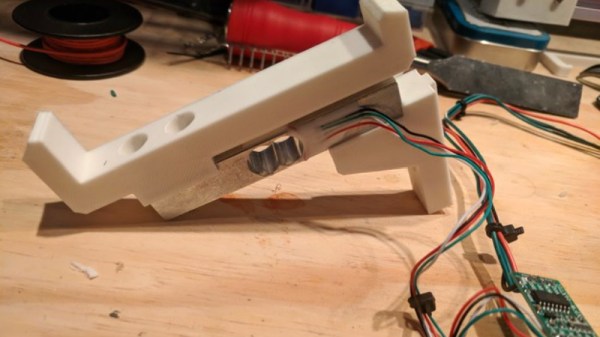
Beyond the 3D printed parts (which were made on the printer itself), the only thing you need to make the modification is the vacuum pump. [Connor] is using a hot air station that includes a vacuum pump for picking up SMD components, but he mentions that you’d probably better off just modifying an aquarium pump and using that. A printed holder snaps over the cooling fan of the Monoprice Mini to hold the vacuum pickup tool, and another printed piece holds the strip of LEDs and the PCB. It’s worth noting that the machine has no ability to control the vacuum pump, and doesn’t need to. The pickup tool is so weak that when the LED lands in the solder paste it sticks to the board well enough that the tool can’t lift it back off.

The real genius in this build comes from the manually written G-Code. You load it from the printer’s built in menu system as if it was a normal 3D print, and it instructs the printer to move the vacuum tool over the line of LEDs, pick one up, and drop it in place on the PCB. It then uses a small peg built into the vacuum tool holder to advance the line of LEDs before starting the cycle all over again. Incredibly, it does this whole complex dance 20 times for each PCB without ever having any kind of feedback or alignment check. It only works because [Connor] was willing to go through the trial and error of getting the calibration and G-Code down as close to perfect as can be expected for such a cheap machine.

This isn’t the first time we’ve seen the Monoprice Mini converted into something a bit more impressive than a cheapo 3D printer. Seems that for whatever the machine lacks in the printing department, it more than makes up for in hackability.

Continue reading “Monoprice Mini Converted To Pick And Place (Kinda)”

Simple RC To USB Interface

With the radio control hobby arguably larger now than it ever has been in the past, there’s a growing demand for high-fidelity PC simulators. Whether you want to be able to “fly” when it’s raining out or you just want to practice your moves before taking that expensive quadcopter up for real, a good simulator on your computer is the next best thing. But the simulator won’t do you much good if it doesn’t feel the same; you really need to hook your normal RC transmitter up to the computer for the best experience.

[Patricio] writes in to share with us his simple hack for interfacing his RC hardware to his computer over USB. Rather than plugging the transmitter into the computer, his approach allows the receiver to mimic a USB joystick. Not only is this more convenient since you can use the simulator without wires, but it will make sure that the minutiae of your radio hardware (such as response lag) is represented in the simulation.

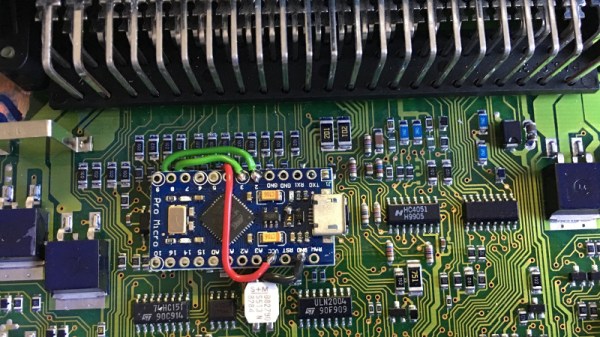
The setup is actually very simple. [Patricio] used the ATtiny85 based Digispark development board because it’s what he had on hand, but the principle would be the same on other microcontrollers. Simply connect the various channels from the RC receiver to the digital input pins. RC receivers are 5 VDC and draw very little current, so it’s even possible to power the whole arrangement from the USB port.

On the software side, the Arduino sketch does about what you expect. It loops through listening for PWM signals on the input pins, and maps that to USB joystick position information. The current code only supports three channels for a simple airplane setup (X and Y for joystick, plus throttle), but it should be easy enough to follow along and add more channels if you needed them for more complex aircraft.

For more information on the intricacies of RC transmitter and receiver interaction, check out this fascinating research on receiver latency.

Milspec Teardown: C-1282 Chaff Controller

A B-52 bomber is approaching its primary target: rail yards in the Beloostrov district of Leningrad. Intel reports the area is likely defended by S-25 Berkut and S-75 Dvinia surface to air missiles (SAMs), but this close to the target the gigantic bomber can’t afford to make the evasive maneuvers, known as combat turns, which would help shake off enemy air defenses. From his position behind the co-pilot, the electronic warfare officer (EWO) reaches over and sets the C-1282 for continuous chaff ejection. Hundreds of thin metallic strips are jettisoned from the B-52, confusing tracking radar and allowing the bomber and her crew to slip through the Soviet air defenses and drop 50,000 lbs of ordnance directly onto the target.

Luckily for all of us, this event never actually occurred. But it was a possibility that the United States and Soviet Union had prepared for extensively. Both sides developed ever more capable weapons, and for each new weapon, a new countermeasure was invariably created. The C-1282 is a component of one such countermeasure, a device that allowed the B-52’s EWO to configure and monitor the bomber’s automatic chaff dispenser. With the C-1282 handling the anti-radar countermeasures, the bomber’s crew could focus their attention on completing their mission.

Of course, as is the case with technology (military or otherwise), the C-1282 was eventually phased out for something new. These old units, now largely worthless, were destroyed or sentenced to a lifetime collecting dust on a storeroom shelf. But through the magic of the Internet, one of these devices is now ready to be laid bare for your viewing pleasure. Dust off your Joseph McCarthy Junior Detective badge and come along as we take a look at a state of the art piece of Anti-Ruskie technology, circa 1960.

Continue reading “Milspec Teardown: C-1282 Chaff Controller”

HOPE XII: Time Travel With Software Defined Radio

It’s easy to dismiss radio as little more than background noise while we drive.  At worst you might even think it’s just another method for advertisers to peddle their wares. But in reality it’s a snapshot of the culture of a particular time and place; a record of what was in the news, what music was popular, what the weather was like, basically what life was like. If it was important enough to be worth the expense and complexity of broadcasting it on the radio, it’s probably worth keeping for future reference.

But radio is fleeting, a 24/7 stream of content that’s never exactly the same twice. Yet while we obsessively document music and video, nobody’s bothering to record radio. You can easily hop online and watch a TV show that originally aired 50 years ago, but good luck finding a recording of what your local radio station was broadcasting last week. All that information, that rich tapestry of life, is gone and there’s nothing we can do about it.

Or can we? At HOPE XII, Thomas Witherspoon gave a talk called “Creating a Radio Time Machine: Software-Defined Radios and Time-Shifted Recordings”, an overview of the work he’s been doing recording and cataloging the broadcast radio spectrum. He demonstrated how anyone can use low cost SDR hardware to record, and later play back, whole chunks of the AM and shortwave bands. Rather than an audio file containing a single radio station, the method he describes allows you to interactively tune in to different stations and explore the airwaves as if it were live.

Continue reading “HOPE XII: Time Travel With Software Defined Radio”

Classroom Gadget Turned Arduino Compatible

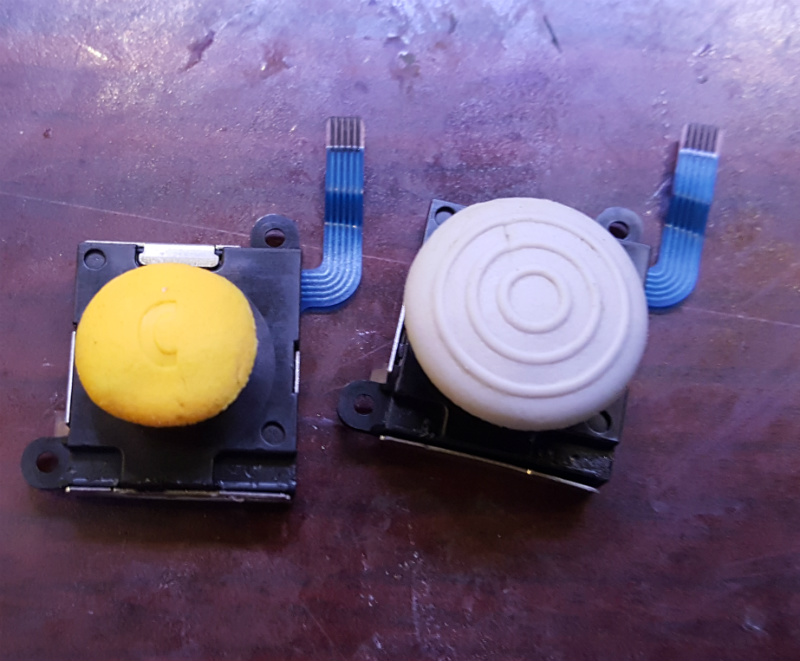
Cheap second-hand hardware is usually a fertile ground for hacking, and by looks of this project, the digital classroom aids that were all the rage a few years back are no exception. [is0-mick] writes in to tell us how he managed to hack one of these devices, a SMART Reponse XE, into an Arduboy compatible game system. As it turns out, this particular gadget is powered by an ATmega128RFA, which is essentially an Arduino-compatible AVR microcontroller with a 2.4GHz RF transceiver tacked on. This makes it an extremely interesting platform for hacking, especially since they are going for as little as $3 USD on eBay.

There’s no USB-Serial converter built into the SMART Response XE, so you’ll need to provide your own external programmer to flash the device. But luckily there’s a labeled ISP connector right on the board which makes it pretty straightforward to get everything wired up.

Of course, getting the hardware working was slightly more complicated than just flashing an Arduino Sketch onto the thing. [is0-mick] has provided his bootloader and modified libraries to get the device’s QWERTY keyboard and ST7586S controlled 384×160 LCD working.

Playing games is fun, but when his friend [en4rab] sent him the SMART Response XE to fiddle with, the goal was actually to turn them into cheap 2.4 GHz analyzers similar to what was done with the IM-ME. It seems they’re well on their way, and [is0-mick] invites anyone who might be interested in filling in some of the blanks on the RF side to get involved.

Continue reading “Classroom Gadget Turned Arduino Compatible”

Measuring Web Latency In The Browser

We’ll go out on a limb and assume that anyone reading these words is probably familiar with the classic ping command. Depending on which operating system you worship the options might be slightly different, but every variation of this simple tool does the same thing: send an ICMP echo request and wait for a response. How long it takes to get a response from the target, if it gets one at all, is shown to the user. This if often the very first step to diagnosing network connectivity issues; if this doesn’t work, there’s an excellent chance the line is dead.

But in the modern web-centric view of networking, ping might not give us the whole picture. But nature it doesn’t take into account things like DNS lookups, and it certainly doesn’t help you determine what (if any) services the target has available to you. Accordingly, [Liu Zhiyong] has come up with a tool he calls “pingms”, which allows you to check web server latency right from your browser.

Rather than relying on ICMP, pingms performs a more realistic test. It takes the list of targets from the file “targets.js” and connects to each one over HTTP. How does it work? The code [Liu] has come up with will take each target domain name, append a random number to create a gibberish filename, and then calculate how long it takes to get a response when trying to download the file. Obviously it’s going to be getting a 404 response from the web server, but the important thing is simply that it gets the response.

With this data, [Liu] has come up with a simplistic but very slick interface which shows the user the collected data with easy to understand color-coded graphs. As interesting as it is to see how long it takes your favorite web sites or service providers to wake up and start talking, watching the colored bars hop up and down the list to sort themselves is easily our favorite part of pingms.

[Liu] has released pingms under the GPLv3 license, so if you’re looking to utilize the software for your own purposes you just need to provide a list of test targets. If you need to perform low-level diagnostics, check out this handy network tester you can build for cheap.