Retrotechtacular: DC To DC Conversion, Rotary Style

If you want to convert one voltage to another, what do you do? Well, if you are talking DC voltages today, you’ll probably use a DC to DC converter. Really, these converters generate some sort of AC waveform and then use either an inductor or a transformer to boost or buck the voltage as desired. Then they’ll convert it back to DC. If you are talking AC voltages, you could just use a transformer. But think about this: a transformer has two sides. The primary makes an alternating magnetic field. Just like rotating a shaft with magnets on it could. The secondary converts that alternating magnetic field into electricity just like a generator does. In other words, a transformer is just a generator that takes an AC input instead of a rotating mechanical input.

That’s a bit of an oversimplification, but in the old days, a lot of mobile radios (and other devices) took this idea to its logical conclusion. A M-G (Motor Generator) set was little more than a motor connected to a generator. The motor might take, say, 12V DC and the output could be, for example 300V AC that would get rectified for the plate voltage in a tube radio.

Continue reading “Retrotechtacular: DC To DC Conversion, Rotary Style”
ESP32 Display Is Worth A Thousand Words

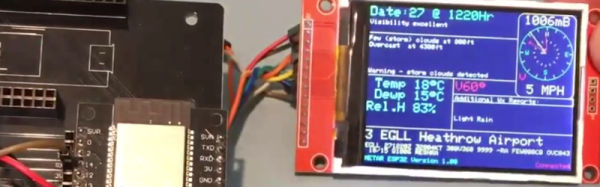
The ESP32 is the successor to the wildly popular ESP8266. There seems to be no end to what the chips can do. However, despite all the wireless communication capabilities, the module doesn’t have a display. [G6EJD] wanted to connect an ILI9341 TFT display and he put the code and information on GitHub. You can also see a video of his work, below.

Since the display uses a serial interface, there isn’t much wiring required. The Adafruit GFX library does the heavy lifting, utilizing the SPI library for the actual communications. The first demo shown on the hardware can pull weather data decoded. If you want more details on the display’s operation, check out [G6EJD’s] YouTube channel and you’ll find other videos that go into more detail.

We’ve seen these displays married to an ESP8266 with an integrated PCB, too. There’s a choice of libraries, and perhaps we’ll see a similar range of choice for the ESP32.

Continue reading “ESP32 Display Is Worth A Thousand Words”

Australian Raspberry Pi Tutorials

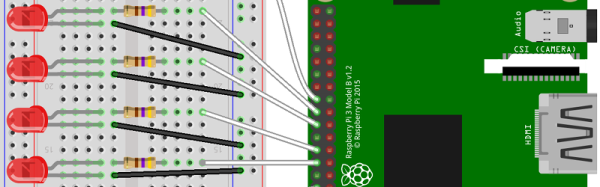
There’s a new and very detailed video tutorial about the Raspberry Pi available from the Australian firm Core Electronics.  There are 30 videos and 5 chapters in total. A few of the introduction videos are short, but the detail videos range from 3 to 16 minutes.

The instructor [Michael] starts out at the very beginning — loading NOOBS on the Pi — and then moves on to Python, shell scripting, and building GUI applications with TkInter. It also covers using Particle Pi for IoT applications that integrate with IFTTT.

We do realize that most people reading Hackaday have probably used a Raspberry Pi at least once or twice. However, we also know that we all get asked to recommend material for beginners, or — in some cases — we are using material to teach classes in schools or hackerspaces.

Continue reading “Australian Raspberry Pi Tutorials”

The Breadboard RF103

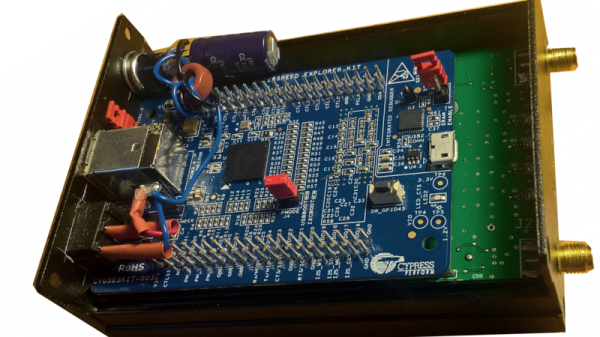
When [ik1xpv] sets out to build a software-defined radio (SDR), he doesn’t fool around. His Breadboard RF103 sports USB 3.0, and 16-bit A/D converter that can sample up to 105 Msps, and can receive from 0 to 1800 MHz. Not bad. Thanks to the USB 3.0 port, all the signal processing occurs in the PC without the limitations of feeding data through a common sound port. You can see the device in action in the video below.

The Cypress FX3 USB device is an ARM processor, but it is only streaming data, not processing it. You can find the slightly modified firmware, a driver for using PC software, and schematics and board layouts on GitHub.

Continue reading “The Breadboard RF103”

TMS9900 Retro Build

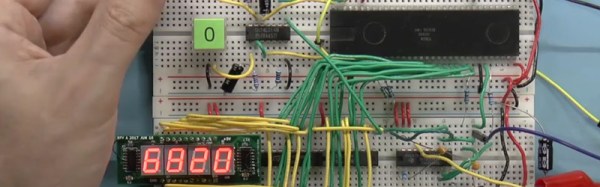
[Robert Baruch] found a TMS9900 CPU from 1983 in a surplus store. If that name doesn’t ring a bell, the TMS9900 was an early 16-bit CPU from Texas Instruments. He found that, unlike modern CPUs, the chip took several voltages and a four-phase twelve-volt clock. He decided to fire it up and — of course — one thing led to another and he wound up with a system on a breadboard. You can see one of the videos he made about the machine below.

This CPU had some odd features, most notably that it stored its registers in off-chip memory and can switch contexts by changing where the registers reside. That was a novel idea when the memory and the CPU were similar in speed. In a modern computer, the memory is much slower than the CPU and this would be a major bottleneck for program execution. The only onboard registers were the program counter, the status register, and a pointer to the general-purpose registers in memory.

Continue reading “TMS9900 Retro Build”

Arduino Does Hard Science

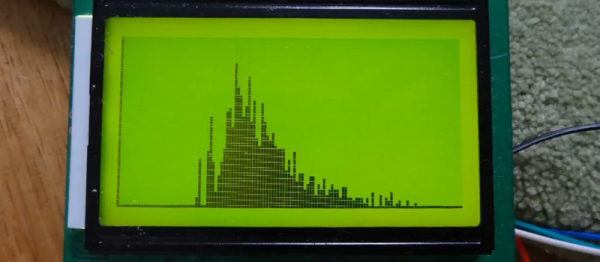
We don’t know why [stoppi71] needs to do gamma spectroscopy. We only know that he has made one, including a high-voltage power supply, a photomultiplier tube, and–what else–an Arduino. You also need a scintillation crystal to convert the gamma rays to visible light for the tube to pick up.

He started out using an open source multichannel analyzer (MCA) called Theremino. This connects through a sound card and runs on a PC. However, he wanted to roll his own and did so with some simple circuitry and an Arduino.

Continue reading “Arduino Does Hard Science”

Machine Learning IDE In Alpha

Machine is an IDE for building machine learning systems using TensorFlow. You can sign up for the alpha, but first, have a look at the video below to see what it is all about.

You’ll see in the video, that you can import data for a model and then do training (in this case, to find a mustache in an image). You’ll see the IDE invites an iterative approach to development since you can alter parameters, run experiments, and see the results.

The IDE syncs with “the cloud” so you can work on it from multiple computers and roll back to previous results easily. We don’t know when the IDE will leave alpha status (or beta, for that matter), but the team’s goal is to release a free version of Machine to encourage widespread adoption.

If you want to learn more about TensorFlow, you are in the right place. We’ve also covered a bare-bones project if you’d rather get started that way. You can also find some good background material going all the way back to the early perceptron-based neural networks.