Weather Forecasting Clock Makes An Almighty Racket

The old-fashioned alarm clock was a staple of cartoons in years past, with loud clanging bells and slap-to-shutoff functionality. Despite being an excellent dramatic device, these classic timepieces began to lose favor to the digital clock radio, and, in more recent times, the smartphone alarm. However, [LenkaDesign] has come up with this excellent build that combines the best of the old and the new.

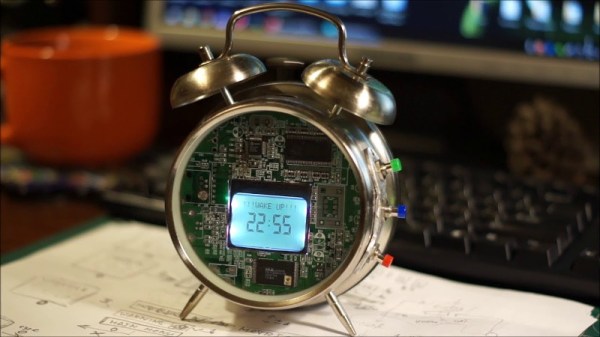
The build starts with an old alarm clock. The clockwork internals are removed, but the bells remain, powered instead by a brushed DC motor. An Arduino Nano is the brains of the operation, interfacing with the now-ubiquitous temperature, humidity and barometric pressure sensors. Time is displayed on a Nokia 5110 LCD screen of the type popular a decade ago when options for small hobby project displays were significantly more limited then they are today.

As a nice touch, an old circuit board lends a new face to this clock, with a trio of big chunky buttons to act as controls. The LCD uses attractive icons to help convey information, making the most of the graphical capabilities available. There’s even a rudimentary weather forecasting algorithm that uses barometric pressure changes to predict the likelihood of rain.

Overall, it’s a tidy build that promises to serve as a great alarm clock, given the high volume of the original bells. Alarm clocks have always been a hacker staple, but if you’re still struggling to get out of bed this fire bell build should rattle your fillings loose on a daily basis. Video after the break.

[Thanks to Baldpower for the tip!]

Continue reading “Weather Forecasting Clock Makes An Almighty Racket” →

Neural Network Knows When Cat Wants To Go Outside

Neural networks are computer systems that are vaguely inspired by the construction of animal brains, and much like human brains, can be trained to obey the whims of the almighty domestic cat. [EdjeElectronics] has built just such a system, and his cat is better off for it.

The build uses a Raspberry Pi, fitted with the Pi Camera board, to image the area around the back door of the house. A Python script regularly captures images and passes them to a TensorFlow neural network for object recognition. The TensorFlow network returns object type and positions to the Python script. This information can be used to determine if there is a cat in the frame, and if it is inside or outside. If the cat remains in position for ten consecutive frames, a text message is sent via Twilio, indicating to the owner to let the cat in or out, as the case may be.

Thirty years ago, object classification was a pie-in-the-sky technology, but now you can run it on a $30 computer to figure out where your pets are. What a time we live in! A similar solution to this problem may be a cat door that unlocks via facial recognition. Video after the break.

[Thanks to Baldpower for the tip!]

Continue reading “Neural Network Knows When Cat Wants To Go Outside” →

Incredibly Heavy Ornament Likely Inappropriate To Hang On Tree

It’s that time of year again, and the Christmas hacks are flooding in thick and fast. To get into the Christmas spirit,  the FoxGuard team wanted a custom ornament to hang from the tree. They may have gotten more than they bargained for.

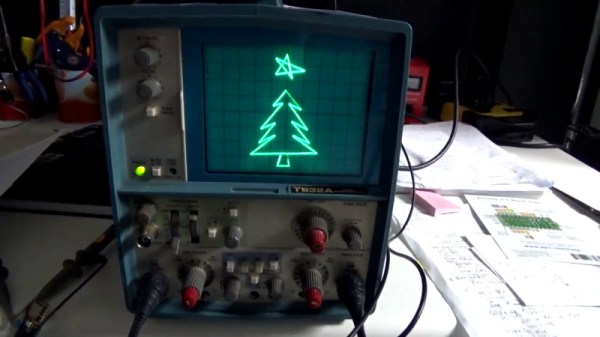
It’s a simple build that demonstrates the basic techniques of working with DACs and scopes in a charming holiday fashion. A Tektronix T932A analog oscilloscope is pressed into service as a display, by operating in XY mode. A Teensy 3.5 was then chosen for its onboard digital to analog converters, and used to output signals to draw a Christmas tree and star on the screen.

Old-school coders will appreciate the effort taken to plot the graphics out on graph paper. While the hack doesn’t do anything cutting edge or wild, it’s impressive how quick and easy this is thanks to modern development methods. While the technology to do this has existed for decades, a hacker in 1998 would have spent hours breadboarding a PIC microcontroller with DACs, let alone the coding required. We’ve come a long way.

It’s a bit of fun, but we highly recommend you don’t try and hang an analog scope off your tree at home. These WiFi-controlled ornaments are perhaps more suitable. Video after the break. Continue reading “Incredibly Heavy Ornament Likely Inappropriate To Hang On Tree” →

Using FTDI Chips With Python

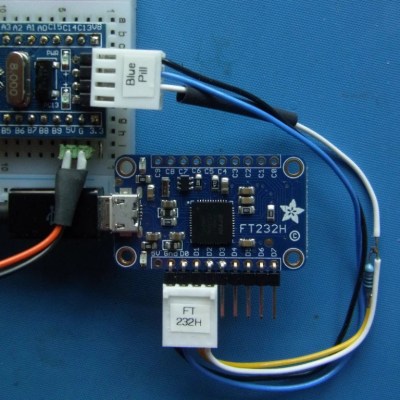
FTDI are a company known for producing chips for USB applications. Most of us have a few USB-to serial adapters kicking about, and the vast majority of them run on FTDI hardware (or, if we’re honest, counterfeit copies). However, FTDI’s hardware has a whole lot more to offer, and [jayben] is here to show us all how to take advantage of it using Python.

FTDI chips are an effective way to debug ARM projects, using the SWD protocol.

FTDI’s chips have varying capabilities, but most can do more than just acting as a USB-connected COM port. It’s possible to use the chips for SPI, I2C, or even bitbanging operation. [jayben] has done the hard work of identifying the best drivers to use depending on your operating system, and then gone a step further to demonstrate example code for sending data over these various interfaces. The article not only covers code, but also shows oscilloscope traces of output, giving readers a strong understanding of what should be happening if everything’s operating as it should. The series rounds out with a primer on how to use FTDI hardware to speak the SWD protocol to ARM devices for advanced debugging use.

It’s a great primer on how to work effectively with these useful chips, and we imagine there will be plenty of hackers out there that will find great use to this information. Of course, it’s important to always be careful when sourcing your hardware as FTDI drivers don’t take kindly to fake chips.

PIC-Powered Game Console Is Blocky Goodness

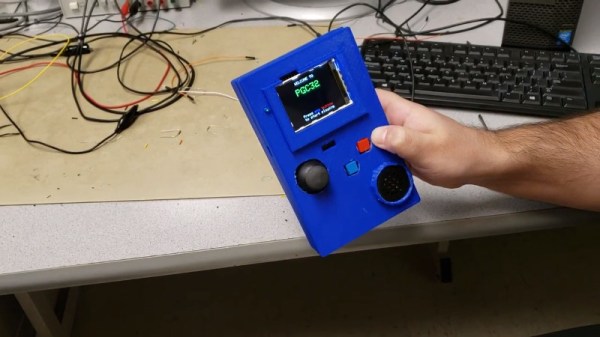
Picking up new skills in the electronics field is often best served by the classic mantra – “learn by doing”. [Juan] and [Leo] did just that, deciding to build a handheld game console for a University project, and delivering the PGC-32.

Built as a final project for the Digital Systems Design course at Cornell University, the PGC-32 takes on a daunting chunk of functionality, and pulls it off in time to get the grades. The team coded a basic block-based game for the hardware, and control is switchable between the analog stick and a built-in accelerometer. Gameplay is displayed on a 320 x 280 color TFT display. Learning to code a basic game is useful, as it teaches student engineers to consider important concepts like timing, race conditions, interrupts, and display routines.

As a university project, it is well documented and the team step through each detail in their code with explanations as to how and why things are done. The internals are particularly neat, too, with a tidy PCB layout and 3D printed case holding everything together.

We’ve seen plenty of work from Cornell’s courses before, too – like this sleep quality monitor.  Video after the break.

Continue reading “PIC-Powered Game Console Is Blocky Goodness” →

Hexagrow Robot Packs A Serious Sensor Package

Automation is a lofty goal in many industries, but not always straightforward to execute. Welding car bodies in the controlled environment of a production line is relatively straightforward. Maintaining plants in a greenhouse, however, brings certain complexities due to the unpredictable organic processes at play. Hexagrow is a robot that aims to study automation in this area, developed as the final year project of [Mithira Udugama] and team.

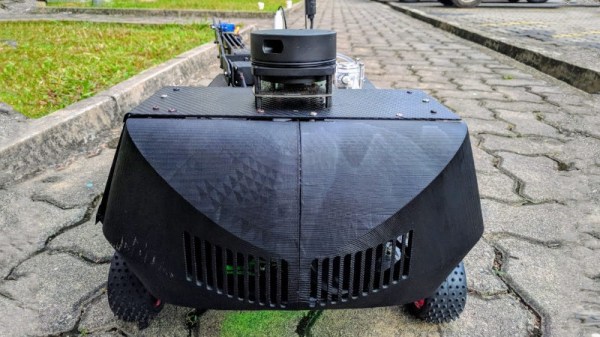
The robot’s chassis is a very modern build, consisting of carbon fiber panels and 3D printed components. This kind of strength is perhaps overkill for the application, but it makes for a very light and rigid robot when the materials are used correctly.

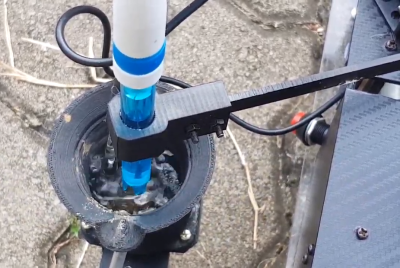
Testing soil pH isn’t easy, but Hexagrow is up to the challenge.

It’s the sensor package where this build really shines, however. There’s the usual accoutrement of temperature and humidity sensors, and a soil moisture probe, as we’d expect. But there’s more, including an impressive soil pH tester. This involves a robotic arm with a scoop to collect soil samples, which are then weighed by a load cell. This is then used to determine the correct amount of water to add to the sample. The mixture is then agitated, before being tested by the probe to determine the pH level. It recalls memories of the science packages on Mars rovers, and it’s great to see this level of sophistication in a university project build. There’s even a LIDAR mounted on top for navigation purposes, though it’s not clear as to whether this sensor is actually functionally used at this point in development.

Plants can be demanding of their caretakers, so perhaps you’d best check you’re measuring your soil moisture correctly? Video after the break.

[Thanks to Baldpower for the tip!]

Continue reading “Hexagrow Robot Packs A Serious Sensor Package” →

A Symbiotic Partnership Between FPGA And 6502

[Kenneth Wilke] is undertaking a noble quest – to build a homebrew microcomputer, based around the venerable 6502. As a prelude to this, he set out to interface the hallowed CPU to an FPGA, and shared the process involved.

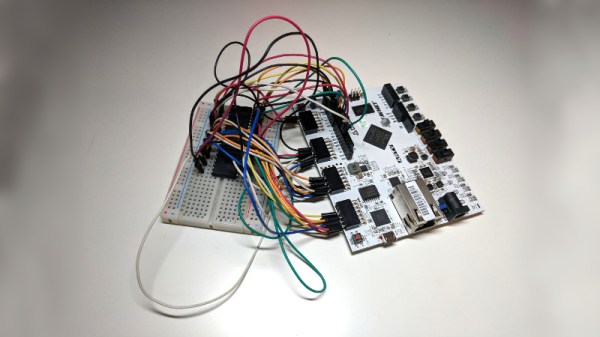
[Kenneth] is using an Arty A7 FPGA development board which is a great fit for purpose, having plenty of I/O pins and being relatively easy to work with for the home tinkerer. This is an important consideration, as many industrial strength FPGAs require software licences to use which can easily stretch into the tens of thousands of dollars.

The 6502 is placed on a breadboard, and a nest of wires connects it to the PMOD interfaces of the Arty board. Then it’s a simple job of mapping out the pins on the FPGA and you’re good to go. Due to the 6502’s design it’s possible to step through instructions one at a time, and this is particularly useful on a basic homebrew build so [Kenneth] was sure to implement this functionality.

It’s all capped off with the FPGA sending the 6502 a starting address and a series of NOPs, to demonstrate the setup is capable of running the 6502 with instructions fed from the FPGA. It’s a project that shows the fundamentals of interfacing two technologies that are widely spread out in sophistication, and acts as a great base for further experimentation.

We can’t wait to see what [Kenneth] does next, as we’ve seen great things before.