
MIDI Mouse Makes Marvelous Music

It’s an old misconception that digital musicians just use a mouse and keyboard for their art. This is often far from the truth, as many computer music artists have a wide variety of keyboards/synths, MIDI controllers, and “analog” instruments that all get used in their creative process. But what if one of those instruments was just a mouse?

Well, that must have been what was going through [kzra]’s mind when he turned an old ps/2 roller ball mouse into an electronic instrument. Born out of a love for music and a hate for waste, the mouse is a fully functional MIDI controller. Note pitch is mapped to the x-coordinate of the pointer, and volume (known as velocity, in MIDI-speak) is mapped to the y-coordinate. The scroll wheel can be used as a mod wheel, user-configurable but most often used to vary the note’s pitch. The mouse buttons are used to play notes, and can behave slightly differently depending on the mode the instrument is set to.

Not satisfied with simply outputting MIDI notes, [kzra] also designed an intuitive user interface to go along with the mouse. A nice little OLED displays the mode, volume, note, and mouse coordinates, and an 8×8 LED matrix also indicates the note and volume. It’s a fantastic and versatile little instrument, and you’ve gotta check out the video after the break to see it for yourself. We’ve seen some awesome retro-tech MIDI controllers before, and this fits right in.

Continue reading “MIDI Mouse Makes Marvelous Music”

The Hidden Sounds Of The Past

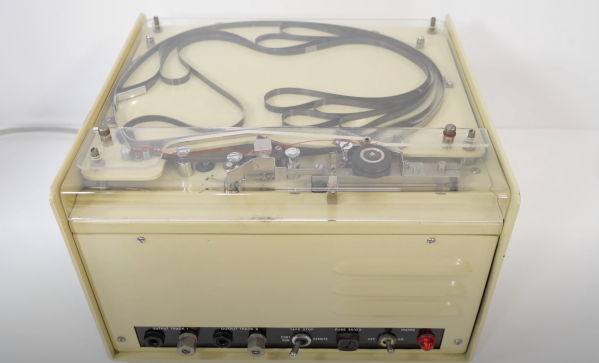
If you stop to think, the number of pre-recorded voices and sounds you might hear on an average day might number in the hundreds. Everything from subway announcements, alerts on your phone, to sound effects at Disneyland is a sound that triggers in response to an event. [Techmoan] came across a device that many of us have interacted with, but likely never seen: a humble Sontranic 9A Announcer.

In their heyday, these sorts of devices formed the backbone of audio feedback. Messages from Father Christmas were recorded and could be reached when calling a number. Sound effects in theme parks that were activated when a ride activated some hidden switch. Anything where the sound effect needed to play on some sort of trigger.

An interesting thing to note is that this is not a reel-to-reel system. The tape is of the standard 1/4″ magnetic variety, perhaps a little thicker for extra durability. It instead sits in the top of the machine; coiling and uncoiling like a two-dimensional lava lamp. Additionally, there’s nothing clever about detecting the beginning or end of the audio loop (as there were four copies of the same recording on this particular tape). In fact, everything about this machine speaks of reliability as the most important design consideration. A reel-to-reel system would just add more points of failure.

After a little bit of diagnosing, [Techmoan] managed to get the device running again and found the message on the tape to be from the phone system, informing the listener that the line is no longer in service. This banal message is perhaps the best testament to the ubiquity of devices like these.

Perhaps in the future, we’ll see an instrument like this magnetic tape-based one created from a similar machine to the one [Techmoan] found.

Continue reading “The Hidden Sounds Of The Past”

DeWalt Literal Hack Upgrades Battery

There are several important decisions you make in your life: Coke or Pepsi; vi or emacs; PC or Mac. But, lately, you need to pick a battery ecosystem for your tools. DeWalt? Black & Decker? Or just cheapies from Harbor Freight? But what happens when your vendor of choice changes their batteries? That’s the situation [jleslie48] found when a DeWalt 14.4V battery died. All the new tools require 18V batteries, so buying an old battery for one tool didn’t make sense. Time to literally hack the old tool to accept the new battery.

Presumably, nothing in the drill will mind the higher voltage. It is all a matter of mechanics and nothing a Dremel tool won’t fix. Since the tool was old and the 18V batteries relatively new, [jleslie48] decided to limit modifications to the tool only leaving the batteries intact for use with the newer tools.

The only problem once you remove the pins and clips that interfere with the battery fit, it won’t actually stay on the drill. We might have turned to duct tape or zip ties, but bungee cord works, too, as you can see in the finished product.

Honestly, though, the bungee is good because you can stretch it to remove the battery for charging. We might have just cannibalized the drill for its motor, but next time you have a tool with no battery, it might be worth looking to see if you could modify the tool.

Bungees are great for robots, too. Or, you can lay siege on your neighbors.

Arduino Cable Tracer Helps Diagnose Broken USB Cables

We’ve all found ourselves swimming amongst too many similar-looking USB cables over the years. Some have all the conductors and functionality, some are weird power-only oddballs, and some charge our phones quickly while others don’t. It’s a huge headache and one that [TechKiwiGadgets] hopes to solve with the Arduino Cable Tracer.

The tracer works with USB-A, Mini-USB, Micro-USB, and USB-C cables to determine whether connections are broken or not and also to identify wiring configurations. It’s built around the Arduino Mega 2560, which is ideal for providing a huge amount of GPIO pins that are perfect for such a purpose. Probing results are displayed upon the 2.8″ TFT LCD display that makes it easy to figure out which cables do what.

It’s a tidy build, and one that we could imagine would be very useful for getting a quick go/no-go status on any cables dug out of a junk box somewhere. Just remember to WIDLARIZE any bad cables you find so they never trouble you again. Video after the break.

Continue reading “Arduino Cable Tracer Helps Diagnose Broken USB Cables”

Control An IRL Home From Minecraft

Minecraft seems to be a game in which anything is possible, both in the virtual world and in the real one. As a sandbox-style game, we’ve seen all kinds of things implemented in it including arithmetic logic units and microcontroller emulators. On the other end of reality we’ve also seen a lot of projects in which real-world interfaces impact the virtual world in some way. As a game, the lines between these two worlds often seem to blur, and that’s no different for this project that allows for control of a smart home from within the game itself.

The project is called HomeAssistantMC and is built with Forge. The mod interfaces directly with a Minecraft game. From within the game, players can create a model of their home complete with light switches and other control interfaces. A WebSocket API listens to the game for changes to these devices, and interfaces with real-world controllers which control the home in real life. The game uses special state blocks to handle the control, and the entire control system can be configured in-game once all of the appropriate software has been installed.

For anyone willing to experiment with this software, all of the code for this project is available on its GitHub page. One of the other interesting things about this project is the ability to use other creations within Minecraft for home automation. For example, building logic gates allows for nuanced control of the home automation setup with creations we’ve already seen in Minecraft before. And, if you really want to go deep into the weeds, you could even build a complete 6502 processor from within the game as well.

PNG Image Decoding Library Does It With Minimal RAM

Want to display a PNG file on a display attached to an Arduino or other microcontroller board? You’ll want to look at [Larry Bank]’s PNGdec, the Arduino-friendly PNG decoder library which makes it much easier to work with PNG files on your chosen microcontroller.

The PNG image format supports useful features like lossless compression, and was generally developed as an improved (and non-patented) alternative to GIF files. So far so great, but it turns out that decoding PNG files on a microcontroller is a challenge due to the limited amount of memory compared to desktop machines. When the PNG specification was developed in the 90s, computers easily had megabytes of memory to work with, but microcontrollers tend to have memory measured in kilobytes, and lack high-level memory management. [Larry]’s library addresses these issues.

PNGdec is self-contained and free from external dependencies, and also has some features to make converting pixel formats for different display types easy. It will run on any microcontroller that can spare at least 48 K of RAM, so if that sounds useful then check out the GitHub repository for code and examples.

We’ve seen [Larry]’s wonderful work before on optimizing GIF playback as well as rapid JPEG decoding, and these libraries have increasing relevance as hobbyists continue to see small LCD and OLED-based displays become ever more accessible and affordable.

[PNG logo: PNG Home Site]

CNC Saves Water Cooling Setup

A classic problem. You have a new CPU and a 15-year old water cooling system. Of course, the bracket doesn’t fit. Time to buy a new cooler? Not if you are [der8auer]. You design a new bracket and mill it out of aluminum.

Honestly, it might seem overkill, but it makes sense. After all, no matter how new the CPU is, using water to cool it still works the same way, in principle.

Continue reading “CNC Saves Water Cooling Setup”