Bridging The PC And Embedded Worlds With Pico And Python

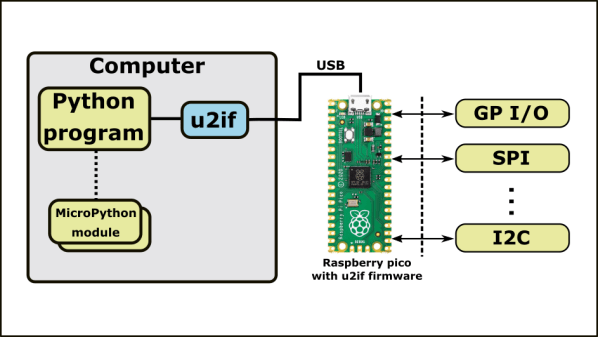
Although protocols like I2C and SPI are great for communicating between embedded devices and their peripherals, it can be a pain to interface these low-level digital interfaces to a PC. [Alexandre] typically used an Arduino to bridge between the PC and embedded worlds, but he got tired of defining a custom serial protocol for each project. Inspired by MicroPython’s machine module, [Alexandre] has developed u2if—an implementation of some of MicroPython’s machine module for PC—using a USB-connected Raspberry Pi Pico to bridge between a PC and low-level digital interfaces.

u2if consists of two parts: the PC portion is a Python implementation of a portion of the MicroPython machine module, and the Raspberry Pi Pico receives some custom C++ firmware. Thus far, [Alexandre] has implemented functionality for the onboard ADCs, I2C, SPI, UART, and GPIO lines as well as additional support for I2S sound and the WS2812B addressable LED.
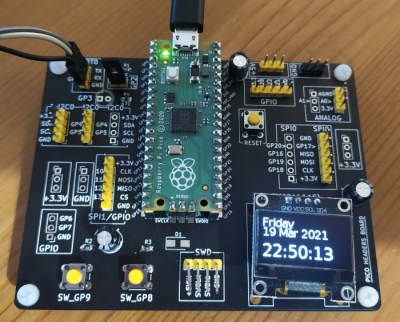
Development board for Raspberry Pi Pico.

In addition to the u2if package, [Alexandre] has designed a PCB to break out all of the Raspberry Pi Pico’s interfaces in a handy 3×3.9″ board. We especially like that multiple headers are supplied for I2C, including one with enough space to mount an SSD1306 OLED display.

We think this could be an incredibly useful tool, and what makes it even more impressive is that it uses a board many of us already have laying around. If you want a dedicated device for interfacing with low-level digital buses, you may want to check out the GreatFET.
Toggle Switch Puzzle Boggles The Mind, Opens The Box

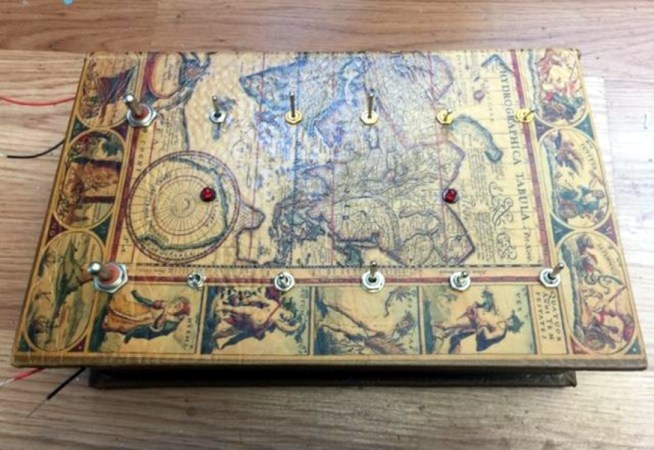
We all have too much stock of one component or another. Maybe you have more audio pots than you know what to do with, or maybe it’s zener diodes. For [technologyguy], that thing is a pile of toggle switches.  Fortunately he’s always wanted to build a locking box with a binary code that’s laid out in switches — as in, find the right code, and a solenoid unlatches the box. This lovely parts bin special only responds to two combinations out of a possible 4,000+, so anyone who tries to open it should probably block out the afternoon.

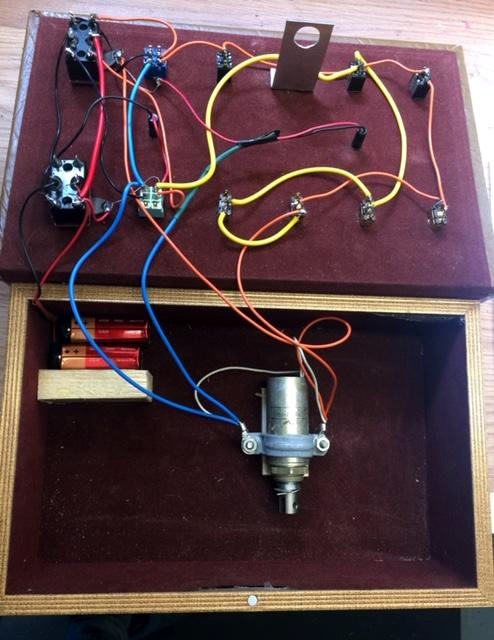
Inside you’ll find two 9 V batteries, a home-brew metal latch, a solenoid, and the undersides of four DPDT and eight SPDT toggle switches. If you just picked this thing up and had no idea what was going on, you’d be so screwed as to what to do first. The box needs power, so you’d have to figure out which switch is which. But it’s so much harder than that, because the bottom left switch selects between the two paths that result in an unlocked book-box.

The next two toggles in from the left are on/off selectors for code A and code B, so not only do you have to have the right path chosen, you have to power it, too. The only progress indicators are the LEDs — there’s one for main power, and the other lets you know that the box is unlatched. What a fun conversation piece for the coffee table Zoom-viewable area!

Want to do something far less useful with your throng of toggles? How about a complicated useless machine?

Heads Up: Smart Glass Multimeter

Sometimes it is hard to probe a circuit and then look over at the meter. [Electronoobs] decided to fix that problem by making a Google Glass-like multimeter using an OLED screen and Bluetooth module.

The custom PCB doesn’t have many surprises. A small board has a controller, a battery charger, a display, and a Bluetooth module. One thing he did forget is a switch, though, so the board is always on unless you arrange an external switch.

Continue reading “Heads Up: Smart Glass Multimeter”

DOS Gaming PC Gets Necessary Updates

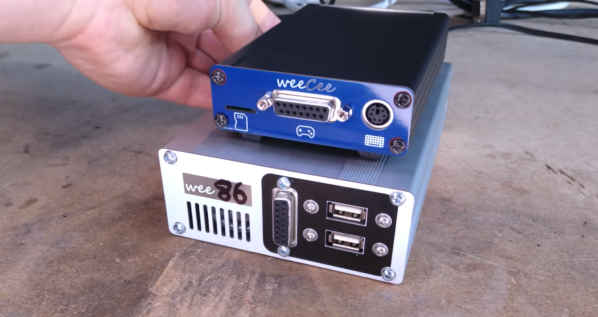
PC-104 is a standard computer form factor that most people outside of industrial settings probably haven’t seen before. It’s essentially an Intel 486 processor with lots of support for standards that have long since disappeared from most computers, but this makes it great for two things: controlling old industrial equipment and running classic DOS games on native hardware. For the latter, we turn once again to [The Rasteri] who is improving on his previous build with an even smaller DOS gaming rig, this time based on a platform even more diminutive than PC-104.

The key of a build like this is that it needs native support for the long-obsolete ISA bus to be able to interface with a SoundBlaster card, a gold standard for video games of the era. This smaller computer still has this functionality in a smaller package, but with some major improvements. First, it has a floating point unit so it can run games like Quake. It’s also much faster than the PC-104 system and uses less power. Finally, it fits in an even smaller case.

The build goes well beyond simply running software on a SoM computer. [The Rasteri] also custom built an interface board for this project, complete with all of the necessary ports and an ISA sound chip, all while keeping size down to a minimum. The new build also lets him give the build a better name than the old one (although he phrases this upgrade slightly differently), and will also let him expand some features in the future as well. Be sure to check out that first build if you’re new to this saga, too.

Continue reading “DOS Gaming PC Gets Necessary Updates”

Guide To Mastering OpenSCAD Costs Roughly The Same As OpenSCAD

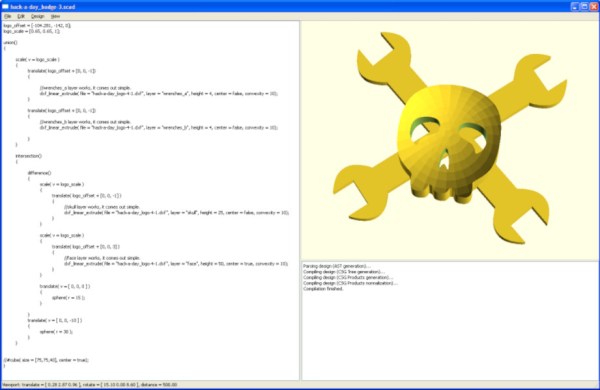
OpenSCAD is a fantastic free tool for 3D modeling, but it’s far less intuitive to use for non-programmers than mouse-driven programs such as Tinkercad. Powerful as it may be, the learning curve is pretty steep. OpenSCAD’s own clickable cheat sheet and manual comes in handy all the time, but those are really more of a reference than anything else. Never fear, because [Jochen Kerdels] had quite the productive lockdown and wrote a free comprehensive guide to mastering OpenSCAD.

[Jochen]’s book opens with a nice introduction to OpenSCAD and it’s user environment and quickly moves into 10 useful projects of increasing complexity that start with simple stuff like wall anchors and shelf brackets and ends with recursive trees.

There are plenty of printing tips along the way to help realize these projects with minimum frustration, and the book wraps up by covering extra functions not expressly used in the projects.

Of course, you could always support [Jochen]’s Herculean effort by buying the print edition and forcing yourself to type everything in instead of copy/pasting, or give it to someone to introduce them to all the program has to offer.

Need help mastering OpenSCAD workflow? We’ve got that. Just want to make some boxes or airfoils? We have those in stock, too.

Main and thumbnail images via [Devlin Thyne]

Pedaling Away Under The Cover Of Your Desk

[Wayne Venables], like many of us, found himself sitting more than usual the past few months.  Armed with a Bluetooth-enabled under desk exercise bike, he quickly found the app to be rather sub-optimal and set about reverse-engineering the protocol of his bike.

Custom GUI for the exercise bike

The first step was to use some apps on his Android phone to reveal the profiles on the bike, which showed his particular machine used a Nordic Bluetooth UART. This meant the only work would be decoding the stream of bytes coming off the wireless serial port. Using Wireshark and Bluetooth logs on his phone, [Wayne] was able to correspond the various commands to points in the video. There were still a few bytes that he wasn’t able to identify, but [Wayne] had enough to whip up a quick .NET app that can start a workout and log it all to a database. The code for his app is on his GitHub.

While [Wayne] doesn’t specifically name the bike he uses in this project, we tracked down the image he shows on his writeup to the Exerpeutic 900e. It appears to be discontinued but the reverse engineering approach should be usable on a range of Bluetooth-connected machines. This isn’t the first bike we’ve seen liberated by reverse engineering here at Hackaday. And we have a feeling it won’t be the last.

Kitchen Bump Bar Plays Doom Between Orders

For as much as we love reverse engineering projects, we have to admit that we almost passed up on this “kitchen bump bar” hack. Having never had the privilege of working in the food-service industry — well, there was that time working at Chuck E. Cheese’s, but that only lasted for one shift — we were unaware of what a bump bar is, and the whys and hows of hacking one to the point where it can play Doom.

We’re glad we stuck with it, though, because [Kiwa]’s hack is pretty cool, and we got to learn a little about the technology of the modern commercial kitchen. Most fast food and family casual restaurants have what’s known as a “kitchen display system”, which relays orders from the wait staff to the kitchen. You’ve probably seen parts of the KDS, like the touch screens used by the wait staff to enter orders, or the screens dangling in the kitchen that display the pending orders. A bump bar is a small terminal used by the kitchen crew to review orders and move them around in the queue, or “bump” them, as needs dictate.

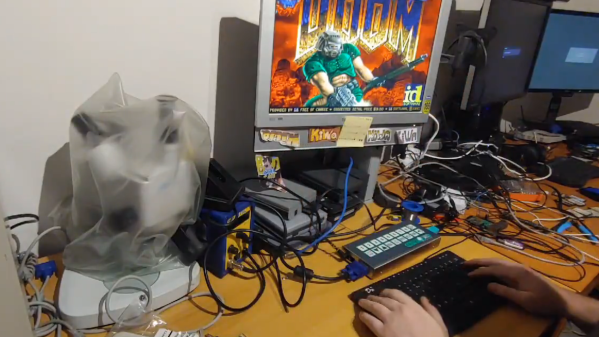
The bump bar [Kiwa] dug into appears to be a model from the early 2000s and very sturdily built, as anything used in a kitchen would need to be. Hooked up to a monitor and a keyboard, [Kiwa] discovered that it booted right into an OS with all the familiar trappings of DOS. After a detour for a teardown and dumping the flash contents, [Kiwa] was able to boot it up and run Doom, albeit somewhat slowly. It also looks like he’s got a couple of different Windows versions running, and even played some Solitaire.

It’s always fun to see what will run Doom — an NES, an oscilloscope, a thermostat, or even a bag of potatoes.

Thanks to [Fritnando] for the tip.