Escape To An Alternate Reality Anywhere With Port-A-Vid

There was a time when only the most expensive televisions could boast crystal clear pixels on a wall-mountable thin screen. What used to be novelty from “High Definition Flat Screen Televisions are now just “TV” available everywhere. So as a change of pace from our modern pixel perfection, [Emily Velasco] built the Port-A-Vid as a relic from another timeline.

The centerpiece of any aesthetically focused video project is obviously the screen, and a CRT would be the first choice for a retro theme. Unfortunately, small CRTs have recently become scarce, and a real glass picture tube would not fit within the available space anyhow. Instead, we’re actually looking at a modern LCD sitting behind a big lens to give it an old school appearance.
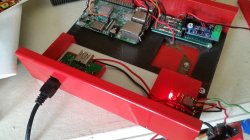
The lens, harvested from a rear-projection TV, was chosen because it was a good size to replace the dial of a vacuum gauge. This project enclosure started life as a Snap-On Tools MT425 but had become just another piece of broken equipment at a salvage yard. The bottom section, formerly a storage bin for hoses and adapters, is now home to the battery and electronics. All original markings on the hinged storage lid were removed and converted to the Port-A-Vid control panel.

A single press of the big green button triggers a video to play, randomly chosen from a collection of content [Emily] curated to fit with the aesthetic. We may get a clip from an old educational film, or something shot with a composite video camera. If any computer graphics pop up, they will be primitive vector graphics. This is not the place to seek ultra high definition content.

As a final nod to common artifacts of electronics history, [Emily] wrote an user’s manual for the Port-A-Vid. Naturally it’s not a downloadable PDF, but a stack of paper stapled together. Each page written in the style of electronics manuals of yore, treated with the rough look of multiple generation photocopy rumpled with use.

If you have to ask “Why?” it is doubtful any explanation would suffice. This is a trait shared with many other eclectic projects from [Emily]. But if you are delighted by fantastical projects hailing from an imaginary past, [Emily] has also built an ASCII art cartridge for old parallel port printers.

Continue reading “Escape To An Alternate Reality Anywhere With Port-A-Vid”


Does Your Phone Need A RAM Drive?

Phones used to be phones. Then we got cordless phones which were part phone and part radio. Then we got cell phones. But with smartphones, we have a phone that is both a radio and a computer. Tiny battery operated computers are typically a bit anemic, but as technology marches forward, those tiny computers grew to the point that they outpace desktop machines from a few years ago. That means more and more phones are incorporating technology we used to reserve for desktop computers and servers. Case in point: Xiaomi now has a smartphone that sports a RAM drive. Is this really necessary?

While people like to say you can never be too rich or too thin, memory can never be too big or too fast. Unfortunately, that’s always been a zero-sum game. Fast memory tends to be lower-density while large capacity memory tends to be slower. The fastest common memory is static RAM, but that requires a lot of area on a chip per bit and also consumes a lot of power. That’s why most computers and devices use dynamic RAM for main storage. Since each bit is little more than a capacitor, the density is good and power requirements are reasonable. The downside? Internally, the memory needs a rewrite when read or periodically before the tiny capacitors discharge.

Although dynamic RAM density is high, flash memory still serves as the “disk drive” for most phones. It is dense, cheap, and — unlike RAM — holds data with no power. The downside is the interface to it is cumbersome and relatively slow despite new standards to improve throughput. There’s virtually no way the type of flash memory used in a typical phone will ever match the access speeds you can get with RAM.

So, are our phones held back by the speed of the flash? Are they calling out for a new paradigm that taps the speed of RAM whenever possible? Let’s unpack this issue.

Continue reading “Does Your Phone Need A RAM Drive?”

Exploring Animal Intelligence Hack Chat

Join us on Wednesday, October 21st at noon Pacific for the Exploring Animal Intelligence Hack Chat with Hans Forsberg!

From our lofty perch atop the food chain it’s easy to make the assumption that we humans are the last word in intelligence. A quick glance at social media or a chat with a random stranger at the store should be enough to convince you that human intelligence isn’t all it’s cracked up to be, or at least that it’s not evenly distributed. But regardless, we are pretty smart, thanks to those big, powerful brains stuffed into our skulls.

We’re far from the only smart species on the planet, though. Fellow primates and other mammals clearly have intelligence, and we’ve seen amazingly complex behaviors from animals in just about every taxonomic rank. But it’s the birds who probably stuff the most functionality into their limited neural hardware, with tool use, including the ability to make new tools, being common, along with long-distance navigation, superb binocular vision, and of course the ability to rapidly maneuver in three-dimensions while flying.

Hans Forsberg has taken an interest in avian intelligence lately, and to explore just what’s possible he devised a fiendishly clever system to train his local magpie flock to clean up his yard, which he calls “BirdBox”. We recently wrote up his initial training attempts, which honestly bear a strong resemblance to training a machine learning algorithm, which is probably no small coincidence since his professional background is with neural networks. He has several years of work into his birds, and he’ll stop by the Hack Chat to talk about what goes into leveraging animal intelligence, what we can learn about our systems from it, and where BirdBox goes next.

join-hack-chatOur Hack Chats are live community events in the Hackaday.io Hack Chat group messaging. This week we’ll be sitting down on Wednesday, October 21 at 12:00 PM Pacific time. If time zones baffle you as much as us, we have a handy time zone converter.

Click that speech bubble to the right, and you’ll be taken directly to the Hack Chat group on Hackaday.io. You don’t have to wait until Wednesday; join whenever you want and you can see what the community is talking about.

Continue reading “Exploring Animal Intelligence Hack Chat”

Motorized Magic Over HDMI

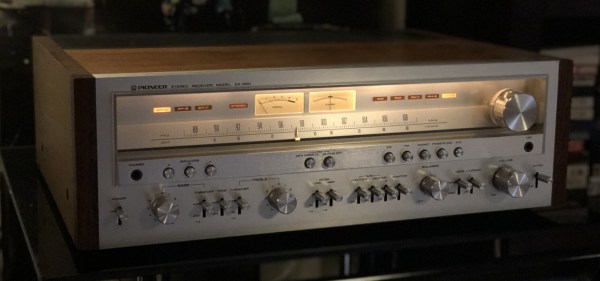
There is a certain warmth that seems to emanate from stereo receivers of the 70s, 80s, and 90s. Despite their large footprint and considerable heft, the soft glow of the indicator lights and solid kerthunk of switches provide a sense of coziness. When [Tom] recently swapped his receiver for a 1970s Pioneer SX-950, he found himself getting up from the couch to adjust the volume when watching TV far too often for his liking. Resolving to do something about it, he added some magic in the form of a motorized volume knob. One of the coolest tricks for stereos was to have a small motor attached to the volume knob so that it could turn the volume up or down via a remote.

The first obstacle came when [Tom] had to forgo the center tap on the potentiometer to get a motorized one. This meant the volume compensation feature would be disabled, which is but a small price to pay for convenience. After scouring the internet, he finally had the part in hand only to discover some troublesome capacitors in the way. The new pot had a rather large motor hanging off the back that the previous one didn’t have. Fortunately, there was a good bit of space between the PCB and the bottom of the chassis, so Tom was able to just flip the capacitors to the underside of the board and bend them on their sides.

The next problem to solve was how to change the volume remotely. IR was considered as well as optical cable control signals. What [Tom] did instead was to implement HDMI CEC (consumer electronics control). CEC was well documented and seemed simple to implement on an ATTINY4313 with the help of a half-H driver. The CEC protocol implemented by [Tom’s] TV seemed to be very sensitive to timing, so an external crystal was used to get more precise timing and additional handshaking was implemented to get the TV to accept the microcontroller as valid. A few fail-safes were added to make sure the motor didn’t burn out if something went wrong with the CEC protocol and a nice enclosure wrapped up the build quite nicely.

We’ve seen CEC implemented before on a PIC 18F87J50, but as a sender of CEC commands not a receiver. [Tom’s] code is available on GitHub and might prove useful if you’re looking to implement CEC on an AVR.

Thanks [Tom] for sending this one in!

TTGO ESP32 Module With Multiple Personalities

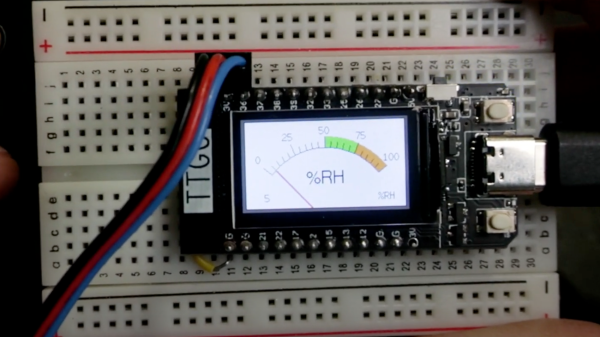
Volos Projects educator [Danko Bertović] had a TTGO ESP32 board looking for a project, so he implemented a surprisingly functional weather station for such a small screen. Presumably that was too boring for him, so he decided to write a version of the classic Atari game Breakout instead. [Danko] prefers using the Arduino IDE for ESP32 projects, and has made the Breakout software available as an Arduino sketch. We hope the weather station sketch will be released soon, too. The TTGO is a small ESP32 board with an ST7789V 1.14 in (29 mm) TFT color display, available from your favorite Shenzhen market supplier. This platform is perfect for all kinds of niche applications. We’d love to hear how you are using, or plan to use, these modules in your projects.

We wrote about one such project last summer, where a similar TTGO module was used to display 50-year broadcast delayed transcripts of the Apollo 11 mission. [Danko] is no stranger to Hackaday — he has made several Arduino-based calculator projects.  Perhaps the most remarkable being the circuit sculpture binary number calculator from last year, another project that morphed into a computer game (Pong).

Continue reading “TTGO ESP32 Module With Multiple Personalities”

Ethernet At 40: From A Napkin Sketch To Multi-Gigabit Links

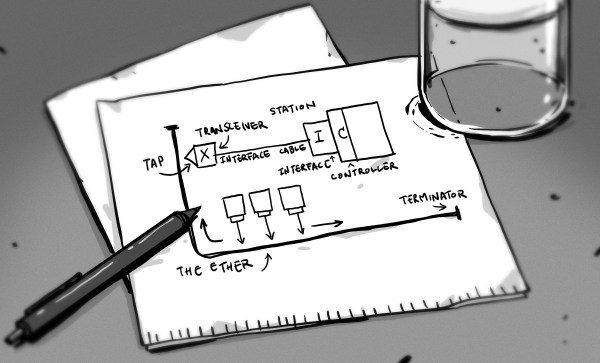
September 30th, 1980 is the day when Ethernet was first commercially introduced, making it exactly forty years ago this year. It was first defined in a patent filed by Xerox as a 10 Mb/s networking protocol in 1975, introduced to the market in 1980 and subsequently standardized in 1983 by the IEEE as IEEE 802.3. Over the next thirty-seven years, this standard would see numerous updates and revisions.

Included in the present Ethernet standard are not just the different speed grades from the original 10 Mbit/s to today’s maximum 400 Gb/s speeds, but also the countless changes to the core protocol to enable these ever higher data rates, not to mention new applications of Ethernet such as power delivery and backplane routing. The reliability and cost-effectiveness of Ethernet would result in the 1990 10BASE-T Ethernet standard (802.3i-1990) that gradually found itself implemented on desktop PCs.

With Ethernet these days being as present as the presumed luminiferous aether that it was named after, this seems like a good point to look at what made Ethernet so different from other solutions, and what changes it had to undergo to keep up with the demands of an ever-more interconnected world. Continue reading “Ethernet At 40: From A Napkin Sketch To Multi-Gigabit Links”

Bench Supplies Get Smaller Thanks To USB-C

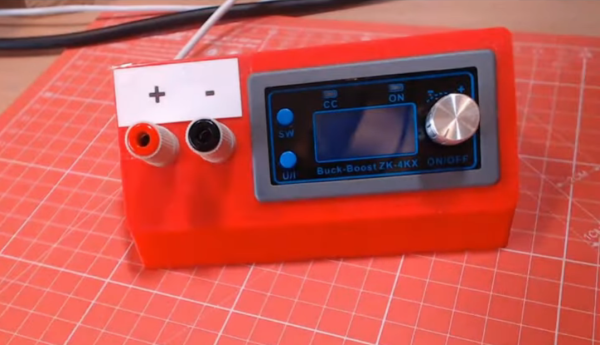
Bench power supplies are an indispensable tool when prototyping electronics. Being able to set custom voltages and having some sort of current limiting feature are key to making sure that the smoke stays inside all of the parts. Buying a modern bench supply might be a little too expensive though, and converting an ATX power supply can be janky and unreliable. Thanks to the miracle of USB-C, though, you can build your own fully-featured benchtop power supply like [Brian] did without taking up hardly any space, and for only around $12.

USB-C can be used to deliver up to 100W but is limited to a few set voltage levels. For voltages that USB-C doesn’t support, [Brian] turns to an inexpensive ZK-4KX buck-boost DC-DC converter that allows for millivolt-level precision for his supply’s output. Another key aspect of using USB-C is making sure that your power supply can correctly negotiate for the amount of power that it needs. There’s an electronic handshake that goes on over the USB connection, and without it there’s not a useful amount of power that can be delivered. This build includes a small chip for performing this negotiation as well.

With all the electronics taken care of, [Brian] houses all of this in a 3D-printed enclosure complete with a set of banana plugs. While it may not be able to provide the wattage of a modern production unit, for most smaller use cases this would work perfectly. If you already have an ATX supply around, though, you can modify [Brian]’s build using that as the supply and case too.

Continue reading “Bench Supplies Get Smaller Thanks To USB-C”