An MSX With A Nintendo Controller

Console owners inhabit their own individual tribes depending upon their manufacturer of choice, and so often never the twain shall meet. But sometimes there are those what-if moments, could Mario have saved the princess more quickly through PlayStation buttons, or how would Sonic the Hedgehog have been with a Nintendo controller? [Danjovic] is finding the answer to one of those questions, with an interface between Nintendo 64 controllers and MSX hardware including the earlier Sega consoles.

In hardware terms, it’s a pretty simple device in the manner of many such projects, an Arduino Nano, a resistor, and a couple of sockets. The clever part lies not in its choice of microcontroller, but in the way it uses the Nano-s timing to ensure the minimum delay between button press and game action. The detail is in the write-up, but in short it makes use of the MSX’s need to attend to video lines to buy extra time for any conversion steps.

The MSX computers have had their share of controller upgrade courtesy of Nintendo hardware in the past, we’ve seen a Wii nunchuck controller talk to them before, as well as a SNES one.

Header image: [mboverload] (Public-domain).

Fitness Trackers Don’t Have To Be Proprietary

Fitness trackers have become a popular piece of consumer electronic equipment, with a range of models from a variety of manufacturers. Many of these commercial offerings, however, leave the consumer with the prospect of their data being drawn off to a cloud server and sold to the highest bidder, trading convenience for a loss of privacy. If only there were a fitness tracker offering complete control!

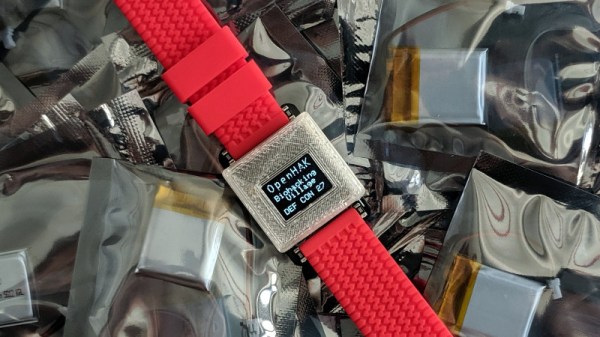
The OpenHAK is an open-source fitness tracker in a 3D printed wristwatch case that measures your heart rate and counts your steps, offering the resultant data for you to collect via Bluetooth. At its heart is a Sparkfun Simblee module, with heart rate sensing through a Maxim MAX30101 and step counting .by a Bocsh BMI160. It’s designed for expandability from the start with a header bringing out useful interface lines. In the prototype, they’ve used this to support a small OLED display. The result is a fitness tracker watch that may not match some of the well-known proprietary devices, but which remains completely open and probably costs a lot less too.

We’ve seen quite a few fitness tracker apps over the years, including a conversion to an EEG, and custom firmware for some commercial trackers.

Bearing-reinforced Stepper Tackles Hefty Axial Loads

These days, it’s common among us hackers to load a stepper motor with forces in-line with their shaft–especially when we couple them to leadscrews or worm gears. Unfortunately, steppers aren’t really intended for this sort of loading, and doing so with high forces can destroy the motor. Fear not, though. If you find yourself in this situation, [Voind Robot] has the solution for you with a dead-simple-yet-dead-effective upgrade to get your steppers tackling axial loads without issue.

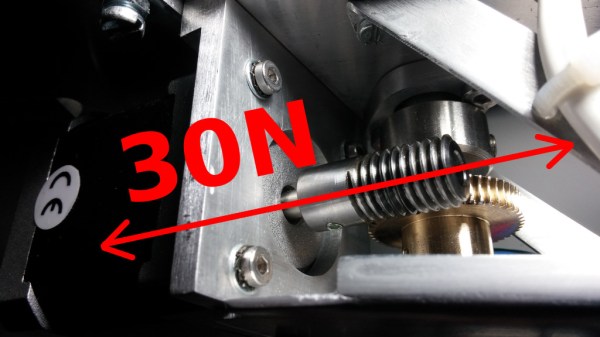
In [Voind Robot’s] case, they started with a worm-gear-drive on a robot arm. In their circumstances, moving the arm could put tremendous axial loads onto the stepper shaft through the worm–as much as 30 Newtons. Such loads could easily destroy the internal stepper motor bearings in a short time, so they opted for some double-sided reinforcement. To alleviate the problem, the introduced two thrust bearings, one on either side of the shaft. These thrust bearings do the work of redirecting the force off the shaft and directly onto the motor casing, a much more rigid place to apply such loads.

This trick is dead simple, and it’s actually over five years old. Nevertheless, it’s still incredibly relevant today for any 3D printer builder who’s considering coupling a leadscrew to a stepper motor for their Z-axis. There, a single thrust bearing could take out any axial play and lead to an overall rigid build. We love simple machine-design nuggets of wisdom like these. If you’re looking for more printer-design tricks, look no further than [Moritz’s] Workhorse Printer article.

Hackaday Links Column Banner

Hackaday Links: August 11, 2019

By the time this goes to press, DEFCON 27 will pretty much be history. But badgelife continues, and it’d be nice to have a way of keeping track of all the badges offered. Martin Lebel stepped up to the challenge with a DEF CON 27 badgelife tracker. He’s been tracking the scene since March, and there are currently more than 170 badges, tokens, and shitty add-ons listed. Gotta catch ’em all!

Nice tease, Reuters. We spotted this story about the FAA signing off on beyond-visual-line-of-sight, or BVLOS, operation of a UAV. The article was accompanied by the familiar smiling Amazon logo, leading readers to believe that fleets of Amazon Prime Air drones would surely soon darken the skies with cargoes of Huggies and Tide Pods across the US. It turns out that the test reported was conducted by the University of Alaska Fairbanks along an oil pipeline in the Last Frontier state, and was intended to explore medical deliveries and pipeline surveillance for the oil industry. The only mention of Amazon was that the company reported they’d start drone deliveries in the US “in months.” Yep.

Ever wonder what it takes to get your widget into the market? Between all the testing and compliance requirements, it can be a real chore. NathanielĀ tipped us off to a handy guide written by his friend Skippy that goes through the alphabet soup of agencies and regulations needed to get a product to market – CE, RoHS, WEEE, LVD, RED, CE for EMC. Take care of all that paperwork and you’ll eventually get a DoC and be A-OK.

A French daredevil inventor made the first crossing of the English Channel on a hoverboard on Sunday. Yes, we know it’s not an “actual” hoverboard, but it’s as close as we’re going to get with the physics we have access to right now, and being a stand-upon jet engine powered by a backpack full of fuel, it qualifies as pretty awesome. The report says it took him a mere 20 minutes to make the 22-mile (35-km) crossing.


We had a grand time last week around the Hackaday writing crew’s secret underground lair with this delightful Hackaday-Dilbert mashup-inator. Scroll down to the second item on the page and you’ll see what appears to be a standard three-panel Dilbert strip; closer inspection reveals that the text has been replaced by random phrases scraped from a single Hackaday article. It looks just like a Dilbert strip, and sometimes the text even makes sense with what’s going on in the art. We’d love to see the code behind this little gem. The strip updates at each page load, so have fun.

And of course, the aforementioned secret headquarters is exactly what you’d picture – a dark room with rows of monitors scrolling green text, each with a black hoodie-wearing writer furiously documenting the black arts of hacking. OpenIDEO, the “open innovation practice” of global design company IDEO, has issued a challenge to “reimagine a more compelling and relatable visual language for cybersecurity.” In other words, no more scrolling random code and no more hoodies. Do you have kinder, gentler visual metaphors for cybersecurity? You might win some pretty decent prizes for your effort to “represent different terms and ideas in the cybersecurity space in an accessible and compelling way.”


ESP8266 Controls TiVo Over The Network

Remember the TiVo? The set-top DVR that was once so popular of a hacking target that Hackaday had a dedicated subdomain for it has today largely faded into obscurity as time-shifted viewing has given way to Internet streaming services like Netflix and Hulu. But make no mistake, while the TiVo may no longer be the centerpiece of the average home entertainment center, there’s a diehard group of antennaed aficionados that are still rocking (and hacking) them.

One such TiVotee is [Thomas McQueen], who recently discovered his TiVo-powered Virgin Media V6 DVR was listening for commands on the network. After finding some official documentation for the protocol and firing off a couple of test commands from his computer’s telnet client, he realized he had an opportunity to flex his microcontroller muscle and create a library that would allow controlling the set-top box with the ESP8266 or other network-capable MCU.

[Thomas] built his project on-top of the basic Arduino WiFi library, making every effort to make it as generalized as possible so it could work on a multitude of platforms and with various targets. He even made sure to give all his functions friendly names that won’t leave users scratching their head when they read through example code down the road. We’ve seen far too many software projects that were poorly documented or obtusely programmed, so it’s always good to see somebody putting some forethought into their code.

The library makes it easy to add TiVo control to your project, but [Thomas] went one step further and came up with an example application that provides a web interface on the ESP8266 or ESP32. Any device with a web browser, such as a smartphone, can connect to the UI and fire off commands to the TiVo. His next step is to combine his library with some code to talk to Amazon’s Alexa so he’ll be able to control playback with his voice.

We’ll hand it to these TiVo users, they’re a tenacious lot. Earlier in the year, we covered how one dedicated TiVo fan managed to brute-force the child lock on his DVR using the Arduino and an IR LED.

NanoVNA Is A $50 Vector Network Analyzer

There was a time when oscilloscopes were big and expensive. Now you can get scopes of various sizes and capabilities on nearly any budget. Vector network analyzers — VNAs — haven’t had quite the same proliferation, but NanoVNA may change that. [IMSAI Guy] bought one for about $50 and made a series of videos about it. Spoiler alert: he likes it. You can see one of the several videos he’s posted, below.

NanoVNA is tiny but sweeps from 50 kHz to 900 MHz and has a touch screen. The device uses a rechargeable battery if you need to haul it up to an antenna tower, for example. Just as a quick test, you can see early in the video the analysis of a rubber duck antenna. The device shows return loss as a plot and you can use a cursor to precisely measure the values. It also shows a Smith chart of the reactance.

Continue reading “NanoVNA Is A $50 Vector Network Analyzer”

Switching Over To SMPS For Efficiency

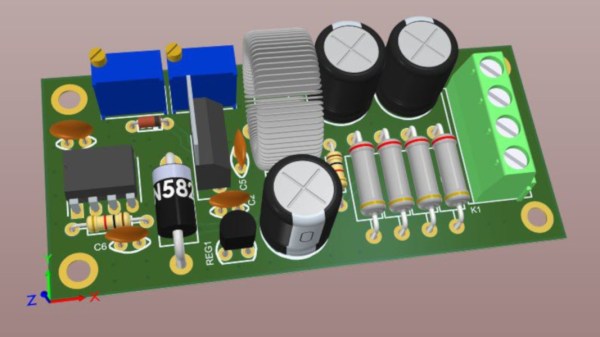
[Hesam Moshiri] has built a variable switch-mode power supply over on hackaday.io. When prototyping a new circuit, often the goal is to get a proof-of-concept working as soon as possible to iron out all of the bugs it might have. The power supply can easily be an afterthought, and for smaller projects we might just reach for an adjustable LM317 voltage regulator to dial in the correct voltage and then move on with the meat of the project. These linear regulators are incredibly inefficient though, so if you find yourself prototyping with one of these often enough, it might be worthwhile to switch to something better.

While it’s easy to simply buy a switch-mode power supply (SMPS) that has everything you need, and rated for 90% or higher efficiency at the same time, getting one with an adjustable output isn’t as easy. This one is based on the relatively popular LM2576-Adj chip which handles the switching frequency part of the circuit automatically. You will also need some large capacitors, an inductor (one of the disadvantages of an SMPS circuit) and a small potentiometer to use as the feedback control for the LM2576. This special pin allows the output voltage of the SMPS to be precisely controlled.

Granted, this project might not be breaking any new grounds, but if you’ve never given serious thought to your small breadboard circuit power supplies, it’s definitely worth looking into. An improvement from a linear regulator’s 30% efficiency to 90% efficiency from an SMPS will not only save you a ton of energy but also solve a lot of heat dissipation problems. If you don’t want to build a switch-mode supply 100% from scratch, though, it might also be possible to modify an existing one to suit your needs as well.