Controlling This Smartwatch Is All In The Wrist

Smartwatches are pretty great. In theory, you’ll never miss a notification or a phone call. Plus, they can do all kinds of bio-metric tracking since they’re strapped to one of your body’s pulse points. But there are downsides. One of the major ones is that you end up needing two hands to do things that are easily one-handed on a phone. Now, you could use the tip of your nose like I do in the winter when I have mittens on, but that’s not good for your eyes. It seems that the future of smartwatch input is not in available appendages, but in gesture detection.

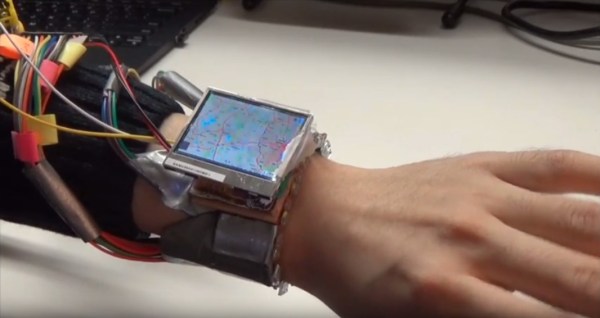
Enter WristWhirl, the brain-child of Dartmouth and University of Manitoba students [Jun Gong], [Xing-Dong Yang], and [Pourang Irani]. They have built a prototype smartwatch that uses continuous wrist movements detected by IR proximity sensors to control popular off-the-shelf applications. Twelve pairs of dirt-cheap IR sensors connected to an Arduino Due detect any of eight simple gestures made by the wearer to do tasks like opening the calendar, controlling a music player, panning and zooming a map, and playing games like Tetris and Fruit Ninja. In order to save battery, a piezo senses pinch between the user’s thumb and forefinger and uses this input to decide when to start and stop gesture detection.

According to their paper (PDF warning), the gesture detection is 93.8% accurate. To get this data, the team had their test subjects perform each of the eight gestures under different conditions such as walking vs. standing and doing either with the wrist in watch-viewing position or hanging down at their side. Why not gesture your way past the break to watch a demo?

If you’re stuck on the idea of playing Tetris with gestures, there are other ways.

Continue reading “Controlling This Smartwatch Is All In The Wrist”

A Smart Wand For All Us Muggles

Arthur C. Clarke said that “any sufficiently advanced technology is indistinguishable from magic.” Even though we know that something isn’t “magic”, it’s nice to see how close we can get. [Dofl] and his friends, big fans of the magic in Harry Potter, thought the same thing, and decided to create a magic wand that they could use themselves.

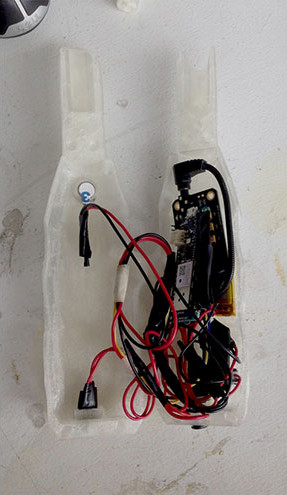
muggle-wand-internalsThe wand itself is 3D printed and has a microcontroller and WiFi board, a voice recognition board, a microphone, and a vibrating motor stuffed inside. The wand converts the voice into commands and since the wand is connected to WiFi, the commands can be used to communicate with your WiFi connected lights (or your WiFi connected anything, really.) Five voice commands are recognized to turn on and off music, the lights, and a “summon” command which is used in the video to request a hamburger from delivery.com. For feedback, the motor is vibrated when a command is recognized.

There’s not much technical information in the original article, but I’m sure our readers could figure out the boards used and could suggest some alternatives to get the wand’s form factor down a bit.  Over the years, other wands have appeared on our pages, using some different technologies.  It’s a fun way to interact with the environment around you, even if you know the “magic” involved is just boring old technology.

Continue reading “A Smart Wand For All Us Muggles”

Ask Hackaday: What Should Father Christmas Bring From Shenzhen?

Imagine this, you have a friend who grew up in Shenzhen, China. The place from whence all your really cool electronics come these days. They speak Chinese in a way only someone born there can, and given that you know them through a shared interest in hardware hacking you can assume they know their way round those famous electronics marts of their home town.

Now, imagine that in a rash move, your friend has offered to pick up a few bits for you on their next trip home. A whole city-sized electronic candy store opens up in front of you, but what do you ask for them to seek out?

Before you continue, consider this. Why has Shenzhen become the powerhouse of electronic manufacturing (and everything else) that it is? Economists will give you pages of fascinating background, but if you want a simple answer it is that those electronics are produced for export, and that its citizens are only too happy to export them to you. Therefore if you want to get your hands on electronics from Shenzhen you do not need a friend who is a native of the city, all you need is a web browser and a PayPal account.

We have all become used to seeking out the cool stuff and eagerly waiting for a padded envelope from China Post a week or two later, so there are very few items that are worth putting a friend to the extra task of finding. At which point you realize that it is the candy store rather than the candy itself which is so alluring, and you ask your friend for a video walkthrough with commentary of their travels through the electronics marts. Oh, and maybe a Chinese Raspberry Pi with red solder resist, just for the collection.

If you had a friend about to board a plane to Shenzhen, what would you ask them to find for you that you can’t just buy for yourself online? Remember, nothing that’ll land them with awkward questions at either airport, nor anything that’ll land them with a hefty customs bill. That’s a very good way to end a friendship.

Huaqiangbei skyline image: Edward Rivens (PD) via Wikimedia Commons.

Script Your Way Out Of Video Editing Drudgery

[Victor Frost] has a deep voice and a fancy top of the line camera. While one would assume this to be a more than generous situation for life to put a person in; it’s got its own set of problems. Mainly that his fantastic fancy camera uses the most modern version of the popular h.264 encoding scheme, h.265. Gasp!

While that too seems like a pro, unfortunately h.265 doesn’t play as nice with his editing software. The solution seems easy, just transcode it and get on your way. However, when you start talking about transcoding 4K video from a top-of-the line source and retaining the quality. Well… It can bring a processor to its knees. Since he’d rather be playing overwatch than transcoding video on his main computer, he decided to offload and automate the drudgery to his spare.

That’s how the Ingest-a-Tron 9000 came into play. It uses a lot of open source software and, yes, windows batch files to take the files off his camera, process it on one computer, and dump it to another. Now he can game (or edit) while he waits. For those of us who are estranged from Linux thanks to our favorite software, it’s good to know that there are still ways to automate away the pain. Video after the break.

Continue reading “Script Your Way Out Of Video Editing Drudgery”

The Most Flexible Synthesizer Is DIY, Raspberry Pi

[Ivan Franco] sent us this great synthesizer project that he’s working on. Or maybe it’s more like a synthesizer meta-project: a synthesizer construction set. You see, what Pryth has is a Raspberry Pi inside that’s running a custom distribution that includes SuperCollider to generate the sound, OSC for the communication layer, and a Teensy with up to 80 (!) multiplexed analog inputs that you’ll connect up to whatever hardware you desire.

Continue reading “The Most Flexible Synthesizer Is DIY, Raspberry Pi”

Low-cost Video Streaming With A Webcam And Raspberry Pi

Some people will tell you that YouTube has become a vast wasteland of entertainment like the boob tube before it. Live streaming doesn’t help the situation much, and this entry level webcam live-stream server isn’t poised to advance the art.

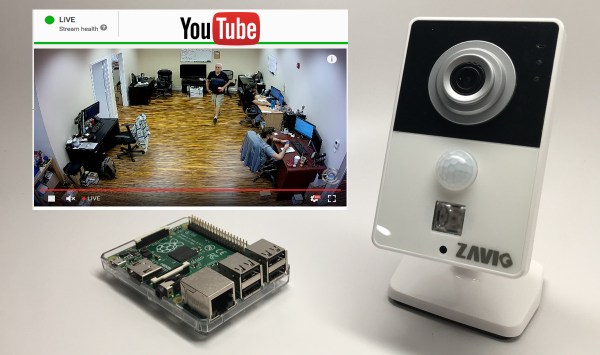
We jest, but only a little. [Mike Haldas] runs a video surveillance company that sells all manner of web-enabled cameras and wondered what it would take to get a low-end camera set up for live streaming. The first step was converting the Zavio webcam stream from RTSP (real-time streaming protocol) to the standard that YouTube uses, RTMP (real-time messaging protocol). Luckily, FFmpeg handles that conversion, so he compiled it for his MacBook Pro and set up a proof of concept. It worked, but he needed a compact solution that would free up his laptop. Raspberry Pi to the rescue – after loading a bunch of libraries and a four-hour build and install of FFmpeg, the webcam was streaming 1080p video of [Mike]’s sales office. He was worried that the Pi wouldn’t have the power needed for the job, and that it would be unstable. But as of this writing, the stream below has been active for six days, and it’s riveting stuff.

Raspberry Pis are a staple in the audio streaming world, like this pro-grade FM broadcast streaming rack or this minuscule internet radio streamer. And of course there’s this quick and dirty, warm and fuzzy streaming baby monitor.

Continue reading “Low-cost Video Streaming With A Webcam And Raspberry Pi”