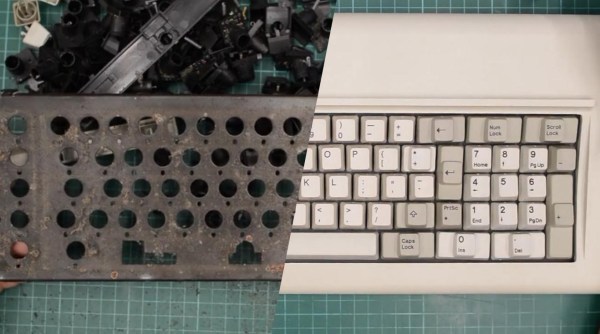
A composite of a disassembled and reassembled Model F keyboard

Model F Keyboard Restoration Goes The Extra Mile

The IBM Model F keyboard should need no introduction. Famed for its buckling spring key mechanisms, the Model F is lusted over for its satisfying typing experience and Armageddon-proof build quality. First introduced in 1981, many of these keyboards will now naturally require basic maintenance. However, [Epictronics] recently went a step further and restored a Model F to like-new condition.

Missing keycaps were the least of his worries, as both new and old replacements are relatively easy to come by. [Epictronics] was more concerned about the forty-year-old foam sandwiched tight inside the keyboard, most likely having long since degraded. Apart from being plain gross, the decaying foam has the potential to foul the buckling spring switches. After taking apart the body and removing the ‘disgusting’ foam pad, a replacement was forged from neoprene and a handy-dandy hole punch.

Disassembly of the keyboard case required the gentle touch of a mallet, and reassembly needed similarly inappropriate tools. As demonstrated in this vintage clip from IBM, keyboard assembly was (and still is) performed automatically by robots, driven by an IBM Series/1 minicomputer. These robots were equally impressive for their precision and strength. Without access to IBM’s aptly named ‘closing tool’ and various other robotic helpers, [Epictronics] had to settle for pool noodles and a comically large clamp during reassembly, mixed with sheer determination.

Other neat tricks in the video include applying heat to reform the coiled keyboard cable, and using car polish to clean the case plastics. The latter has the potential to make things worse, so a delicate hand is needed to maintain the textured plastic.

We recently covered another Model F restoration, and it’s exciting to see so many dedicated hackers keeping these keyboards clickety-clacking well into the 21st century.

Continue reading “Model F Keyboard Restoration Goes The Extra Mile”
Python Provides Classic Basic

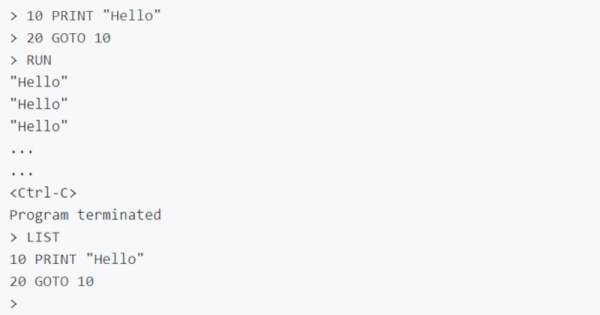
Back in the late 1970s and early 1980s when you turned on a PC, more often than not, you’d get a Basic prompt. Most people would then load a game from a tape, but if you were inclined to program you could just start writing. [Richpl] wanted that same experience and thus PyBasic was born. Along with some other Github contributors, the system has grown quite a bit and would be a good start at porting classic games or creating a replica vintage computer.

The interpreter lacks specialized hardware-specific features such as sound and graphics, of course, but then again, you could add them. It does have file I/O and also includes some interesting features like an analog of C’s ternary operator.

Continue reading “Python Provides Classic Basic”

Vintage Computer Festival East Reboots This Weekend

We don’t have to tell the average Hackaday reader that the last two years have represented a serious dry spell for the type of in-person events that our community has always taken for granted. Sure virtual hacker cons have their advantages, but there’s nothing quite like meeting up face to face to talk shop with like-minded folks and checking out everyone’s latest passion project.

Luckily for classic computer aficionados, especially those on the East Coast of the United States, the long wait is about to end. After being forced to go virtual last year, Vintage Computer Festival East will once again be opening their doors to the public from October 8th to the 10th at the InfoAge Science & History Center in Wall, New Jersey. Attendees will need to wear a mask to gain access to the former Camp Evans Signal Corps R&D laboratory, but that’s a small price to pay considering the impressive list of exhibits, presentations, and classes being offered.

In fact, it’s shaping up to be the biggest and best VCF East yet. The Friday classes cover a wide range of topics from CRT repair to implementing a basic video controller with a FPGA, and the list of speakers include early computer luminaries such as Michael Tomczyk, the Product Manager for the VIC-20, and Adventure International founder Scott Adams. A little birdie even tells us that if you bring your copy of Back into the Storm, our very own Bil Herd will be sign it for you after his talk on the history of the Commodore wraps up Saturday evening.

If you’d rather get hands-on you can always take a walk over to the Computer Deconstruction Laboratory, InfoAge’s on-site hackerspace. Glitch Works will be on hand with several popular kits such as the XT-IDE, an 8-bit ISA adapter that lets you connect (relatively) modern drives to classic machines, and the R6501Q/R6511Q Single Board Computer. A bit rusty with the iron and would rather start on something a little easier? Not to worry. Neil Cherry, a staple of the Hackaday comment section since before we switched to color pictures, will be instructing hackers young and old in the ways of the flux during his all-day soldering classes.

Of course, no VCF trip is truly complete until you’ve searched for treasure in the consignment room. The space has been expanded for 2021, and considering how long folks have had to clean out their attics and garages thanks to the pandemic, we’re expecting a bumper crop of interesting hardware to wade through. If the turnout for the VCF Swap Meet in April was any indication, we’d suggest bringing some extra cash with you.

As a proud sponsor of the 2021 Vintage Computer Festival East, Hackaday will naturally be bringing you a first-hand account of the overall event as well as a deeper look into some of the incredible exhibits on display in the very near future. But words and pictures on a page can only go so far. If you’ve grown tired of virtual events and are looking to peek your head out, we can guarantee a trip to InfoAge this weekend will be well worth the gas money for anyone within driving distance.

Some Pleasing Experiments In 8-Bit Video Cards

These days, supply chain factors and high demand have made it incredibly difficult to lay one’s hands on a GPU. However, if you’re into older computers, you might find it hard to source old-school video cards too. Fear not, for [Dave’s Dev Lab] has been cooking up some experiments with a goal of eventually producing a new 8-bit ISA video card from scratch.

The long term goal is to recreate the original design of early IBM hardware, namely, the MDA and CGA video cards of decades past. The experiments center around the venerable Motorola 6845 which was widely used in computers in the 1980s. However, [Dave] intends to make them suitable for outputting to modern screens using typical VGA and DVI outputs, as well as those expected by modern TFT LCDs.

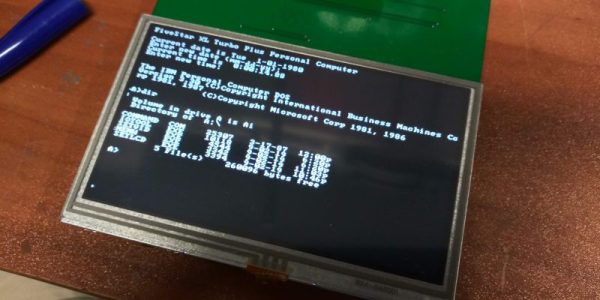
Thus far, [Dave] has achieved successful VGA output in a 40×35 text mode. With an 8×16 font, and the display running at 640×480 resolution at 60 Hz, everything hums along nicely. Similar experiments with a modern 480×272 LCD display have also worked well.

There’s a long way to go before [Dave’s] hardware is playing Commander Keen, but it’s great to see such effort being put into the platform. It could yet serve as a great upgrade for those wishing to use their vintage IBM metal without having to source a tired old CGA monitor.

We’ve seen similar work before too, with the Graphics Gremlin from [Tube Time] achieving a similar task. If you’ve been brewing up your own ISA hardware at home, do drop us a line.

How To Get Into Computer Game Development In 1982

If you are a follower of retrocomputing, perhaps you caught the interactive Black Mirror episode Bandersnatch when it came out on Netflix. Its portrayal of a young British bedroom coder finding his way into the home computer games industry of the early 1980s was of course fictional and dramatised, but for those interested in a real-life parallel without the protagonist succumbing to an obsession with supernatural book there’s a recent epic Twitter thread charting an industry veteran’s path into the business.

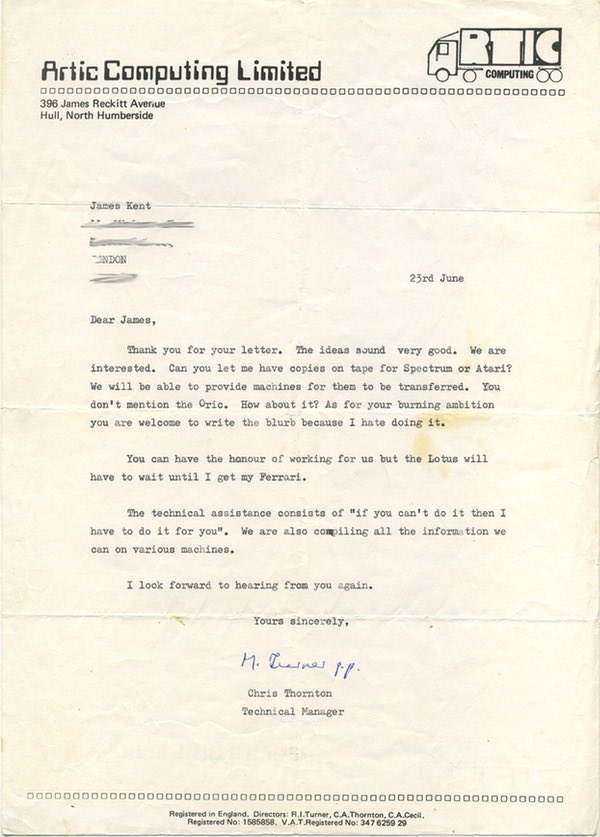
An acceptance letter like this from Artic Software would have been the wildest dream of any early-80s bedroom coder.

[Shahid Kamal Ahmad] now has an impressive portfolio spanning his his nearly four decades at the forefront of gaming, but his story starts in 1982 as a diabetic British Pakistani teenager from a not-privileged background in London writing in BASIC on his Atari 400. His BASIC games are good, but not good enough to gain acceptance from a publisher, so he sells his prized BMX bicycle to buy books on Atari 6502 assembler, a coffee percolator, and for curiosity’s sake, [Rodnay Zaks’] Programming the Z80. An obsessive three-month learning of 6502 programming and the Atari’s architecture ensues, and his game Storm in a Teacup sells to Artic Software.  He’s a professional game developer.

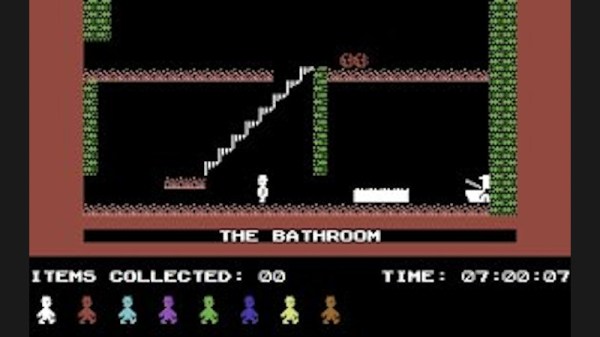
We follow him through a couple more projects until he arrives at Software Projects in Liverpool to try to sell his game Faces of Haarne, which he secures publishing for but also lands the opportunity of a lifetime. Jet Set Willy is the smash hit of the year on the ZX Spectrum, and they urgently need a Commodore 64 port. Can he do it in four weeks, with a bonus if he manages three? The subsequent descent into high-pressure assembly coding and learning the quirks between two completely different 8-bit architectures is an epic in itself, but he manages it in just a shade over the three weeks and they pay him the bonus anyway. His career in the computer game industry is cemented.

Through this tale the reminders of 1980s Britain are everywhere, far from bring a retro paradise it was a place hollowed out by industrial decline, with very little for those at the bottom of society to be optimistic about. His descriptions of casual racism are hard-hitting, but the group of computer-addicted friends at school is probably something that all teenagers of the era whose interests lay in that direction can relate to. The real hero of the story is probably his mother, who somehow found the resources for that Atari 400 and who provided him with much-needed support and encouragement.

This thread captures a unique and never-to-be repeated era in which a teenager could master an emerging technology and make a living in it without an expensive education. Like Bil Herd’s description of his career at Commodore in the same period, it’s well worth a read.

FPGA Retrocomputer: Return To Moncky

Part of the reason that retrocomputers are still so popular despite their obsolescence is that it’s possible to understand the entire inner workings of a computer like this, from the transistors all the way up to the software. Comparatively, it will likely be a long time (if ever) before anyone is building a modern computer from discrete components. To illustrate this point, plenty of 8-bit computers are available to either restore from original 80s hardware or to build from kits. And if you’d like to get even deeper into the weeds you can design your own computer including the instruction set completely from the ground up using an FPGA.

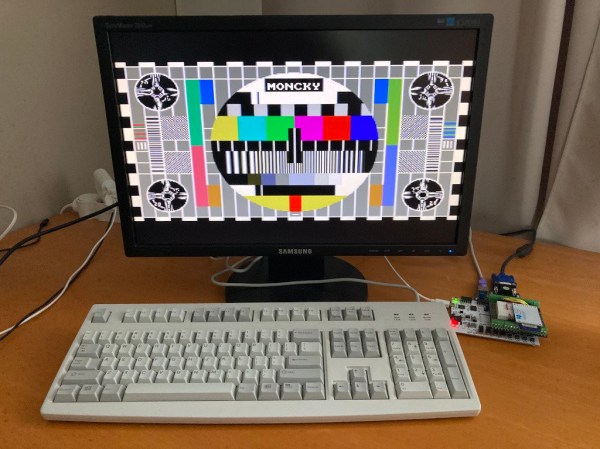
This project, called the Moncky project, is a step above the usual 8-bit computer builds as it is actually a 16-bit computer. It is built around an Arty Spartan-7 FPGA dev board running around 20 MHz and has access to 2 x 128 kB dual-port RAM for memory. To access the outside world there is a VGA output, PS/2 capability, SPI, and uses an SD card as a hard drive. This project really shines in the software, though, as the project creator [Kris Demuynck] builds everything from scratch in order to illustrate how everything works for educational purposes, and is currently working on implementing a C compiler to make programming the computer easier.

All of the project files, as well as all of the code, are available on the project’s GitHub page if you’d like to follow along or build on this homebrew 16-bit computer. It’s actually the third iteration of this computer, with the Moncky-1 and Moncky-2 being used to develop the more basic building blocks for this computer. While it’s not the first 16-bit computer we’ve seen implemented on an FPGA, it is one of the few that builds its own RISC instruction set and associated software rather than cloning a known existing processor. We’ve also seen some interesting x86 implementations on an FPGA as well.

Thanks to [koen-ieee] for the tip!

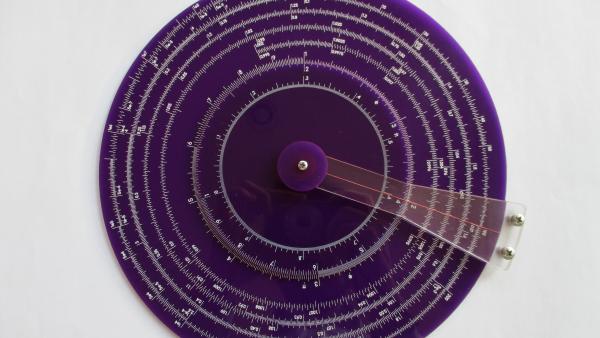
front view of a purple acrylic slide rule with white ink scale markings.

Design And Build Your Own Circular Slide Rule

You have to really like slide rules to build your own, including the necessary artwork. Apparently [Dylan Thinnes] is a big fan, based on this project he began working on a few months back. The result is a set of algorithms that automatically generates most of the scales that were common on slide rules back in the day. For example:

K       Cubic scale, x^3
A,B     Squared scale, x^2
C,D     Basic scale, x
CI,DI   Inverted scale, 1/x
CF,DF   Folded scale, x*pi
LLn     Log-log scales, e^a*x
LL0n    Log-log scales, e^-a*x
L       Log scale, log10(x), linear
S       Sine and cosines scale, sin(x)
T       Tangent scale, tan(x)

If you’ve ever tried to manually draw an axis using a computer program — attempting to automatically set reasonable tick marks, grids, and labels — you can appreciate that this is a non-trivial problem. [Dylan] tackled things from the bottom up, developing several utility functions that work in concert to iteratively build up each scale. One advantage of this approach, he says, is that you can quite easily build almost any scale you want. We’re going to take his word on that, because the project is not easily accessible to the average programmer. As [Dylan] notes:

At the moment it’s still a library w/ no documentation, and written in a relatively obscure language called Haskell, so it’s really only for the particularly determined.

The project is published on his GitHub repository, and sample scales and demo program are available. Without knowledge of obscure languages and being only mildly determined, one can at least generate some sample scales — just downloading the Haskell environment, a few dependencies, and clone [Dylan]’s repository. The output is an SVG file which can be scaled to any desired size. In this follow-up Reddit post he discusses the fabrication techniques used for the acrylic circular slide rule shown in the lead photo.

It’s always been possible to make your own slide rules using pre-generated artwork — for example, the Slide Rule Museum website has a slew of various scales available in graphic format. But if you want to make a custom scale, or make one of that’s meters long, check out [Dylan]’s project and give it a whirl. For another take on making slide rules, check out this project that we covered last year.