Cerebrum: Mobile Passwords Lifted Acoustically With NASB


There are innumerable password hacking methods but recent advances in acoustic and accelerometer sensing have opened up the door to side-channel attacks, where passwords or other sensitive data can be extracted from the acoustic properties of the electronics and human interface to the device. A recent and dramatic example includes the hacking of RSA encryption  simply by listening to the frequencies of sound a processor puts out when crunching the numbers.

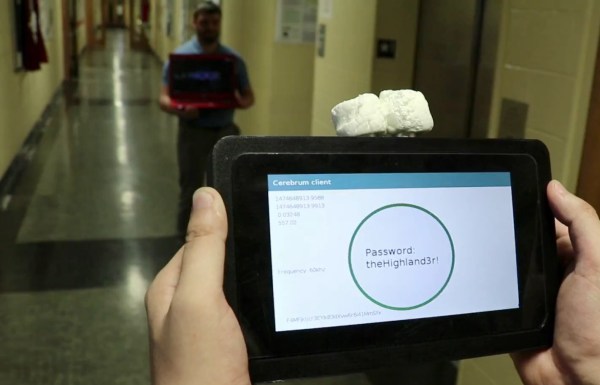
Now there is a new long-distance hack on the scene. The Cerebrum system represents a recent innovation in side-channel password attacks leveraging acoustic signatures of mobile and other electronic devices to extract password data at stand-off distances.

Continue reading “Cerebrum: Mobile Passwords Lifted Acoustically With NASB”

Ask Hackaday: Which Balaclava Is Best For Hacking?

At Hackaday, we’re tapped into Hacker Culture. This goes far beyond a choice of operating system (Arch Linux, or more correctly, ‘Arch GNU/Linux’, or as I’ve recently taken to calling it, ‘Arch GNU plus Linux’).  This culture infects every fiber of our soul, from music (DEF CON’s station on Soma FM), our choice in outerwear (black hoodies, duh), and our choice in laptops (covered in stickers). We all wear uniforms, although a gaggle of computer science and electronics nerds all wearing black t-shirts won’t tell you that. We all conform, whether we’re aware of it or not.

Despite a standardized uniform for this subculture, one small detail of this Hacker Uniform has remained unresolved for decades. Are one-hole or three-hole balaclavas best for hacking? Which balaclava is best for stealing bank accounts and hacking into NASA computers? What offers the best protection from precipitating ones and zeros in a real-life Matrix screensaver?

Continue reading “Ask Hackaday: Which Balaclava Is Best For Hacking?”

Review: The O-scope Mayer D4/WG5 Calibrated Fleshy Test Probe

A selection of probes, from [Jim Williams'] Linear Technology app note 72.
A selection of probes, from [Jim Williams’] Linear Technology app note 72.
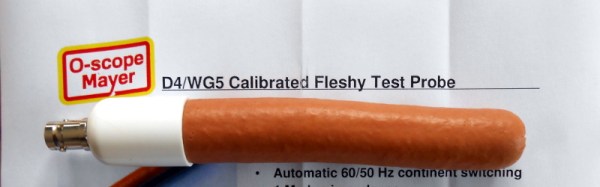
It’s not often that we are shown an entirely new class of test equipment here at Hackaday, so it was with some surprise that we recently received the new O-scope Mayer offering. If your most simple piece of test equipment is your own finger, able to measure temperature, detect voltage, and inject a 50 or 60 Hz sine wave, then what they have done is produce a synthetic analogue with a calibrated reading. The idea is that where previously you could only say “Too hot!”, or “High voltage!”, you should now be able to use their calibrated probe to gain an accurate reading.

The O-scope Mayer D4/WG5 Calibrated Fleshy Test Probe is a roughly 4″ (100mm) long cylinder of their InteliMeat™ synthetic finger analogue terminated with a calibrated matching unit and a BNC socket. In the box aside from the instruction leaflet is a BNC lead through which you can connect it to your oscilloscope.

Continue reading “Review: The O-scope Mayer D4/WG5 Calibrated Fleshy Test Probe”

Introducing The Hackaday Passive Aligned Ferrite Active Quantum Crystal Nanoparticle Reference Sticker

As you know, here at Hackaday we take our audio equipment very seriously indeed. We’ve seen it all over the years and have a pretty jaded view of a lot of the audiophile products that come past our door, but once in a while along comes something that’s a bit special. That’s why today we’d like to introduce you to a new product, The Hackaday Passive Aligned Ferrite Active Quantum Crystal Nanoparticle Reference Sticker.

Here’s the problem: we’re surrounded by electrical noise. You can’t see it, you can’t touch it, and you can’t hear it, but your audio equipment can, and when that happens it will degrade your listening experience without your realising it. You might have shelled out your life savings on a top-end Hinari amp, Marc Vincent surround sound processor, Friedland carillon wire cables and a set of Saisho floor-standing speakers, but if you haven’t dealt with your system’s magnetic compatibility they’re never quite going to reach their potential and you’ll always be left wondering why your broader soundstage just doesn’t zing. You need an HPAFAQCNRS.

Continue reading “Introducing The Hackaday Passive Aligned Ferrite Active Quantum Crystal Nanoparticle Reference Sticker”

An Introduction To Differential I²C

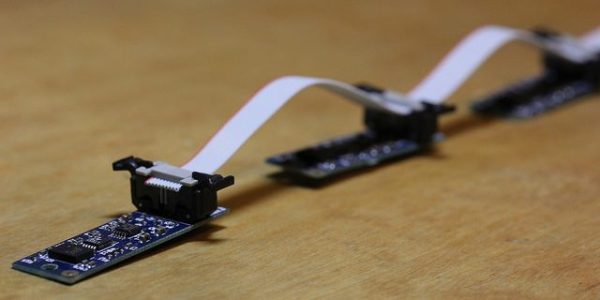
A few weeks back, we talked about the no-nos of running I²C over long wires. For prototyping? Yes! But for a bulletproof production environment, this practice just won’t make the cut. This month I plucked my favorite solution from the bunch and gave it a spin. Specifically, I have put together a differential I²C (DI²C) setup with the PCA9615 to talk to a string of Bosch IMUs. Behold: an IMU Noodle is born! Grab yourself a cup of coffee and join me as I arm you with the nuts and bolts of DI²C so that you too can run I²C over long cables like a boss.

What’s so Schnazzy about Differential Signals?

There’s a host of ways to make I²C’s communication lines more noise resistant. From all of the choices we covered, I picked differential signals. They’re simple, fairly standardized, and just too elegant to ignore. Let’s take a moment for a brief “differential-signals-101” lecture. Hopefully, you’re already caffeinated! Continue reading “An Introduction To Differential I²C”

Linux-Fu: Applications On The Web

Did you know you can run remote Linux GUI programs in a browser with HTML5 support? It’s even secure because you can use SSH tunneling and that little trick means you don’t even need to open additional ports. If this sounds like gibberish, read on, it’s actually pretty easy to get up and running.

I recently was a guest on a Houston-based podcast, and the hosts asked me if the best thing about writing for Hackaday was getting to work with the other Hackaday staff. I told them that was really good, but what I like best was interacting with people (well, most people) in the comments. That sometimes you’d post an article and someone would bring a topic up in comments that would really knock your socks off. This is how I wound up with this nearly ideal remote access solution, that requires nothing on the remote side but a web browser.

A while back I posted about keeping programs running after log off on a Linux box. The post was mostly about non-GUI programs but you could use NX or VNC to handle it. In the comments, someone mentioned how unhappy they’d been with recent copies of NX and another commenter called [Screen for X11] posted about a tool called xpra.

Continue reading “Linux-Fu: Applications On The Web”

The $2 32-Bit Arduino (with Debugging)

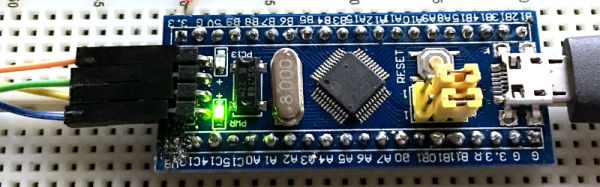
I have a bit of a love/hate relationship with the Arduino. But if I had two serious gripes about the original offering it was the 8-bit CPU and the lack of proper debugging support. Now there’s plenty of 32-bit support in the Arduino IDE, so that takes care of the first big issue. Taking care of having a real debugger, though, is a bit trickier. I recently set out to use one of the cheap “blue pill” STM32 ARM boards. These are available for just a few bucks from the usual Chinese sources. I picked mine up for about $6 because I wanted it in a week instead of a month. That’s still pretty inexpensive. The chip has a lot of great debugging features. Can we unlock them? You can, if you have the right approach.

The Part

For a few bucks, you can’t complain about the hardware. The STM32F103C8T6 onboard is a Cortex-M3 processor that runs at 72 MHz. There’s 64K of flash and 20K of RAM. There’s a minimicro-USB that can act as a programming port (but not at first). There’s also many 5 V-tolerant pins, even though this a 3.3 V part.

You can find a lot more information on this wiki. The board is a clone–more or less–of a Maple Mini. In fact, that’s one way you can use these. You can use the serial or ST-Link port to program the Maple bootloader (all open source) and use it like a Maple. That is, you can program it via the USB cable.
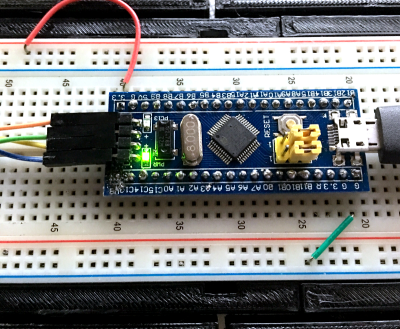
From my point of view, though, I don’t want to try to debugging over the serial port and if I have the ST-Link port already set up, I don’t care about a bootloader. You can get hardware that acts as a USB to ST-Link device inexpensively, but I happen to have an STM32VLDISCOVER board hanging around. Most of the STM32 demo boards have an ST-Link programmer onboard that is made to use without the original target hardware. On some of the older boards, you had to cut traces, but most of the new ones just have two jumpers you remove when you want to use the programmer to drive another device.

The “blue pill” designation is just a common nickname referring to the Matrix, not the pharmaceuticals you see on TV ads. The board has four pins at one edge to accommodate the ST-Link interface. The pin ordering didn’t match up with the four pins on the STM32VLDISCOVER, so you can’t just use a straight four-pin cable. You also need to bring power over to the board since it will have to power the programmer, too. I took the power from the STM32VLDISCOVER board (which is getting its power from USB) and jumpered it to my breadboard since that was handy.

Continue reading “The $2 32-Bit Arduino (with Debugging)”