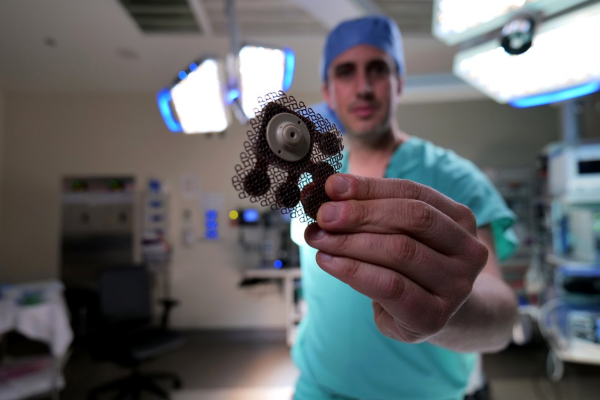
Microbubbles And Ultrasound: Getting Drugs Through The Blood-Brain Barrier

The brain is a rather important organ, and as such, nature has gone to great lengths to protect it. The skull provides physical protection against knocks and bumps, but there’s a lesser-known defense mechanism at work too: the blood-brain barrier. It’s responsible for keeping all the nasty stuff – like bacteria, viruses, and weird chemicals – from messing up your head.

The blood-brain barrier effectively acts as a filter between the body’s circulatory system and the brain. However, it also frustrates efforts to deliver drugs directly to the brain for treating conditions like brain tumors. Now, scientists have developed a new technique that may allow critical life saving drugs to get through the barrier with the help of ultrasound technology. 

Continue reading “Microbubbles And Ultrasound: Getting Drugs Through The Blood-Brain Barrier”

Hackaday Links Column Banner

Hackaday Links: May 14, 2023

It’s been a while since we heard from Dmitry Rogozin, the always-entertaining former director of Roscosmos, the Russian space agency. Not content with sending mixed messages about the future of the ISS amid the ongoing war in Ukraine, or attempting to hack a mothballed German space telescope back into action, Rogozin is now spouting off that the Apollo moon landings never happened. His doubts about NASA’s seminal accomplishment apparently started while he was still head of Roscosmos when he tasked a group with looking into the Apollo landings. Rogozin’s conclusion from the data his team came back with isn’t especially creative; whereas some Apollo deniers go to great lengths to find “scientific proof” that we were never there, Rogozin just concluded that because NASA hasn’t ever repeated the feat, it must never have happened.

Continue reading “Hackaday Links: May 14, 2023”

Tools Of The Trade: Dirt Cheap Or Too Dirty?

We’ve recently seen a couple reviews of a particularly cheap oscilloscope that, among other things, doesn’t meet its advertised specs. Actually, it’s not even close. It claims to be a 100 MHz scope, and it’s got around 30 MHz of bandwidth instead. If you bought it for higher frequency work, you’d have every right to be angry. But it’s also cheap enough that, if you were on a very tight budget, and you knew its limitations beforehand, you might be tempted to buy it anyway. Or so goes one rationale.

In principle, I’m of the “buy cheap, buy twice” mindset. Some tools, especially ones that you’re liable to use a lot, make it worth your while to save up for the good stuff. (And for myself, I would absolutely put an oscilloscope in that category.) The chances that you’ll outgrow or outlive the cheaper tool and end up buying the better one eventually makes the money spent on the cheaper tool simply wasted.

But that’s not always the case either, and that’s where you have to know yourself. If you’re only going to use it a couple times, and it’s not super critical, maybe it’s fine to get the cheap stuff. Or if you know you’re going to break it in the process of learning anyway, maybe it’s a shame to put the gold-plated version into your noob hands. Or maybe you simply don’t know if an oscilloscope is for you. It’s possible!

And you can mix and match. I just recently bought tools for changing our car’s tires. It included a dirt-cheap pneumatic jack and an expensive torque wrench. My logic? The jack is relatively easy to make functional, and the specs are so wildly in excess of what I need that even if it’s all lies, it’ll probably suffice. The torque wrench, on the other hand, is a bit of a precision instrument, and it’s pretty important that the bolts are socked up tight enough. I don’t want the wheels rolling off as I drive down the road.

Point is, I can see both sides of the argument. And in the specific case of the ’scope, the cheapo one can also be battery powered, which gives it a bit of a niche functionality when probing live-ground circuits. Still, if you’re marginally ’scope-curious, I’d say save up your pennies for something at least mid-market. (Rigol? Used Agilent or Tek?)

But isn’t it cool that we have so many choices? Where do you buy cheap? Where won’t you?

Hackaday Podcast 218: Open Source AI, The Rescue Of Salyut 7, The Homework Machine

This week, Editor-in-Chief Elliot Williams and Kristina Panos have much in the way of Hackaday news — the Op Amp Challenge is about halfway over, and there are roughly three weeks left in the Assistive Tech challenge of the 2023 Hackaday Prize. Show us what you’ve got on the analog front, and then see what you can do to help people with disabilities to live better lives!

Kristina is still striking out on What’s That Sound, which this week honestly sounded much more horrendous and mechanical than the thing it actually is. Then it’s on to the hacks, beginning with the we-told-you-so that even Google believes that open source AI will out-compete both Google’s own AI and the questionably-named OpenAI.

From there we take a look at a light-up breadboard, listen to some magnetite music, and look inside a pair of smart sunglasses. Finally, we talk cars, beginning with the bleeding edge of driver-less. Then we go back in time to discuss in-vehicle record players of the late 1950s.

Check out the links below if you want to follow along, and as always, tell us what you think about this episode in  the comments!

Download and savor at your leisure.

Continue reading “Hackaday Podcast 218: Open Source AI, The Rescue Of Salyut 7, The Homework Machine”

This Week In Security: TPM And BootGuard, Drones, And Coverups

Full disk encryption is the go-to solution for hardening a laptop against the worst-case scenario of physical access. One way that encryption can be managed is through a Trusted Platform Module (TPM), a chip on the motherboard that manages the disk encryption key, and only hands it over for boot after the user has authenticated. We’ve seen some clever tricks deployed against these discrete TPMs, like sniffing the data going over the physical traces. So in theory, an integrated TPM might be more secure. Such a technique does exist, going by the name fTPM, or firmware TPM. It uses a Trusted Execution Environment, a TEE, to store and run the TPM code. And there’s another clever attack against that concept (PDF).

It’s chip glitching via a voltage fault. This particular attack works against AMD processors, and the voltage fault is triggered by injecting commands into the Serial Voltage Identification Interface 2.0 (SVI2). Dropping the voltage momentarily to the AMD Secure Processor (AMD-SP) can cause a key verification step to succeed even against an untrusted key, bypassing the need for an AMD Root Key (ARK) signed board firmware. That’s not a simple process, and pulling it off takes about $200 of gear, and about 3 hours. This exposes the CPU-unique seed, the board NVRAM, and all the protected TPM objects.

So how bad is this in the real world? If your disk encryption only relies on an fTPM, it’s pretty bad. The attack exposes that key and breaks encryption. For something like BitLocker that can also use a PIN, it’s a bit better, though to really offer more resistance, that needs to be a really long PIN: a 10 digit PIN falls to a GPU in just 4 minutes, in this scenario where it can be attacked offline. There is an obscure way to enable an “enhanced PIN”, a password, which makes that offline attack impractical with a secure password.

And if hardware glitching a computer seems to complicated, why not just use the leaked MSI keys? Now to be fair, this only seems to allow a bypass of Intel’s BootGuard, but it’s still a blow. MSI suffered a ransomware-style breach in March, but rather than encrypt data, the attackers simply threatened to release the copied data to the world. MSI apparently refused to pay up, and source code and signing keys are now floating in the dark corners of the Internet. There have been suggestions that this leak impacts the entire line of Intel processors, but it seems likely that MSI only had their own signing keys to lose. But that’s plenty bad, given the lack of a revocation system or automatic update procedure for MSI firmware. Continue reading “This Week In Security: TPM And BootGuard, Drones, And Coverups”

Linux Fu: C On Jupyter

If you are a Pythonista or a data scientist, you’ve probably used Jupyter. If you haven’t, it is an interesting way to work with Python by placing it in a Markdown document in a web browser. Part spreadsheet, part web page, part Python program, you create notebooks that can contain data, programs, graphics, and widgets. You can run it locally and attach to it via a local port with a browser or, of course, run it in the cloud if you like. But you don’t have to use Python.

You can, however, use things with Jupyter other than Python with varying degrees of success. If you are brave enough, you can use C. And if you look at this list, you’ll see you can use things ranging from Javascript, APL, Fortran, Bash, Rust, Smalltalk, and even MicroPython.

Continue reading “Linux Fu: C On Jupyter”

Share Your Projects: Making Helpful PCBs

When it comes to things that hackers build, PCBs are a sizeable portion of our creative output. It’s no wonder – PCB design is a powerful way to participate in the hardware world, making your ideas all that more tangible with help of a friendly PCB fab. It’s often even more lovely when the PCB has been designed for you, and all you have to do is press “send” – bonus points if you can make a few changes for your own liking!

A lot of the time, our projects are untrodden ground, however, and a new design needs to be born. We pick out connectors, work through mechanical dimensions, figure out a schematic and check it with others, get the layout done, and look at it a few more times before sending it out for production. For a basic PCB, that is enough – but of course, it’s no fun to stop at ‘basic’, when there’s so many things you can do at hardly any cost.

Let’s step back a bit – you’ve just designed a board, and it’s great! It has all the chips and the connectors you could need, and theoretically, it’s even supposed to work first try. Now, let’s be fair, there’s an undeniable tendency – the more PCBs you design, the better each next one turns out, and you learn to spend less time on each board too. As someone with over two hundred PCBs under her belt, I’d like to show you a bunch of shortcuts that make your PCB more helpful, to yourself and others.

There’s a few ways that you can share your PCB projects in a more powerful way – I’d like to point out a few low-hanging fruits, whether README.md files or markings on the PCB itself. I’ve been experimenting quite a bit with external and embedded documentation of PCBs, as well as PCB sharing methods, got some fun results, and I’d like to share my toolkit through a few punchy examples and simple tricks. I’d also like to hear about yours – let’s chat! Continue reading “Share Your Projects: Making Helpful PCBs”