Alan Yates: Introduction To Vacuum Technology

When we mention vacuum technology, it’s not impossible that many of you will instantly turn your minds to vacuum tubes, and think about triodes, or pentodes. But while there is a lot to interest the curious in the electronics of yesteryear, they are not the only facet of vacuum technology that should capture your attention.

When [Alan Yates] gave his talk at the 2017 Hackaday Superconference entitled “Introduction To Vacuum Technology”, he was speaking in a much more literal sense. Instead of a technology that happens to use a vacuum, his subject was the technologies surrounding working with vacuums; examining the equipment and terminology surrounding them while remaining within the bounds of what is possible for the experimenter. You can watch it yourself below the break, or read on for our precis.

In the first instance, he introduces us to the concept of a vacuum, starting with the work of [Evangelista Torricelli] on mercury barometers in the 17th century Italy, and continuing to explain how pressure, and thus vacuum, is quantified. Along the way, he informs us that a Pascal can be explained in layman’s terms as roughly the pressure exerted by an American dollar bill on the hand of someone holding it, and introduces us to a few legacy units of vacuum measurement.

In classifying the different types of vacuum he starts with weak vacuum sources such as a domestic vacuum cleaner and goes on to say that the vacuum he’s dealing with is classified as medium, between 3kPa and 100mPa. Higher vacuum is beyond the capabilities of the equipment available outside high-end laboratories.

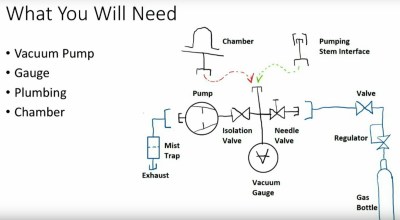
Introduction over, he starts on the subject of equipment with a quick word about safety, before giving an overview of the components a typical small-scale vacuum experimenter’s set-up. We see the different types of vacuum gauges, we’re introduced to two different types of service pumps for air conditioning engineers, and we learn about vacuum manifolds. Tips such as smelling the oil in a vacuum pump to assess its quality are mentioned, and how to make a simple mist trap for a cheaper pump. There is a fascinating description of the more exotic pumps for higher vacuums, even though these will be out of reach of the experimenter it is still of great interest to have some exposure to them. He takes us through vacuum chambers, with a warning against cheap bell jars not intended for vacuum use, but suggests that some preserving jars can make an adequate chamber.


We are then introduced to home-made gas discharge tubes, showing us a home-made one that lights up simply by proximity to a high voltage source. Something as simple as one of the cheap Tesla coil kits to be found online can be enough to excite these tubes, giving a simple project for the vacuum experimenter that delivers quick results.

Finally, we’re taken through some of the tools and sundries of the vacuum experimenter, the different types of gas torches for glass work, and consumables such as vacuum grease. Some of them aren’t cheap, but notwithstanding those, he shows us that vacuum experiments can be made within a reasonable budget.

Continue reading “Alan Yates: Introduction To Vacuum Technology”

My Kingdom For A Capacitor

While working on a project recently, I required a capacitor of around 1000 μF and went rummaging through my collection of parts. No luck there. At that point I’d usually go through my collection of junk electronics and computer motherboards, but I had recently gone through and tossed the stuff that had been laying around for as long as I could remember. No matter, I thought. I’ll just head over to RadioShack and…

Now, I have been accused of many things over the years, but “deep” is certainly not one of them. Yet, at this moment I had what could only be described as an existential crisis. There is no RadioShack, not in my state at least. I don’t live in an area that’s blessed with a maker “scene”, so no independent shop or even a hackerspace within reasonable driving distance of me either. I could order it online of course, but everyone’s trying to sell them in bulk and shipping will take a few days at least. A few days? Who knows where my interests will be in a few days. How can I get anything done under these conditions?

Desperate times call for desperate measures, so I got in the car and took a ride to the only place I knew where I could by electronic components for cheap: Goodwill. Continue reading “My Kingdom For A Capacitor”

When Is A 10-bit A/D An 8-bit A/D?

Marketing guys love bigger numbers. Bigger is better, right? After all, Subway called it a “footlong” not an 11-incher. So when it comes to analog to digital (A/D) conversion, more bits are better, right? Well, that depends. It is easy to understand that an A/D will have a low and high measurement and the low will be zero counts and the high will result in the maximum count for the number of bits. That is, an 8-bit device will top out at 255, a 10-bit at 1023, and so on.

The question is: are those bits meaningful? The answer depends on a few factors. Like most components we deal with, our ideal model isn’t reality, but maybe it is close enough.

Continue reading “When Is A 10-bit A/D An 8-bit A/D?”

Astro Cat: Raspberry Pi Telescope Controller

When somebody tackles an engineering problem, there are two possible paths: they can throw together a quick and dirty fix that fits their needs (the classic “hack”, as it were), or they can go the extra mile to develop a well documented solution that helps the community as a whole. We cover it all here at Hackaday, but we’ve certainly got a soft spot for the latter approach, even if some may feel it falls into the dreaded territory of “Not A Hack”.

When [Gary Preston] wanted to control his telescope and astrophotography hardware, he took the second path in a big way. Over the course of several posts on his blog, [Gary] walks us though the creation of his open source Raspberry Pi add-on board that controls a laundry list of sensors and optical gear. Just don’t call it a HAT, while it may look the part, [Gary] is very specific that it does not officially meet the HAT specifications put out by the Raspberry Pi Foundation.

Even if you aren’t terribly interested in peering into the infinite void above, the extremely detailed write-up [Gary] has done contains tons of multidisciplinary information that you may find useful. From showing how to modify the Pi’s boot configuration to enable true hardware UART (by default, the Pi 3 ties it up with Bluetooth) and level shifting it with a ST3232 to a breakdown of the mistakes he made in his PCB layout, there’s plenty to learn.

Astro CAT is a completely open source project, with the hardware side released under the CERN Open Hardware License v1.2, and the INDI driver component is available under the GPL v3.

If this looks a bit daunting for your first stab at astrophotography with the Raspberry Pi, fear not. We’ve covered builds which can get you up and running no matter what your budget or experience level is.

Slinky Walks Down Stairs And Picks Up 80m Band

Originally intended as a way to stabilize sensitive instruments on ships during World War II, the Slinky is quite simply a helical spring with an unusually good sales pitch. But as millions of children have found out since the 1940’s, once you roll your Slinky down the stairs a few times, you’ve basically hit the wall in terms of entertainment value. So what if we told you there was yet another use for this classic toy that was also fun for a girl and a boy?

As it turns out, a cheap expandable metal coil just so happens to make for a pretty good antenna if you hook it up right. [Blake Hughes] recently took on this project and provided some detailed pictures and information for anyone else looking to hook a couple of Slinkies to their radio. [Blake] reports excellent results when paired to his RTL-SDR setup, but of course this will work with whatever kind of gear you might be using at these frequencies.

Before anyone gets out the pitchforks, admittedly this isn’t exactly a new idea. There are a few other write-ups online about people using a Slinky as a cheap antenna, such as this detailed analysis from a few years ago by [Frank Dörenberg]. There’s even rumors that soldiers used a Slinky from back home as a makeshift antenna during the Vietnam War. So this is something of an old school ham trick revived for the new generation of SDR enthusiasts.

Anyway, the setup is pretty simple. You simply solder the RF jack of your choice to two stretched out Slinkies: one to the center of the jack and one to outside. Then run a rope through them and stretch them out in opposite directions. The rope is required because the Slinky isn’t going to be strong enough when expanded to keep from laying on the ground.

One thing to keep in mind with a Slinky antenna is that these things are not exactly rated for outside use. Without some kind of treatment (like a spray on acrylic lacquer) , they’ll quickly corrode and fail. Though a better idea might simply to be to think of this as a temporary antenna that you put away when you’re done with. Thanks to the fact that the Slinky doesn’t get deformed even when stretching it out to maximum length, that’s relatively easy to accomplish.

If you’re looking for a good RTL-SDR to go along with your new Slinky antenna, check out this roundup of some of the options that are on the market as of 2017. You’ll probably need an upconverter to get down to the 80m band, so you might as well build that while you’re at it.

Internet Of Things Opens Possibilities

While a lot of hardware gets put on the “Internet of Things” with only marginal or questionable benefits (or with hilariously poor security), every now and then a project makes use of this new platform in a way that illustrates the strengths of IoT. [ThingEngineer] turned to this platform as a cost-effective solution for an automatic gate, since new keyfobs were too expensive and a keypad was not an option.

Using an Electric IMP, [ThingEngineer] began by installing his IoT patch into the LiftMaster gate control box. This particular gate has easily accessible points that the controller can access to determine the gate’s status, so from there, an API was written to do the heavy lifting. A web server was deployed as well, so anyone with access can use a smartphone or other device to open the gate.

For anyone else looking to deploy a similar IoT solution, [ThingEngineer] has put all of the project code, schematics, and a thorough write-up about the project on his GitHub page. There are many useful ways to get on board the Internet of Things, though; so many that it’s been possible to win a substantial prize for using it in a creative way.

Build Your Own Digital Panel Meter

A popular purchase from the usual stockists of imported electronic modules is a digital panel meter. A very small amount of money secures a module with a seven-segment display that you can stick on the front of your power supply or project for an easy readout. Even before the advent of these ultra-cheap Chinese products there have been readily available digital meters, in a line stretching back to the 1970s with chips such as the Intersil 7106.

[Marcus Taciuc] is eschewing the off-the-shelf parts, and creating his own digital panel meter. He’s using an MSP430 microprocessor as the brain of his device, and a Hitachi HD44780 compatible LCD display at the front end. The appropriate combinations of resistors and op-amps feeding the MSP’s ADC inputs allow his meter to be used to measure up to 40 VDV, and up to 10A.

He’s put up a video which we’ve included below the break, showing the use to which this meter has been put: replacing the moving-coil meter in what looks like a classic piece of Heathkit equipment. A 3D printed bracket allows the new meter to fit the circular hole of the original meter, with the LCD on the front. You might still order a prefab meter module, but you can’t deny this looks good.

Continue reading “Build Your Own Digital Panel Meter”