Powering external devices directly from a PC’s I/O ports has been a thing long before USB was even a twinkle in an engineer’s eye. Some of us may remember the all too common PS/2 pass-through leads that’d tap into the 275 mA that is available via these ports. When USB was first released, it initially provided a maximum of 500 mA which USB 3.0 increased to 900 mA.
For the longest time, this provided power was meant only to provide a way for peripherals like keyboards, mice and similar trivial devices to be powered rather than require each of these to come with its own power adapter. As the number of computer-connected gadgets increased USB would become the primary way to not only power small devices directly, but to also charge battery-powered devices and ultimately deliver power more generally.
Which brings us to the USB Power Delivery (USB-PD) protocol. Confusingly, USB-PD encompasses a number of different standards, ranging from fixed voltage charging to Programmable Power Supply and Adjustable Voltage Supply. What are the exact differences between these modes, and how does one go about using them? Continue reading “Powering Up With USB: Untangling The USB Power Delivery Standards”→
[Uri]’s project was The Skull CTF, an electronic hardware puzzle that came in the shape of a PCB skull, and his detailed look behind the scenes covers just about every angle, from original concept to final wrap-up, along with his thoughts and feedback at every stage. His project reached its funding goal, got manufactured and shipped, and in the end was a success.
[Uri] started with a working project, but beyond that was virtually a complete novice when it came to crowdfunding. He eventually settled on using Crowd Supply to make his idea happen, and his writeup explains in great detail every stage of that process, including dollar amounts. What’s great to see is that not only does [Uri] explain the steps and decisions involved, but explains the research that went into each, and how he feels each of them ended up working out.
The entire thing is worth a read, but [Uri] summarizes the experience of crowdfunding a hardware project thus: an excellent way to test out the demand for an idea and bring a product into existence, but be aware that unless a project is a runaway success it probably won’t be much of an income generator at that stage. It was a great learning experience, but involved a lot of time and effort on his part as well.
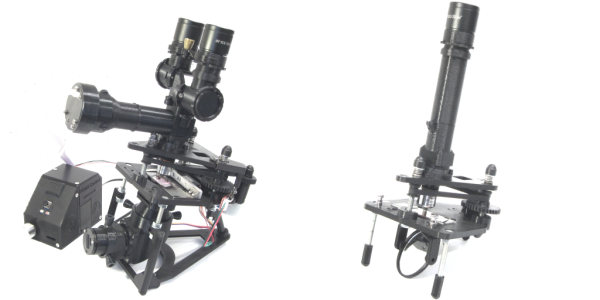
What do you get when you cross a day job as a Medical Histopathologist with an interest in 3D printing and programming? You get a fully-baked Open Source microscope, specifically the Portable Upgradeable Modular Affordable (or PUMA), that’s what. And this is no toy microscope. By combining a sprinkle of off-the-shelf electronics available from pretty much anywhere, a pound or two of filament, and a dash of high quality optical parts, PUMA cooks up quite possibly one of the best open source microscopy experiences we’ve ever tasted.
GitHub user [TadPath] works as a medical pathologist and clearly knows a thing or two about what makes a great instrument, so it is a genuine joy for us to see this tasty project laid out in such a complete fashion. Many a time we’ve looked into an high-profile project, only to find a pile of STL files and some hard to source special parts. But not here. This is deliberately designed to be buildable by practically anyone with access to a 3D printer and an eBay account.
The project is not currently certified for medical diagnostics use, but that is likely only a matter of money and time. The value for education and research (especially in developing nations) cannot really be overstated.
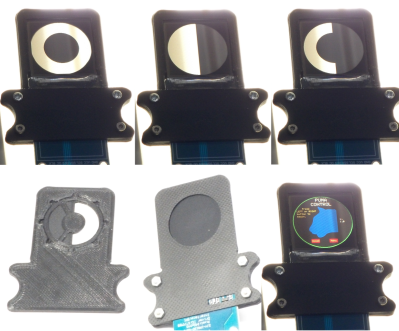
A small selection of the fixed and active aperture choices
The modularity allows a wide range of configurations from simple ambient light illumination, with a single objective, great for using out in the field without electricity, right up to a trinocular setup with TFT-based spatial light modulator enabling advanced methods such as Schlieren phase contrast (which allows visualisation of fluid flow inside a live cell, for example) and a heads-up display for making measurements from the sample. Add into the mix that PUMA is specifically designed to be quickly and easily broken down in the field, that helps busy researchers on the go, out in the sticks.
The GitHub repo has all the details you could need to build your own configuration and appropriate add-ons, everything from CAD files (FreeCAD source, so you can remix it to your heart’s content) and a detailed Bill-of-Materials for sourcing parts.
We covered fluorescence microscopy before, as well as many many other microscope related stories over the years, because quite simply, microscopes are a very important topic. Heck, this humble scribe has a binocular and a trinocular microscope on the bench next to him, and doesn’t even consider that unusual. If you’re hungry for an easily hackable, extendable and cost-effective scope, then this may be just the dish you were looking for.
Heat pump heating technology is starting to pop up more and more lately, as the technology becomes cheaper and public awareness and acceptance improves. Touted as a greener residential heating system, they are rapidly gaining popularity, at least in part due to various government green policies and tax breaks.
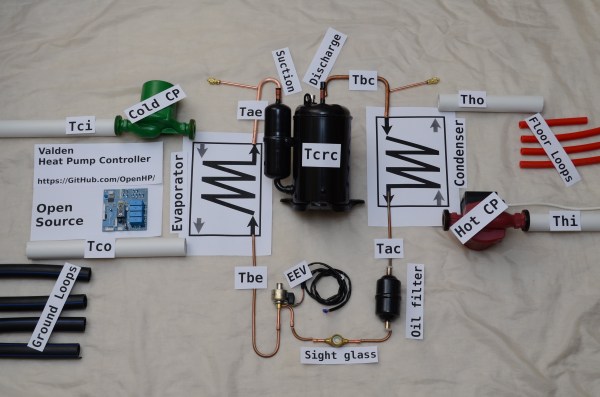
[Gonzho] has been busy the last few years working on his own Arduino Powered Open Source heat pump controller, and the project logs show some nice details of what it takes to start experimenting with heat pumps in general, if that’s your game. Or you could use this to give an old system a new lease of life with an Arduino brain transplant.
In essence they are very simple devices; some kind of refrigerant is passed through a source of heat, absorbing some of it, it then flows elsewhere, and is compressed, which increases its temperature, before that increased heat is lost where the increase in temperature is desired.
This heat source could be a river, a mass of pipes buried in the ground, or simply the air around you. The source and quality of the heat source as well as the desired system operating temperature dictate the overall efficiency, and with ground-source systems it’s even possible to dump excess heat directly into the ground and store it for when required later. This could be the result of a residential cooling system, or even directly sourced from a solar heated setup.
This heat pumping process is reversible, so it is possible to swap the hot and cold ends, just by flipping some valves, and turn your space heater into a space cooler. This whole process can trace its roots back to the super talented Scottish professor, William Cullen who in 1748 was the first person on record to demonstrate artificial refrigeration.
The power needed to run the compressor pump and control gear is usually electrically derived, at least in non-vehicular applications, but the total power required is significantly less than the effective heating (or cooling) power that results.
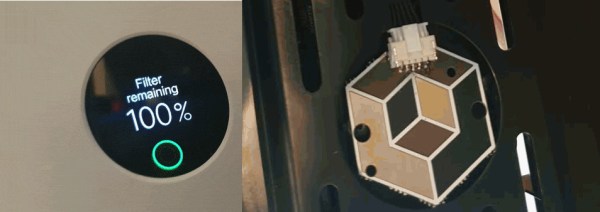
The “razor and blades model” probably set a lot of young hackers on their current trajectory. If we buy a widget, we want to pick our widget refills instead of going back to the manufacturer for their name-brand option. [Flamingo-Tech] was having none of it when they needed a new filter for their Xiaomi air purifier so they set out to fool it into thinking there was a genuine replacement fresh from the box. Unlike a razor handle, the air purifier can refuse to work if it is not happy, so the best option was to make a “mod-chip.”
The manufacturer’s filters have a Near-Field Communication (NFC) chip and antenna which talk to the base station. The controller receives the filter data via I2C, but the mod-chip replaces that transmitter and reassures the controller that everything is peachy in filter town. On top of the obvious hack here, [Flamingo-Tech] shows us how to extend filter life with inexpensive wraps, so that’s a twofer. You can create your own mod-chip from the open-source files or grab one from [Flamingo-Tech’s] Tindie store.
When we met our contact from MNT in the coffee shop, he was quietly working away on his laptop. Jet black and standing thick it was like an encyclopedia that didn’t quite blend in with the sea of silver MacBook lookalikes on the surrounding tables. After going through all the speeds and feeds we eagerly got our 64 piece driver kit out to open it up and see what made this marvel tick, but when the laptop was turned over it became clear that no tools were needed. The entire bottom of the machine was a single rectangle of transparent acrylic revealing everything from sharp white status LEDs on the bare mainboard to individual 18650 LiFePO4 battery cells in a tidy row. In a sense that’s the summary of the entire product: it’s a real laptop you can use to get work done, and every element of it from design to fabrication is completely transparent.
The MNT Reform
The device pictured here is called the Reform and is designed and manufactured by MNT, a company in Berlin, Germany (note MNT stands for MNT, it’s not an acronym). The Reform is a fully open source laptop which is shipping today and available via distribution through Crowd Supply. If the aesthetic doesn’t make it clear the Reform is an opinionated product designed from the ground up to optimize for free-as-in-freedom: from it’s solid metal chassis to the blob-free GNU/Linux distribution running inside.
We’re here to tell you that we’ve held one, it’s real, and it’s very well built.
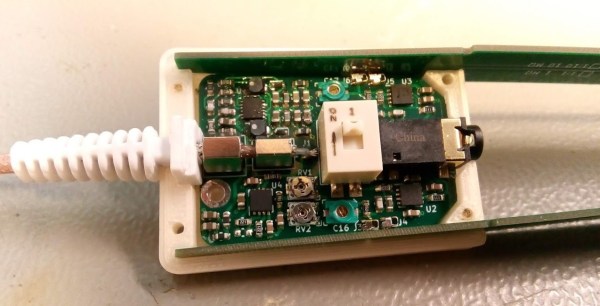
[Petteri Aimonen] presents for us a modular differential probe, as his entry into the 2021 Hackaday Prize.
This project shows a simple and well polished implementation of a differential-to-single-ended preamplifier, which allows a differential signal to be probed and fed to an oscilloscope via a BNC cable.
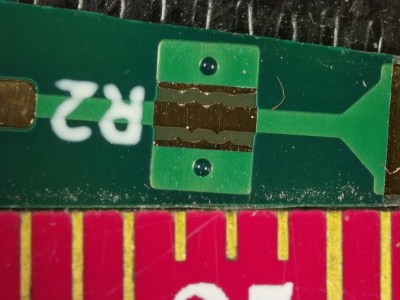
PCB Spark gap for primary ESD protection
It implements a classic instrumentation amplifier, where we have two amplifier stages. The first gives us the options for a gain of either 1 or 10, if we need it, with the second stage having a gain of 2.
The remaining circuit is a power supply to generate the necessary dual-rail supplies to feed the opamps. There is a lot of filtering on those output rails as well as on the USB power input side to try keep all that switched-mode power supply noise out of the signal path.
There are a couple of interesting design choices including the use of PCB material for the long removable probe arms, that integrate PCB spark gaps to offer a first defence against ESD reaching the more delicate parts of the system.
Why This Is Useful
There are two main classes of signals we electronics engineers care about: single-ended and differential-mode.
With the first kind, the signal is carried on a single wire, which is defined as being referenced to the common system ground. Current flows along the wire and returns to its source along the path of least resistance, at least at low frequencies. At higher frequencies, the path of least inductance is more relevant. This is all well and good, so long as you design the PCB correctly.
Coupling from adjacent wires due to mutual capacitance and inductance, as well as noise in the reference ground all conspire to mangle the signal we want to pass down the wire.
As the frequencies increase, and especially if you’re dealing with sharp edges, with all that extra odd-harmonic power, things start to get bad real fast. The way we deal with this is by utilising differential-mode signalling. This is where instead of a single wire, referenced to some notion of ground, we send the signal down a pair of wires, where the voltage difference between the wires forms the signal. Any external noise that leaks into the pair, will (hopefully!) affect both wires equally, forming what we call a common-mode component. When you look at the difference, this common mode noise disappears. (Our own [Bil Herd] covered this some time ago.)
When probing a circuit, it pays to have the right kind of probe as well as an understanding of the effect the probe will have on the circuit in operation. If you have a single-ended signal and you want to view it on your scope, your choice is either a passive or active probe. Usually some kind of passive probe will be most available. These commonly come in 50 Ω and 1 MΩ versions, and you need to be careful to use the correct probe type for your application.
For probing differential signals, it is possible to use a pair of probes, one for each signal wire, and then utilise the scope’s math difference function to show the signal. This is quite often a desperate measure, and what you really want is a differential front-end in hardware. You need a differential active probe.
The circuit may be simple, but don’t underestimate how much tweaking it needs to have good performance – a little slip with the PCB layout, as the author describes, caused some annoying resonances which can be hard to track down.
The project is still under active development, with the author showing the process as the project progresses, but its looking pretty good already, if you ask us.
Sources can found on his GitHib, which uses all Open Source tools, so its pretty accessible too.



 [Uri]’s project was