PIC Powered PicoBat Picks Up Pulsed Power

In 2012, [Bruno] wanted to detect some bats. Detect bats? Some varieties of bat (primarily the descriptively named “microbats”) locate themselves and their prey in space using echolocation, the same way your first robot probably did. The bat emits chirps from their adorably tiny larynx the same way a human uses its vocal cords to produce sound. The bat then listens for an echo of that sound and can make inferences about the location of its presumed prey in the volume around it. Bat detectors are devices which can detect these ultrasonic sounds and shift them into a range that humans can hear. So how would you build such a device? [Bruno]’s PicoBat probably sets the record for component count and code simplicity.

With no domain expertise the most conspicuous way to build a bat detector is probably to combine the glut of high performance microcontrollers with a similarly high performing analog to digital converter. With a little signal processing knowledge you sample the sounds at their native frequency, run them through a Fast Fourier transform, and look for energy in the ultrasonic frequency range, maybe about 20 kHz to 100 kHz, according to Wikipedia. With more knowledge about signal interference it turns out there are a surprisingly large number of ways to build such a device, including some which are purely analog. (Seriously, check out the Wikipedia page for the myriad ways this can be done.)

[Bruno] did use a microcontroller to build his bat detector, but not in the way we’d have expected. Instead of using a beastly high performance A/D and a similarly burly microcontroller, the PicoBat has a relatively tame PIC12 and a standard ultrasonic transducer, as well as a piezo buzzer for output. Along with a power rail, that’s the entire circuit. The code he’s running is similarly spartan. It configures a pair of GPIOs and toggles them, with no other logic. That’s it.

So how does this work? The ultrasonic transducer is designed mechanically to only receive sounds in the desired frequency range. Being piezoelectric, when enough sound pressure is applied the stress causes a small voltage. That voltage is fed into the PIC not as a GPIO but as a clock input. So the CPU only executes an instruction when ultrasonic sound with enough intensity hits the transducer. And the GPIO toggling routine takes four clock cycles to execute, yielding a 1:4 clock divider. And when the GPIOs toggle they flip the potential across the buzzer, causing it to make human-audible sound. Brilliant!

Check out [Bruno]’s video demo after the break to get a sense for how the device works. You might be able to do this same trick with other components, but we’re willing to be that you won’t beat the parts count.

Continue reading “PIC Powered PicoBat Picks Up Pulsed Power”
No Caffeine, No Problem: A Hand-Soldered Chip-Scale Package

It’s said that the electronic devices we use on a daily basis, particularly cell phones, could be so much smaller than they are if only the humans they’re designed for weren’t so darn big and clumsy. That’s only part of the story — battery technology has a lot to do with overall device size — but it’s true that chips can be made a whole lot smaller than they are currently, and are starting to bump into the limit of being able to handle them without mechanical assistance.

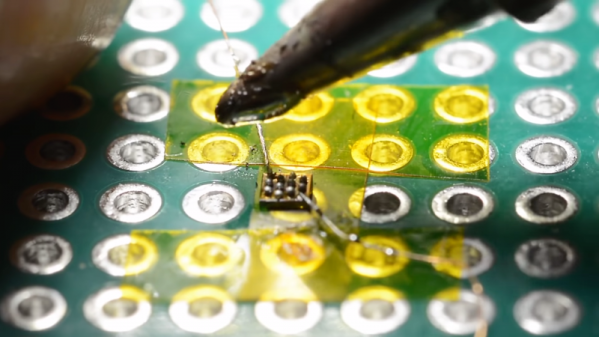
Or perhaps not, if [mitxela]’s hand-soldering of a tiny ball-grid array chip is any guide. While soldering wires directly to a chip is certainly a practical skill and an impressive one at that, this at least dips its toe into the “just showing off” category. And we heartily endorse that. The chip is an ATtiny20 in a WLCSP (wafer-level chip-scale package) that’s a mere 1.5 mm by 1.4 mm. The underside of the chip has twelve tiny solder balls in a staggered 4×6 array with 0.4 mm pitch. [mitxela] tackled the job of soldering this chip to a 2.54-mm pitch breakout board using individual strands from #30 AWG stranded wire and a regular soldering iron, with a little Kapton tape to hold the chip down. Through the microscope, the iron tip looks enormous, and while we know the drop of solder on the tip was probably minuscule we still found ourselves mentally wiping it off as he worked his way across the array. In the end, all twelve connections were brought out to the protoboard, and the chip powers up successfully.

We’re used to seeing [mitxela] work at a much larger scale, like his servo-plucked music box or a portable Jacob’s Ladder. He’s been known to get small before though, too, like with these tiny blinkenlight earrings.

Continue reading “No Caffeine, No Problem: A Hand-Soldered Chip-Scale Package”

SiFive Releases Smaller, Lower Power RISC-V Cores

Today, SiFive has released two new cores designed for the lower end of computing. This adds to the company’s existing portfolio of microcontrollers and SoCs based on the Open RISC-V ISA. Over the last two years, SiFive has introduced a number of cores based on the RISC-V ISA, an Open Architecture ISA that gives anyone to design and develop a microcontroller or microprocessor platform. These two new cores fill out the low-power end of SiFive’s core portfolio.

The two new cores included in the announcement are the SiFive E20 and E21, both meant for low-power applications, and according to SiFive presentations, they’re along the lines of an ARM Cortex-M0+ and ARM Cortex-M4. This is a core — it’s not a chip yet — but since the introduction of SiFive’s first microcontrollers, many companies have jumped on the RISC-V bandwagon. Western Digital, for example, has committed to using the RISC-V architecture in SoCs and as controllers for hard drive, SSDs, and NASes.

The first chip from SiFive was the HiFive 1, which was based on the SiFive E31 CPU. We got our hands on the HiFive 1 early last year, and it is a beast. With the standard complement of benchmarks, in terms of raw power, it’s approximately twice as fast as the Teensy 3.6, based on the Kinetis K66, a 180 MHz ARM Cortex-M4F. The SiFive E31 is about 1.5 times as fast as the Teensy 3.6 on a pure calculations per clock basis. This is remarkable because the Teensy 3.6 is our go-to standard for when you want to toggle pins really really fast with a cheap, readily available microcontroller platform.
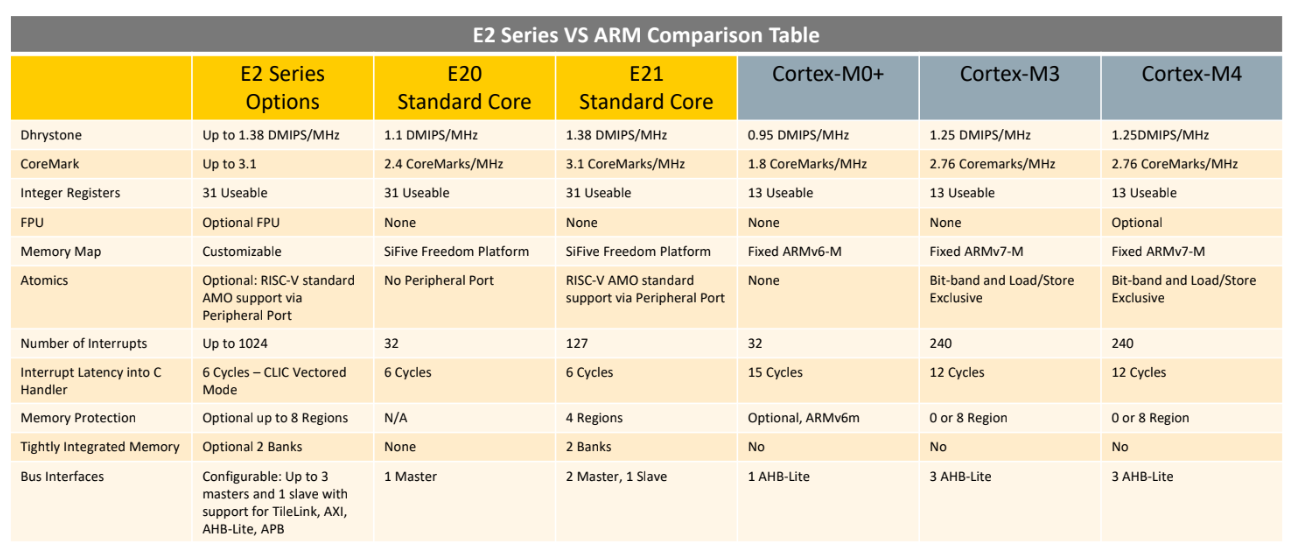
But sometimes you don’t need the fastest or best microcontroller. To that end, SiFive is looking toward a lower-power microcontroller based on the RISC-V core. The new offerings are built on the E2 Core IP series, with two standard cores. The E21 core provides mainstream performance for microcontrollers, and the E20 core is the most power-efficient core offered by SiFive. In effect, the E21 core is a replacement for the ARM Cortex-M3 and Cortex-M4, while the E20 is a replacement for the ARM Cortex-M0+.

Just a few months ago, SiFive released a gigantic, multicore, Linux-capable processor called the HiFive Unleashed. With support for DDR4 and Gigabit Ethernet, this chip would be more at home in a desktop than an Internet of Things thing. The most popular engine ever produced isn’t a seven-liter turbo diesel, it’s whatever goes into a Honda econobox; likewise, many more low-power microcontrollers like the Cortex-M0 and -M3 are sold than the newer, more powerful, and more expensive chips. Even though it’s not as exciting as a new workstation CPU, the world needs microcontrollers, and the more Open, the better.

A Crash Course In Reliable Communication

It’s probably fair to say that anyone reading these words understands conceptually how physically connected devices communicate with each other. In the most basic configuration, one wire establishes a common ground as a shared reference point and then the “signal” is sent over a second wire. But what actually is a signal, how do the devices stay synchronized, and what happens when a dodgy link causes some data to go missing?

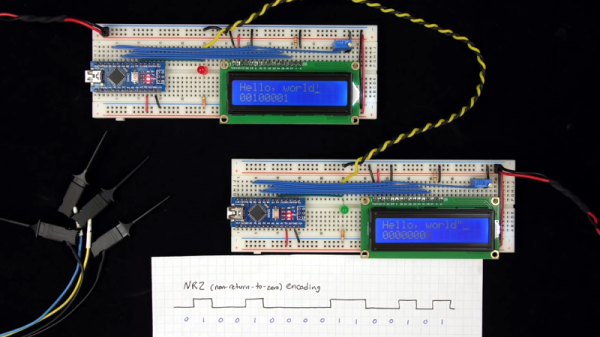
All of these questions, and more, are addressed by [Ben Eater] in his fascinating series on data transmission. He takes a very low-level approach to explaining the basics of communication, starting with the concept of non-return-to-zero encoding and working his way to a shared clock signal to make sure all of the devices in the network are in step. Most of us are familiar with the data and clock wires used in serial communications protocols like I2C, but rarely do you get to see such a clear and detailed explanation of how it all works.

He demonstrates the challenge of getting two independent devices to communicate, trying in vain to adjust the delays on the receiving and transmitting Arduinos to try to establish a reliable link at a leisurely five bits per second. But even at this digital snail’s pace, errors pop up within a few seconds. [Ben] goes on to show that the oscillators used in consumer electronics simply aren’t consistent enough between devices to stay synchronized for more than a few hundred bits. Until atomic clocks come standard on the Arduino, it’s just not an option.

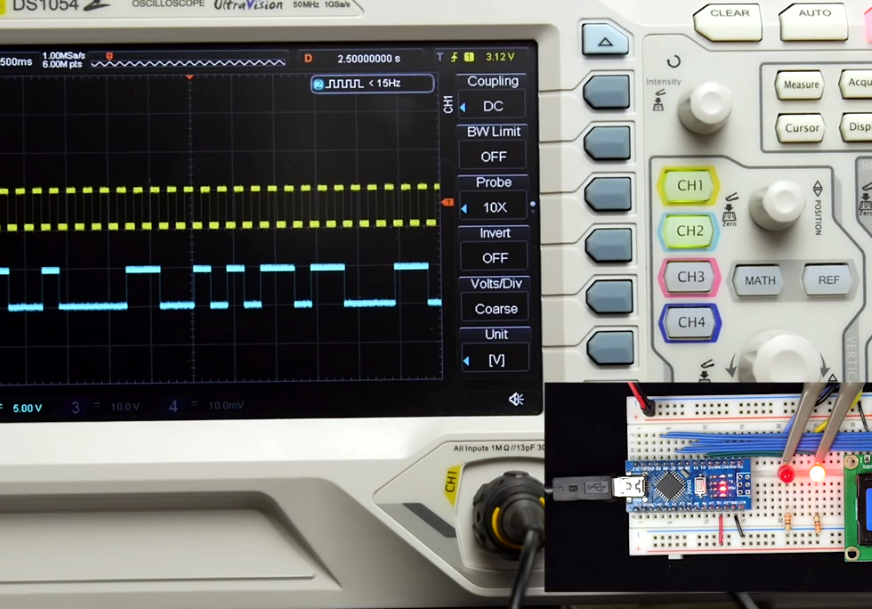
[Ben] then explains the concept of a dedicated clock signal, and how it can be used to make sure the devices are in sync even if their local clocks drift around. As he shows, as long as the data signal and the clock signal are hitting at the same time, the actual timing doesn’t matter much. Even within the confines of this basic demo, some drift in the clock signal is observed, but it has no detrimental effect on communication.

In the next part of the series, [Ben] will tackle error correction techniques. Until then, you might want to check out the fantastic piece [Elliot Williams] put together on I2C.

[Thanks to George Graves for the tip.]

Continue reading “A Crash Course In Reliable Communication”

Ambient Lighting For Baby With The ESP8266

There are plenty of great reasons to have a child. Perhaps you find the idea of being harshly criticized by a tiny person very appealing, or maybe you enjoy somebody screaming nonsense at you while you’re trying to work on something. But for us, we think the best reason for procreation is getting another excuse to build stuff. It’ll be what, at least two years before a baby can solder or program a microcontroller? Somebody’s going to have to do it for them until then.

To try to help his baby daughter get on a better sleep schedule, [Amir Avni] decided to outfit her room with some “smart” lighting to establish when it’s time for her to wake up. Not only can he and his wife control the time the lights come on to “day” mode, but they can also change the colors. For example, they can switch over to a red glow at night. Despite some learning experience setbacks, the both the parents and the baby are very happy with the final product.

An ESP8266 controls a WS2812 LED strip to provide the adjustable lighting, and a DHT22 sensor was added to the mix to detect the temperature and humidity in the baby’s room. [Amir] used Blynk to quickly throw together a slick mobile application that allows for complete control of the brightness and color of light in the room, as well as provides a readout of the environmental data pulled from the DHT22.

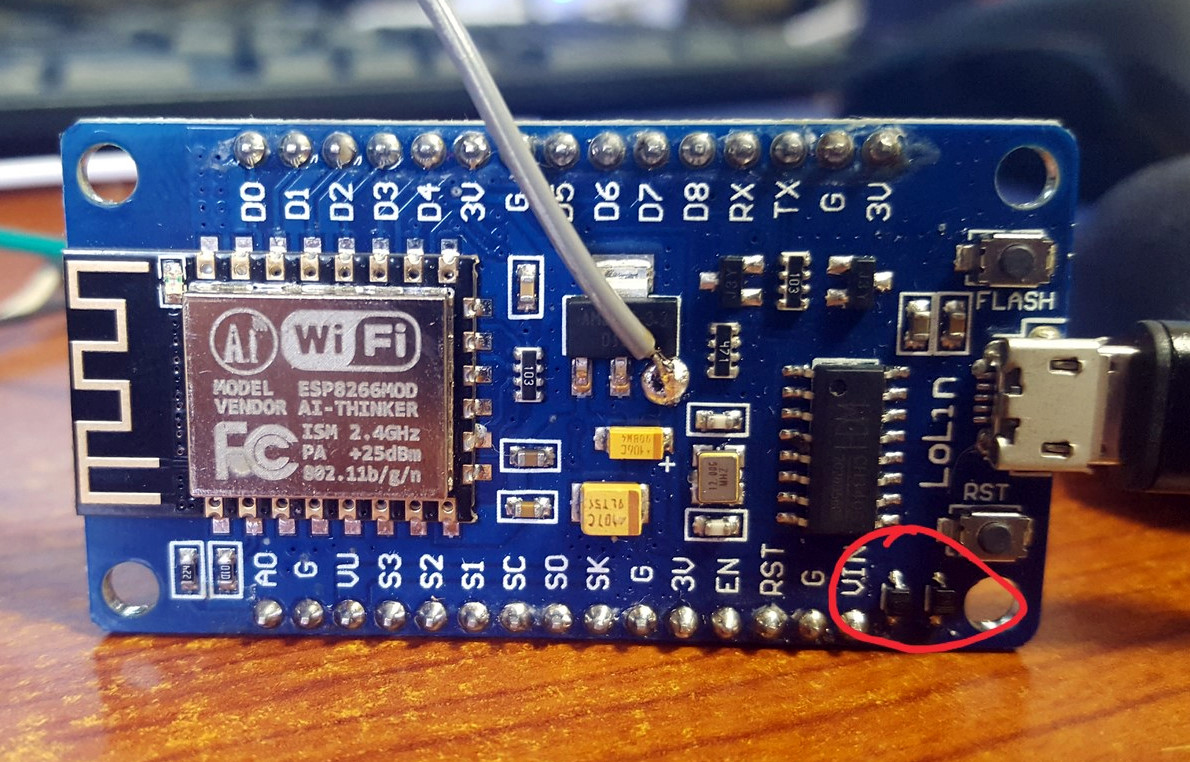
But not everything went according to plan. [Amir] thought he could power the LED strip from the ESP8266 development board by soldering to the 5 V side of its AMS1117 voltage regulator. Which worked fine, until he turned on too many LEDs. Then it pulled too much current through a resistor connected to the regulator, and let all the magic smoke out. An important reminder of what can happen when we ask more of a circuit than what it was designed for.

We’ve covered many awesome projects that were born of a parental need, from feature packed baby monitors to devices seemingly designed to program nostalgia in the little one’s subconscious.

It’s UNIX. On A Microcontroller.

It’s difficult to convey in an era when a UNIX-like operating system sits in your pocket, how there was once a time when the mere word was enough to convey an aura of immense computing power. If you ran UNIX, your computer probably filled a room, and you used it for Serious Stuff rather than just checking your Twitter feed. UNIX machines may still perform high-end tasks, but Moore’s Law has in the intervening years delivered upon its promise, and your phone with its UNIX-like OS is far more powerful than that room-sized minicomputer of the 1970s. A single chip for a few cents can do that job, which begs the question: just how little do we need to run UNIX today? It’s something [Joerg Wolfram] could advise you upon, because he’s got a functional UNIX running on a microcontroller.

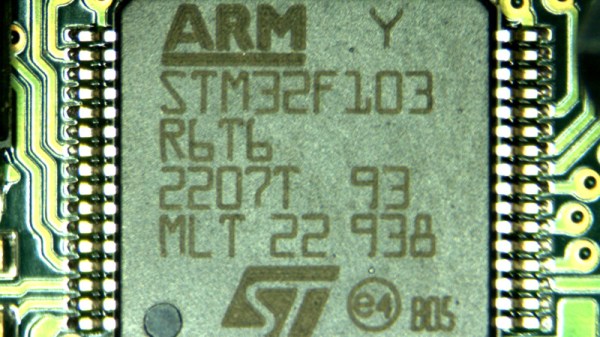
Of course, the UNIX in question is not exactly the same as the one you’d find on a supercomputer, either in the 1970s or now. Mini UNIX is a minimalist version of the operating system developed by [Heinz Lycklama] at Bell Labs four decades ago. It gives you a complete UNIX V6 system for the DEC PDP-11, but which needs only 56K of RAM, and no MMU. Emulating a PDP-11 on an STM32 microcontroller allows it to run happily, and while it’s not the most minimalist of microcontrollers it’s still a pretty cheap part upon which to run UNIX.

It’s doubtful whether a 1970s version of an operating system on a commodity microcontroller will take the world by storm, but that’s hardly the point of such a neat hack. It’s certainly not the first time we’ve seen similar work, though this PIC32 offering has a little more in the way of resources to offer.

Header image: Golonlutoj [CC BY-SA 3.0].

$6 Weather Station Goes Where You Do

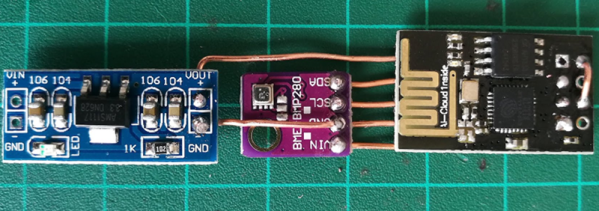
We admit, we see a lot of weather stations. What makes [Mike Diamond’s] take on this old favorite interesting is that it is tiny enough to carry with you, and uses your cell phone as a hotspot to deliver its data. Of course, that assumes you have a phone that can act as a hotspot.

The parts are straightforward, a power supply, an ESP8266, and a weather sensor board. It looks as though you could easily slip the whole affair into a tube or maybe a 3D printed enclosure. We were a little concerned about the bare wire used, but as [Mike] points out you can use insulated wire if you like, and we’d encourage you to do so.

Continue reading “$6 Weather Station Goes Where You Do”