The Unreasonable Effectiveness Of Adhesive Tape

No doubt many of you have spent a happy Christmas tearing away layers of wrapping paper to expose some new gadget. But did you stop to spare a thought for the “sticky-back plastic” holding your precious gift paper together?

There are a crazy number of adhesive tapes available, and in this article I’d like to discuss a few of the ones I’ve found useful in my lab, and their sometimes surprising applications. I’d be interested in your own favorite tapes and adhesives too, so please comment below!

But first, I’d like to start with the tapes that I don’t use. Normal cellulose tape, while useful outside the lab, is less than ideally suited to most lab applications. The same goes for vinyl-based insulating tapes, which I find have a tendency to fall off leaving a messy sticky residue. When insulation is necessary, heatshrink seems to serve better.

The one tape I have in my lab which is similar to common cellulose tape however is Scotch Magic Tape. Scotch Magic tape, made from a cellulose acetate, and has a number of surprising properties. It’s often favored because of it’s matte finish. It can easily be written on and when taped to paper appears completely transparent. It’s also easy to tear/shape and remove. But for my purposes I’m more interested in it’s scientific applications.

Here’s a neat trick you can try at home. Take a roll of tape (I’ve tried this with Scotch Magic tape but other tapes may work too) to a dark room. Now start unrolling the tape and look at interface where the tape leaves the rest of the roll. You should see a dim blue illumination. The effect is quite striking and rather surprising. It’s called triboluminescence and has been observed since the 1950s in tapes and far earlier in other materials (even sugar when scraped in a dark room will apparently illuminate). The mechanism, however, is poorly understood.

It was perhaps this strange effect that led researchers to try unrolling tape in a vacuum. In 1953 a group of Russian researchers attempted this and bizarrely enough, were able to generate X-rays. Their results were unfortunately forgotten for many years, but were replicated in 2008 and even used to X-ray a researcher’s finger! As usual Ben Krasnow has an awesome video on the topic:

In my lab however I mostly use Scotch tape to remove surface layers. In certain experiments it’s valuable to have an atomically flat surface. Both Mica and HOPG (a kind of graphite) are composed of atomically flat layers. Scotch tape can be used to remove the upper layers leaving a clean flat surface for experimentation.
graphene
The mechanical exfoliation of Graphene

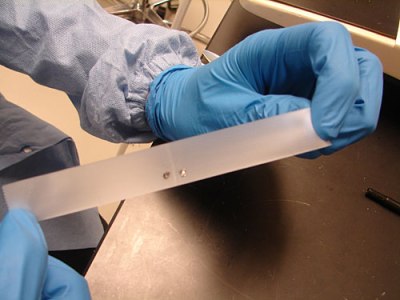
Researchers have also modified this technique to produce graphene. Graphene is composed of single carbon layers and has a number of amazing properties, highly conductive, incredibly strong, and transparent. For years producing small quantities of graphene provided difficult. But in 2004 a simple method was developed at the University of Manchester using nothing but bulk ordered graphite (HOPG) and a little Scotch tape. When repeatedly pressed between the Scotch tape, the Graphite layers can be separated until eventually only a signal layer of graphene remains.
kaptonmasking
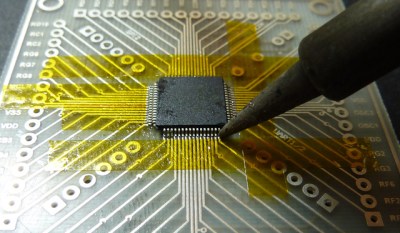
Using Kapton to maskout traces via Dangerous Prototypes


The other non-conductive tape I use regularly in my lab is of course Kapton tape. While Kapton is a Dupoint brand name, it’s basically a polyimide film tape which is thermally stable up to 400 degrees C. This makes it ideal for work holding in electronics (or masking out pins) when soldering. You can also use it for insulating (though it’s inadvisable for production applications). Typically polyimide tape is available under a number of dubious synonyms (one example is Kaptan) from a variety of Chinese suppliers at low cost.


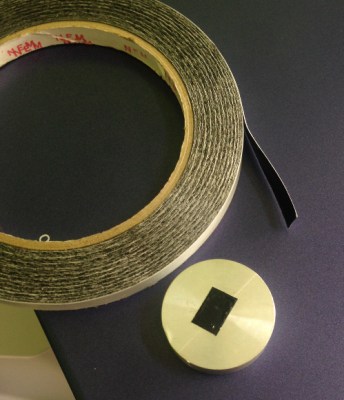
Carbon tape is conductive in all axes. This means it you can create a electrical connection by simply taping to your devices. It’s resistance however is somewhat high. I’ve most commonly come across this when using electron microscopes. Carbon tape is used both to keep a sample in place and create an electrical connection between the sample and the sample mount.
carbon_tape
Carbon tape, applied to a SEM mount.

Other conducting tapes are available with lower resistance, creating a electrical connection without soldering is valuable in a number of situations. Particularly when heat might damage the device. One example of this is piezoelectric materials. Not only does solder often bond poorly to ceramic materials, but it may also depole the material removing its piezoelectric properties. I tend to use conductive epoxies in these situations, but conductive tapes appear to be an attractive option.

Aluminum tape is commonly used for (heat) insulation in homes. It’s therefore very cheap and easily available. As well as conducting heat aluminum tape of course also conducts electricity. Around the lab this can be pretty handy. While the adhesive is not conductive, making it less attractive for connection parts, I’ve found aluminum tape great of sealing up holes in shielded enclosures. It also makes a great accompaniment to aluminum foil which is used to provide ad-hoc shielding in many scientific environments. Copper tape is also easily obtained, though slightly more expensive.
ztape
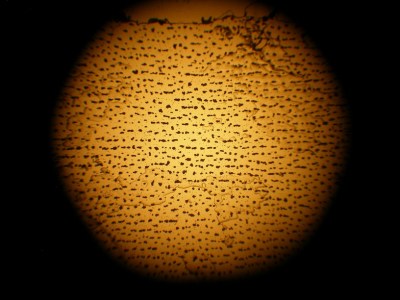
Z tape under a microscope

A much less common, but far cooler conductive tape is so called Z tape. This tape is composed of regular double-sided tape impregnated with spaced conductors. The result is a tape that conducts in only one direction (from the top to the bottom). This makes it similar in structure to a zebra strip, commonly used to connect LCDs. Z tape is unfortunately pretty expensive, a short 100mm strip can cost 5 dollars. What exactly 3M had in mind when creating Z tape is unclear. But it can be used for repairing FPC connectors on LCDs or in other situations where soldering is impractical.

One of the more awesome applications is Jie and Bunnie’s circuit sticker project. The kits are designed to allow kids to assemble circuits simply by sticking components together. Z tape is ideal for this, as it allows multiple connections to be made using the same piece to tape.

I couldn’t write an article on tape without mentioning the somewhat apocryphal “Invisible Electrostatic Wall” incident. A report at the 17th Annual EOS/ESD Symposium describes a “force field” like wall that appeared during the production of polypropylene film. While the story seems slightly dubious, it reminds us of the surprising applications and utility of tapes.

Next time you’re sending off a package or ripping open a package, spare a thought for the humble tape that holds it together.

Federico Musto Of Arduino SRL Shows Us New Products And New Directions

Recently, we sat down with [Federico Musto], CEO of Arduino SRL, for a chat about how the Italian Arduino firm was doing, what new products and projects they’ve got in the hopper, and what they’ve been up to for the last six months or so. It was high time!

Boards

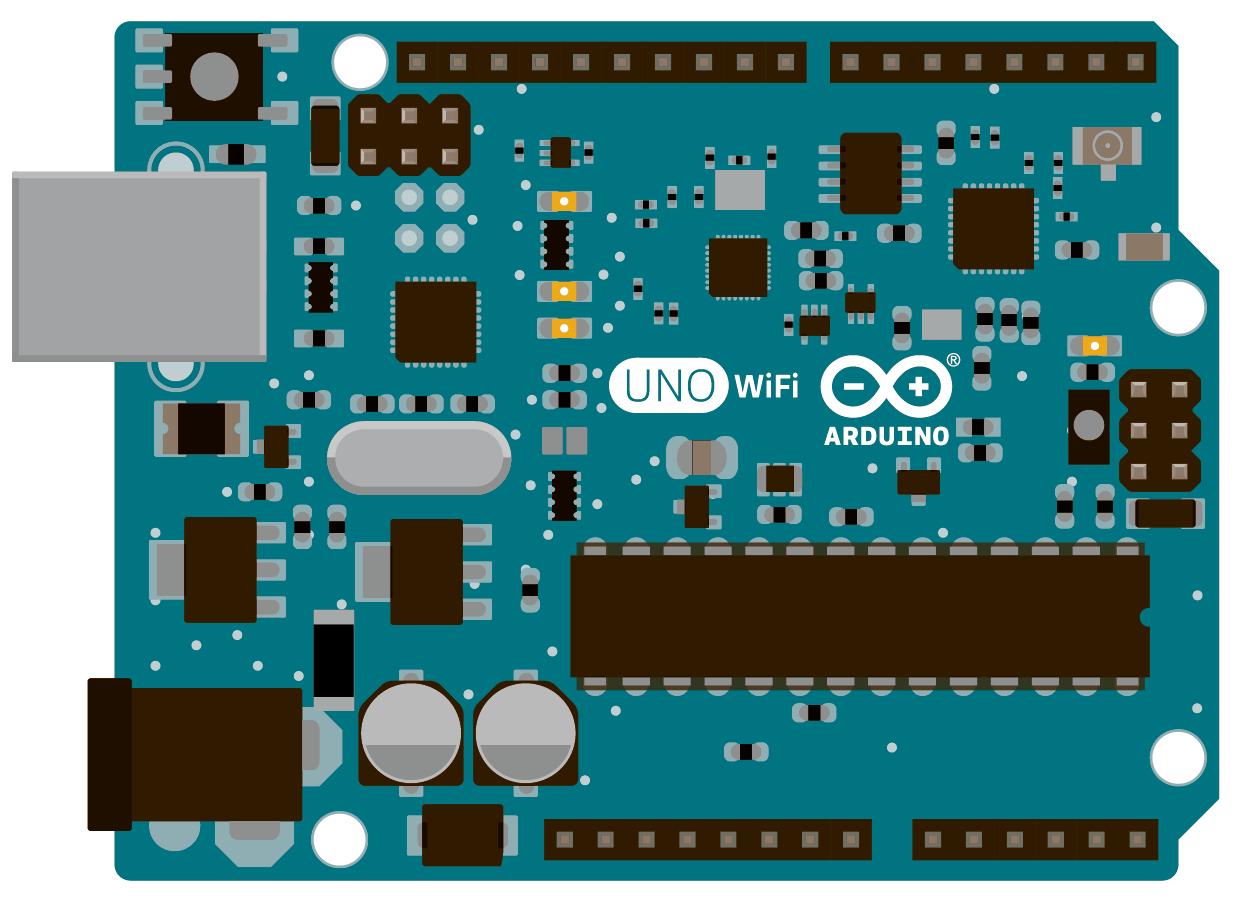
The big story from our meeting, that [Federico] actually hinted at before, is the release of the Uno WiFi. How many projects have you seen on Hackaday that are based on an Arduino Uno with an ESP8266 WiFi module plugged into it? A bazillion. The Uno and ESP8266 are like the peanut butter and jelly of the last few years’ hacker zeitgeist.

Uno WiFi

arduino-uno-wifiThe Uno WiFi, then, is the Goober Grape (not an endorsement, you consume this stuff at your own risk). Less poetically put, Arduino has soldered the ESP8266 onto the Arduino Uno for you: no fiddling around with modules and pin-headers necessary. It’s not a ground-breaking innovation, but this is the kind of smart, community-led development that we like to see. You wanted cheap and easy WiFi on your Arduino? You got it.

Indeed, since the Arduino Yun came out, a lot of hackers were using it as a simple way to get their Arduino onto a wireless network: IoT and all that. When the ESP8266 hit the scene, many thought that the Yun looked dead in the water: with the ESP chip, you could get WiFi on your Arduino for half the price. But some folks need the extra power, or would rather just program in Python. Think of all the simple IoT projects based on the Raspberry Pi, for instance.

With the addition of the Uno WiFi, both the simple IoT devices and the more demanding applications can stay within the Arduino family. Go with the Uno WiFi if you want something networked but simple that the standard AVR ATmega328 processor can handle easily. If you actually need the extra computational power and flexibility of an embedded Linux distribution in addition to the ATmega, go for the Yun. If the ATmega isn’t cutting it, or if you need more power or peripherals from the microcontroller side, the new Tian board with its ARM Cortex-M0+ will fit the bill. It’s actually a compelling range of products even if they are superficially similar.

Tian

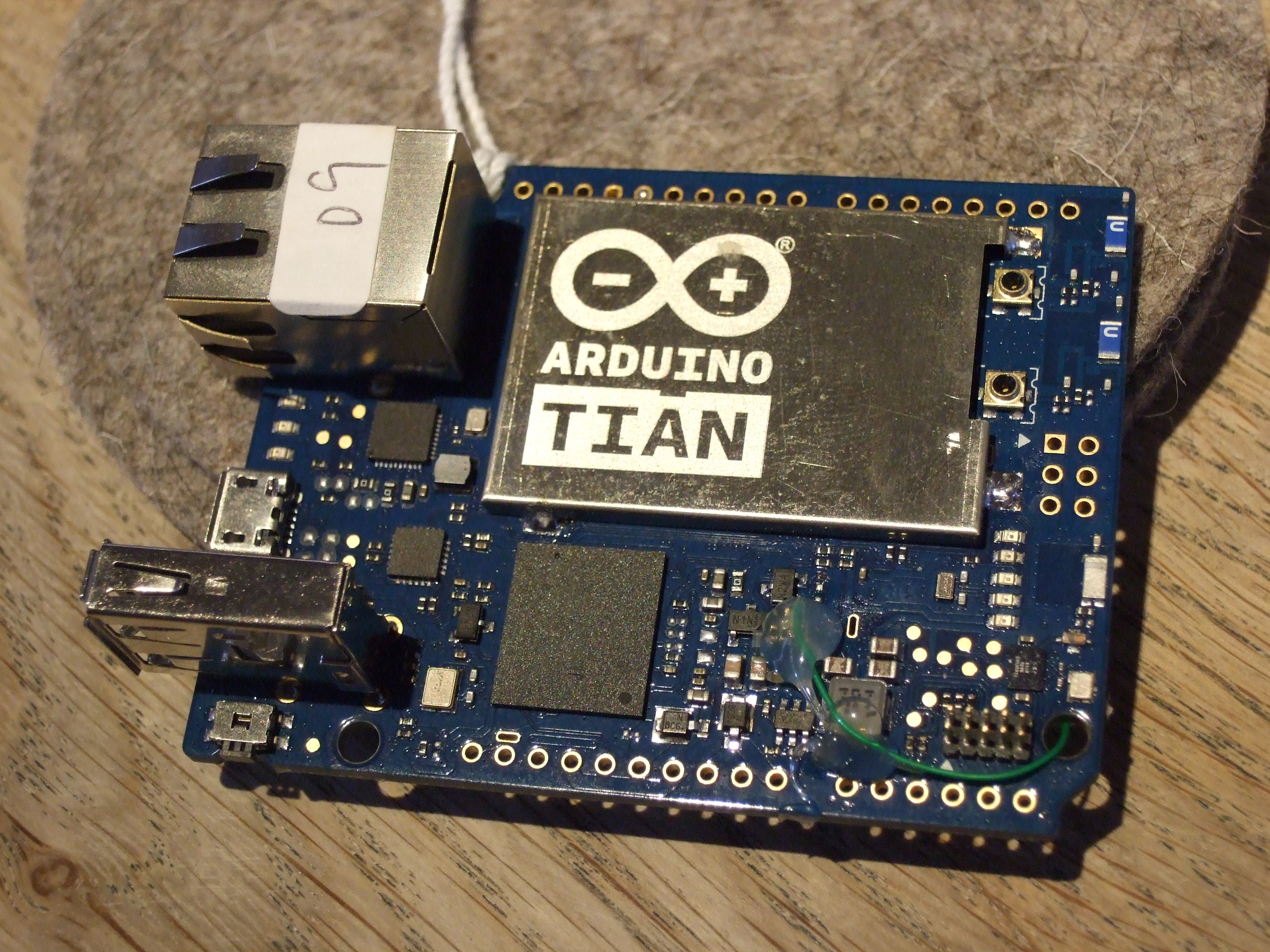
DSCF8150Which brings us to the Tian. The Arduino Tian is a neat new board, in our opinion. It’s got an integrated MIPS processor with 2.4 and 5GHz WiFi on board, as well as being able to do Bluetooth and Bluetooth LE. It runs faster than the Yun by a bit, and it’s got 4 GB of eMMC memory on-board so you don’t have to fool around with an external SD card as you do with the Yun or fruit-pastry Linux single-board computers.

We can’t decide if the Tian (or the Yun, for that matter) is a microcontroller with a Linux computer tacked on, or a Linux computer with a microcontroller to handle GPIO. Most of the applications that we’ve seen fit in with the former. We’d like to see more development on the Linux side, à la Raspberry Pi. In that light, we’re glad to see Arduino SRL continuing work on their Ciao library to help streamline communication between the microcontroller and the Linux box.

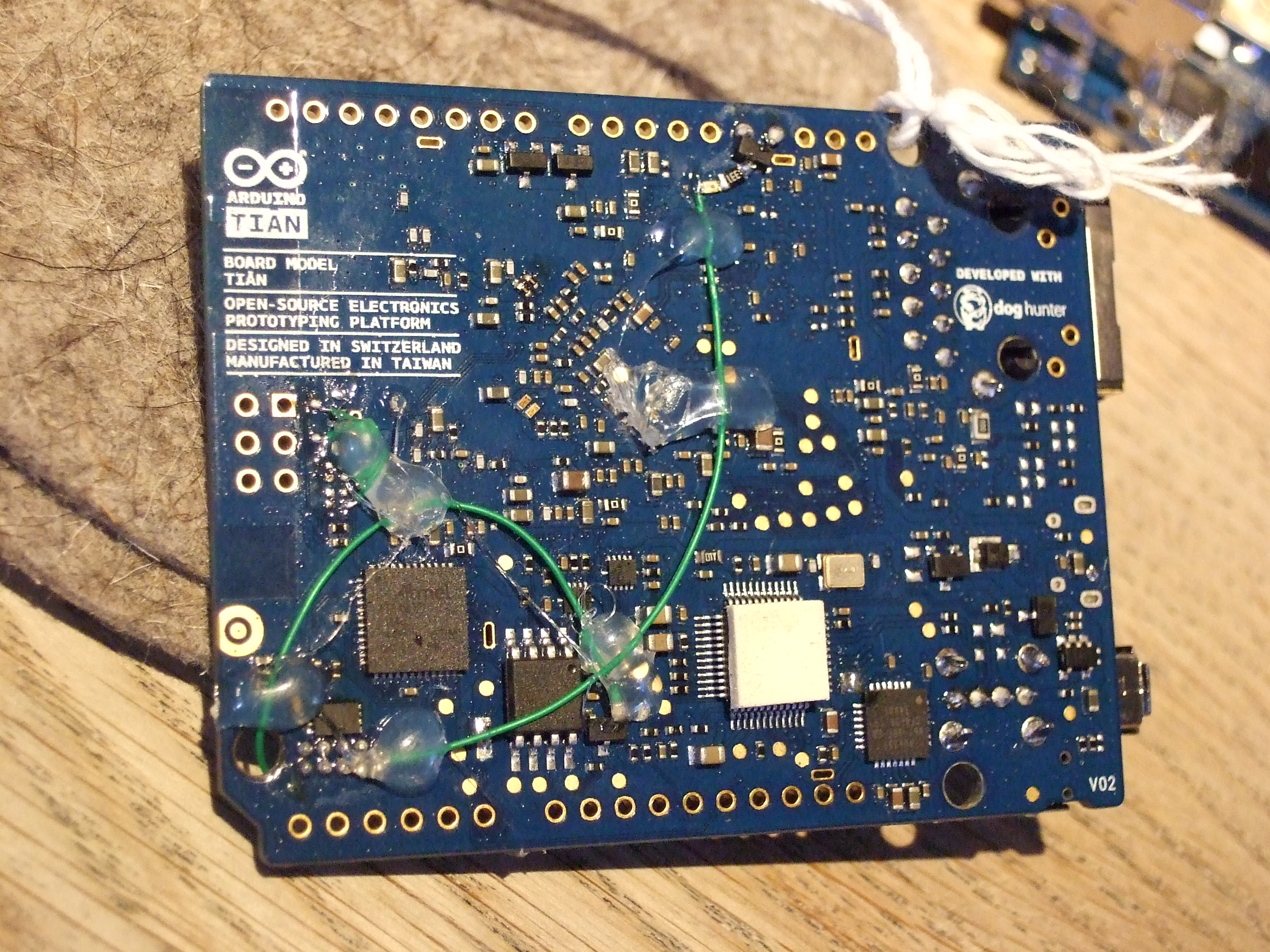
DSCF8151One of the cool tricks that [Federico] showed with the Tian was the ability to control the Linux computer from the Cortex M0+ microcontroller. As you can see in this prototype, only a few green wires (and some hot glue) were needed to make it work. The production version of the Tian should have this functionality built in.

As a demonstration, we SSH’ed into the Linux side of the Tian and pressed a button connected to the M0+ microcontroller.

The Linux side shut down gracefully, and we later booted it back up again. This is a particularly cool trick because the Linux side, with its fast processor and WiFi, is a power hog. The M0+ and its associated circuitry, on the other hand, run on very little power and can be throttled back into sleep mode when not crunching numbers. Although the boot-up time for the Linux side means that you wouldn’t be turning it on an off every few minutes, the ability to get the combined system into a low-power state for longer periods of time vastly increases the scope of projects where the Tian would be useful. Cute hack.

The Tian has only been available for about a month now. Have any of you tried one out?

Other Boards

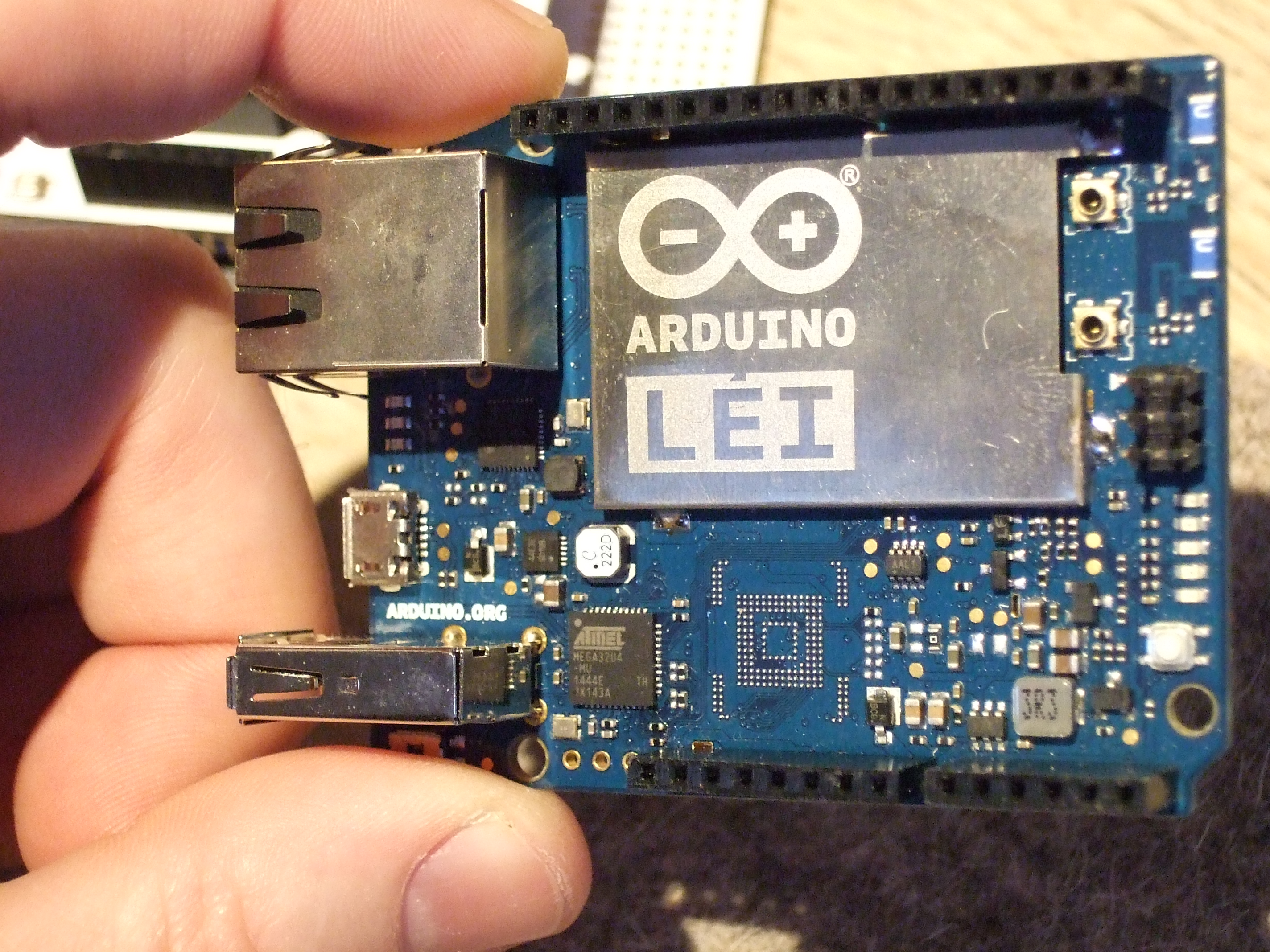
DSCF8149[Federico] also showed us the Lei, which is a China-only Arduino board that combines the Tian’s Linux side with the Atmel ATmega part from the Yun, and has no onboard memory. It’s a cheaper hybrid between the two boards that [Federico] said wasn’t worth getting FCC certified for the US and the rest of the world. With the Yun and the Tian being so broadly similar already, we think that he’s probably right.

What the newest revision of the Yun, the Tian, and even the Lei have in common is that the microcontroller’s USB pins have been broken out to headers so that it could more easily be used as a standalone USB device. This gives even the cheapest boards in the family three ways to connect to USB — device mode through the microcontroller, and both host mode and USB OTG mode also through the Linux side. And it also enables shields, like this GSM shield below, to connect up to the microcontroller over USB. (Although the headers weren’t populated in this photo.)

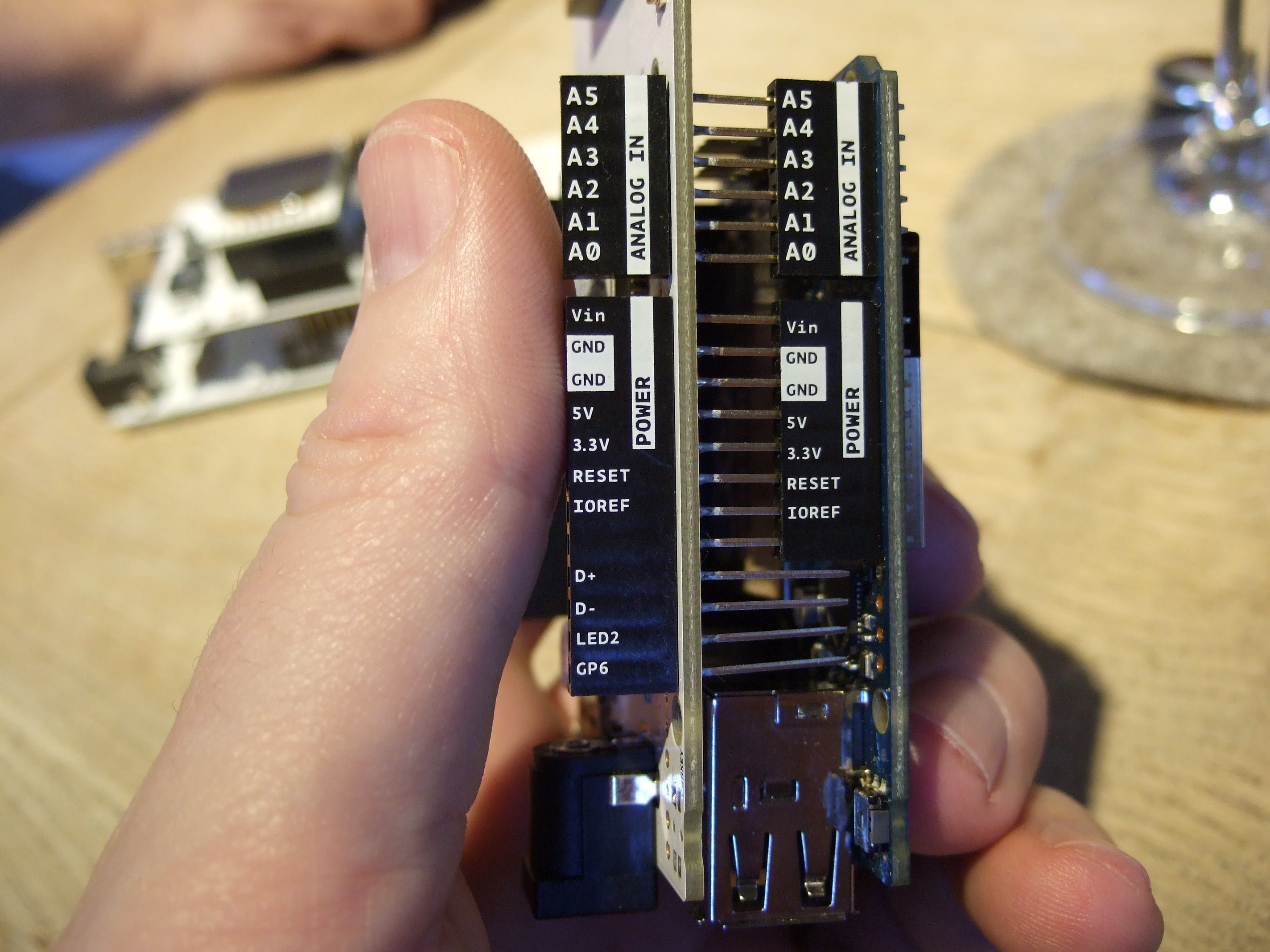
DSCF8145This photo also shows a cute touch in the physical design of all of the Arduino SRL boards. All of the pinouts are labelled on the side of the female headers. Although we’re sure that you diehard Arduino fans out there can tell your A0 from your A5 in your sleep, we think it’s great not to have to go running back to the datasheet to double-check.

And finally, [Federico] showed me some of the new development they’ve been making on the Industrial and the Industrial 101 demonstration board. The Industrial is essentially the same Linux side as in the Yun, just in a smaller stand-alone package. Pairing this up with the Industrial 101 board, with its ATmega32u4 gives you essentially a Yun, but with a few more pinouts. We’re not yet sure what to make of the module-style packages that we’ve seen from many firms of late — we think that they’re too fidgety for hobbyists, and easy enough to DIY for a firm that’s producing tens of thousands of units. We could easily be wrong.

Anyway, the fun part about the Industrial 101 board was showing off all of the special shields that Arduino SRL has designed to go along with them. Here’s an OLED screen and joystick combo, for instance.

Free Stuff

If you’re interested in the Uno WiFi, you should probably check out the Arduino Christmas Challenge that’s going on through January 31st. If you enter a project on GitHub and register with Arduino, you stand a decent chance of winning a free Uno WiFi in January. (For what it’s worth, Arduino LLC and Microsoft are doing something similar. We’re not picking sides, just pointing out how to get free boards.)

IDE Developments

dl38We’d seen the new(ish) Arduino Studio development environment before, but it only just now made sense to us. Sure, it’s great to have a better editor than the old Java-based one. We’ve all been whining about the lack of code completion and so forth. The new editor environment, based on Adobe’s open-source Brackets editor is a huge step forward. But we’ve got a further direction that we’d like to see Arduino SRL take this, and the fact that the new editor is written in client-side Javascript is a big help.

The Yun, the Tian, and the China-only Lei boards all feature an OpenWRT-based Linux distribution onboard as well as WiFi connectivity. They also managed to get the entire GCC compilation chain compiling natively on the MIPS cores. It shouldn’t be too much more work to get a cross-compiler for the microcontroller up and running on the Arduino’s Linux side. Once that happens, you could compile and flash code onto the microcontroller entirely from within the Yun or Tian. Add in a nice, browser-based graphical editor, and you have a recipe for a self-contained development environment.

os.jsAnd [Federico] demoed some more tricks that point obliquely toward this future of Arduino-hosted Arduino development: we connected over the public Internet to an Arduino Yun in their R&D labs in Sicily that was serving an Arduino-branded version of OS.js, an “operating system” written in Javascript that runs in the client’s browser. Coupling something like OS.js to their Javascript-based Studio, running a cross-compiler on the Arduino’s Linux side would put the last pieces together to enable you to write, debug, and flash microcontroller projects completely on the Yun or Tian, without installing anything on your laptop other than a browser. The Arduino could become its own self-contained toolchain. How neat would that be? We hope we’re right.

Foundation and Stores

After months of legal work and lining up partners, Arduino SRL recently announced the formation of the Arduino Foundation. The Foundation is a non-profit that aims to give out Arduino boards and materials to schools and communities that might not have the resources to do so themselves, and also simply to give back to the Arduino community. In fact, the Uno WiFi Christmas challenge we mentioned above is sponsored by the Foundation.

manifestinoWe’d like to see the Foundation figure out how to reward the people who wrote popular Arduino libraries. In our mind, the success of Arduino is largely due to the enthusiastic and talented pool of coders who’ve written diverse libraries that support every kind of hardware peripheral known to man. There’s a million projects out there that simply use a Dallas one-wire temperature sensor or an RFM12B radio, and every one of them owes the coders who wrote the initial libraries a big debt. It’d be neat if the Arduino Foundation could find a way to pay some of this debt back. And from talking with [Federico], paying the community back is one of their main goals.

Arduino SRL has also thought about how to connect up better with the people making hardware that goes along with their boards — the shield-makers out there. [Federico] said that they’d open up their first brick-and-mortar Arduino store in Berlin any day now. The plan is to have a section of the store dedicated to community projects, giving the people who make shields and other add-ons a place to have their wares seen and sold. It’s also a clever way for the Arduino company to connect closer with the people who are doing the most innovative work in the Arduino ecosystem, so we think it’s a win all around.

And finally, we couldn’t talk Arduino without asking about the legal situation. Although everyone’s lawyers have been busy, [Federico] told me that there’s not much news on the trademark court cases since the last time we talked.

In Italy, and presumably the rest of the world outside of the USA, it’s all over but the shouting. It looks very likely that the court will rule for Arduino SRL, because Italy and Europe has a very straightforward trademark law — the company to file first essentially gets the trademark. And that was Arduino SRL.

Only in the USA is the situation more complicated, both because Arduino LLC filed first, and because it’s possible that Arduino SRL will demonstrate that they were producing boards with the Arduino name on them before Arduino LLC was even incorporated. We’re not lawyers, but this case certainly looks like it could go either way to us. And the US case is not likely to be settled until the summer of 2016, though, so don’t hold your breath.

Wrapup

Maybe 2015 will be remembered as the year of the dueling Arduinos, but we’re hopeful that instead it will be remembered as a year in which a bunch of new and improved Arduino hardware got released. From Arduino LLC, we’ve seen further collaborations with Intel. Arduino SRL has stayed true to their Linux and WiFi roots, coming out with the Tian, Industrial, and the Uno WiFi and continuing work on their operating system and the microcontroller interfacing. All in all, it’s been a good year for Arduino.

We’ve already hinted at some of what we’d like to see on the Arduino scene next year. What do you want to see for 2016?

Source: Flibble CC-BY-SA 3.0 https://commons.wikimedia.org/wiki/File:Acorn-ARM-Evaluation-System.jpg

Reverse Engineering The IPhone’s Ancestor

By all accounts, the ARM architecture should be a forgotten footnote in the history of computing. What began as a custom coprocessor for a computer developed for the BBC could have easily found the same fate as National Semiconductor’s NS32000 series, HP’s PA-RISC series, or Intel’s iAPX series of microprocessors. Despite these humble beginnings, the first ARM processor has found its way into nearly every cell phone on the planet, as well as tablets, set-top boxes, and routers. What made the first ARM processor special? [Ken Shirriff] potsed a bit on the ancestor to the iPhone.

The first ARM processor was inspired by a few research papers at Berkeley and Stanford on Reduced Instruction Set Computing, or RISC. Unlike the Intel 80386 that came out the same year as the ARM1, the ARM would only have a tenth of the number of transistors, used one-twentieth of the power, and only use a handful of instructions. The idea was using a smaller number of instructions would lead to a faster overall processor.

This doesn’t mean that there still isn’t interesting hardware on the first ARM processor; for that you only need to look at this ARM visualization. In terms of silicon area, the largest parts of the ARM1 are the register file and the barrel shifter, each of which have two very important functions in this CPU.

The first ARM chip makes heavy use of registers – all 25 of them, holding 32 bits each. Each bit in a single register consists of two read transistors, one write transistor, and two inverters. This memory cell is repeated 32 times vertically and 25 times horizontally.

The next-largest component of the ARM1 is the barrel shifter. This is just a device that allows binary arguments to be shifted to the left and right, or rotated any amount, up to 31 bits. This barrel shifter is constructed from a 32 by 32 grid of transistors. The gates of these transistors are connected by diagonal control lines, and by activating the right transistor, any argument can be shifted or rotated.

In modern terms, the ARM1 is a fantastically simple chip. For one reason or another, though, this chip would become the grandparent of billions of devices manufactured this year.

The Mystery Of The Boiled Batteries

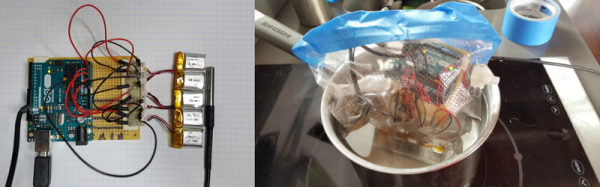
While debugging a strange battery failure in a manufacturing process, [Josh] discovered a new (to us) LiPo battery failure mode.

Different battery chemistries react differently to temperature. We’ve used lithium exclusively in high-altitude ballooning, for instance, because of their decent performance when cold. Lithium batteries generally don’t like high temperatures, on the other hand, but besides the risk of bursting into flames, we had no idea that heat could kill them. When the battery’s voltage is already low, though, it turns out it can.

[Josh]’s process required molding plastic with the battery inside, and this meant heating the batteries up. After the fact, he noticed an unreasonably high failure rate in the batteries, and decided to test them out. He put the batteries, each in a different initial charge, into a plastic bag and tortured them all with ice and fire. (OK, boiling water.)

When the batteries got hot, their voltage sagged a little bit, but they recovered afterwards. And while the voltage sagged a little bit more for the batteries with lower initial charge, that’s nothing compared to the complete failure of the battery that entered the hot water with under 1V on it — see they yellow line in the graphs.

battery_voltages

There’s a million ways to kill a battery, and lithium batteries are known not to like being completely discharged, but it looks like the combination of deep discharge and heat is entirely deadly. Now you know.

EZ-Spin Motor Spins “Forever”

Now this isn’t a perpetual motion machine, but it’s darn close. What [lasersaber] has done instead is to make the EZ Spin, an incredibly efficient motor that does nothing. Well, nothing except look cool, and influence tons of people to re-build their own versions of it and post them on YouTube.

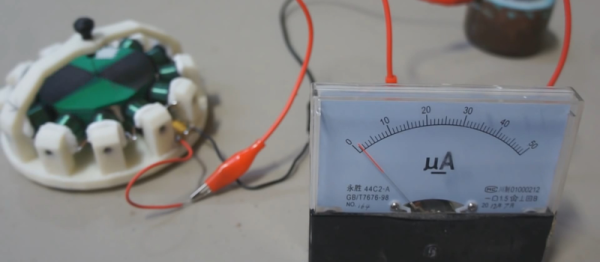
The motor itself is ridiculously simple: it’s essentially a brushless DC motor with a unique winding pattern. A number of coils — anywhere from six to twenty-four — are wired together with alternating polarity. If one coil is a magnetized north, its two neighbors are magnetized south, and vice-versa. The rotor is a ring with permanent magnets, all arranged so that they have the same polarity. A capacitor is used for the power source, and a reed switch serves as a simplistic commutator, if that’s even the right term.

As the motor turns, a permanent magnet passes by the reed switch and it makes the circuit. All of the electromagnets, which are wound in series, fire and kick the rotor forwards. Then the reed switch opens and the rotor coasts on to the next position. When it gets there the reed switch closes and it gets a magnetic kick again.

The catch? Building the device so that it’s carefully balanced and running on really good (sapphire) bearings, entirely unloaded, and powered with high impedance coils, leads to a current consumption in the microamps. As with most motors, when you spin it by hand, it acts as a generator, giving you a simple way to charge up the capacitor that drives it. In his video [lasersaber] blows on the rotor through a straw to charge up the capacitor, and then lets it run back down. It should run for quite a while on just one spin-up.

The EZ Spin motor is absolutely, positively not perpetual motion or “over-unity” or any of that mumbo-jumbo. It is a cool, simple-to-build generator/motor project that’ll definitely impress your friends and challenge you to see how long you can get it running. Check out [lasersaber]’s website, this forum post, and a 3D model on Thingiverse if you want to make your own.

Continue reading “EZ-Spin Motor Spins “Forever””

Truck-Sized Star Destroyer Takes Flight

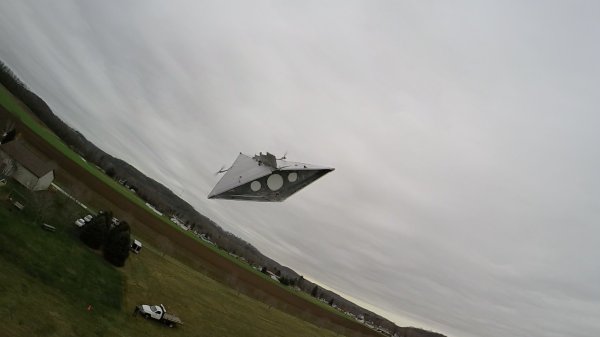
While some of you may have been to see the new Star Wars movie, you might be sad that everything happened a long time ago in a galaxy far away. But there’s a group of RC enthusiasts called [Flite Test] who are trying to bring at least a little bit of that fantasy into real life. They’ve created a truck-sized Star Destroyer that actually flies. It looks kind of terrifying, too.

While it’s not as big as a “real” Star Destroyer, it’s certainly one of the biggest we’ve ever seen in real life. Built out of foam, this monstrosity is 15 feet long and powered by two huge electric motors and a large lithium polymer battery. Of course they didn’t start out by building this huge flying spaceship; they created a smaller model as proof-of-concept and flew that one around for a while to make sure everything was shipshape. While it’s exciting to see the small model in flight, it’s another thing to see the 15-foot version swooping around.

We’re sad to report that the Star Destroyer did meet a similar fate as the one that Rey was scavenging at the beginning of the movie (spoilers: it crashed), we hope that the RC team rebuilds it so it’s space worthy again. Maybe they can even add a real-life ion drive or a few lasers to make it even more real.

Continue reading “Truck-Sized Star Destroyer Takes Flight”

2015: As The Hardware World Turns

A few hours from now, the ball will drop in Times Square. 2015 is over, and the good news is you can easily turn a handwritten ‘5’ into a ‘6’. Keep that in mind for the next few weeks. It’s time for a retrospective of everything that happened in 2015. That’s rather boring, though, and it’s usually better to put the most outrageous items in the lede. Therefore, it’s time for predictions of what will happen over the next 366 days. They are, in order:

  • 2016 will be the year of the Linux desktop
  • Self-driving cars will be demonstrated
  • Graphene! Something to do with graphene!
  • Your company will receive a resume with ‘Bitcoin’ listed as a skill
  • Fusion power is only nine years away

With that said, a lot happened this year. Tiny Linux single board computers became incredibly cheap, Radio Shack died, and Arduino went crazy.

Continue reading “2015: As The Hardware World Turns”