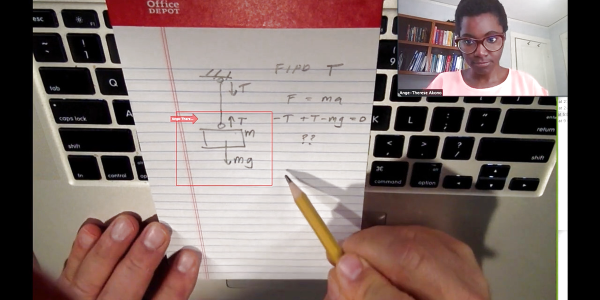
Video conferencing is nothing new, but the recent world events have made it much more mainstream than it has been in the past. Luckily, web camera technology is nothing new and most software can also show your screen. But what about your paper documents? Turns out that [John Nelson] can show you how to spend $5 for an old laptop camera module and put your documents center stage on your next Zoom, Skype or other video conferences.
This is especially good for things that would be hard to draw in real time during a conference like a quick sketch, a schematic, or as you can see in the post and the video demo below, chemical molecule diagrams.
Stuck at home in self-quarantine, artist and filmmaker [Kira Bursky] had fewer options than normal for her latest film project. While a normal weekend film sprint would have involved collaborating with actors, set designers, and cinematographers in a frenzied attempt to finish in less than 48 hours, she instead chose to indulge in her curiosity for projection mapping, a technique that involves projecting visuals onto three-dimensional or flat surfaces.
In order for the images to properly map onto a surface, the surface first has to be mapped so that the projection is able to properly transform the flat image in order to produce the illusion of the light wrapping around the object. The technique is done in layers, in software similar to Photoshop, making it easier for the designer to organize the different interacting components in their animation.
[Kira] used a tool called Lightform to design her projections, which relies on a camera to calibrate the location of the surface and a projector to display the visuals. Her animated figures are drawn with loose lines and characterized by their slow gradients and ethereal movements. In the background of her film, a rhythmic sound plays while she brings the figures closer to view. Their outlines come into greater focus until the figures transform into her physical body, which also dances with the meandering lights.
There’s a lot of interesting content produced on video these days. Invariably, though, when we post something some comments will appear lamenting that a video isn’t the most efficient way to disseminate technical information. We have mixed feelings. Some things benefit from being able to see, for example, a screencast. Some people like the human connection of seeing an instructor interact with a class instead of just reading. But we will admit that sometimes a video takes longer to watch, especially if it is full of pauses. Unsilence is a tool from [labmoellertim] that can fix that. The command line tool takes a video and strips out the parts that are silent. You can also use it as a Python library if you want to build your own tools using the technique.
If you’ve ever taken a class online, it isn’t uncommon to speed up a video so you can get through class faster. This works to a point, but removing or speeding up silent gaps means you don’t have to “listen faster.” Of course, you could still speed up the video, too.
Here at Hackaday HQ we’re no strangers to vintage game emulation. New versions of old consoles and arcade cabinets frequently make excellent fodder for clever hacks to cram as much functionality as possible into tiny modern microcontrollers. We’ve covered [rossumur]’s hacks before, but the ESP_8-bit is a milestone in comprehensive capability. This time, he’s topped himself.
There isn’t much the ESP 8-bit won’t do. It can emulate three popular consoles, complete with ROM selection menus (with menu bloops). Don’t worry about building a controller, just connect any old (HID compliant) Bluetooth Classic keyboard or WiiMote you have at hand. Or if that doesn’t do it, a selection of IR devices ranging from joysticks from the Atari Flashback 4 to Apple TV remotes are compatible. Connect analog audio and composite video and the device is ready to go.
The system provides this impressive capability with an absolute minimum of components. Often a schematic is too complex to fit into a short post, but we’ll reproduce this one here to give you a sense for what we’re talking about. Come back when you’ve refreshed your Art of Electronics and have a complete understanding of the hardware at work. We never cease to be amazed at the amount of capability available in modern “hobbyist” components. With such a short BOM this thing can be put together by anyone with an ESP-32-anything.
There’s one more hack worth noting; the clever way [rossumur] gets full color NTSC composite video from a very busy microcontroller. They note that NTSC can be finicky and requires an extremely stable high speed reference clock as a foundation. [rossumur] discovered that the ESP-32 includes a PLL designed for audio work (the “APLL”) which conveniently supports fractional components, allowing it to be trimmed to within an inch of the desired frequency. The full description is included in the GitHub page for the project and includes detailed background of various efforts to get color NTSC video (including the names of a couple hackers you might recognize from these pages).
Ever since we first saw the nightmarish artwork produced by Google DeepDream and the ridiculous faux paintings produced from neural style transfer, we’ve been aware of the ways machine learning can be applied to visual art. With commercially available trained models and automated pipelines for generating images from relatively small training sets, it’s now possible for developers without theoretical knowledge of machine learning to easily generate images, provided they have sufficient access to GPUs. Filmmaker [Kira Bursky] took this a step further, creating a surreal short film that features characters and textures produced from image sets.
She began with about 150 photos of her face, 200 photos of film locations, 4600 photos of past film productions, and 100 drawings as the main datasets.
via [Kira Bursky]Using GAN models for nebulas, faces, and skyscrapers in RunwayML, she found the results from training her face set disintegrated, realistic, and painterly. Many of the images continue to evoke aspects of her original face with distortions, although whether that is the model identifying a feature common to skyscrapers and faces or our own bias towards facial recognition is up to the viewer.
On the other hand, the results of training the film set photos on models of faces and bedrooms produced abstract textures and “surreal and eerie faces like a fever dream”. Perhaps, unlike the familiar anchors of facial features, it’s the lack of recognizable characteristics in the transformed images that gives them such a surreal feel.
[Kira] certainly uses these results to her advantage, brainstorming a concept for a short film that revolves around her main character experiencing nightmares. Although her objective was to use her results to convey a series of emotionally striking scenes, the models she uses to produce these scenes are also quite interesting.
She started off by using the MiDaS model, created by a team of researchers from ETH Zurich and Intel, for generating monocular depth maps. The results associated levels inside of an image with their appropriate depth in relation to one another. She also used the MASK R-CNN for masking out the backgrounds in generated faces and combined her generated images in Photoshop to create the main character for her short film.
via [Vox]In order to simulate the character walking, she used the Liquid Warping GAN, a framework for human motion imitation and appearance transfer, created by a team from ShanghaiTech University and Tencent AI Lab. This allowed her to take her original images and synthesize results from reference poses of herself going through the motions of walking by using a 3D body mesh recovery module. Later on, she applied similar techniques for motion tracking on her faces, running them through the First Order Motion Model to simulate different emotions. She went on to join her facial movements with her character using After Effects.
Bringing the results together, she animated a 3D camera blur using the depth map videos to create a less disorienting result by providing anchor points for the viewers and creating a displacement map to heighten the sense of depth and movement within the scenes. In After Effects, she also overlaid dust and film grain effects to give the final result a crisper look. The result is a surprisingly cinematic film entirely made of images and videos generated from machine learning models. With the help of the depth adjustments, it almost looks like something that you might see in a nightmare.
They say a picture is worth a thousand words, and by that logic a video must be worth millions. However, from nearly the dawn of photography around 1840, photographers have made fake photographs. In modern times, Photoshop and Deepfake make you mistrust images and videos. [Action Lab] has a great camera trick in which it looks like he can control the speed of light. You can see the video below.
You probably can guess that he can’t really do it. But he has videos where a real laser beam appears to slowly move across the screen like a laser blaster shot in a movie. You might think you only need to slow down the video speed, but light is really fast, so you probably can’t practically pull that stunt.
Timelapse fragment from an infrared sky camera watching cloud patterns.
There are plenty of ways to create timelapse videos, but [Andy] has an efficient method for ensuring up-to-date ones exist for his infrared sky camera, and he has it running thanks to some well-documented shell scripts on a spare Raspberry Pi. The resulting timelapse video is always available from the web, and always up-to-date for the current day.
The idea is to automatically fetch images from a remote source (in his case, an infrared sky camera) and turn them into a cumulative video that is regularly updated for the day in question. The resulting video file is either served from the same machine, or sent elsewhere. All that’s needed besides a source for the stills are two shell scripts and some common Linux utilities.
Since [Andy] is mainly interested in tracking clouds his system only runs during daylight hours, but it can be easily changed. In fact, [Andy]’s two shell scripts are great project resources, not only because they are easily modified and well documented, but because he doesn’t make assumptions about how well one might know the command line. He also provides tips from experience; for example he has found that a 120 second interval makes for the best timelapses.