Making MicroView Wordy

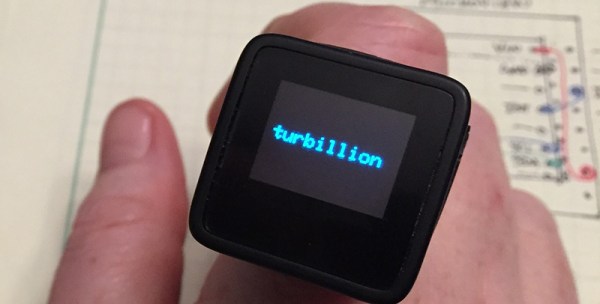
Despite the MicroView shipping a ton of units, we haven’t seen many projects using this tiny Arduino and OLED display in a project. Never fear, because embedded systems engineer, podcaster, and Hackaday Prize judge [Elecia White] is here with a wearable build for this very small, very cool device.

The size and shape of the MicroView just cried out to be made into a ring, and for that, [Elicia] is using air-drying bendy polymer clay. To attach the clay to the MicroView, [Elecia] put some female headers in a breadboard, and molded the clay over them into a ring shape. It works, and although [Elecia] didn’t do anything too tricky with the headers and clay, there are some interesting things you could do running wires through the clay.

What does this ring do? It’s a Magic 8 Ball, a game of Pong controlled by an accelerometer, a word-of-the-day thing (with definitions), all stuffed into a brass silicon, OLED, and clay knuckle. Video below.

If you’re wondering, Turbillion (n). A whirl; a vortex.

Continue reading “Making MicroView Wordy”

Over-engineering Ding Dong Ditch

One day, [Samy]’s best friend [Matt] mentioned he had a wireless doorbell. Astonishing. Even more amazing is the fact that anyone can buy a software defined radio for $20, a small radio module from eBay for $4, and a GSM breakout board for $40. Connect these pieces together, and you have a device that can ring [Matt]’s doorbell from anywhere on the planet. Yes, it’s the ultimate over-engineered ding dong ditch, and a great example of how far you can take practical jokes if you know which end of a soldering iron to pick up.

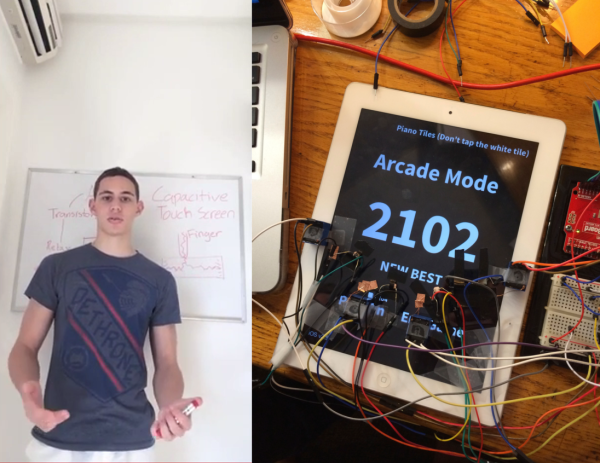
Simply knowing [Matt] has a wireless doorbell is not enough; [Samy] needed to know the frequency, the modulation scheme, and what the doorbell was sending. Some of this information can be found by looking up the FCC ID, but [Samy] found a better way. When [Matt] was out of his house, [Samy] simply rang the doorbell a bunch of times while looking at the waterfall plot with an RTL-SDR TV tuner. There are a few common frequencies tiny, cheap remote controls will commonly use – 315 MHz, 433 MHz, and 900 MHz. Eventually, [Samy] found the frequency the doorbell was transmitting at – 433.8 MHz.

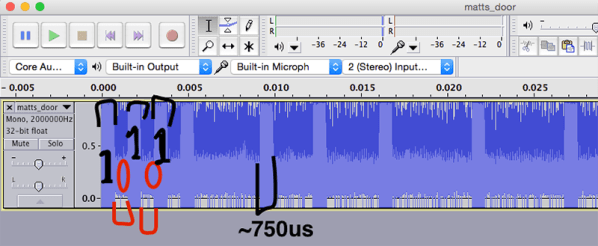
After capturing the radio signal from the doorbell, [Samy] looked at the audio waveform in Audacity. It looked like this doorbell used On-Off Keying, or just turning the radio on for a binary ‘1’ and off for a binary ‘0’. In Audacity, everything the doorbell transmits becomes crystal clear, and with a $4 434 MHz transmitter from SparkFun, [Samy] can replicate the output of the doorbell.

For the rest of the build, [Samy] is using a mini GSM cellular breakout board from Adafruit. This module listens for any text message containing the word ‘doorbell’ and sends a signal to an Arduino. The Arduino then sends out the doorbell code with the transmitter. It’s evil, and extraordinarily over-engineered.

Right now, the ding dong ditch project is set up somewhere across the street from [Matt]’s house. The device reportedly works great, and hopefully hasn’t been abused too much. Video below.

Continue reading “Over-engineering Ding Dong Ditch”

Hackaday Links Column Banner

Hackaday Links: December 7, 2014

Have some .40 cal shell casings sitting around with nothing to do? How about some bullet earbuds? If you’ve ever wondered about the DIY community over at imgur, the top comment, by a large margin, is, “All of these tools would cost so much more than just buying the headphones”

Here’s something [Lewin] sent in. It’s a USB cable, with a type A connector on one end, and a type A connector on the other end. There is no circuitry anywhere in this cable. This is prohibited by the USB Implementors Forum, so if you have any idea what this thing is for, drop a note in the comments.

Attention interesting people in Boston. There’s a lecture series this Tuesday on Artificial Consciousness and Revolutionizing Medical Device Design. This is part two in a series that Hackaday writer [Gregory L. Charvat] has been working with. Talks include mixed signal ASIC design, and artificial consciousness as a state of matter. Free event, open bar, and you get to meet (other) interesting people.

Ghostbusters. It’s the 30th anniversary, and to celebrate the event [Luca] is making a custom collectors edition with the BluRay and something very special: the Lego ECTO-1.

Let’s say you need to store the number of days in each month in a program somewhere. You could look it up in the Time Zone Database, but that’s far too easy. How about a lookup table, or just a freakin’ array with 12 entries? What is this, amateur hour? No, the proper way of remembering the number of days in each month is some bizarre piece-wise function. It is: f(x) = 28 + (x + ⌊x8⌋) mod 2 + 2 mod x + 2 ⌊1x⌋. At least the comments are interesting.

Arduinos were sold in the 70s! Shocking, yes, but don’t worry, time travel was involved. Here’s a still from Predestination, in theatres Jan 9, rated R, hail corporate.

Pico-Kubik Quadruped Fits In The Palm Of Your Hand

Most of the legged robots we see here are of the hexapod variety, and with good reason. Hexapods are very stable and can easily move even if one or more of the legs has been disabled. [Radomir] has taken this a step farther and has become somewhat of an expert on the more technically difficult quadruped robot, building smaller and smaller ones each time. He has been hard at work on his latest four-legged creation called the Pico-Kubik, and this one will fit in the palm of your hand.

The Pico-Kubik runs Micropython on a VoCore board, which allows for it to have a small software footprint to complement its small hardware footprint. It accomplishes the latter primarily through the use of HK-282A Ultra-Micro Servos, an Arduino Pro Mini, and a tiny lithium ion battery. It’s still a work in progress, but the robot can already crawl across the tabletop.

This isn’t [Radomir]’s first time at the tiny quadruped rodeo, either. He has already built the Nano-Kubik and the µKubik, all of which followed the first (aptly-named) Kubik quadruped. Based on the use of SI prefixes, we can only assume the next one will be the hella-Kubik!

L3D Cube Takes The Work Out Of Building An LED Cube

Building an LED cube usually means a heck of a lot of delicate soldering work. Bending jigs, assembly jigs, and lots of patience are the name of the game. The problem multiplies if you want to build with RGB LEDs. [Shawn and Alex] are hoping to change all that with their L3D cube. Yes, L3D is a Kickstarter campaign, but it has enough good things about it that we’re comfortable featuring it here on Hackaday. What [Shawn and Alex] have done is substitute WS2812b surface mount LEDs for the 5mm  or 3mm through hole LEDs commonly used in cubes. The downside is that the cube is no longer visible on all sides. The upside is that it becomes a snap to assemble.

The L3D cube is open source hardware. The source files are available from separate software and hardware Github repositories. Not next week, not when they hit their funding goal, but now. We seriously like this, and hope all crowdfunding campaigns go this route.

The L3D cube uses an open source Spark Core as its processor and WiFi interface. Using WS2812b’s means less I/O pins, and no LED driver chips needed. This makes it perfect for a board like Spark or Arduino.  On the software side, the team has created a Processing Library which makes it easy to create animations with no coding necessary.

L3D has all the features one would expect from an LED cube – a microphone for ambient sound visualizations, and lots of built in animations. It seems [Shawn and Alex] have also created some sort of synchronization system while allows multiple cubes to work together when stacked. The team is hoping someone will come up with a 3D printed light diffuser to make these cubes truly a 360 degree experience.

The L3D cube campaign is doing well, [Shawn and Alex] are close to doubling their $38,000 goal. Click past the break to check out their Kickstarter video!

Continue reading “L3D Cube Takes The Work Out Of Building An LED Cube”

ArTICam Interfaces Game Boy Camera With TI Calculators

[Christopher Mitchell] has given Texas Instruments calculators the ability to capture images through a Game Boy Camera with ArTICam. First introduced in 1998, The Game Boy Camera was one of the first low-cost digital cameras available to consumers. Since then it has found its way into quite a few projects, including this early Atmel AT90 based hack, and this Morse code transceiver.

TI calculators don’t include a Game Boy cartridge slot, so [Christopher] used an Arduino Uno to interface the two. He built upon the Arduino-TI Calculator Linking (ArTICL) Library  to create ArTICam. Getting the Arduino to talk with the Game Boy Camera’s M64282FP image sensor turned out to be easy, as there already are code examples available. The interface between the camera sensor and the Arduino is simple enough. 6 digital lines for an oddball serial interface, one analog sense line, power and ground. [Christopher] used a shield to solder everything up, but says you can easily get away with wiring directly the Arduino Uno’s I/O pins. The system is compatible with the TI-83 Plus and TI-84 Plus family of calculators. Grabbing an image is as simple as calling  GetCalc(Pic1) from your calculator program.

So, If you have an old calculator lying around, give it a try to enjoy some 128×123-pixel grayscale goodness!

Micro Word Clock

A word clock – a clock that tells time with words, not dials or numbers – is one of those builds that’s on every Arduino neophyte’s ‘To Build’ list. It’s a bit more complex than blinking a LED, but an easily attainable goal that’s really only listening to a real time clock and turning a few LEDs on and off in the right pattern.

One of the biggest hurdles facing anyone building a word clock is the construction of the LED matrix; each LED or word needs to be in its own light-proof box. There is another option, and it’s something we’ve never seen before: you can just buy 8×8 LED matrices, so why not make a word clock out of that? That’s what [Daniel] did, and the finished project is just crying out to be made into a word watch.

[Daniel]’s word clock only uses eight discrete components: an ATMega328p, a DS1307 real time clock, some passives, and an 8×8 LED matrix. A transparency sheet with printed letters fits over the LED matrix forming the words, and the entire device isn’t much thicker than the LED matrix itself.

All the files to replicate this build can be found on [Daniel]’s webpage, with links to the Arduino code, the EAGLE board files, and link to buy the board on OSH Park.