Vibration Isolation Helps Improve FPV Video Feed

First-person view technology has become hugely popular in the RC community, letting the user get a vantage point as though they were actually within their tiny scale vehicle. It can be difficult to get a good, clean video feed though, particularly in models that have a lot of drivetrain vibration. [Engineering After Hours] decided to tackle this problem with a simple vibration isolator design. (Video, embedded below.)

The first step is to analyse the vibration to get an idea of the frequencies that are most important to target. WIth that done, a simple 3D printed camera mount is designed with three flexible joints between the camera and the base which is rigidly coupled to the RC boat or car’s body. The modal analysis tools in Fusion 360 were used to get a rough idea of the frequency response of the system, helping to get things in the ballpark with a minimum of fuss.

The final design does help cut down on vibrations, though it is unable to counteract heavy vibration from driving on extremely rough surfaces. In these cases, [Engineering After Hours] recommends the use of a gimbal instead. Proper damping can be a godsend in many applications; bricks can make a huge difference for your 3D printer, for example.

Continue reading “Vibration Isolation Helps Improve FPV Video Feed”

Hacking A Digital Microscope Camera For Fun And Automated PCB Inspection

A desire for automated PCB inspection has led [charliex] down some deep rabbit holes. He’s written his own inspection software, he’s mounted his PCB vise on a stepper-controlled table, and now he’s hacked his digital microscope camera to allow remote and automated control.

Eakins cameras have become a relatively popular, relatively inexpensive choice for electronics hobbyists to inspect their small-scale work. The cameras have a USB port for a mouse and overlay a GUI on the HDMI output for controlling the camera’s various settings and capturing images to the SD card. Using the mouse-based GUI can feel clunky, though, so users have already endeavored to streamline the process to fit better in their workflow. [charliex] decided to take streamlining a few steps further.

One issue in microscope photography is that microscopes have an extremely tight focus plane. So, even at the minuscule scales of an SMD circuit board, the components are simply too tall. Only a sub-millimeter-thick layer can be in focus at a time. If you take just a single image, much of what you want to see will be lost in the blurry distance. Focus stacking solves this problem by taking multiple pictures with the focus set at different depths then combining their focused bits into a single sharp image.

This takes care of the focus issue, but even the most streamlined and intuitive manual controls become tedious given the multitude of pictures required. So [charliex] searched for a way to remotely control his camera, automating focus stacking and possibly even full PCB scans.

Continue reading “Hacking A Digital Microscope Camera For Fun And Automated PCB Inspection”

Extensive Modification Of DSLR Includes High Quality Audio

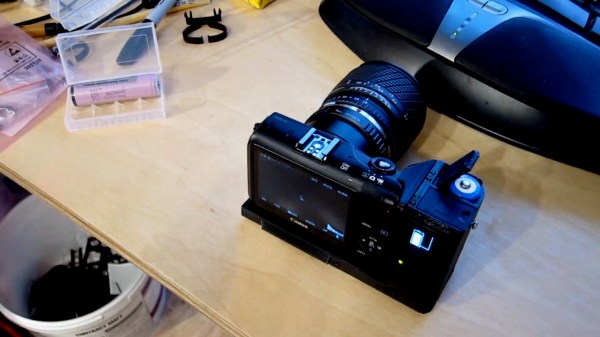
Modern DSLR cameras are incredible pieces of technology that can take excellent high-quality photos as well as record video and audio. However, as they become jacks of all trades they risk being masters of none, and the audio quality in modern DSLRs certainly reflects that old cliche. To get true high-quality audio while recording with a camera like this Canon 80d, you’ll either need a secondary audio recording device or you’ll need to interface one directly into the camera itself.

This build from [Tony] aka [Carnivore] goes into the inner workings of the camera to add an audio mixer to the camera’s audio input, allowing for multiple audio streams to be recorded at once. First, he removed the plastic around the microphone port and attached a wire to it that extends out of the camera to a 1/8″ plug. While he had the case open he also wired a second shutter, added a record button to a custom location on the front of the camera, and bypassed a switch which prevents the camera from operating if the battery door isn’t closed.

With those modifications in place, he removed the internal flash from the camera before closing the body. A custom 3D printed mount was placed in the vacant space which now houses the audio mixer, a SR-AX100 from Saramonic. This plugs in to the new microphone wire from earlier in the build, allowing the camera to have an expanded capacity for recording audio.

While [Tony] has a fairly unique use case for all of these modifications to an already $1000 camera, getting into the inner workings of DSLRs isn’t something to shy away from if you need something similar done. We’ve even seen modifications to cameras like these to allow for watercooling during video recording.

Continue reading “Extensive Modification Of DSLR Includes High Quality Audio”

Raspberry Pi Tally Lights

Running a camera studio is a complicated affair from pretty much every angle. Not only is the camera gear expensive but the rest of the studio setup takes care and attention down to the lighting as well. When adding multiple cameras to the mix, like for a television studio, the level of complexity increases exponentially. It’s great to have a few things that simplify the experience of running all of this equipment too, without the solution itself causing more problems than it solves, like these network-operated Raspberry Pi-powered tally lights.

A tally light is the light on a camera that lets the person being recorded know which camera is currently in use. Networking them all together often requires complex wiring or at least some sort of networking solution, which is what this particular build uses. However, the lights are controlled directly over HTTP rather than using a separate application which might need a port open on a firewall or router, which not only simplifies their use but doesn’t decrease network security.

The HTTP interface, plus all of the software and schematics for this build, are available on the project’s GitHub page. We imagine the number of people operating a studio and who are in need of a tally light system to be fairly low, but the project is interesting from a networking point-of-view regardless of application. If you do have a studio like this and are looking for other ways to improve it, we do have a simple teleprompter hack that might be right up your alley.

Watercooling A Canon DSLR Leads To Serious Engineering Upgrades

The Canon EOS R5 is a highly capable, and correspondingly very expensive camera. Capable of recording video in 8K in a compact frame size, it unfortunately suffers from frustrating overheating issues. Always one to try an unconventional solution to a common problem, [Matt] decided to whip up a watercooling solution. What ensues is pure, top-notch engineering.

The watercooling setup is amusing, but the real star of the show is the custom copper heatsink that transforms the camera’s performance without spoiling its practicality.

Upon its original release, Canon had the R5 camera simply shut off on a 20 minute timer when recording 8K video. When the userbase complained, an updated firmware was released that used an onboard sensor and would only shutdown when excessive temperatures were reached. Under these conditions, the camera could record for around 25 minutes at 20 °C. [Matt] set about disassembling the camera to investigate, figuring out that the main processor was the primary source of heat. With a poor connection to its heatsink and buried under a power supply PCB, there simply wasn’t anywhere for heat to go, leaving the camera to regularly overheat and take hours to cool down.

After whipping up an amusing but impractical watercooling solution and verifying it allowed the camera to record indefinitely, [Matt] set about some proper thermal engineering. A custom copper heatsink was produced for inside the camera, bonded directly to the processor and DRAM with thermal paste instead of poor-quality thermal tape. This then directs heat out through the plastic back of the camera. In cool environments, this is enough to allow the camera to record continuously. In warmer environments, simply adding a small fan to the back of the camera was enough to keep things operational indefinitely.

[Matt] finishes the video by pointing out that Canon could have made the camera far more useful for videographers by simply investing a little more time into the camera’s cooling design, while also generating more profits by selling a cooling accessory for extended recording. We’ve seen some of [Matt’s] work before too, such as this DIY 4K projector build. Video after the break.

Continue reading “Watercooling A Canon DSLR Leads To Serious Engineering Upgrades”

USB Webcams Out Of Stock? Make One With A Raspberry Pi And HQ Camera Module

More people working from home has had an impact on the cost and availability of USB webcams, so [Jeff Geerling] got around the issue with a DIY solution that rang in around $100. It consists of a Raspberry Pi and HQ camera module acting as a USB webcam, and there is no messy streaming of ffmpeg over the network masquerading as a camera device or anything. It works just as a USB camera should.

[Jeff] chose a Raspberry Pi Zero and HQ camera module for his unit, making a tidy package that might not be quite as small as commercial webcams, but is certainly perfectly respectable as a USB camera. That being said, there are a few drawbacks, namely the lack of a microphone or autofocus, latency issues at higher resolutions, and the need to shut down the Pi cleanly.

Check out the GitHub repository for everything needed to set up your own, including a complete hardware list and some options for mounting. [Jeff] also tested whether the camera would work with the new keyboard-embedded Raspberry Pi 400, and it absolutely does. Embedded below is a video walkthrough and demonstration of the whole project, so check it out.

Continue reading “USB Webcams Out Of Stock? Make One With A Raspberry Pi And HQ Camera Module”

Raspberry Raven Pi Security Camera Does Double Duty

The worst thing about holiday decorations is that while you could leave them up all year, your neighbors probably won’t like you very much for it. Christmas lights on your house are one thing, but as far as Halloween decorations go, [MisterM]’s raven security camera is one of the few exceptions to this rule.

Nevermore will [MisterM] wonder who goes there. As soon as this raven lays its beady red LED eyes on whatever is lurking in the garden, it comes to life with a bit of head swiveling and some random sounds. The bird either goes CAW! or quotes Christopher Lee’s reading of Edgar Allen Poe’s “The Raven”.

Inside this bird’s chest cavity is a Raspberry Pi 2 and standard camera, a servo to swivel the head, and an audio amplifier and speaker. This bird is running MotionEye on top of the Raspi OS so it can run a script whenever it senses motion.

We like that [MisterM] was able to find right-sized bits of plastic to mount the servo in the neck and the horn to the head. It just goes to show that not everything needs a 3D printer, a CNC, or woodworking. Check out the scary demo after the break.

Want to scare the whole neighborhood? Check out the science behind good-looking house projections.

Continue reading “Raspberry Raven Pi Security Camera Does Double Duty”