One Lucky 3DS Gets A Switch-Style Dock

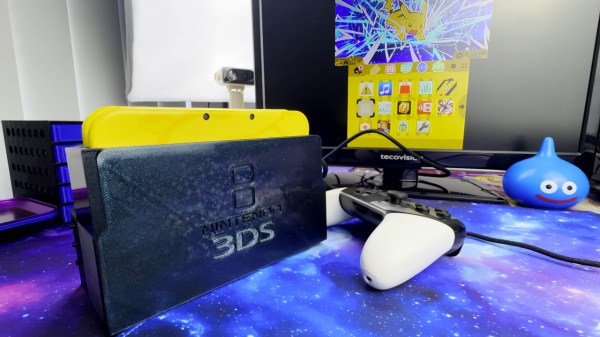
The Nintendo Switch dock set a new bar for handheld docking user experience – just plug your console in to charge it, output image to your monitor, and keep it working with any USB peripherals of your choice. What if a 3DS is more your jam? [KOUZEX] shows off a Switch-style dock design for his gorgeous yellow 3DS, with Switch Pro controller support, and this dock wasn’t just a 3D printing job – there’s a fair bit of electronics to show, too.

While the 3DS looks stock at a glance, it has already been upgraded internally – there’s a USB-C capture card built in, half-ticking the “monitor output” requirement, and a Raspberry Pi board turns that output into HDMI. Building a charging dock is also pretty simple, with just two contacts on the side that desire 5V. Now, the pro controller support was a fair bit harder – requiring an internal modchip for emulating buttons, and trying out receiver boards for the Switch controller until a well-functioning one was found.

The build video is quite satisfying to watch, from assembling some QFNs onto tiny OSHPark boards using a hotplate and soldering them into the 3DS, to planning out, building, and dremeling some prints to create a true slide-console-into-dock experience, same way the Switch pulled it off. It even has the same USB-C and HDMI arrangement as the Switch dock, too! Want a simpler dock for your 3DS? Don’t forget that you can build a charger dock for yours with just a 3D print and a few wires.
Continue reading “One Lucky 3DS Gets A Switch-Style Dock”

Building A Stylish IPhone Standby Dock

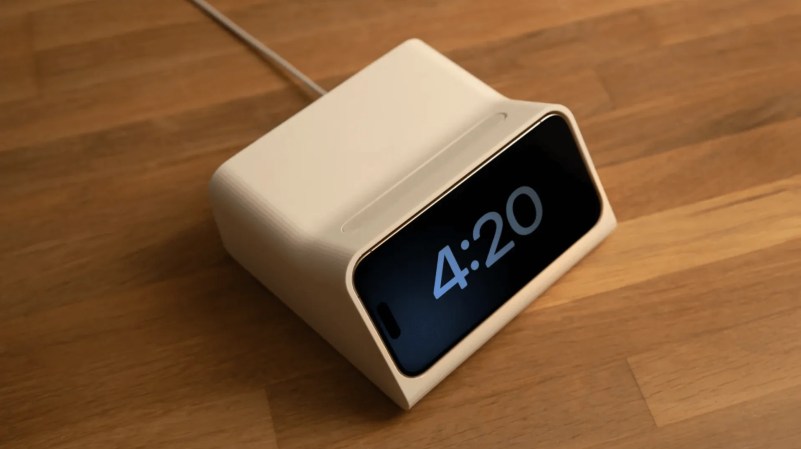
[Scott Yu-Jan] is a big fan of the iPhone’s standby mode. Put the phone on charge horizontally, and it looks all stylish, with sleek widgets and clocks and stuff showing you information you presumably care about. [Scott] enjoyed this so much, in fact, he whipped up a custom charging dock to make the most of it.

The design was a collaboration with artist [Overwork], who mentioned the DN 40 alarm clock created by legendary designer [Dieter Rams]. [Overwork] sent [Scott] a draft inspired by that product, and he printed one up. It featured an integrated MagSafe charger to juice up the iPhone, and pressing into one side of the phone would pop it free. It was cool, but a little clumsy to use.

[Scott] liked the basic concept, but shows us how he iterated upon it to make it even nicer. He added in a wireless charger for AirPods in the back, gave the device adhesive feet, and a big chunky eject button to release the phone when desired.

You can also grab the files to print your own if you so desire! We’ve seen [Scott’s] work before, too, like his neat 3D scanner build. Video after the break.

Continue reading “Building A Stylish IPhone Standby Dock”

Printable Keyboard Dock Puts Steam Deck To Work

Whether or not you’re into playing video games, you have to admit, that the Steam Deck is a pretty interesting piece of hardware. We’ve seen hackers jump through all sorts of uncomfortable hoops to get Linux running on their mobile devices in the past. The fact that you can pick up a fairly powerful x86 handheld computer right now for a reasonable amount of money is certainly exciting. The Linux steam deck gets even more enticing when you consider the software support it enjoys thanks to its large and vibrant user community. No wonder we’ve started to see them dotting the workbenches during Hackaday Supercon.

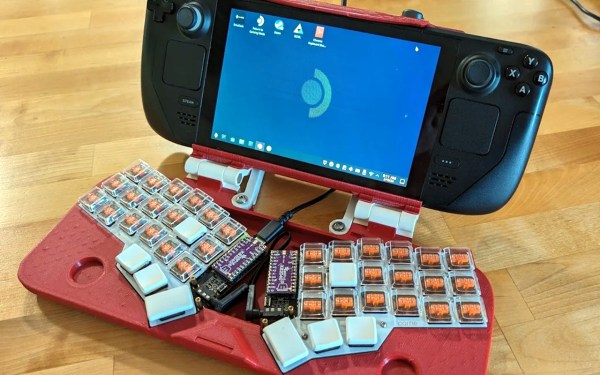
If there’s a downside, it’s that the Steam Deck was very clearly designed to be a handheld gaming system, not a portable computer. Sure you can plug in an external monitor and keyboard, but things can quickly become ungainly. This is why a printable dock from [a8ksh4] caught our eye.

It’s officially designed to let you mate the Steam Deck with the Corne keyboard, a split ergonomic design that’s graced these pages a few times in the past. [A8ksh4] has included links for all the hardware you’ll need outside the printed parts, from the hinges and keyboard PCBs, all the way to the keycaps and stainless steel screws. If you’re looking for a turnkey experience, this is it.

Continue reading “Printable Keyboard Dock Puts Steam Deck To Work”

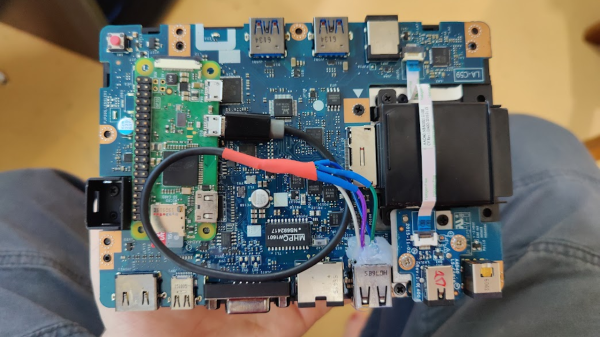
Showing the dock PCB with a Pi Zero attached and wired up onto it

Is Your USB-C Dock Out To Hack You?

In today’s installment of Betteridge’s law enforcement, here’s an evil USB-C dock proof-of-concept by [Lachlan Davidson] from [Aura Division]. We’ve seen malicious USB devices aplenty, from cables and chargers to flash drives and even suspicious USB fans. But a dock, however, is new. The gist is simple — you take a stock dock, find a Pi Zero W and wire it up to a USB 2.0 port tapped somewhere inside the dock. Finding a Pi Zero is unquestionably the hardest part in this endeavor — on the software side, everything is ready for you, just flash an SD card with a pre-cooked malicious image and go!

On the surface level, this might seem like a cookie-cutter malicious USB attack. However, there’s a non-technical element to it; USB-C docks are becoming more and more popular, and with the unique level of convenience they provide, the “plug it in” temptation is much higher than with other devices. For instance, in shared workspaces, having a USB-C cable with charging and sometimes even a second monitor is becoming a norm. If you use USB-C day-to-day, the convenience of just plugging a USB-C cable into your laptop becomes too good to pass up on.

This hack doesn’t exactly use any USB-C specific technical features, like Power Delivery (PD) – it’s more about exploiting the convenience factor of USB-C that incentivizes you to plug a USB-C cable in, amplifying an old attack. Now, BadUSB with its keystroke injection is no longer the limit — with a Thunderbolt-capable USB-C dock, you can connect a PCIe device to it internally and even get access to a laptop’s RAM contents. Of course, fearing USB-C cables is not a viable approach, so perhaps it’s time for us to start protecting from BadUSB attacks on the software side.

Playdate Handheld Turned Typewriter

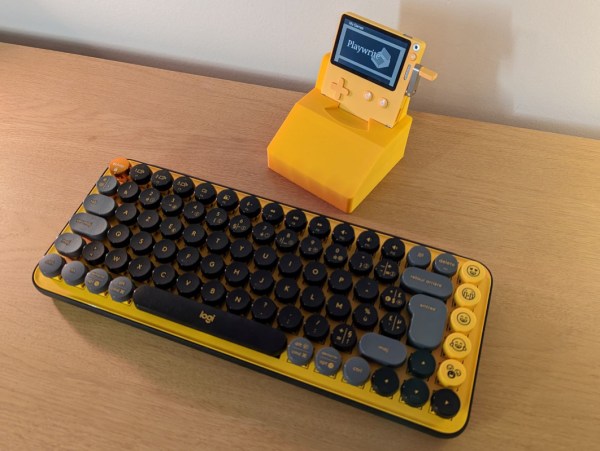
The Playdate is an interesting gaming system. It’s a handheld, has a black and white screen, and superficially reminds us a little bit of the original Game Boy, right down to the button layout. But the fact that it has a second controller that pops out of the side, that this controller is a crank, and that the whole system was made by the same people that made Untitled Goose Game, makes us quite intrigued. Apparently it has made an impact on others, too, because this project turns the gaming system into a typewriter.

The Playdate doesn’t have native support for USB accessories unless it’s plugged into this custom 3D printed dock. Inside of the dock is a Teensy 4.1 which handles some translation between the keyboard and the console. Once the dock is taken care of the text editor needs to be side-loaded to the device as well. The word processor has the ability to move the cursor around, insert and delete text, and the project’s creator, [t0mg], plans to add more features in future versions like support for multiple files, changing the font, and a few other things as well.

For anyone interested in recreating this project, all of the printable files, the text editor, and the schematics are all available in the GitHub repo. It’s an impressive project for a less well-known console that we haven’t seen many other hacks for, unless you count this one-off Arduboy project which took some major inspiration from the Playdate’s crank controller.

Nintendo Switch Gets A Stylish Dock In A Broken NES

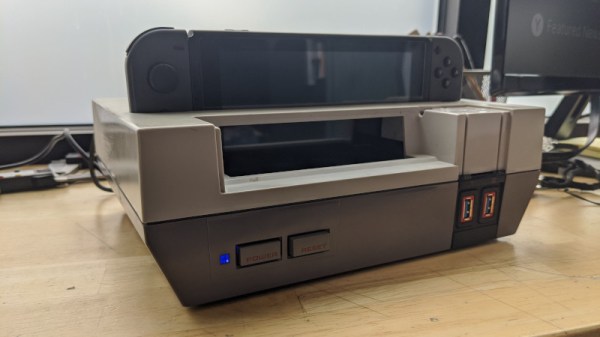
The Switch is Nintendo’s latest home console, which has forever blurred the line between handhelds and consoles you plug in to your TV. It does both! Typically, hooking up to a screen is done through the dock, but that wasn’t quite cool enough for [sturm]. He took a NES and turned it into a tidy Switch dock instead!

The build starts with an original NES shell, which is gutted of its original hardware. The PCB from the original dock is installed, and a slot cut in the top of the NES to allow the Switch to be inserted. Naturally, there’s a spring flap reminiscent of the Super NES to keep the dock looking clean when not in use. When it is installed, a series of cables and bezels break out the USB ports to the original controller ports on the NES.

It’s a tidy build that brings a touch of nostalgia to the modern console. We’re sure an official version would sell like hotcakes, too. There’s plenty of similarly inspired builds for the Switch, with the Gamecube Joycons a particular highlight!

Continue reading “Nintendo Switch Gets A Stylish Dock In A Broken NES”

Nintendo Switch Laptop Isn’t As BASIC As It Looks

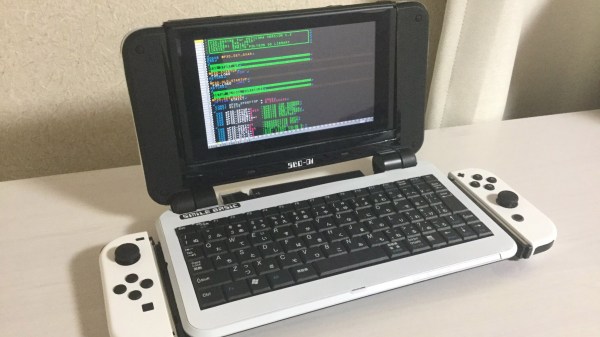
Remember the days when computers booted up straight into a BASIC screen, where theoretically you could program yourself a full game without any further software needed? Well, in reality most of us were amused enough making it print “butts” over and over again, but there are those who are adept in the dark arts of making impressive things with such a limited language. [Bugtaro] is one of those people, and to help with his game development in SmileBASIC 4 on the Nintendo Switch, he built himself a dock that turns it into a laptop with an integrated keyboard.

Details on the build are scarce as it’s only outlined in his Twitter account, but there’s enough to give us an idea about what it’s composed of. The Switch slides into the top just like the official dock it comes with, and the laptop shell takes advantage of those functions. Inside it is a 5000 mAh battery to extend the portable life of the whole ensemble, plus a USB hub which gives it its built-in keyboard and allows for a mouse to be plugged in as well. The laptop also gives the Switch its docked TV output mode and can hold the Joy-cons slotted on its sides.

This project would pass for any other case mod here at Hackaday if it weren’t for the fact that [Bugtaro] is in fact a programmer that has been releasing BASIC software on Japanese magazines since the 1980s and worked on several cult classic Mega Drive games with Wolf Team and NexTech during the 1990s. His latest game is GIVERS P3D, a game programmed in SmileBASIC using a 3D engine of his own design and one of the flagship games for the platform. It would be interesting to see if more SmileBASIC programmers end up coming up with their own solutions to aid their development experience following this project.

If you’re interested in the possibilities of custom-made Switch docks like these but don’t fancy giving it a keyboard, how about this one that wraps a Gamecube controller around the screen? And if you don’t have a Switch yet and are looking for a bigger challenge, well, you can make your own from scratch.

[Via GoNintendo]