Hackaday Links Column Banner

Hackaday Links: October 6, 2019

“If you or someone you love has been exposed to questionable quality electrolytic capacitors, you could be entitled to financial compensation.” Perhaps that’s not exactly the pitch behind this class action lawsuit against capacitor manufacturers, but it might as well be. The suit claims that the defendants, a group of capacitor manufacturers that includes Nichicon, Matsuo, ELNA, and Panasonic, “engaged in an unlawful conspiracy to fix, raise, maintain, or stabilize the prices of Capacitors.” Translation: if you bought capacitors between 2002 and 2014 from a distributor, you paid too much for them. The suit aims to recover a bunch of money from the defendants and divide it up between all the class members, so make sure you go back through all your receipts from Mouser and DigiKey over the last 17 years so you can file a claim that could be worth several dozen cents.

When are people going to learn that posting pictures of their illegal activities online is an Official Bad Idea? One SpaceX fan earned a night in jail after posting selfies he took with Starhopper, the SpaceX test article currently residing at Elon Musk’s would-be spaceport at Boca Chica, Texas. JB Wagoner, a SpaceX super-fan, made the pilgrimage from California to Texas — in his Tesla of course — to see the recent Starship Mark 1 unveiling, and decided to take a side trip to see the Starhopper. He parked at a beach, climbed a dune, and was able to walk right up to Starhopper and go selfie-crazy. After posting the pictures on Facebook, he was arrested, interviewed by Homeland Security, charged with criminal trespass, and thrown in a cell overnight. Wagoner has since been bonded out, but the charges might not stick, since Texas trespassing law requires clear signage or verbal notification of trespass, neither of which Wagoner encountered. SpaceX had even let the fence between the beach and the Starhopper collapse, so Wagoner seems to have had no way of knowing he was trespassing. Still, posting the pictures online was probably asking for trouble.

As satire and dark comedy, the 1987 cyberpunk classic RoboCop can’t be beat. But it also managed to accurately foreshadow a lot of what was to come in the world in terms of technology. No, we don’t have cyborg law enforcement — yet — but we do have something predicted by one throwaway scene: robotic realtors. In the movie, kiosks were set up around Murphy’s old house to extol the various virtues of living there, which ended up triggering the cyborg and starting the film’s climactic rampage. The real-life robotic realtor is a little more flexible, more like a telepresence robot — described aptly as “a Segway with an iPad on top.” The robotic realtor is not autonomous; it only lets a remote realtor interact with potential homebuyers without having to travel to multiple homes. It seems a little gimmicky to us, but the robots are reported to have made 25 sales in their first year on the job.

We’ve been seeing a lot of cheap resin printers these days, enough to make us want to jump into the market and start playing with them. But the cheap ones are all cheap for the same reason — they’re so dang small! They all use LCD screens from phones to mask off the UV light used to cure the resin, and the resulting print volume is tiny. Clem Mayer from MayerMakes has bigger ideas, though: he wants to make a giant resin printer using an LCD monitor as the mask. It’s not as simple as using a bigger screen, though; the film used between the screen and the resin, a fluoropolymer film called FEP, gets deformed when used on larger screens. So Clem is looking at a new built-plate interface that floats the resin on a layer of denser, immiscible liquid. It’s an interesting idea that is still clearly in the proof-of-concept phase, but we look forward to seeing what progress Clem makes.
Monochrome CRT And Liquid Crystal Shutter Team Up For Color Video

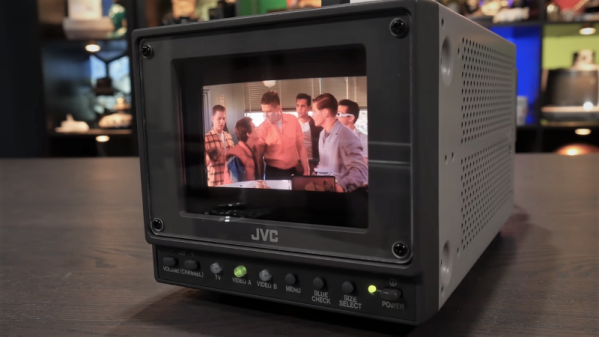
If you were tasked with designing a color video monitor, it’s pretty clear how you’d go about it. But what if you’d been asked to do so 20 years ago? Would it have been a cut and dried from an engineering standpoint? Apparently not, as this hybrid LCD-CRT video monitor demonstrates.

We’d honestly never heard of this particular design, dubbed “LCCS”, or liquid crystal color shutter, until [Technology Connections]’ partial teardown of the JVC monitor and explanation of its operation. The idea is simple and hearkens back to the earliest days of color TV in the United States, when broadcasters were busy trying to bring color to a monochrome world in a way that would maximize profits. One scheme involved rotating a color wheel in front of the black-and-white CRT and synchronizing the two, which is essentially what’s happening in the LCCS system. The liquid crystal panel cycles between red, blue, and green tints in time with the CRT’s images behind it, creating a full-color picture. “But wait!” you cry. “Surely there were small color CRTs back in the year 2000!” Of course there were, but they kind of sucked. Just look at the comparison of a color CRT and the LCCS in the video below and you’ll see why this system carved out a niche in the pro video market, especially for video assist monitors in the days before digital cinematography. A similar system was used by Tektronix for color oscilloscopes, too.

As usual, [Technology Connections] has managed to dig up an interesting bit of the technological fossil record and present it in a fascinating way. From video on vinyl to 1980s copy protection to the innards of a toaster, we enjoy the look under the hood of forgotten tech.

Continue reading “Monochrome CRT And Liquid Crystal Shutter Team Up For Color Video”

Resin Printers Are Now Cheaper, Still Kind Of A Hassle

Your run-of-the-mill desktop 3D printer is based on a technology known as Fused Deposition Modeling (FDM), where the machine squirts out layers of hot plastic that stick to each other. But that’s not the only way to print a Benchy. One of the more exotic alternative techniques uses a photosensitive resin that gets hardened layer by layer. The results are impressive, but historically the printers have been very expensive.

But it looks like that’s finally about to change. The [3D Printing Nerd] recently did a review of the Longer3D Orange 10 which costs about $230, less than many FDM printers. It isn’t alone, either. Monoprice has a $200 resin printer, assuming you can find it in stock.

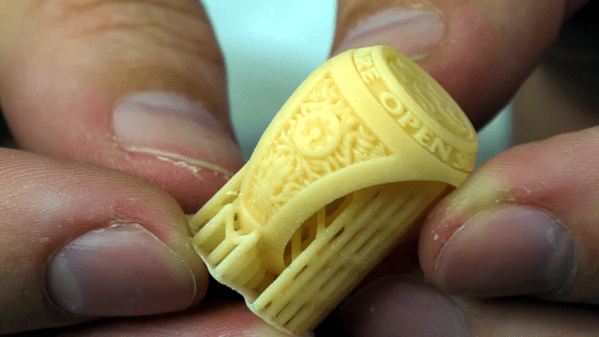
The resin isn’t cheap and it’s harder to handle than filament. Why is it harder to handle? For one is smells, but more importantly, you aren’t supposed to get it on your skin. The trade off is that the resulting printed parts look fantastic, with fine detail that isn’t readily possible with traditional 3D printing techniques.

Some resin printers use a laser to cure resin at particular coordinates. This printer uses an LCD to produce an image that creates each layer. Because the LCD exposes all the resin at one time, each layer takes a fixed amount of time no matter how big or detailed the layer is. Unfortunately, using these displays means the build area isn’t very large: the manufacturer says it’s 98 by 55 millimeters with a height of up to 140mm. The claimed resolution, though, is 10 microns on the Z-axis and 115 microns on the LCD surface.

Getting the prints out of the printer requires you to remove the uncured resin. In the video, they used a playing card and two alcohol baths. After you remove the uncured resin, you’ll want to do a final curing step. More expensive printers have dedicated curing stations but on this budget printer, you have to cure the parts separately. How? By leaving them out in the sun. Presumably, you could use any suitable UV light source.

There are a few other similar-priced options out there. Sparkmaker, Wanhao (resold by Monoprice). If you’re willing to spend more, Prusa has even thrown their orange hat into the ring. If you were wondering if you could use the LCD in your phone to do this, the answer is sort of.

Continue reading “Resin Printers Are Now Cheaper, Still Kind Of A Hassle”

The Bluetooth LCD Sniffer You Didn’t Know You Needed

At one time or another, we’ve all suffered through working with a piece of equipment that didn’t feature a way to export its data to another device. Whether it was just too old to offer such niceties, or the manufacturer locked the capability behind some upgrade, the pain of staring at digits ticking over on a glowing LCD display and wishing there was a practical way to scrape what our eyes were seeing is well known to hackers.

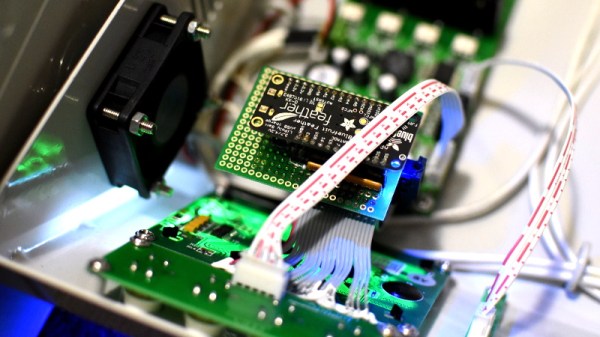
That was precisely the inspiration for DoMSnif, the dot matrix LCD sniffer that [Blecky] has been working on. Originally the project started as a way to record the temperature of his BRTRO-420 reflow oven, but realizing that such a device could have widespread appeal to other hardware hackers, he’s rightfully decided to enter it into the 2019 Hackaday Prize. If perfected, it could be an excellent way to bolt data capture capabilities to your older devices.

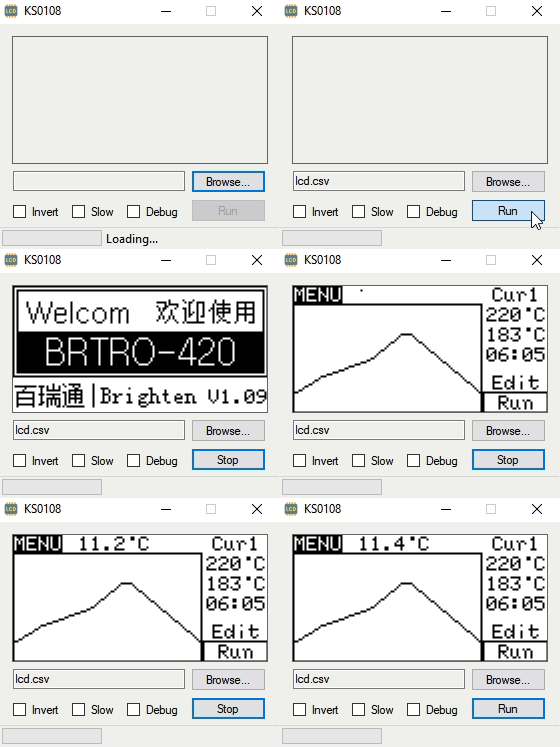
The first phase of this project was figuring out how to capture and parse the signals going into the device’s KS0108 LCD. Getting the data was certainly easy enough, he just had to hook a logic analyzer up between the display and the main board of the device. Of course, figuring out what it all means is a different story.

After running the oven for a bit with the analyzer recording, [Blecky] had more than enough data to get started on decoding it. Luckily, the layout of this fairly common 128×64 pixel display is well documented and easy enough to understand. With a little work, he was able to create a tool that would import the captured data and display it on a virtual LCD.

Unfortunately, the Bluetooth part is where things get tricky. Ultimately, [Blecky] wants to ditch the logic analyzer and use a Adafruit Feather nRF52 Bluefruit to capture the signals going to the LCD and pipe them to a waiting device over Bluetooth. But his testing has found that the nRF52’s radio is simply too slow. The display is receiving data every 14us, but it takes the radio at least 50us to send a packet.

[Blecky] is looking at ways around this problem, and we’re confident he’ll crack it. The solution could be in buffering and compressing the data before sending it out, though you’d lose the ability to monitor the display in real-time. Even if he has to abandon the Bluetooth aspect entirely and make the device wired, we still think there would be a market for an easy to use hardware and software solution for scraping LCD data.

This Tiny TFT Pendant Is Digital Jewelry

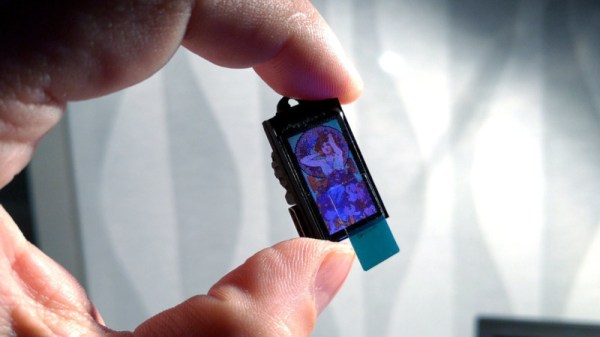
Hackers have a multitude of skills, many are well-versed in the ways of all things that blink and flash. These abilities have often be applied to the field of jewelry and human adornment, and many LEDs have been employed in this work. [Deshipu] has been attempting something a touch different however, by constructing a tiny TFT pendant.

The basic idea is not dissimilar from those USB photo keychains of recent history. A SAMD21 Cortex M0+ serves as the brains of the operation, with the tiny microcontroller being soldered to a custom PCB that makes up the body of the pendant. A ST7735S TFT LCD screen is then attached to act as the display. Charging and delivery of images is done over USB, which can be handled natively by the SAMD21.

Currently, the pendant is capable of displaying 16-color BMPs, with the intention to create a converter for animated GIFs in the pipeline. Potential upgrades also involve creating a larger battery pack to sit behind the wearer’s neck, as currently the device has just 8 mAh to work with.

It’s a nicely designed piece, with the pendant appearing barely bigger than the screen itself. It’s not the first time we’ve seen a hacker take on a pendant, and we’re sure it won’t be the last. If you’ve got the goods, be sure to hit up the tip line. 

Prusa Printer Gets An LCD-ectomy, Gains A VFD

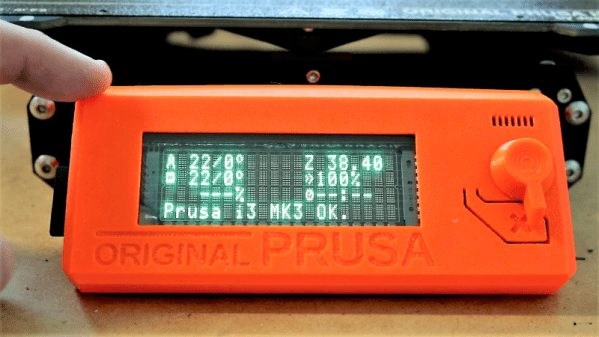
What’s wrong with the OEM display on a Prusa I3 Mk3? Nothing at all. Then why replace the stock LCD with a vacuum fluorescent display? Because VFDs are much, much cooler than LCDs.

(Pedantic Editor’s Note: VFDs actually run a little warm.)

At least that’s the reasoning [Scott M. Baker] applied to his Prusa upgrade. We have to admit to a certain affection for all retro displays relying on the excitation of gasses. Nixies, Numitrons, and even the lowly neon pilot light all have a certain charm of their own, but by our reckoning the VFD leads the pack. [Scott] chose a high-quality Noritake 4×20 alphanumeric display module for his upgrade, thriftily watching eBay for bargains rather than buying from the big distributors. The module has a pinout that’s compatible with the OEM LCD, so replacing it is a snap. [Scott] simplified that further by buying a replacement Prusa control board with no display, to which he soldered the Noritake module. Back inside the bezel, the VFD is bright and crisp. We like the blue-green digits against the Prusa red-orange, but [Scott] has an orange filter on order for the VFD to make everything monochromatic. That’ll be a nice look too.

A completely none functional hack, to be sure, but sometimes aesthetics need attention too. And it’s possible that a display switch would help the colorblind use the UI better, like this oscilloscope mod aims to do.

Continue reading “Prusa Printer Gets An LCD-ectomy, Gains A VFD”

Driving A 16×2 LCD With Voltage Modulation

The basic 16×2 LCD is an extremely popular component that we’ve seen used in more projects than we could possibly count. Part of that is because modern microcontrollers make it so easy to work with; if you’ve got an I2C variant of the display, it only takes four wires to drive it. That puts printing a line of text on one of these LCDs a step or two above blinking an LED on a digital pin on the hierarchy of beginner’s electronics projects.

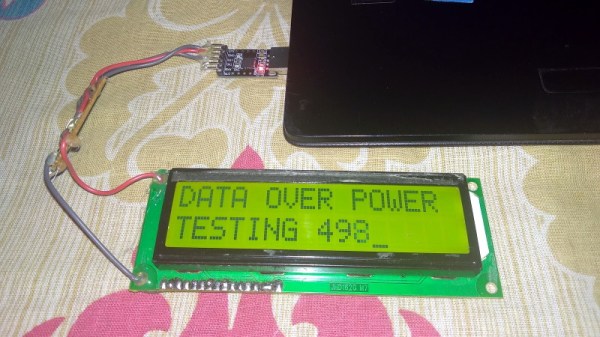
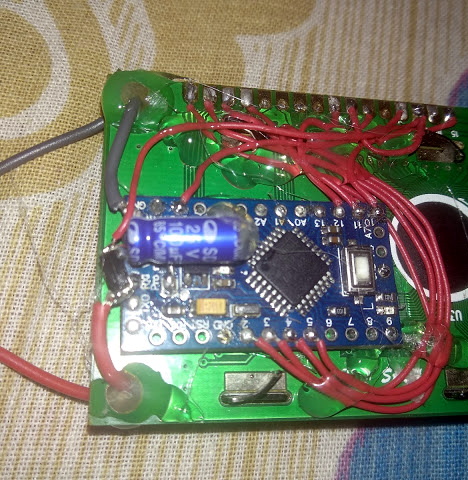
What’s that? Even four wires is too many? In that case, you might be interested in this hack from [Vinod] which shows how you can drive the classic 16×2 with data and power on the same pair of wires. You’ll still need a microcontroller “backpack” for the LCD to interpret the modulated voltage, but if you’ve got an application for a simple remote display, this is definitely worth checking out.

The basic idea is to “blink” the 5 V line so quick that a capacitor on the LCD side can float the electronics over the dips in voltage. As long as one of the pins of the microcontroller is connected to the 5 V line before the capacitor, it will be able to pick up when the line goes low. With a high enough data rate and a large enough capacitor as a buffer, you’re well on the way to encoding your data to be displayed.

For the transmitting side, [Vinod] is using a Python script on his computer that’s sending out the text for the LCD over a standard USB to UART converter. That’s fed into a small circuit put together on a scrap of perfboard that triggers a MOSFET off of the UART TX line.

We actually covered the theory behind this technique years ago, but it’s always interesting to see somebody put together a real-world example. There might not be too many practical uses for this trick in the era of dirt-cheap microcontrollers bristling with I/O, but it might make a fun gag at your hackerspace.

Continue reading “Driving A 16×2 LCD With Voltage Modulation”