You Don’t Need That Bulky CRT Oscilloscope Anymore

While it might be nice to use a $4,000 oscilloscope in a lab at a university or well-funded corporate environment, a good portion of us won’t have access to that kind of equipment in our own home shops. There are a few ways of getting a working oscilloscope without breaking the bank, though. One option is to find old CRT-based unit for maybe $50 on craigslist which might still have 60% of its original 1970s-era equipment still operational. A more reliable, and similarly-priced, way of getting an oscilloscope is to just convert a device you already have.

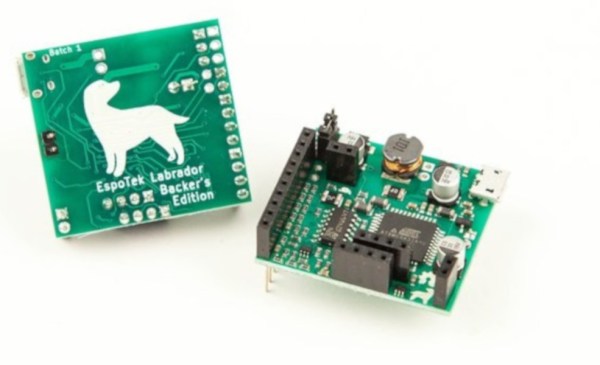
The EspoTek Labrador is an open-source way of converting a Raspberry Pi, Android device, or even a regular run-of-the-mill computer into a working oscilloscope. It’s a small USB device with about a two square inch PCB footprint that includes some other features as well like a signal generator and logic analyzer. It’s based on an ATxmega which is your standard Arduino-style AVR microcontroller but geared for low power usage. It looks as though it is pretty simple to use as well, and the only requirements are that you can install the software needed for the device on whatever computing platform you decide to use.

While the Labrador is available for sale at their website, it is definitely a bonus when companies offer products like this but also release the hardware and software as open source. That’s certainly a good way to get our attention, at least. You can build your own if you’d like, but if you’d rather save the time you have pre-built options. And it doesn’t hurt that most of the reviews of this product seem to be very favorable (although we haven’t tried one out ourselves). If you’d prefer an option without a company backing it, though, we have you covered there too.
Prusa Launches Their Own 3D Model Repository

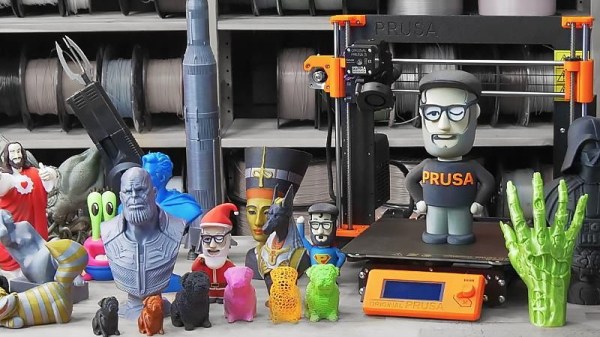
If you own a 3D printer, you’ve heard of Thingiverse. The MakerBot-operated site has been the de facto model repository for 3D printable models since the dawn of desktop 3D printing, but over the years it’s fallen into a state of disrepair. Dated and plagued with performance issues, many in the community have been wondering how long MakerBot is still going to pay to keep the lights on. Alternatives have popped up occasionally, but so far none of them have been able to amass a large enough userbase to offer any sort of real competition.

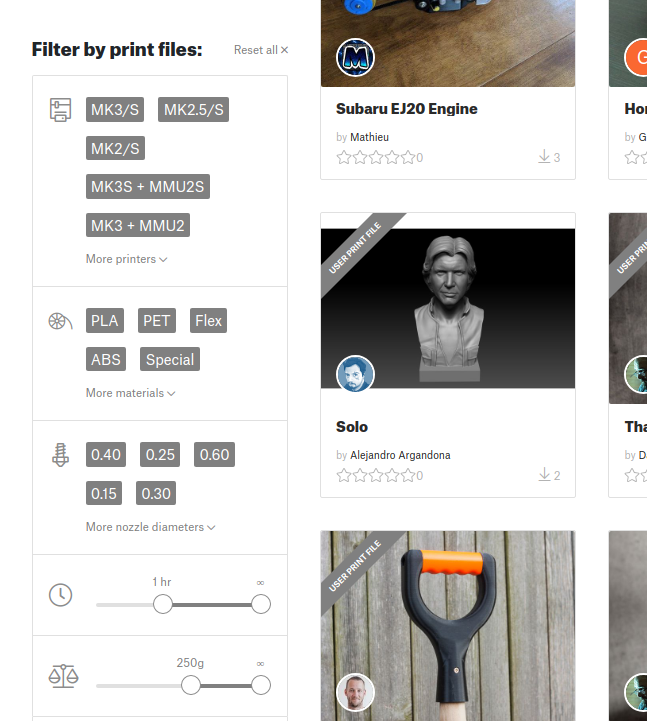
Sorting models by print time and material required.

But that might soon change. [Josef Průša] has announced a revamped community for owners of his 3D printers which includes a brand-new model repository. While clearly geared towards owners of Prusa FDM printers (support for the new SLA printer is coming at a later date), the repository is not exclusive to them. The immense popularity of Prusa’s products, plus the fact that the repository launched with a selection of models created by well known designers, might be enough to finally give Thingiverse a run for its money. Even if it just convinces MakerBot to make some improvements to their own service, it would be a win for the community.

The pessimists out there will say a Prusa-run model database is ultimately not far off from one where MakerBot is pulling the strings; and indeed, a model repository that wasn’t tied to a particular 3D printer manufacturer would be ideal. But given the passion for open development demonstrated by [Josef] and his eponymous company, we’re willing to bet that the site is never going to keep owners of other printers from joining in on the fun.

That being said, knowing that the users of your repository have the same printer (or a variant, at least) as those providing the designs does have its benefits. It allows for some neat tricks like being able to sort designs by their estimated print time, and even offers the ability to upload and download pre-sliced GCode files in place of traditional STLs. In fact, [Josef] boasts that this is the world’s only repository for ready-to-print GCode that you can just drop onto an SD card and print.

Regular Hackaday readers will know that we’ve been rather critical of the decisions made by MakerBot over the last few years, but to be fair we aren’t exactly alone in that respect. The community desperately needs a repository for printable models that’s in somebody else’s hands, and frankly we’re thrilled with the idea it could be [Josef Průša] leading the charge. His printers might not be perfect, and they certainly aren’t cheap, but they definitely don’t fail to impress. Here’s hoping this latest venture will be the same.

Continue reading “Prusa Launches Their Own 3D Model Repository”

The Future Of Fritzing Is Murky At Best

Fritzing is a very nice Open Source design tool for PCBs, electrical sketches, and schematics for designers and artists to move from a prototype to real hardware. Over the years, we’ve seen fantastic projects built with Fritzing. Fritzing has been the subject of books, lectures, and educational courses, and the impact of Fritzing has been huge. Open up a book on electronics from O’Reilly, and you’ll probably see a schematic or drawing created in Fritzing.

However, and there’s always a however, Fritzing is in trouble. The project is giving every appearance of having died. You can’t register on the site, you can’t update parts, the official site lacks HTTPS, the Twitter account has been inactive for 1,200 days, there have been no blog posts for a year, and the last commit to GitHub was on March 13th. There are problems, but there is hope: [Patrick Franken], one of the developers of Fritzing and the president of the PCB firm Aisler which runs the Fritzing Fab, recently gave a talk at FOSDEM concerning the future of Fritzing. (That’s a direct FTP download, so have fun).

Continue reading “The Future Of Fritzing Is Murky At Best”

Open Source LIDAR Lets You Get Down To The Nitty Gritty

If you’re unfamiliar with LIDAR, you might have noticed it sounds a bit like radar. That’s no accident – LIDAR is a backronym standing for “light detection and ranging”, the word having initially been created as a combination of “light” and “radar”. The average person is most likely to have come into contact with LIDAR at the business end of a police speed trap, but it doesn’t have to be that way. Unruly is the open source LIDAR project you’ve been waiting for all along.

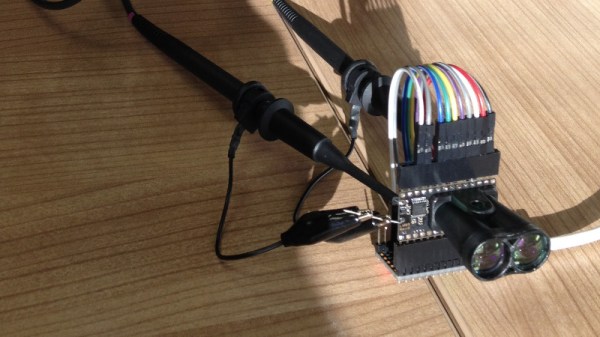
Unlike a lot of starter projects, LIDAR isn’t something you get into with a couple of salvaged LEDs and an Arduino Uno. We’re talking about measuring the time it takes light to travel relatively short distances, so plenty of specialised components are required. There’s a pulsed laser diode, and a special hypersensitive avalanche photodiode that operates at up to 130 V. These are combined with precision lenses and filters to ensure operation at the maximum range possible. Given that light can travel 300,000 km in a second, to get any usable resolution, a microcontroller alone simply isn’t fast enough to cut it here. A specialized  time-to-digital converter (TDC) is used to time how long it takes the light pulse to return from a distant object. Unruly’s current usable resolution is somewhere in the ballpark of 10 mm – an impressive feat.

It’s a complicated project, requiring the utmost attention to detail to get any results at all. The team behind Unruly have done a great job of both designing and documenting the project. It’s great to see an open source LIDAR package in the wild, giving hackers more options than just the pre-baked commercial modules on the market. We can’t wait to see where the project goes next.

For more on LIDAR, check out last week’s Hackaday podcast – we cover Unruly, as well as a handful of other standout projects in the field.

ULX3S: An Open-Source Lattice ECP5 FPGA PCB

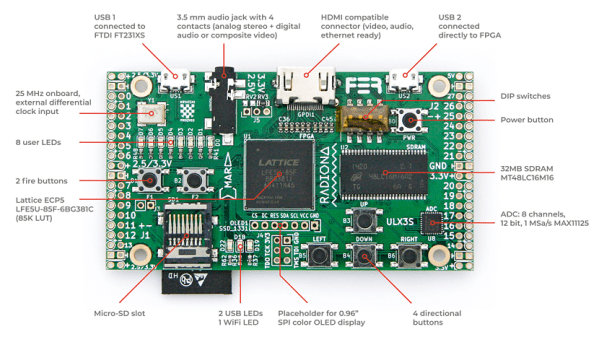
The hackers over at Radiona.org, a Zagreb Makerspace, have been hard at work designing the ULX3S, an open-source development board for LATTICE ECP5 FPGAs. This board might help make 2019 the Year of the Hacker FPGA, whose occurrence has been predicted once again after not quite materializing in 2018. Even a quick look at the board and the open-source development surrounding it hints that this time might be different.

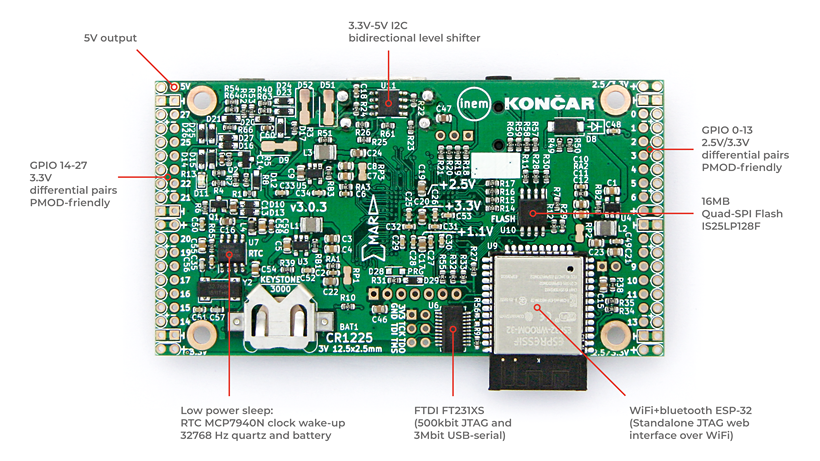
Bottom side of ULX3S PCB

The ULX3S was developed primarily as an educational tool for undergraduate-level digital logic classes. As such, it falls into the “kitchen sink” category of FPGA boards, which include a comprehensive suite of peripherals and devices for development, as opposed to more bare-bones FPGA breakouts. The board includes 32 MB SDRAM, WiFi via an ESP-32 (supporting over-the-air update), a connector for an SPI OLED display, USB, HDMI, a microSD slot, eight channels of 12-bit ADC (1 MS/s), a real-time-clock, 56 GPIO pins, six buttons, 11 LEDs, and an onboard antenna for 433 MHz FM/ASK. This seems like a great set of I/Os for both students and anyone else starting FPGA development.

The ULX3S supports members of the Lattice ECP5 FPGA family, ranging from the 12F (12 k LUTs) to the 85F (84 k LUTs). What can you do with this much FPGA horsepower? Have a look at the long list of examples curated in the ULX3S Links repo. There, you’ll find code from retro-computing to retro-gaming, the usual LED and HDMI demos, and even Linux running on a mor1kx OpenRISC core. Maybe the most interesting links in the repo, however, are those that show how to program the FPGA with a completely open-source toolchain. Proprietary toolchains are the last link keeping some vendor’s FPGAs from wider adoption in the OSHW community, and it’s great to see people chipping away at them.

The board itself is completely open-source. In the GitHub repo, you’ll find the KiCAD 5 design files for the PCB released under an MIT-style license. Even more impressive is the advice in the README, which not only welcomes independent production of the boards, but gives some solid advice on dealing with PCBA vendors during manufacture. Our own advice is to do the right thing and offer the developers a cut if you decide to independently market this board, even though you aren’t required to by the license. If want one, but don’t want to manufacture your own, you can contact the developers using the email or gitter links at the bottom of the ULX3S page: they’re currently doing a small production run.

The Radiona Org folks have created a few videos showcasing example code. Check out how the on-board ESP-32 runs a web server that can load bitstreams into the FPGA (in this case for some retro-gaming), after the break.

Continue reading “ULX3S: An Open-Source Lattice ECP5 FPGA PCB”

Open Source Company Gives Us A Peek At Financial Innards

Here at Hackaday we are willing to bet that in a universe free of all monetary constraints, many of our readers would leave their day jobs in order to pursue their hardware hobbies full time. Obviously this is only practical for a lucky minority of people (for a wide variety of reasons) but we’re willing to bet that a significant stumbling block is figuring how to do it in the first place. You quit your job, but then what? If more information about starting and sustaining small hardware business’ was available more people would take the plunge to start one. There are software companies with salary transparency but this is only part of the picture and we can’t think of many hardware companies that offer the same. What we really want is to get an image of the entire business end to end; from suppliers to COGS to salary. And we want to see it for hardware.

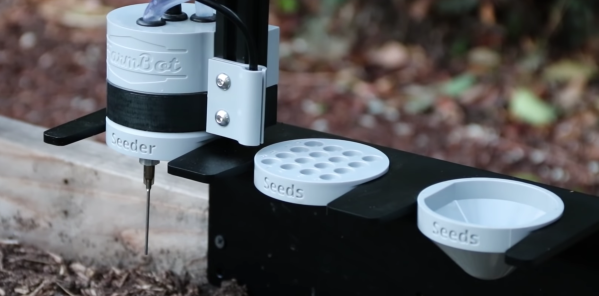
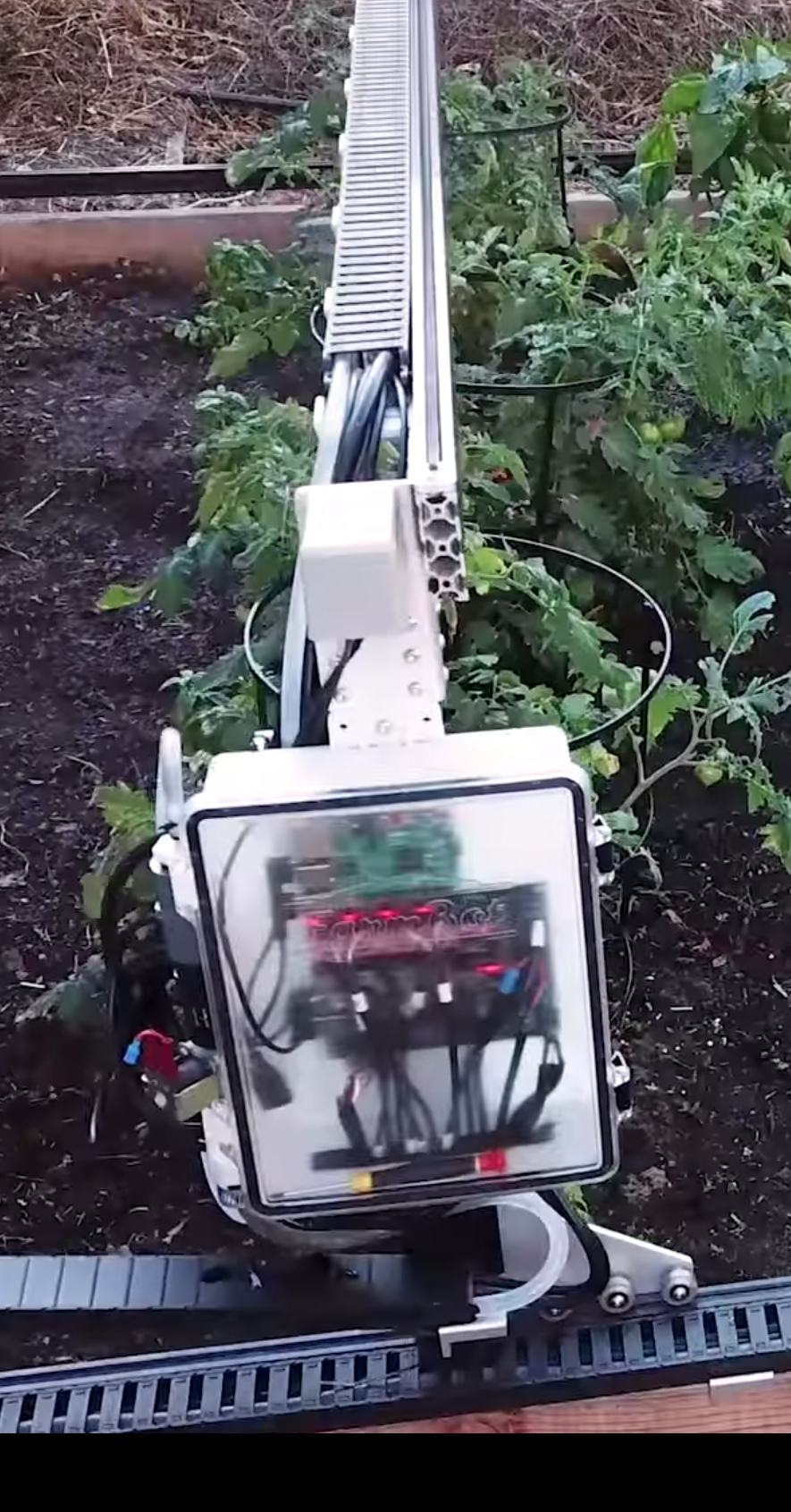
Years ago the first and second Hackaday Prizes captured an entrant named FarmBot whose goal was to build open source robotic farming equipment to make it easier for anyone to grow their own food. A few successful Kickstarters and years later they’ve been shipped multiple versions of the Genesis and Genesis XL robotic farming system and have a sustainable business! And now they’ve decided to open source their business operations too. Suffice to say, this provides quite an uncommon view into the guts of what makes a small open source hardware business tick. Let’s take a closer look!
There is a wealth of information exposed in the company documentation; it’s as though they took their internal wiki and made it public, which we suppose is exactly what happened. The most interesting part for our readers might be the statistics page that tracks costs and quantities for their products. This is where the magic lives. You can use to it see that so far they’ve sold 124 Genesis XL machines at an average selling price of $3,834.34 for $475,458.30 of revenue (it cost $187,200 to build their run of 200 machines). You can also see that each machine has 1,415 parts and takes about 25 hours to assemble. This page is where the true guts of the business live.

Everything else is here too. Here’s where you can learn about what vendors FarmBot uses use logistics, or power, or web infrastructure monitoring. And this is the page with the infamous salary calculation formulas if you want to guess what you’d make as an employee. Then there’s a bunch of boring but important stuff. Fulfillment processes live here, and the consumables they use to support that fulfillment are listed here (with costs!).

One reason we enjoy open source so much is that it affords a wonderful opportunity for people to learn instead of keeping the important parts of a product or process perpetually under wraps. We’re hoping that documentation like this becomes more prevalent and foster an explosion of small hardware companies to follow it.

Lenses For DIY Augmented Reality Will Get A Bit Less Unobtainable

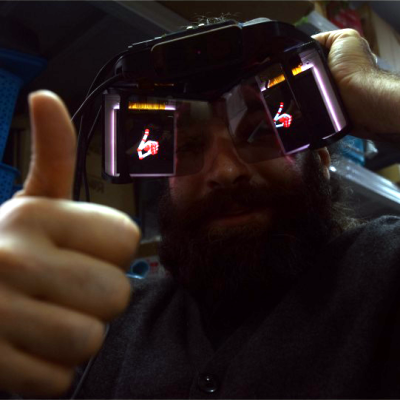
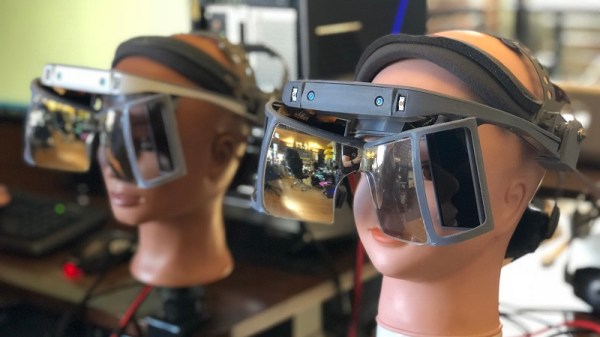
You may remember that earlier this year Leap Motion revealed Project North Star, a kind of open-source reference design for an Augmented Reality (AR) headset. While it’s not destined to make high scores in the fashion department, it aims to be hacker-friendly and boasts a large field of view. There’s also an attractive element of “what you see is what you get” when it comes to the displays and optical design, which is a good thing for hackability. Instead of everything residing in a black box, the system uses two forward-facing displays (one for each eye) whose images are bounced off curved reflective lenses. These are essentially semitransparent mirrors which focus the images properly while also allowing the wearer to see both the displays and the outside world at the same time. This co-existence of both virtual and real-world visuals are a hallmark of Augmented Reality.

A serious setback to the aspiring AR hacker has been the fact that while the design is open, the lenses absolutely are not off the shelf components. [Smart Prototyping] aims to change that, and recently announced in a blog post that they will be offering Project North Star-compatible reflective lenses. They’re in the final stages of approving manufacture, and listed pre-orders for the lenses in their store along with downloadable 3D models for frames.

When Leap Motion first announced their open-source AR headset, we examined the intruiguing specifications and the design has since been published to GitHub.  At the time, we did note that the only option for the special lenses seemed to be to CNC them and then spring for a custom reflective coating.

If the lenses become affordable and mass-produced, that would make the design much more accessible. In addition, anyone wanting to do their own experiments with near-eye displays or HUDs would be able to use the frame and lenses as a basis for their own work, and that’s wonderful.