Simplest Jumping Kangaroo Bot

One of the takeaway ideas that we got from BEAM robotics was the idea that the machine itself, rather than tons of processing power, can do a lot. Your hand affords gripping, and humans have made a pretty good living out of manipulating things (he says, typing). None of this is about the brain; it’s all about the mechanism.

Which brings us to the one-motor “Runner” robot. We’ll admit that we were a little bit disappointed to see that it doesn’t run so much as hop, flop, or scoot along on the two legs and that front wheel-nose. Still, it’s an awesome mechanism, and gets the locomotion job done in a very theatrical way. We’re left wondering if using two motors would allow it to steer or just flip over and flail around on its back. Going to a six “leg” design will definitely get the job done, as demonstrated by Boston Dynamics RHex robot.
Continue reading “Simplest Jumping Kangaroo Bot”

Home Pool Added To Home Automation

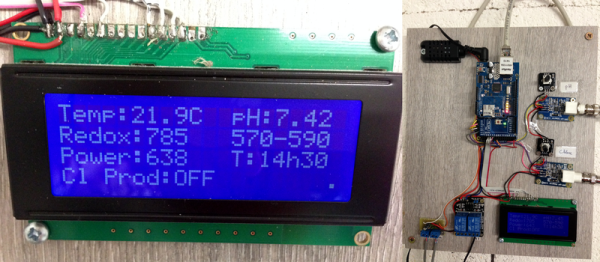
Anyone who owns their own pool knows it’s not as simple as filling it up with water and jumping in whenever you want. There’s pool covers to deal with, regular cleaning with the pool vacuum and skimmers, and of course, all of the chemicals that have to be added to keep the water safe. While there are automatic vacuums, there aren’t a whole lot of options for automating the pool chemicals. [Clément] decided to tackle this problem, eliminating one more task from the maintenance of his home. (Google Translate from French.)

The problem isn’t as simple as adding a set amount of chemicals at a predetermined time. The amount of chemicals that a pool owner has to add are dependent on the properties of the water, and the amount of time that’s elapsed since the previous chemical treatment, and the number of people who have been using the water, and whether or not the pool cover is in use. To manage all of this, [Clément] used an ORP/Redox probe and a pH probe, and installed both in the filtration system. The two probes are wired to an Arduino with an ethernet shield. The Arduino controls electrically actuated chemical delivery systems that apply the required amount of chemicals to the pool, keeping it at a nice, healthy balance.
Continue reading “Home Pool Added To Home Automation”

DEF CON: BSODomizing In High Definition

A few years ago, [Kingpin] a.k.a. [Joe Grand] (A judge for the 2014 Hackaday Prize) designed the most beautiful electronic prank ever. The BSODomizer is a simple device with a pass-through connection for a VGA display and an infrared receiver. Plug the BSODomizer into an unsuspecting coworker’s monitor, press a button on a remote, and watch Microsoft’s blue screen of death appear. It’s brilliant, devious, and actually a pretty simple device if you pick the right microcontroller.

The original BSODomizer is getting a little long in the tooth. VGA is finally dead. The Propeller chip used to generate the video only generates text, and can’t reproduce Microsoft’s fancy new graphical error screens. HDMI is the future, and FPGAs have never been more accessible. For this year’s DEF CON, [Kingpin] and [Zoz] needed something to impress an audience that is just learning how to solder. They’ve revisited the BSODomizer, and have created the greatest hardware project at this year’s DEF CON.

Continue reading “DEF CON: BSODomizing In High Definition”

Animated Progress Bar Shows LCD New Tricks

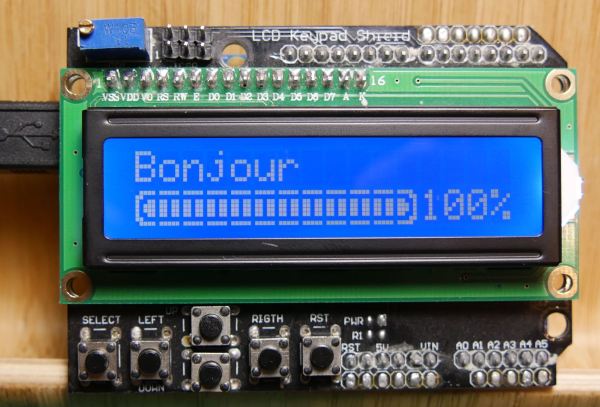
A small LCD screen can be extremely helpful with small microcontroller projects. Not everything needs to communicate to a fancy server using an ESP8266. However, if the simplicity of the character displays irks you, it’s possible to spice them up a little bit with custom characters and create animations, like [Fabien] did with his animated Arduino progress bar. (Google Translate from French)
The project started out simply enough: all [Fabien] needed was a progress bar. It’s easy enough to fill in the “characters” on the 2×16 character LCD screen one-by-one to indicate progress, and the first version of this did exactly that. The second version got a little bit fancier by adding a border around the progress bar and doubling its resolution, but the third version is where knowing the inner machinations of the microcontroller really paid off. Using a custom charset reuse optimization, [Fabien] was able to use 19 custom characters at a time when the display will normally only allow for eight. This was accomplished by placing the custom characters in memory in the correct order, to essentially trick the microcontroller into displaying them.
These types of microcontroller hacks get deep into the inner workings of the microcontroller and help expose some tricks that we can all use to understand their operation on a deeper level. Whether you’re using PWM to get a microcontroller to operate a TV, or creating the ATtiny-est MIDI synth, these tricks are crucial to getting exactly what you want out of a small, inexpensive microcontroller.

Hackaday Prize Entry: Diagnosing Concussions

Athletes of every age receive a lot of blows to the head. After a few years of this and a lot of concussions, symptoms similar to Alzheimer’s can appear. For his Hackaday Prize entry, [Mihir] wanted to build a simple device that could be given to high school coaches that would diagnose concussions. He came up with HeadsUp, a device so simple even a high school gym teacher could use it.

The origins of HeadsUp began as an augmented reality device, but after realizing that was a difficult project, pivoted to something a bit easier and even more useful. HeadsUp tracks the wearer’s eye movements with a webcam while a series of LEDs strobe back and forth in front of the wearer’s eyes. This is the fastest and easiest way to test for a concussion, and making this automated means it’s the perfect device to throw in a gym bag.

Building A Full-Spectrum Digital Camera On The Cheap

The sensor on your digital camera picks up a lot more than just the light that’s visible to the human eye. Camera manufacturers go out of their way to reduce this to just the visible spectrum in order to produce photos that look right to us. But, what if you want your camera to take photos of the full light spectrum? This is particularly useful for astrophotography, where infrared light dramatically adds to the effect.

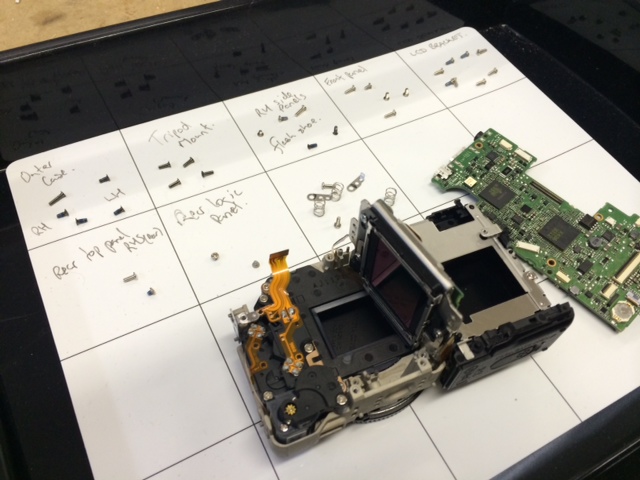
Generally, accomplishing this is just a matter of removing the internal IR-blocking filter from your camera. However, most of us are a little squeamish about tearing into our expensive DSLRs. This was the dilemma that [Gavin] faced until a couple of years ago when he discovered the Canon EOS-M.

Now, it’s important to point out that one could do a similar conversion with just about any cheap digital camera and save themselves a lot of money (the practically give those things away now). But, as any photography enthusiast knows, lenses are just as important as the camera itself (maybe even more so).
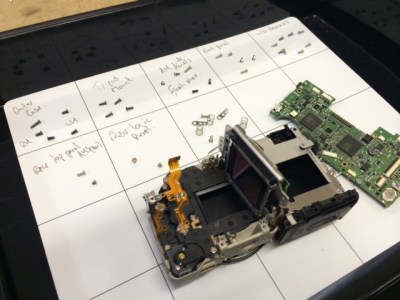
photo-31So, if you’re interested in taking nice pictures, you’ve got to have a camera with an interchangeable lens. Of course, if you’re already into photography, you probably already have a DSLR with some lenses. This was the case for [Gavin], and so he needed a cheap digital camera that used Canon interchangeable lenses like the ones he already had. After finding the EOS-M, the teardown and IR-blocking filter removal was straightforward with just a couple of hiccups.

When [Gavin] wrote his post in 2014, the EOS-M was about $350. Now you can buy them for less than $150 used, so a conversion like this is definitely into the “cheap enough to tinker” realm. Have a Nikon camera? The Nikon 1 J3 is roughly equivalent to the original EOS-M, and is about the same price. Want to save even more money, and aren’t concerned with fancy lenses? You can do a full-spectrum camera build with a Raspberry Pi, with the added benefit of being able to adjust what light is let in.


Fail Of The Week: The Pitfalls Of Designing A Wideband Radio

If you are someone whose interests lie in the field of RF, you won’t need telling about the endless field of new possibilities opened up by the advent of affordable software defined radio technology. If you are a designer or constructor it might be tempting to believe that these radios could reduce some of the problems facing an RF design engineer. After all, that tricky signal processing work has been moved into code, so the RF engineer’s only remaining job should be to fill the not-so-huge gap between antenna and ADC or DAC.

In some cases this is true. If you are designing an SDR front end for a relatively narrow band of frequencies, perhaps a single frequency allocation such as an amateur band, the challenges are largely the same as those you’d find in the front end of a traditional radio. The simplest SDRs are thus well within the abilities of a home constructor, for example converting a below-100kHz-wide segment of radio spectrum to the below-100kHz baseband audio bandwidth of a decent quality computer sound card which serves as both ADC and DAC. You will only need to design one set of not-very-wide filters, and the integrated circuits you’ll use will not be particularly exotic.

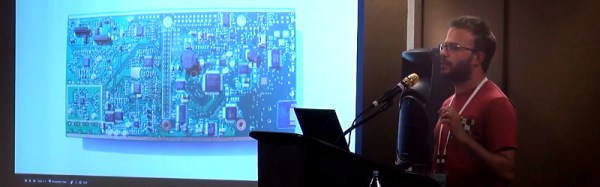
But what happens if the SDR you are designing is not a simple narrow-band device? [Chris Testa, KD2BMH] delivered a talk at this year’s Dayton Hamvention looking at some of the mistakes he made and pitfalls he encountered over the last few years of work on his 50MHz to 1GHz-bandwidth Whitebox handheld SDR project. It’s not a FoTW in the traditional sense in that it is not a single ignominious fail, instead it is a candid and fascinating examination of so many of the wrong turnings a would-be RF engineer can make.

The video of his talk can be found below the break, courtesy of Ham Radio Now. [Chris]’s talk is part of a longer presentation after [Bruce Perens, K6BP] who some of you may recognise from his activities when he’s not talking about digital voice and SDRs. We’re jumping in at about the 34 minute mark to catch [Chris], but [Bruce]’s talk is almost worth an article in itself..

Continue reading “Fail Of The Week: The Pitfalls Of Designing A Wideband Radio”