2019 Hackaday Prize Begins Right Now

This is the 2019 Hackaday Prize, the worldwide hardware design contest focused on product development. We know you can build a working prototype, and we still want to see you do that. But a great idea should have reach beyond your own workshop. This year’s Hackaday Prize is about taking your product across the finish line, from concept to design for manufacture.

Prizes to Jump Start Your Product

$125,000 and a Supplyframe DesignLab Residency await the Best Product winner. There are five focus categories this year, with the winner of each receiving a $10,000 prize. And to help encourage those early beginnings, we have another $10,000 in seed funding set aside which means up to $500 for each of the top 20 entries who get in and gather those “likes” before June first.

There are a few areas of focus you should have in mind as you work on your products. These are Concept, Design, Production, Benchmark, and Communication. All entries are eligible to receive prizes related to these, and in addition to the $50,000 we mentioned above for the winner in each area, we have another $3,000 for each set aside to recognize an honorable mention.

$200,000 is on the line and the final results will be revealed live on stage at the Hackaday Superconference in November. Your name should be in one of those sealed envelopes!

Why You? And Why the Hackaday Prize

Something amazing happened thirty years ago. A core of very motivated hackers took on the mantle of design, software, and even business skill, to build the computers that thrust us into a new information age. As these machines matured, a wave of software engineers picked up that torch, themselves embracing product and design thinking to accelerate the startup craze to new levels, again changing the world.

Ask yourself where we are right now. What are the hot new startups? The buzz now is all about billion dollar valuation but where is the substance? What we really need are the scrappy hackers who have a flag to plant to change the world. We’ve mistakenly been waiting for software companies to use their special sauce to lead a hardware renaissance, but instead it feels like we’re solving more and more trivial problems — where are the world-changers?

This is the hunger behind the 2019 Hackaday Prize. Three decades later, it is time for Hardware Engineers to be recognized as Innovators and leaders again. This is the call for the hardware community to come together, share knowledge, acquire new skills, and embark on a journey that uses the technological raw materials at our fingertips to invent the solutions that really matter. Make the idea and the execution happen now, and that enormous valuation will follow. Now is the time to change the world, you are the hackers who will do it, and this time around hardware will be leading the charge.

Improvisation, Mentorship, and Your Ability to Do Everything

We know you can build a working prototype of just about anything. But just like the creators of the Commodore, the Sinclair, Amiga, Apple, and Atari, you need to be more than a hardware designer. You need to know your users like you know yourself. You need an eye for industrial design — each of the machines mentioned above are iconic by how they look and not just by how they work. People behind these products knew what they were up against, and chose to make them stand-out designs in terms of performance, price, and how they fit into our lives.

You don’t have every skill necessary to make a great leap forward in every one of these areas — nobody does. But with the right community around you, you will learn some of them and find collaborators for the rest. Throughout the 2019 Hackaday Prize we’ll be pushing everyone to step past where you think your skills end, to learn what makes a product great, what makes it loved by the end user, and what makes it feasible to follow through to the end of the rainbow.

Get in early and take part in Prize demo days. Get matched up with world-class mentors and work with them in a masterclass situation from which everyone can learn. Show off your work and you’ll attract good ideas and good people. This is the Homebrew Computer Club of the new millennium. You’re going to find inspiration (and become the inspiration!) from everyone in the club. You’re going to riff on the breakthroughs of others, and together we’re all going to lead that Hardware Renaissance.

Don’t let this call go unanswered. Start your Hackaday Prize entry right now, and don’t look back.


Raspberry Pi Breathes Life Into A Scale Model SEGA

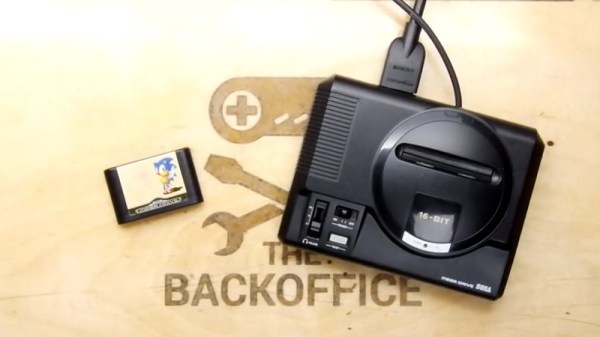
Miniature game consoles are all the rage right now. Many of the big names in gaming are releasing their own official “mini” versions of their classic machines, but naturally we see plenty of DIY builds around these parts as well. Generally they’re enclosed in a 3D printed model of whatever system they’re looking to emulate, but as you might expect that involves a lot of sanding and painting to achieve a professional look.

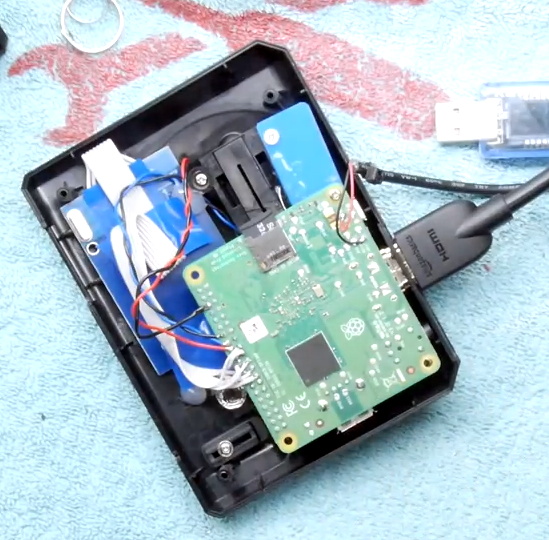
But for SEGA Genesis (or Mega Drive as it was known outside the US) fans, there’s a new option. A company by the name of Retro Electro Models has released a high-fidelity scale model of SEGA’s classic console, so naturally somebody hacked it to hold a Raspberry Pi. Wanting to do the scale detailing of the model justice, [Andrew Armstrong] went the extra mile to get the power button on the front of the console working, and even added support for swapping games via RFID tags.

[Andrew] uses the Raspberry Pi 3 A+ which ended up being the perfect size to fit inside the model. Fitting the Pi Zero would have been even easier, but it lacks the horsepower of its bigger siblings. The RFID reader is connected to the Pi over SPI, and the reed switch used to detect when the power switch has been moved is wired directly to the GPIO pins. The system is powered by a USB cable soldered directly to Pi’s PCB and ran out a small hole in the back of the case.

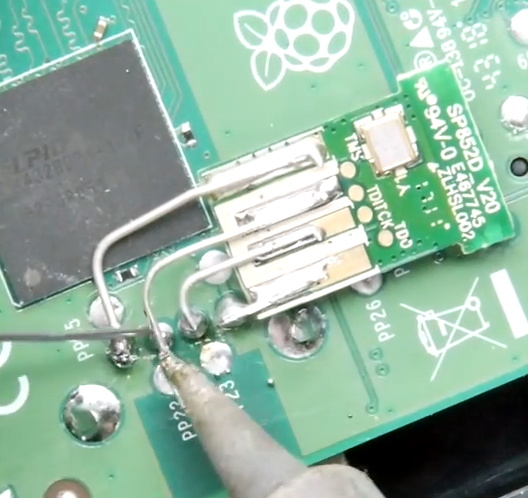
For input, [Andrew] is using a small wireless keyboard that includes a touch pad and gaming controls. Unfortunately, it has a proprietary receiver which had to be integrated into the system. In a particularly nice touch, he used snipped off component leads to “wire” the receiver’s PCB directly to the pins of the Pi’s USB port. Not only does it look cool, but provides a rigid enough connection that he didn’t even need to glue it down to keep it from rattling around inside the case. Definitely a tip to keep in the back of your mind.

The software side of this project is about what you’d expect for an emulation console, though with the added trickery of loading games based on their RFID tag. At this point [Andrew] only has a single “cartridge” for the system, so he simply drops the tags into the cartridge slot of the console to load up a new title. It doesn’t look like Retro Electro Models is selling loose cartridges (which makes sense, all things considered), so there might still be a job for your 3D printer yet if you want to have a library of scale cartridges to go with your console.

For those of you who were on Team Nintendo in the 1990’s, we’ve seen a similar build done with a 3D printed case. Of course, if even these consoles are a bit too recent for your tastes, you could build a miniature Vectrex instead.

Continue reading “Raspberry Pi Breathes Life Into A Scale Model SEGA”

The Repair And Refurbishment Of Silicone Keyboards

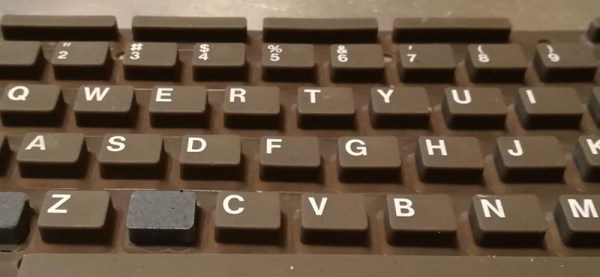
There are a lot of retrocomputers out there sitting in garages and attics, and most of them need work. After thirty or forty years, you’re looking at a lot of corrosion, leaking caps, and general wear and tear. When it comes to extreme refurbishment, we haven’t seen anyone better than [Drygol], and this time he’s back with an exceptional example of how far repair and refurbishment can go. He’s repairing the silicone keyboard of a Commodore 116 using some very interesting techniques, and something that opens up the door to anyone building their own silicone keypad.

This project comes from from a member of a demoscene group that found an old C116 that needed a lot of work. The C116 shipped with a silicone membrane keyboard instead of the mechanical keyswitches of the C64 and other, higher-end computers. Unfortunately, this silicone keypad had a few keys ripped out of it. No one, as far as we can tell, has ever figured out how to make these silicone keypads from scratch, but [Drygol] did come up with a way to replace the ripped and missing keys. The process starts with making a silicone mold of the existing keyboard, then casting silicone into the negative of that mold. After a few attempts , [Drygol] had a custom silicone button that matched the shape and color of the original C116 keyboard. The only thing left to do was to attach tiny conductive carbon pads to the bottom of the newly cast buttons and fit them into the existing keyboard.

This is an interesting refurbishment, because there are a lot of vintage computers that used silicone keyboards in the place of mechanical keyswitches. The Speccy, The Commodore TED machines, and a lot of vintage calculators all used silicone keyboards. Until now, no one has figured out how to make DIY silicone keypads, and repairing silicone was out of the question. [Drygol]’s attempt isn’t perfect — it needs key labels, but screen or pad printing will take care of that — but it’s the best we’ve seen yet and opens the doors to a lot of interesting projects in the world of vintage computer repair.

Yet Another DIY Handheld Pi Gaming Console

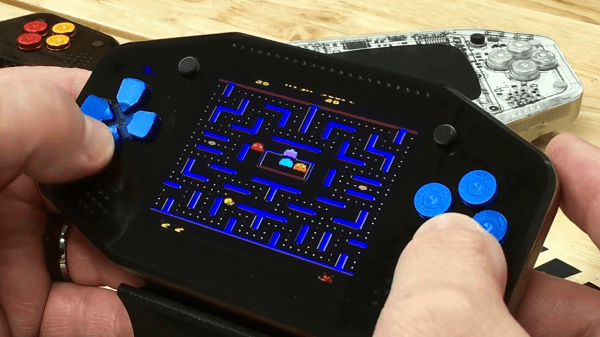
The Raspberry Pi is a great platform for running retro video games, and with the addition of some buttons, a TFT screen and some speakers it’s relatively inexpensive and easy to get a working console up and running. If you have access to even a cheap 3D printer, a good-looking DIY console is well within reach for not a lot of money. YouTube user [DIY Engineering] has a bunch of consumer-grade fabrication tools and has designed and built a high-end but still DIY RetroPi gaming console, the RKDR II.

Among the tools that [DIY Engineering] has are both a FDM and DLP 3D printer, a reflow oven, a couple of different CNC machines and a laser cutter. They are all consumer grade, but not necessarily cheap – especially combined! [DIY Engineering] uses Fusion3D to model the case, bezel and circuit board, the latter of which is a 4 layer board designed in Eagle and sent off to be fabbed. The buttons, D-pad, screen and battery are bought off the shelf, but everything else is DIY. Check out the video for the details – the tools used, and the design files, are linked in the information section under the video on YouTube.

Continue reading “Yet Another DIY Handheld Pi Gaming Console”

Quantum Computing With QISKit

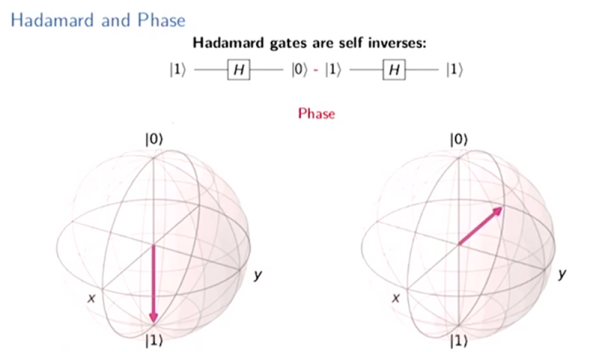
We all know that quantum computing is coming, but it is hard to know how to get started with it. [Mtreinish] suggests Qiskit — an Apache Licensed SDK for developing quantum applications. He has a presentation he gave in Singapore that you can see below, and a notebook you can go through on GitHub. If you are impatient, you can even run the notebook online through Google.

The tools can work against several backends including a simulator or the real hardware available from IBM. The official site has a different notebook you can use as a tutorial. Interestingly, the foundation of all Qiskit programs is “Terra” (the Earth) and permeating all Qiskit elements is Aer or air. There are also fire and water elements. At the bottom of the official notebook, you’ll find a lot of community notebooks that go deeper into specific topics.

Continue reading “Quantum Computing With QISKit”

Custom Inflatables Are Only A Laser Beam Away

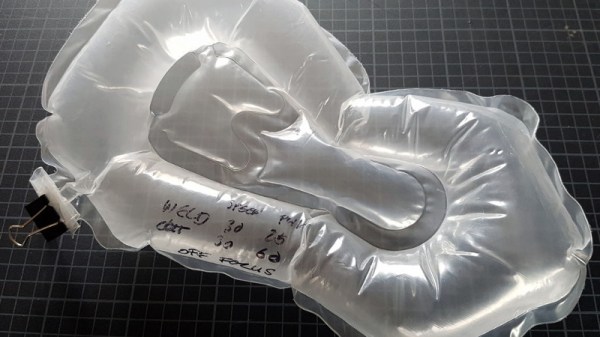
Carl Sagan one said “If you wish to make an apple pie from scratch, you must first invent the universe.” It might not be a very accurate description of the relative difficulty level of baking, but the logic is sound enough: there’s often a lot of ground work that needs to be to covered before you hit your ultimate goal. A perfect example of this principle is the inflatable raft that [ralph124c] hopes to eventually create; before he can set sail he has to perfect making balloon animals with his laser cutter.

In the long run, the raft will be constructed from sheets of TPU coated fabric that are fused together with a hot iron. But before he spends the time and money on building the real thing, he wants to do some scaled down tests to make sure his design works as expected. He makes a cryptic remark about learning the hard way that inflatables are prone to bouts of strange behavior, and out of an overabundance of caution we’ll just take his word for it.

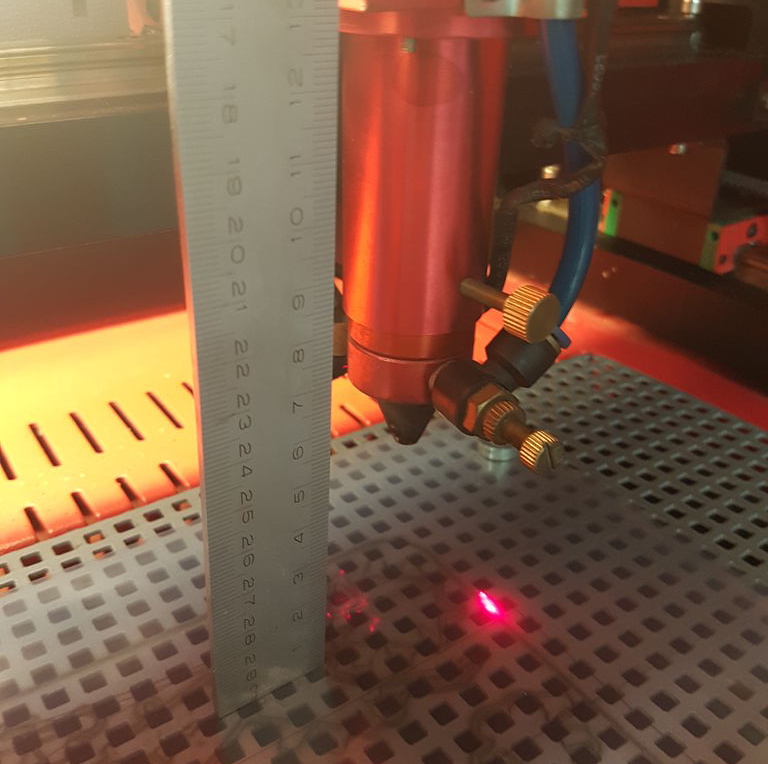
He hoped to test his designs with the much cheaper LDPE film, but he found that the hot iron didn’t fuse it together in the way he was hoping. His mind turned to his 60 watt laser cutter, and wondered if the desired effect could be achieved by turning the power down as low as possible and quickly moving across the material.

His first attempts either blew right through the film or did absolutely nothing, but eventually he had the bright idea to move the laser farther from the LDPE. This put the beam out of focus, which not only expanded the area it would cover, but reduced the energy being delivered to the surface. With a bit more experimentation, he found he was able to neatly weld the pieces of material together. He even found that he could increase the power slightly to cut through the film without having to adjust the laser focus. With the ability to create complex inflatable shapes, perhaps [ralph124c] will create balloon version of Carl Sagan or an apple pie to celebrate.

Of course, this technology isn’t limited to birthday balloons and model rafts. The ability to quickly and easily produce custom inflatable shapes could be a huge boon to anyone working in soft robotics, and we’ve even seen similar concepts applied to haptic feedback systems.

[Thanks to Arthur for the tip.]

A Word Clock, The Hard Way

We’ve all seen word clocks, and they’re great, but there are only so many ways to show the time in words. This word clock with 114 servos is the hard way to do it.

We’re not sure what [Moritz v. Sivers] was aiming for with this projection clock, but he certainly got it right. The basic idea is to project the characters needed to compose the time messages onto a translucent PVC screen, which could certainly have been accomplished with just a simple character mask and some LEDs. But for extra effect, [Moritz] mounted each character to a letterbox mounted over a Neopixel. The letterboxes are attached to a rack and pinion driven by a micro servo. The closer they get to the screen, the sharper the focus and the smaller the size of the character. Add in a little color changing and the time appears to float out from a jumbled, unfocused background. It’s quite eye-catching, and worth the 200+ hours of printing time it took to make all the parts. Complete build instructions are available, and a demo video is after the break.

We like pretty much any word clock – big, small, or even widescreen. This one really pushes all our buttons, though.

Continue reading “A Word Clock, The Hard Way”