Gaming Mouse Becomes Digital Camera

Ever since the world decided to transition from mechanical ball mice to optical mice, we have been blessed with computer pointing devices that don’t need regular cleaning and have much better performance than their ancestors. They do this by using what is essentially a tiny digital camera to monitor changes in motion. As we’ve seen before, it is possible to convert this mechanism into an actual camera, but until now we haven’t seen something like this on a high-performance mouse designed for FPS gaming.

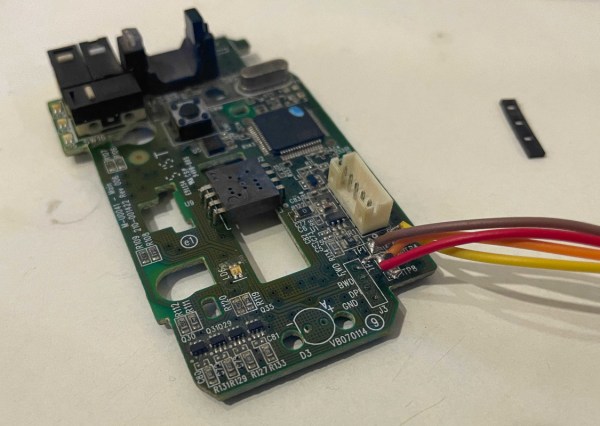
For this project [Ankit] is disassembling the Logitech G402, a popular gaming mouse with up to 4000 dpi. Normally this is processed internally in the mouse to translate movement into cursor motion, but this mouse conveniently has a familiar STM32 processor with an SPI interface already broken out on the PCB that could be quickly connected to in order to gather image data. [Ankit] created a custom USB vendor-specific endpoint and wrote a Linux kernel module to parse the data into a custom GUI program that can display the image captured by the mouse sensor on-screen.

It’s probably best to not attempt this project if you plan to re-use the mouse, as the custom firmware appears to render the mouse useless as an actual mouse. But as a proof-of-concept project this high-performance mouse does work fairly well as a camera, albeit with a very low resolution by modern digital camera standards. It is much improved on older mouse-camera builds we’ve seen, though, thanks to the high performance sensors in gaming mice.
Lawn Mower Carburetor Improves Mileage On Old Sedan

Before the Ford marketing department started slapping Maverick badges on pickup trucks, the name had been attached to compact cars from the 70s instead. These were cheap even by Ford standards, and were built as a desperate attempt to keep up with Japanese imports that were typically higher quality and more efficient than most American cars at the time. Some people called them the poor man’s Mustang. While Ford and the other American car companies struggled to stay relevant during the gas crisis, it turns out that they could have simply slapped a lawn mower carburetor on their old Mavericks to dramatically improve fuel efficiency.

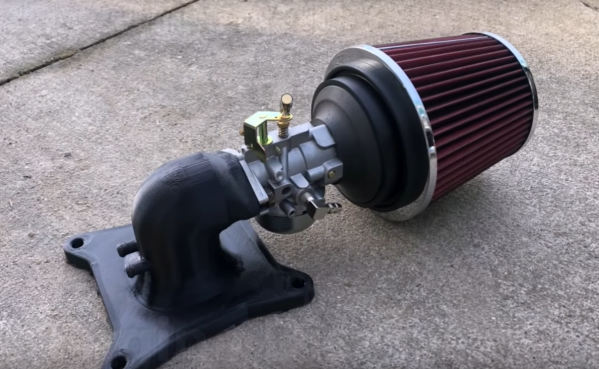
The old Maverick used a 5 L carbureted V8 engine, which is not exactly the pinnacle of efficiency even by 1970s standards. But [ThunderHead289] figured out that with some clever modifications to the carburetor, he could squeeze out some more efficiency. By using a much smaller carburetor, specifically one from a lawn mower, and 3D printing an adapter for it, he was able to increase the fuel efficiency to over 40 mpg (which is higher than even the modern Mavericks) while still achieving a top speed of 75 mph.

While it’s not the fastest car on the block with this modification, it’s still drives well enough to get around. One thing to watch out for if you try this on your own classic car is that some engines use fuel as a sort of coolant for certain engine parts, which can result in certain problems like burned valves. And, if you don’t have a lawnmower around from which to borrow a carb, take a look at this build which 3D prints one from scratch instead.

Thanks to [Jack] for the tip!

Continue reading “Lawn Mower Carburetor Improves Mileage On Old Sedan”

MiniDisc Player Supports Full Data Transfer

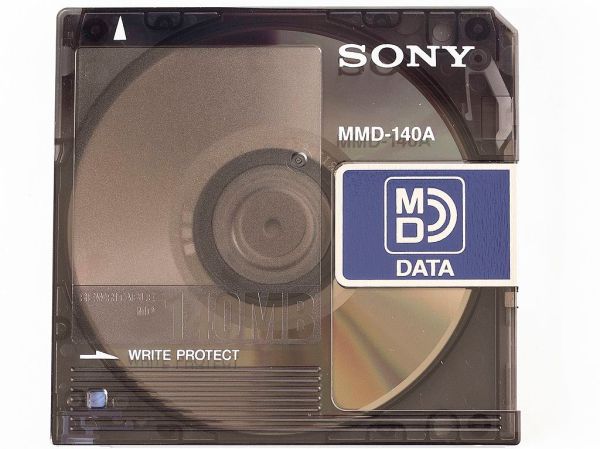
Between the era of the CD and the eventual rise and domination of streaming music platforms, there was a limbo period of random MP3 players mixed in with the ubiquitous (and now officially discontinued) iPod. In certain areas, though, the digital music player of choice was the MiniDisc, a miniature re-writable CD player with some extra digital features. Among them was the ability to transfer music to the discs over USB, but they did not feature the ability to transfer the songs back to a computer. At least until now, thanks to this impressive hack from [asivery].

Although it sounds straightforward, this trick has a lot of moving parts that needed to come together just right. The MiniDisc player uses a proprietary encoding format called ATRAC, so a codec is needed for that. The MiniDisc player stores data from the disc in a 40-second buffer when playing, so the code reads the data directly from DRAM in 40-second chunks, moves the read head, repeats the process as needed, then stitches the 40-second parts back together. It can work on any Sony NetMD portable, if you are lucky enough to still have one around.

The project is a tremendous asset to the MiniDisc community, especially since the only way to recover data from a MiniDisc player prior to this was to use a specific version known as the RH-1. As [asivery] reports, used RH-1 players are going for incredibly high prices partially because of this feature. Since this new method demonstrates that it’s possible to do with other devices, perhaps its reign in the MiniDisc world will come to a close. For those still outside the loop on this esoteric piece of technology, take a look at this MiniDisc teardown.

Thanks to [Maarten] for the tip!

DIY Metal Detector Gives You The Mettle To Find Some Medals

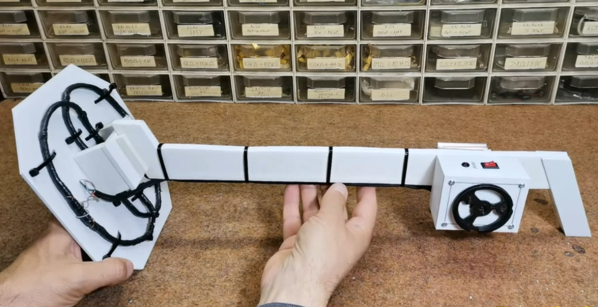
Hurricane season is rapidly approaching those of us who live in the northern hemisphere. While that does come with a good deal of stress for any homeowners who live in the potential paths of storms it also comes with some opportunities for treasure hunting. Storms tend to wash up all kinds of things from the sea, and if you are equipped with this DIY metal detector you could be unearthing all kinds of interesting tchotchkes from the depths this year.

The metal detector comes to us from [mircemk] who is known for building simple yet effective metal detectors. Unlike his previous builds, this one uses only a single integrated circuit, the TL804 operational amplifier. It also works on the principle of beat-balance which is an amalgamation of two unique methods of detecting metal.  When the wire coils detect a piece of metal in the ground, the information is fed to an earpiece through an audio jack which rounds out this straightforward build.

[mircemk] reports that this metal detector can detect small objects like coins up to 15 cm deep, and larger metal objects up to 50 cm. Of course, to build this you will also need the support components, wire, and time to tune the circuit. All things considered, though it’s a great entryway into the hobby.

Want to learn more about metal detecting? Check out this similar-looking build which works on the induction balance principle.

Continue reading “DIY Metal Detector Gives You The Mettle To Find Some Medals”

All-In-One Automated Plant Care

Caring for a few plants, or even an entire farm, can be quite a rewarding experience. Watching something grow under and then (optionally) produce food is a great hobby or career, but it can end up being complicated. Thanks to modern technology we can get a considerable amount of help growing plants, even if it’s just one plant in a single pot.

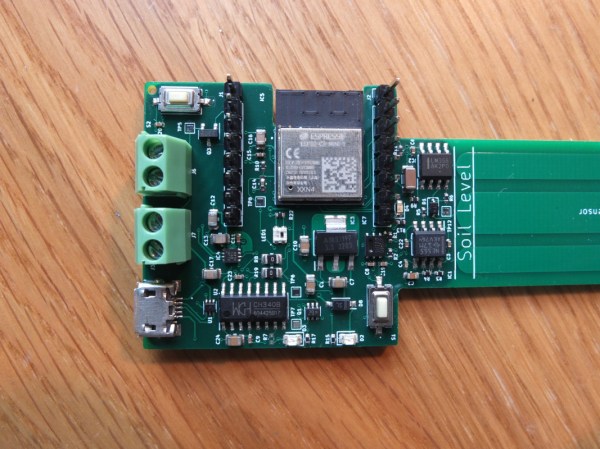
Plant Bot from [YJ] takes what would normally be a wide array of sensors and controllers and combines them all into a single device. To start, there is a moisture sensor integrated into the housing so that when the entire device is placed in soil it’s instantly ready to gather moisture data. Plant Bot also has the capability to control LED lighting if the plant is indoors.  It can control the water supply to the plant, and it can also communicate information over WiFi or Bluetooth.

The entire build is based around an ESP32 which is integrated into the PCB along with all of the other sensors and components needed to monitor a single plant. Plant Bot is an excellent all-in-one solution for caring for a plant automatically. If you need to take care of more than one at a time take a look at this fully automated hydroponic mini-farm.

Mini MIDI Synth Uses Minimum Number Of Parts

The 80s were the golden age of synthesizers in pop music. Hugely complicated setups that spared no expense were the norm, with synths capable of recreating anything from pianos and guitars to percussion, strings, and brass. These types of setups aren’t strictly necessary if you’re looking to make music, though, especially in the modern age of accessible microcontrollers. This synthesizer from [Folkert] with MIDI capabilities, for example, creates catchy tunes with only a handful of parts.

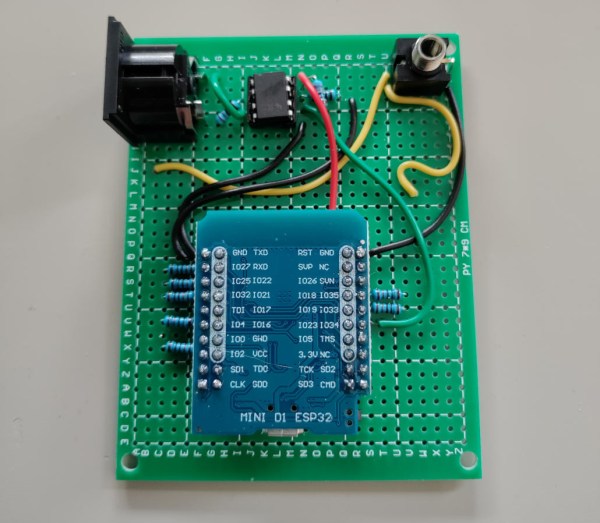
This tiny synth is built around an ESP32 and works by generating PWM signals normally meant for LEDs. In this case, the PWM signals are sent through a rudimentary amplifier and then on to an audio output device.  That could be a small speaker, an audio jack to another amplifier, or a capture device.

The synth’s eight channels use up most of the ESP32’s I/O and provide a sound that’s reminiscent of the eight-bit video game era. The total parts count for this build is shockingly small with only a handful of resistors, the ESP, an optocoupler, and a few jacks.

For those wishing to experiment with synthesizers, a build like this is attractive because it’s likely that all the parts needed are already sitting around in a drawer somewhere with possibly the exception of the 5 pin DIN jacks needed for MIDI capabilities. Either way, [Folkert] has made all of the schematics available on the project page along with some sample mp3 files. For those looking to use parts from old video game systems sitting in their parts drawer, though, take a look at this synthesizer built out of a Sega Genesis.

Learn Sign Language Using Machine Vision

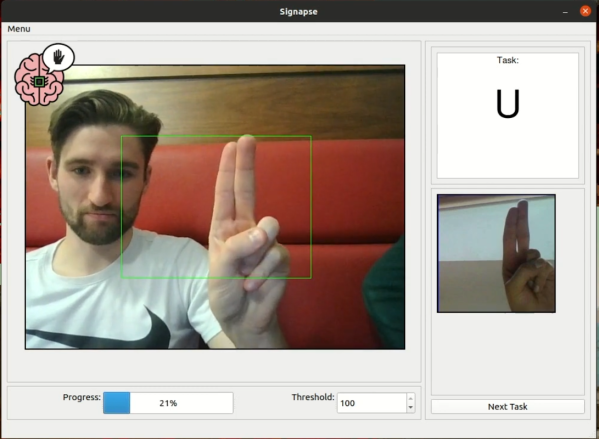
Learning a new language is a great way to exercise the mind and learn about different cultures, and it’s great to have a native speaker around to improve the learning experience. Without one it’s still possible to learn via videos, books, and software though. The task does get much more complicated when trying to learn a language that isn’t spoken, though, like American Sign Language. This project allows users to learn the ASL alphabet with the help of computer vision and some machine learning algorithms.

The build uses a computer vision model in MobileNetV2 which is trained for each sign in the ASL alphabet. A sign is shown to the user on a screen, and the user needs to demonstrate the sign to the computer in order to progress. To do this, OpenCV running on a Raspberry Pi with a PiCamera is used to analyze the frames of the user in real-time. The user is shown pictures of the correct sign, and is rewarded when the correct sign is made.

While this only works for alphabet signs in ASL currently, the team at the University of Glasgow that built this project is planning on expanding it to include other signs as well. We have seen other machines built to teach ASL in the past, like this one which relies on a specialized glove rather than computer vision.

Continue reading “Learn Sign Language Using Machine Vision”