
arduino browser

Web Browser Pushes Arduino’s Limits

Some projects that we build fulfill a genuine need for a new piece of hardware or software that will make life easier or fix a common problem. Other projects, on the other hand, we do just because it’s possible to do. [Gilchrist] has finished work on a project that fits squarely in the second category: a web browser that runs exclusively on an Arduino Uno with an ethernet shield.

The Arduino can serve plain-text web pages to an attached LCD and can follow hyperlinks. User input is handled by a small joystick, but the impressive part of the build is on the software side. The Arduino only has 2KB of RAM to handle web pages, and the required libraries take up 20KB of memory, leaving only about 12 KB for the HTML parser/renderer and the LCD renderer.

The Arduino browser is a work in progress, and [Gilchrist] mentions that goals for the project include more robustness to handle poor HTML (the Hackaday retro edition loads flawlessly though), a terminal, and WiFi capabilities. To that end, maybe a good solution would be using the new ESP8266 chip to keep things small and inexpensive?

supercapacitor ups

Supercapacitors For The Raspberry Pi

As versatile as the Raspberry Pi is, it has a weakness when it needs to be able to shut down properly during a power outage, especially when handling data-sensitive or industrial applications. To solve this problem, [Pavol Sedlacek] has created a supercapacitor-based UPS specifically for the Raspberry Pi that gives it enough time to properly halt its processes and shut down if it detects a power failure.

The device is called the Juice4Halt. It uses a DC-DC converter to provide power to the Pi from the normal power supply and to charge the supercapacitors during normal operation. It is bidirectional, so in the event of a power failure it works in reverse to take power from the capacitors and feed it back to the Pi. A second DC-DC converter handles power from an external power supply.

A side effect of using supercapacitors as a UPS is that they can also help the Pi survive brownouts. The project site has an incredible amount of detail about the functionality of the device, including circuit diagrams and the source code. We’ve seen other supercapacitor-based UPS units before but this particular one is much more robust and would be truly at home in any industrial or other sensitive setting.

Joule Thief Steals Power For A Clock

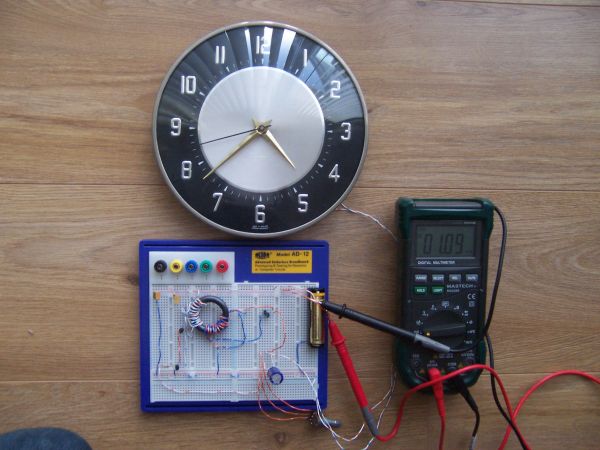
A common project among electronics tinkerers is the joule thief, a self-oscillating circuit that can “steal” the remaining energy in a battery after the voltage has dropped so low that most devices would stop working. Typically the circuit powers an LED until almost all of the energy is extracted from the battery, but [Lionel Sears] has created a specialized joule theif that uses the “extra” energy to power a clock.

The circuit uses four coils instead of the usual two to extract energy from the battery. The circuit charges a large capacitor which provides the higher current pulses needed to drive the clock’s mechanism. It can power the clock from a single AA battery, and will run until the voltage on the battery is only 0.5 volts.

Normally the clock would stop running well before the voltage drops this low, despite the fact that there’s still a little chemical energy left in the batteries. The circuit can drive the clock for an extended time with a new battery, or could use old “dead” batteries to run the clock for a brief time while the final little bit of energy is drawn from them. If you’re so inclined, you could even use hot and cold water with a joule thief to run your clock! Thanks to [Steven] for the tip.

fridge alarm

Internet Of Things Refrigerator Alarm

For anyone who gets a late-night craving for anything out of the refrigerator and needs some help in the willpower department, [Claudio] may have the project for you. He has just finished work on a project that sends out an alarm when the refrigerator door opens, alerting others that you’re on the prowl for munchies.

The device uses a light sensor connected to an OpenPicus IoT kit that contains a FlyportPRO Wi-Fi module. When the refrigerator door is opened, the device sends out an email message via a web server, which can be sent to whomever you choose. All of the project’s code and instructions are available on the project site as well.

The project is pretty clever in that no actual interfacing with the refrigerator is required, beyond running a power cable through the seal of the door (although [Claudio] notes that the device will run on a lithium battery as an option). The web server itself can be set up to send out alarms during any timeframe as well, allowing a user to customize his or her nighttime snacking window. If you’re looking for a less subtle approach, we’d recommend the fridge speakers with a volume setting of 11.

Digital Decade Resistance Box On The Cheap

[Stynus] has finished a unique decade resistance box which doesn’t use conventional rotary switches to select the appropriate resistors. These switches are old fashioned and expensive, so [Stynus] built this decade resistance box that uses a microcontroller and a series of relays to switch the resistors.

Simply selecting a resistance on the screen tells the microcontrollers which resistors need to be switched in order to provide the proper resistance. The box uses relays to do switching instead of transistors because the transistors don’t handle high frequency AC as well as the relays. The device is powered by an 18V transformer and rectifier and, as a bonus, [Stynus] got all of his parts on the cheap which made this a great solution to the expensive resistance decade box problem.

This is a very well-polished piece of test equipment. We’ve featured other decade resistance boxes but never one that was controlled by a microcontroller. All of the PCB layouts and the code for microcontroller are available on the project site if you have a desire to make your own.

Lamp Comes To Life With Ultrasonic Sensors

Fans of the bouncing lamp from the Pixar corporate logo will enjoy [Daniel]’s latest project. It’s a motion controlled desk lamp that uses ultrasonic sensors to control its physical position.

The core of the project is an Arduino and the three ultrasonic sensors. The sensors act as range finders, and when they are all working together under the direction of the microcontroller they can tell which direction a hand was moving when it passed by. This information is used to drive two servos, one in the base and one on the lamp’s arm.

The project requires an articulating desk lamp of some sort (others besides the specific one [Daniel] used shouldn’t be much of a problem as long as they bend in the same way). Most hackers will have the rest of the parts on hand, with the possible exception of the rangefinder. The code is up on the project site for a look-see or in case you want to build your own.

The only problem that [Daniel] had when putting this all together was that the base was a little wobbly. He was able to fix that with some thumbtacks, and we think the next step for the project should be switching the light on and off over the internet.

Topsy Turvy Clock Tells Confusing Time

Looking for a new clock but hate the fact that all the numbers are always in the correct order? Look no further than [Andy]’s topsy turvy clock which correctly tells time despite the fact that the numbers on the face of the clock are in random positions.

At first glance, the clock looks fairly normal despite the mixed-up numerals. Upon closer inspection, the clock is much more than it appears to be. A battery backed real-time clock keeps track of time, and a microcontroller turns the hands of the clock to where they need to be. The clock uses optical sensors to make sure the hands are in the correct starting position when it is first powered on.

Check out the video below for a better illustration of what the clock looks like when in operation. The hour hand is always pointing at the correct hour, and the minute hand starts every five minutes at the number it would have started at on a normal clock, i.e. at 1:15 the hour hand will point at “one” and the minute hand will point at “three”.

We love this very interesting and unique take. It was inspired by a few other clocks, including a version of the infamous Vetinari “random tick” clock which will drive you crazy in a different way.