Quake In 276 KB Of RAM

Porting the original DOOM to various pieces of esoteric hardware is a rite of passage in some software circles. But in the modern world, we can get better performance than the 386 processor required to run the 1993 shooter for the cost of a dinner at a nice restaurant — with plenty of other embedded systems blowing these original minimum system requirements out of the water.

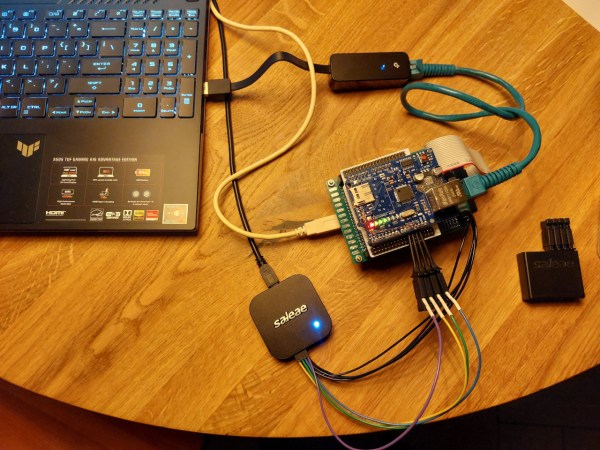
For a much tougher challenge, a group from Silicon Labs decided to port DOOM‘s successor, Quake, to the Arduino Nano Matter Board platform instead even though this platform has some pretty significant limitations for a game as advanced as Quake.

To begin work on the memory problem, the group began with a port of Quake originally designed for Windows, allowing them to use a modern Windows machine to whittle down the memory usage before moving over to hardware. They do have a flash memory module available as well, but there’s a speed penalty with this type of memory. To improve speed they did what any true gamer would do with their system: overclock the processor. This got them to around 10 frames per second, which is playable, but not particularly enjoyable. The further optimizations to improve the FPS required a much deeper dive which included generating lookup tables instead of relying on computation, optimizing some of the original C programming, coding some functions in assembly, and only refreshing certain sections of the screen when needed.

On a technical level, Quake was a dramatic improvement over DOOM, allowing for things like real-time 3D rendering, polygonal models instead of sprites, and much more intricate level design. As a result, ports of this game tend to rely on much more powerful processors than DOOM ports and this team shows real mastery of their hardware to pull off a build with a system with these limitations. Other Quake ports we’ve seen like this one running on an iPod Classic require a similar level of knowledge of the code and the ability to use assembly language to make optimizations.

Thanks to [Nicola] for the tip!

Drive For Show, Putt For Dough

Any golfer will attest that the most impressive looking part of the game—long drives—isn’t where the game is won. To really lower one’s handicap the most important skills to develop are in the short game, especially putting. Even a two-inch putt to close out a hole counts the same as the longest drive, so these skills are not only difficult to master but incredibly valuable. To shortcut some of the skill development, though, [Sparks and Code] broke most rules around the design of golf clubs to construct this robotic putter.

The putter’s goal is to help the golfer with some of the finesse required to master the short game. It can vary its striking force by using an electromagnet to lift the club face a certain amount, depending on the distance needed to sink a putt. Two servos lift the electromagnet and club, then when the appropriate height is reached the electromagnet turns off and the club swings down to strike the ball. The two servos can also oppose each other’s direction to help aim the ball as well, allowing the club to strike at an angle rather than straight on. The club also has built-in rangefinding and a computer vision system so it can identify the hole automatically and determine exactly how it should hit the ball. The only thing the user needs to do is press a button on the shaft of the club.

Even the most famous golfers will have problems putting from time to time so, if you’re willing to skirt the rules a bit, the club might be useful to have around. If not, it’s at least a fun project to show off on the golf course to build one’s credibility around other robotics enthusiasts who also happen to be golfers. If you’re looking for something to be more of a coach or aide rather than an outright cheat, though, this golf club helps analyze and perfect your swing instead of doing everything for you.

Continue reading “Drive For Show, Putt For Dough”

Reverse Time Back To The Days Of RPN

While Texas Instruments maintains dominance in the calculator market (especially graphing calculators), there was a time when this wasn’t the case. HP famously built the first portable scientific calculator, the HP-35, although its reverse-Polish notation (RPN) might be a bit of a head-scratcher to those of us who came up in the TI world of the last three or four decades. Part of the reason TI is so dominant now is because they were the first to popularize infix notation, making the math on the calculator look much more like the math written on the page, especially when compared to the RPN used by HP calculators. But if you want to step into a time machine and see what that world was like without having to find a working HP-35, take a look at [Jeroen]’s DIY RPN calculator.

Since the calculator is going to be RPN-based, it needs to have a classic feel. For that, mechanical keyboard keys are used for the calculator buttons with a custom case to hold it all together. It uses two rows of seven-segment displays to show the current operation and the results. Programming the Arduino Nano to work as an RPN calculator involved a few tricks, though. [Jeroen] wanted a backspace button, but this disrupts the way that the Arduino handles the input and shows it on the display but it turns out there’s an Arudino library which solves some of these common problems with RPN builds like this.

One of the main reasons that RPN exists at all is that it is much easier for the processor in the calculator to understand the operations, even if it makes it a little bit harder for the human. This is because early calculators made much more overt use of a stack for performing operations in a similar way to Assembly language. Rather than learning Assembly, an RPN build like this can be a great introduction to this concept. If you want to get into the weeds of Assembly programming this is a great place to go to get started.

Digital Audio Workstation In A Box

Although it’s still possible to grab a couple of friends, guitars, and a set of drums and start making analog music like it’s 1992 and there are vacant garages everywhere yearning for the sounds of power chords, the music scene almost demands the use of a computer now. There are a lot of benefits, largely that it dramatically lowers the barrier to entry since it greatly reduces the need for expensive analog instruments. It’s possible to get by with an impressively small computer and only a handful of other components too, as [BAussems] demonstrates with this tiny digital audio workstation (DAW).

The DAW is housed inside a small wooden box and is centered around a Behringer JT-4000 which does most of the heavy lifting in this project. It’s a synthesizer designed to be as small as possible, but [BAussems] has a few other things to add to this build to round out its musical capabilities. A digital reverb effects pedal was disassembled to reduce size and added to the DAW beneath the synthesizer. At its most basic level this DAW can be used with nothing but these components and a pair of headphones, but it’s also possible to add a smartphone to act as a sequencer and a stereo as well.

For a portable on-the-go rig, this digital audio workstation checks a lot of the boxes needed including MIDI and integration with a computer. It’s excellent inspiration for anyone else who needs a setup like this but doesn’t have access, space, or funds for a more traditional laptop- or desktop-centered version. For some other small on-the-go musical instruments we recently saw a MIDI-enabled keyboard not much larger than a credit card.

Linux, Now In Real Time

Although Linux runs almost every supercomputer, most of the web, the majority of smart phones, and a few writers’ ancient Macbooks, there’s one major weak point in the Linux world that will almost always have developers reaching for a different operating system. Linux is not a real-time operating system (RTOS), meaning that it can’t respond to requests in the real world within a set timeframe. This means that applications needing computer control in industry, medicine, robotics, and other real-world situations generally need a purpose-built RTOS. At least, that was true until recently when an update to the Linux kernel added real-time capabilities.

The feature, called PREEMPT_RT, forces the Linux kernel to respond to certain request within a set limit of time. This means that a system with this support built into the kernel can “preempt” any current task, stopping everything else a computer is doing in order to execute that task right away. There are some existing solutions to getting a functional equivalent system working with Linux now, but they can be clunky or inelegant, requiring the user to install patches or other software to get it to work. With the support built directly into the kernel this will become much less of a pain point for anyone who needs this functionality going forward.

This feature has been in the works for around two decades now, so with this entering general use now we would expect to start seeing it show up in various projects as well as in commercial offerings soon, especially since other RTOS solutions can be pricey. Don’t recompile the kernel in your desktop for this feature just yet, though; real-time function can cause some unintended consequences with normal use you’ll need to account for. There’s some more discussion on this in the /r/Linux subreddit and there are some other real-time operating systems available for computers not typically capable of running Linux to take a look at as well.

Amateur Astronomer Images Spy Satellite

As anyone who’s looked at the sky just before dawn or right after dusk can confirm, for the last seventy years or so there have been all kinds of artificial satellites floating around in low-Earth orbit that are visible to the naked eye. Perhaps the most famous in the last few decades is the International Space Station, but there are all kinds of others up there from amateur radio satellites, the Starlink constellation, satellite TV, and, of course, various spy satellites from a few of the world’s governments. [Felix] seems to have found one and his images of it can be found here.

[Felix] has been taking pictures of the night sky for a while now, including many different satellites. While plenty of satellites publish their paths to enable use, spy satellites aren’t generally public record but are still able to be located nonetheless. He uses a large Dobsonian telescope to resolve the images of several different satellites speculated to be spy satellites, with at least one hosting a synthetic aperture radar (SAR) system. His images are good enough to deduce the size and shape of the antennas used, as well as the size of the solar panels on board.

As far as being concerned about the ramifications of imaging top-secret technology, [Felix] is not too concerned. He states that it’s likely that most rival governments would be able to observe these satellites with much more powerful telescopes that he has, so nothing he has published so far is likely to be a surprise to anyone. Besides, these aren’t exactly hidden away, either; they’re up in the sky for anyone to see. If you want to take a shot at that yourself you can get a Dobsonian-like telescope mostly from parts at Ikea, and use a bit of off-the-shelf electronics to point them at just the right position too.

Mechanical Logic Gates With Amplification

One of the hardest things about studying electricity, and by extension electronics, is that you generally can’t touch or see anything directly, and if you can you’re generally having a pretty bad day. For teaching something that’s almost always invisible, educators have come up with a number of analogies for helping students understand the inner workings of this mysterious phenomenon like the water analogy or mechanical analogs to electronic circuits. One of [Thomas]’s problems with most of these devices, though, is that they don’t have any amplification or “fan-out” capability like a real electronic circuit would. He’s solved that with a unique mechanical amplifier.

Digital logic circuits generally have input power and ground connections in addition to their logic connection points, so [Thomas]’s main breakthrough here is that the mechanical equivalent should as well. His uses a motor driving a shaft with a set of pulleys, each of which has a fixed string wrapped around the pulley. That string is attached to a second string which is controlled by an input. When the input is moved the string on the pulley moves as well but the pulley adds a considerable amount of power to to the output which can eventually be used to drive a much larger number of inputs. In electronics, the ability to drive a certain number of inputs from a single output is called “fan-out” and this device has an equivalent fan-out of around 10, meaning each output can drive ten inputs.

[Thomas] calls his invention capstan lever logic, presumably named after a type of winch used on sailing vessels. In this case, the capstan is the driven pulley system. The linked video shows him creating a number of equivalent circuits starting with an inverter and working his way up to a half adder and an RS flip-flop. While the amplifier pulley does take a minute to wrap one’s mind around, it really helps make the equivalent electronic circuit more intuitive. We’ve seen similar builds before as well which use pulleys to demonstrate electronic circuits, but in a slightly different manner than this build does.

Continue reading “Mechanical Logic Gates With Amplification”