Increasing System Memory With The Flick Of A Switch

There’s an apocryphal quote floating around the internet that “640K ought to be enough memory for anybody” but it does seem unlikely that this was ever actually said by any famous computer moguls of the 1980s. What is true, however, is that in general more computer memory tends to be better than less. In fact, this was the basis for the Macintosh 512k in the 1980s, whose main feature was that it was essentially the same machine as the Macintosh 128k, but with quadruple the memory as its predecessor. If you have yet to upgrade to the 512k, though, it might be best to take a look at this memory upgrade instead.

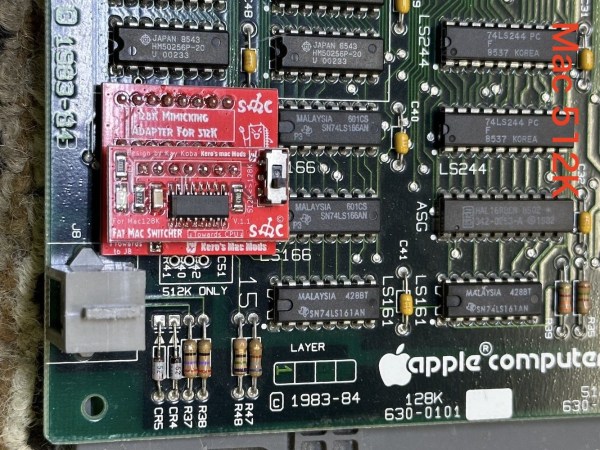
The Fat Mac Switcher, as it is called by its creator [Kay Koba], can upgrade the memory capability of these retro Apple machines with the simple push of a switch. The switch and controller logic sit on a separate PCB that needs to be installed into the computer’s motherboard in place of some of the existing circuitry. The computer itself needs its 16 memory modules replaced with 41256 DRAM modules for this to work properly though, but once its installed it can switch seamlessly between 512k and 128k modes.

Another interesting quirk of the retro Macintosh scene is that the technically inferior 128k models tend to be valued higher than the more capable 512k versions, despite being nearly identical otherwise. There are also some other interesting discussions on one of the forum posts about this build as well. This module can also be used in reverse; by installing it in a Macintosh 512k the computer can be downgraded to the original Macintosh 128k. For this the memory modules won’t need to be upgraded but a different change to the motherboard is required.

A product like this certainly would have been a welcome addition in the mid 80s when these machines were first introduced, since the 512k was released only months after the 128k machines were, but the retrocomputing enthusiasts should still get some use out of this device and be more able to explore the differences between the two computers. If you never were able to experience one of these “original” Macintosh computers in their heyday, check out this fully-functional one-third scale replica.

The Apple Silicon That Never Was

Over Apple’s decades-long history, they have been quick to adapt to new processor technology when they see an opportunity. Their switch from PowerPC to Intel in the early 2000s made Apple machines more accessible to the wider PC world who was already accustomed to using x86 processors, and a decade earlier they moved from Motorola 68000 processors to take advantage of the scalability, power-per-watt, and performance of the PowerPC platform. They’ve recently made the switch to their own in-house silicon, but, as reported by [The Chip Letter], this wasn’t the first time they attempted to design their own chips from the ground up rather than using chips from other companies like Motorola or Intel.

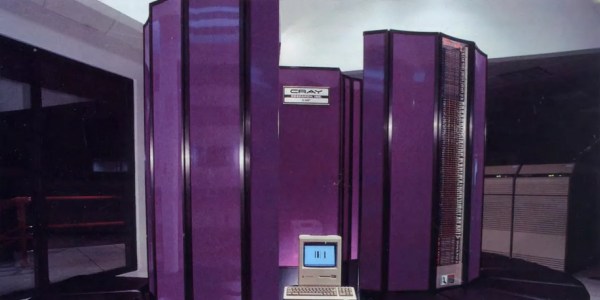
In the mid 1980s, Apple was already looking to move away from the Motorola 68000 for performance reasons, and part of the reason it took so long to make the switch is that in the intervening years they launched Project Aquarius to attempt to design their own silicon. As the article linked above explains, they needed a large amount of computing power to get this done and purchased a Cray X-MP/48 supercomputer to help, as well as assigning a large number of engineers and designers to see the project through to the finish. A critical error was made, though, when they decided to build their design around a stack architecture rather than a RISC. Eventually they switched to a RISC design, though, but the project still had struggled to ever get a prototype working. Eventually the entire project was scrapped and the company eventually moved on to PowerPC, but not without a tremendous loss of time and money.

Interestingly enough, another team were designing their own architecture at about the same time and ended up creating what would eventually become the modern day ARM architecture, which Apple was involved with and currently licenses to build their M1 and M2 chips as well as their mobile processors. It was only by accident that Apple didn’t decide on a RISC design in time for their personal computers. The computing world might look a lot different today if Apple hadn’t languished in the early 00s as the ultimate result of their failure to develop a competitive system in the mid 80s. Apple’s distance from PowerPC now doesn’t mean that architecture has been completely abandoned, though.

Thanks to [Stephen] for the tip!

IR Camera Is Excellent Hacking Platform

While there have been hiccups here and there, the general trend of electronics is to decrease in cost or increase in performance. This can be seen in fairly obvious ways like more powerful and affordable computers but it also often means that more powerful software can be used in other devices without needing expensive hardware to support it. [Manawyrm] and [Toble_Miner] found this was true of a particular inexpensive thermal camera that ships with Linux installed on it, and found that this platform was nearly perfect for tinkering with and adding plenty of other features to turn it into a much more capable tool.

The duo have been working on a SC240N variant of the InfiRay C200 infrared camera, which ships with a Hisilicon SoC. The display is capable of displaying 25 frames per second, making this platform an excellent candidate for modifying. A few ports were added to the device, including USB and MicroSD, and which also allows the internal serial port to be accessed easily. From there the device can be equipped with the uboot bootloader in order to run essentially anything that could be found on any other Linux machine such as supporting a webcam interface (and including a port of DOOM, of course). The duo doesn’t stop at software modifications though. They also equipped the camera with a lens, attached magnetically, which changes the camera’s focal length to give it improved imaging capabilities at closer ranges.

While the internal machinations of this device are interesting, it actually turns out to be a fairly capable infrared camera on its own as well. The hardware and software requirements for these devices certainly don’t need a full Linux environment to work, and while we have seen thermal cameras that easily fit in a pocket that are based on nothing any more powerful than an ESP32, it does tend to simplify the development process dramatically to include Linux and a little more processing power if you can.

Continue reading “IR Camera Is Excellent Hacking Platform”

JITX Spits Out Handy USB Cable Tester

When USB first came on the scene, one of the benefits was that essentially any four conductors could get you to the point where you could send information at 12 Mbps. Of course everything is faster these days, and reaching today’s speeds requires a little bit more fidelity in the cables. This simple tester makes sure that your modern cables are actually up to the task.

One of the design goals of this project is to automate away the task of testing cables or finding one that works, especially before thinking a problem with a device is somewhere in software, spending hours or days debugging, before realizing that it’s actually being caused by a hardware malfunction. The small PCB has two USB-C fittings to plug in both of the ends of a cable to, and between those connectors there is a number of LEDs. Each LED is paired to one the many conductors within the USB cable, and not only does it show continuity of these conductors but it can also show a high resistance connection via a dimly-lit or off-color display from an LED.

One of the other interesting facets of this build is the use of JITX, which is a software-defined electronics CAD tool which allows PCB design to be automated by writing out the requirements of the PCB into code, rather than drawing it manually. It’s worth a look, and a lot of the schematics of this particular project as well as some discussion on this software can be found on the project’s GitHub page. Incidentally, if this tester looks familiar, it’s probably because your’re thinking of the open source hardware USB tester created by [Álvaro Prieto].

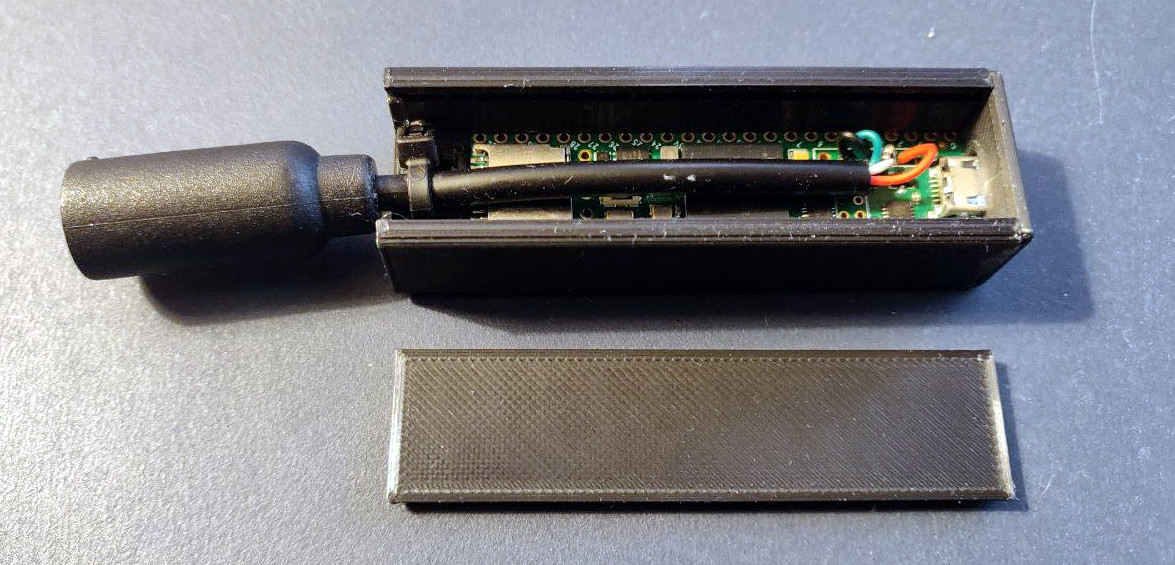
UAV Flight Controller Saves Weight

When building autonomous airborne vehicles like drones or UAVs, saving a little bit of weight goes a long way, literally. Every gram saved means less energy needed to keep the aircraft aloft and ultimately more time in the air, but unmanned vehicles often need to compromise some on weight in order to carry increased computing abilities. Thankfully this one carries a dizzying quantity of computer power for an absolute minimum of weight, and has some clever design considerations to improve its performance as well.

The advantage of this board compared to other similar offerings is that it is built to host a Raspberry Pi Compute Module 4, while the rest of the flight controllers are separated out onto a single circuit board. This means that the Pi is completely sandboxed from the flight control code, freeing up computing power on the Pi and allowing it to run a UAV-specific OS like OpenHD or RubyFPV. These have a number of valuable tools available for unmanned flight, such as setting up a long range telemetry and camera links. The system itself supports dual HD camera input as well as additional support for other USB devices, and also includes an electronic speed controller mezzanine which has support for quadcopters and fixed wing crafts.

Separating non-critical tasks like cameras and telemetry from the more important flight controls has a number of benefits as well, including improved reliability and simpler software and program design. And with a weight of only 30 grams, it won’t take too much cargo space on most UAVs. While the flight computer is fairly capable of controlling various autonomous aircraft, whether it’s a multi-rotor like a quadcopter or a fixed wing device, you might need a little more computing power if you want to build something more complicated.

A Mobile Phone From 1985

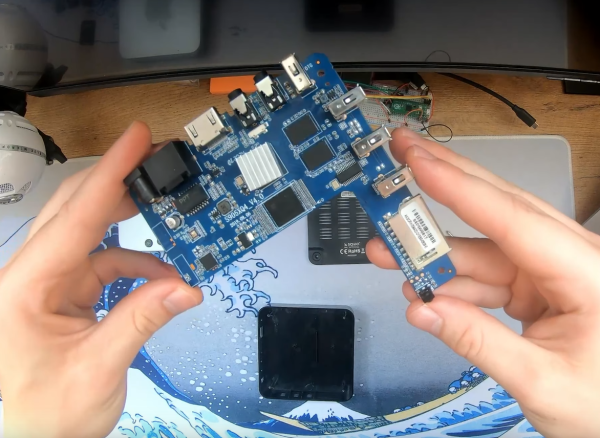
It might seem quaint through the lends of history we have the luxury of looking through, but in the mid 1980s it was a major symbol of status to be able to communicate on-the-go. Car phones and pagers were cutting-edge devices of the time, and even though there were some mobile cellular telephones, they were behemoths compared to anything we would recognize as a cell phone today. It wasn’t until 1985 that a cell phone was able to fit in a pocket, and that first device wasn’t just revolutionary because of its size. It made a number of technological advancements that were extremely impressive for its time, and [Janus Cycle] takes us through some of those in this teardown video.

The Technophone came to us from Great Britain by way of a former Ericsson engineer named Nils Mårtensson. It was able to achieve its relatively small stature using a surface-mount PCB, which was a cutting-edge manufacturing process for the time. Not only did it use surface-mount components and boards, but the PCB itself has 12 layers and two sides and hosts two custom Technophone chips. The phone is relatively modular as well, with the screen, battery pack, and other components capable of easily disconnecting from the main board. Continue reading “A Mobile Phone From 1985”

Vehicle-to-Grid Made Easy

As electric cars continue to see increased adoption, one associated technology that was touted long ago that still hasn’t seen widespread adoption is vehicle-to-grid or vehicle-to-home. Since most cars are parked most of the time, this would allow the cars to perform load-levelling for the grid or even act as emergency generators on an individual basis when needed. While this hasn’t panned out for a variety of reasons, it is still possible to use an EV battery for use off-grid or as part of a grid tie solar system, and now you can do it without needing to disassemble the battery packs at all.

Normally when attempting to use a scrapped EV battery for another use, the cells would be removed from the OEM pack and reorganized to a specific voltage. This build, however, eliminates the need to modify the packs at all. A LilyGO ESP32 is used to convert the CAN bus messages from the battery pack to the Modbus communications protocol used by the inverters, in this case a Fronius Gen24, so the inverter and battery can coordinate energy delivery from one to the other automatically. With the hard part out of the way, the only other requirements are to connect a high voltage DC cable from the battery pack to the inverter.

[Dala], the creator of this project, has taken other steps to ensure safety as well that we’d recommend anyone attempting to recreate this build pays close attention to, as these battery packs contain an extremely large amount of energy. The system itself supports battery packs from Nissan Leafs as well as the Tesla Model 3, which can usually be found for comparably low prices. Building battery energy storage systems to make up for the lack of commercially-available vehicle-to-home systems isn’t the only use for an old EV battery, though. For example, it’s possible to use Leaf batteries to triple the range of other EVs like [Muxsan] did with this Nissan van.

Continue reading “Vehicle-to-Grid Made Easy”