PIC Up A NeoPixel Ring And C What You Can Do Using This Tutorial

lit ringAs [Shahriar] points out in the introductory matter to his latest video at The Signal Path, Arduinos are a great way for a beginner to dig into all kinds of electronic excitement, but they do so at the cost of isolating that beginner from the nitty gritty of microcontrollers. Here, [Shahriar] gives a very thorough walkthrough of a 60-neopixel ring starting with the guts and glory of a single RGB LED. He then shows how that ring can easily be programmed using a PIC and some C.

[Shahriar]’s eval board is a simple setup that he’s used for other projects. It’s based on the PIC18F4550 which he’s programming with an ICD-U64. The PIC is powered through USB, but he’s using a separate switching supply to power the ring itself since he would need ~60mA per RGB to make them burn white at full brightness.

He’s written a simple header file that pulls in the 18F4550 library, sets the fuses, and defines some constants specific to the ring size. As he explains in the video, the PIC can create a 48MHz internal clock from a 20Mhz crystal and he sets up this delay in the header as well. The main code deals with waveform generation, and [Shahriar] does a great job explaining how this is handled with a single pin. Before he lights up the ring, he puts his scope on the assigned GPIO pin to show that although the datasheet is wrong about the un-delayed width of the low period for a zero bit, it still works to program the LEDs.

[Shahriar] has the code available on his site. He is also holding a giveaway open to US residents: simply comment on his blog post or on the video at YouTube and you could win either a TPI Scope Plus 440 with probes and a manual or a Tektronix TDS2232 with GPIB. He’ll even pay the shipping.

Continue reading “PIC Up A NeoPixel Ring And C What You Can Do Using This Tutorial”

Roboceratops: A Robot Dinosaur That Defies Extinction

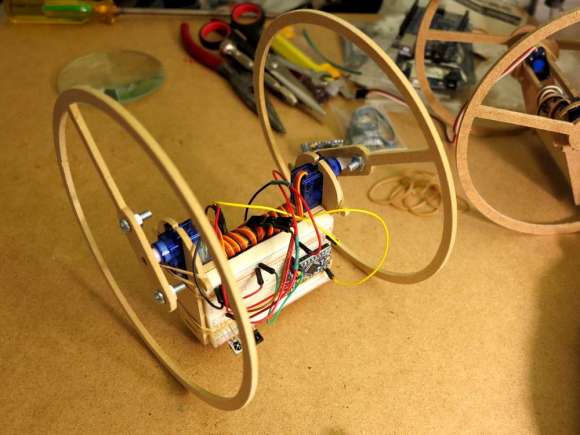
roboceratopsInspired by a childhood love of dinosaurs, [Robert] set out to build a robotic dinosaur from the Ceratopsian family. After about a year of design, building, and coding, he has sent us a video of Roboceratops moving around gracefully, chomping a rope, and smoothly wagging his tail.

Roboceratops is made from laser-cut MDF and aluminium bars in the legs. That’s not cookie dough on those legs, it’s upholstery foam, and we love the way [Robert] has shaped it. Roboceratops has servos in his jaw, neck, tail, and legs for a total of 14-DOF. You can see the servo specifics and more in the video description. [Robert] has full kinematic control of him through a custom controller and is working to achieve total quadrupedal locomotion.

Inside that custom controller is an Arduino Mega 2560, an LCD, and two 3-axis analog joysticks that control translation, height, yaw, pitch, and jaw articulation. For now, Roboceratops receives power and serial control through a tether, but [Robert] plans to add an on-board µC for autonomous movement as well as wireless, a battery, an IMU, and perhaps some pressure/contact detection in his feet.

The cherry on top of this build is the matching, latching custom carry case that has drawers to hold the controller, power supply, cable, tools, and spare parts. Check out Roboceratops after the break.

Continue reading “Roboceratops: A Robot Dinosaur That Defies Extinction”

Homemade Bazooka Has Earned Its Stripes

Many of us dream of launching rockets from our shoulders, but [John] here actually did something about it.

This bazooka build started with a 6″ diameter PVC pipe. He mounted a length of 80/20 T-slotted aluminum extrusion to the pipe through a couple of wood blocks. [John] installed rail buttons on some Estes Alpha rockets which slide along nicely inside the T-slot. He welded a PVC cleanout fitting and plug to one end for easy access and gave her a nice paint job.

The ignition is simple: an irresistible red push button is wired to a 9V battery and a pair of alligator clips. [John] loads up a rocket, puts the gators on the wires of an igniter, pushes said button, and Bob’s your uncle. All he needs now is a pair of gun boats. Video of the build and some demonstrations we don’t necessarily recommend are after the jump.

Continue reading “Homemade Bazooka Has Earned Its Stripes”

Kumo Connect: From Automated Desktop And Backyard Gardens To Automated Everything

photo hutI ran into a guy at Maker Faire Kansas City who I used to scoop ice cream with twenty years ago. We were slinging frozen dairy at a Baskin Robbins in a dying suburban strip mall that had a one-hour photo booth in the parking lot. It was just far enough away from our doorstep that dotting its backside with the hard-frozen ice cream balls that had been scooped and then not always accidentally dropped into the depths of the freezer was challenging. This guy, [Blake], kept a hockey stick hidden in the back room especially for this purpose. I never could get them to fly that far, but he was pretty good at it.

I hadn’t seen him since those days, and there he was manning a booth at Maker Faire. He looked quite professional, showing no hint of the mischief from those days of ice cream hockey. His booth’s main attraction was Niwa, a connected indoor garden. Having spent four years living and working in Japan after college, [Blake] did not choose this name arbitrarily: ‘niwa’ is Japanese for ‘garden’. He loves Hackaday and was more than happy to share his story.

Niwa and gnome

Connecting with Nature

[Blake] is an avid gardener, but his wife does not share this passion. A few years ago, he took a new job that required travel on an almost weekly basis, which meant big trouble for his plants. Unfortunately, he couldn’t find what he wanted to ensure they were taken care of. You know what comes next: he decided he would design his own system. However, he had no experience with electronics.

Continue reading “Kumo Connect: From Automated Desktop And Backyard Gardens To Automated Everything”

Retrotechtacular: AT&T’s Hello Machine

1ESSHow many Ma Bell employees does it take to build an ESS mainframe? This week, Retrotechtacular takes you into the more poetic recesses of the AT&T Archive to answer that very question. This wordless 1974 gem is an 11-minute exploration of the construction and testing of a Western Electric 1ESS. It begins with circuit board population and ends with lots of testing.


tree

The film is really quite groovy, especially the extreme closeups of wire wrapping and relay construction. The soundtrack is a string-heavy suite that moves you through the phases of bringing up the 1ESS while drawing parallels to the wires of communication. You may lose count of the punch down blocks and miles of cables, but there are surprisingly few mustaches.

Continue reading “Retrotechtacular: AT&T’s Hello Machine”

Whimsical Homemade Wimshurst Machine

gge5

Got some empty plastic bottles in your recycling bin or cluttering up your desk? Then you’ve got a large portion of the material you need for building your own Wimshurst machine like [Thomas Kim] did. This demonstration and build video is one of the many treasures of his YouTube channel. He shows the machine in operation and then spends several real-time minutes showing how he made the heart of it using plastic bottles, the conductive brush from a laser printer, discarded CDs, and a bunch of copper wire. As a bonus, he removes the conductive material and paint from a CD with a homemade taser. As a super special bonus, there’s no EDM soundtrack to this video, just the sounds of productivity.

The Wimshurst machine is an electrostatic generator that slightly predates the Tesla coil. It works by passing a charge from one spinning disk to another disk spinning in the opposite direction. When the charge reaches the collecting comb, it is stored in Leyden jars. Finally, it gets discharged in a pretty spark and the cycle begins anew. Once you’re over shocking your friends, use your Wimshurst machine to make an electrostatic precipitator.

Continue reading “Whimsical Homemade Wimshurst Machine”

Visualize Vroom With This RGB LED Tachometer

[Pete Mills] recently bought the all-new Ford Fiesta, which offers impressive fuel economy over that of his Jeep. He soon figured out that he has real time access to a wealth of engine and chassis data through Ford’s OpenXC platform and used it to build blueShift, a neopixel tachometer. The car already has a tach, but this one is more visual, can be seen in periphery, and is just plain fun.

In case you hadn’t heard, the OpenXC platform is Ford’s consumer key to the kingdom of OBD2 treasures. It unlocks the magic through its Vehicle Interface, which plugs into the OBD2 port and translates the CAN bus messages to OpenXC format. These messages are packaged into JSON format and can be sent over Bluetooth or Ethernet/Wi-Fi to an Android, Python, or iOS device.

[Pete] went with Bluetooth and used a BlueSMiRF with an Arduino Pro Mini. He derives power from the car’s on-board USB port, but has future plans to use the OpenXC VI port. blueShift reads the RPM data and displays a green trail as the engine revs up. At the peak revolution, it shows a red LED. This one is sticky and will persist for the lesser of three seconds or the time elapsed to a new positive RPM. [Pete] is also reading the headlight status of the car. As soon as they come on, the RGB LEDs dim to avoid blinding him at night.

[Pete] wanted to make an enclosure more finished-looking than a Tupperware box. He nearly detoured into 3D-printer design, but ended up putting together a Prusa i3v and came up with this RAM mount-compatible enclosure. His fantastic write-up and code are on his blog, but you can make the jump to see a short demo and a full explanation video. You can also make smart brake lights or even create art with OpenXC.

Continue reading “Visualize Vroom With This RGB LED Tachometer”