Watch The Low-Cost Mechatronics Lab Dispense Candy, Sort Cups

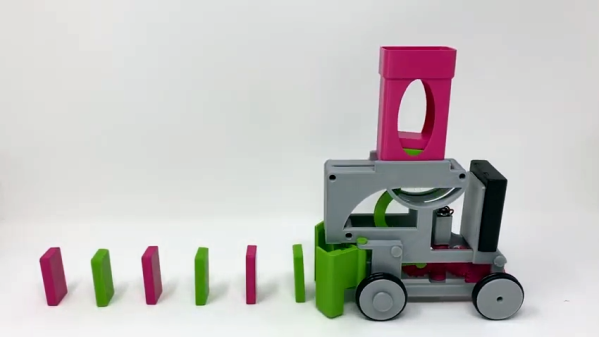
A lot can be done with simple motors and linear motion when they are mated to the right mechanical design and control systems. Teaching these principles is the goal behind the LCMT (Low Cost Mechatronics Trainer) which is intended primarily as an educational tool. The LCMT takes a “learn by doing” approach to teach a variety of principles by creating a system that takes a cup from a hopper, fills it with candy from a dispenser, then sorts the cups based on color, all done by using the proper combinations of relatively simple systems.

The Low Cost Mechatronics Trainer can be built for under $1,000 and is the wonderful work of a team from the Anne Arundel Community College in Maryland, USA. The LCMT is clearly no one-off project; there are complete CAD files and build documentation on the site, as well as a complete lab guide for educators.

A demo video of the assembled system is embedded below, with a walkthrough done by [Tim Callinan]. It’s worth a watch to see how cleanly designed the system is, and the visual learners among you may learn a thing or two just by watching the system go through its motions.

Continue reading “Watch The Low-Cost Mechatronics Lab Dispense Candy, Sort Cups”

“Yell To Press B” Mod Makes N64 Controller Worse

There’s probably no reason anyone would actually desire a mod like this. Well, no good reason. But [William Osman] had been pondering what it would be like to play some classic games with inputs other than buttons, and decided to make an audio sensor responsible for pressing the B button on an old N64 controller. This “Yell To Press B” mod was also something unique to show his hosts when he visited the YouTube video game aficionados, [Game Grumps].

[William] acknowledges that the build is a bit of a hack job, but the project page does a good job of documenting his build process and covering the kinds of decisions involved in interfacing to a separate piece of hardware. After all, most budding hackers have sooner or later asked themselves “how do I make my gadget press a button on this other thing?” [William] ends up using a small relay to close the connection between the traces for the B button when triggered by a microphone module, but he points out that it should be possible to do a non-destructive version of the mod. Examples exist of reading the N64 controller’s state with an Arduino, which could form the basis of a man-in-the-middle approach of “Yell To Press B” (or anything else) instead of soldering to the button contacts. A video is embedded below, in which you can watch people struggle to cope with the bizarre mod.

Continue reading ““Yell To Press B” Mod Makes N64 Controller Worse”

Solar-Powered IoT Sensor Saves Wine Batch From Overheating

Making wine isn’t just about following a recipe, it’s a chemical process that needs to be monitored and managed for best results. The larger the batch, the more painful it is to have something go wrong. This means that the stakes are high for small vineyards such as the family one [Mare] works with, which have insufficient resources to afford high-end equipment yet have the same needs as larger winemakers. The most useful thing to monitor is the temperature profile of the fermentation process, and [Mare] created an exceptional IoT system to do that using LoRa wireless and solar power.

It’s not enough just to measure temperature of the fermenting liquid; viewing how the temperature changes over time is critical to understanding the process and spotting any trouble. [Mare] originally used a Raspberry Pi, I2C temperature sensor, and a Wi-Fi connection to a database to do the monitoring. This was a success, but it was also overkill. To improve the system, the Raspberry Pi was replaced with a LoRaDunchy board, an STM-based module of [Mare]’s own design which is pin-compatible with the Arduino Nano. It includes a battery charger, power management, and LoRa wireless communication. Adding a solar cell and lithium-polymer battery was all it took to figuratively cut the power cord.

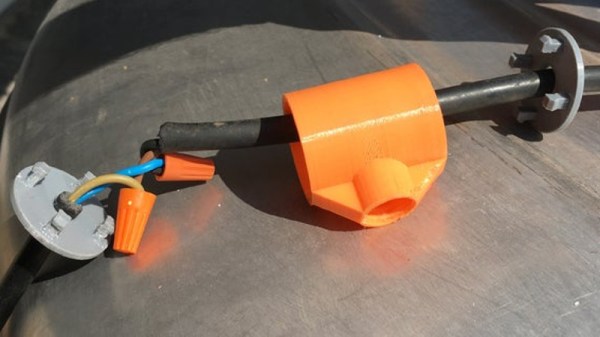
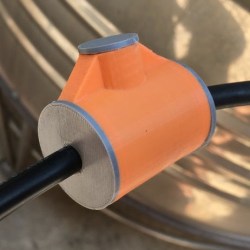
Sensing the temperature of fermentation is done by sealing the temperature sensor into a thin aluminum tube, and lowering that into the vat. There it remains, with the LoRaDunchy board periodically waking up to read the sensor and report the tempurature over LoRa before going back to sleep, all the while sipping power from the battery which in turn gets recharged with solar power.

It’s an elegant system that has already paid off. A 500 litre vat of wine generated an alarm when the temperature rose above 24 Celsius for 10 minutes. An email alert allowed the owner to begin mixing the solution and add ice water to put the brakes on the runaway reaction. The temperature dropped and slow fermentation resumed, thanks to the twin powers of gathering the right data, then doing something meaningful with it.

Vineyards and LoRa have joined forces before, for example in the Vinduino project which aims to enable water-smart farming. If you’re unfamiliar with LoRa in general, the LoRa on the ESP32 project page contains a good primer, and if the antenna on the module shown here looks familiar to you it’s because we recently featured [Mare]’s guide on making DIY LoRa antennas from salvaged wire.

Set Up A Headless Raspberry Pi, All From Another Computer’s Command Line

There are differences between setting up a Raspberry Pi and installing an OS on any other computer, but one thing in common is that if you do enough of them, you seek to automate the process any way you can. That is the situation [Peter Lorenzen] found himself in, and his solution is a shell script to install and configure the Raspberry Pi for headless operation, with no need to connect either a keyboard or monitor in the process.

[Peter]’s tool is a script called rpido, and with it the process for setting up a new Raspberry Pi for headless operation is super streamlined. To set up a new Pi, all [Peter] needs to do is:

  1. Plug an SD card into his laptop (which happens to be running Ubuntu.)
  2. Run: rpido -w -h myhostname -s which downloads and installs the newest version of Raspbian lite, does some basic setup (such as setting the hostname), configures for headless operation, and launches a root shell.
  3. Use the root shell to do any further tweaks or checks (like launching raspi-config for additional changes.)
  4. Exit the shell, remove the SD card from his laptop, and install the card into the Raspberry Pi.

There are clear benefits to [Peter]’s script compared to stepping through a checklist of OS install and setup tasks, not to mention the advantage of not needing to plug in a keyboard and monitor. Part of the magic is that [Peter] is mounting the SD card’s filesystem in a chroot environment. Given the right tools, the ARM binaries intended for the Pi run on his (Intel) Ubuntu laptop. It’s far more convenient to make changes to the contents of the SD card in this way, before it goes to its new home in a Pi.

Not everything has to revolve around an SD card, however. [Jonathan Bennet] showed that it’s possible to run a Raspberry Pi without an SD card by using the PXE boot feature, allowing it to boot and load its file system from a server on the same network, instead of a memory card.

DIY Mini Helical Antennas From Salvaged Co-ax Cable

[Mare] has a visual guide and simple instructions for making DIY mini helical 868 MHz antennas for LoRa applications. 868 MHz is a license-free band in Europe, and this method yields a perfectly serviceable antenna that’s useful where space is constrained.

A metric 5 mm drill bit makes a convenient core.

The process is simple and well-documented, but as usual with antenna design it requires attention to detail. Wire for the antenna is silver-plated copper, salvaged from the core of RG214U coaxial cable. After straightening, the wire is wound tightly around a 5 mm core. 7 turns are each carefully spaced 2 mm apart. After that, it’s just a matter of measuring and bending the end for soldering to the wireless device in question. [Mare] has used this method for wireless LoRa sensors in space-constrained designs, and it also has the benefit of lowering part costs since it can be made and tested in-house.

Antennas have of course been made from far stranger things than salvaged wire; one of our favorites is this Yagi antenna made from segments of measuring tape.

Fail Of The Week: Laser-based Persistence Of Vision Gadget

[XTronical]’s idea for a laser-based persistence of vision gadget failed, but the basic idea seemed sound. A row of inexpensive red lasers shine into a spinning mirror and are reflected onto a distant surface, making 8 scan lines. A reflective object sensor detects mirror position, and by rapidly turning individual lasers on and off, a pattern can be drawn out.

That was the idea, anyway. A quick prototype consisting of some small and economical red laser diodes and a double-sided mirror hot glued to the shaft of a small DC motor formed the guts of the unit. [XTronical] worried that the spinning mirror might be unstable or unreliable, but that part performed just fine. The problems, he found, were mainly with the lasers.

[XTronical] had hoped to turn the lasers on and off directly via the digital I/O pins of an Arduino, but here’s where a lot of little issues sank the project. First of all, hot glue was handy for mounting but the lasers were cumbersome to align by hand, and the hot glue made it troublesome to effect repairs when units failed. In addition, the beams had inconsistent brightness and spot sizes, which made for poor visuals. [XTronical]’s approach of controlling the lasers by applying and cutting power may also have been a source of trouble. It’s possible that these lasers cannot turn on and off fast enough, but it’s hard to say without measuring.

Sensible ideas can be rendered unworkable by an accumulation of small problems, and that seems to have been the case here. A video overview is embedded below; is this approach doomed, or can it be made workable?

Continue reading “Fail Of The Week: Laser-based Persistence Of Vision Gadget”

A Daylight-Readable Bar Graph Display In The 70s Wasn’t Cheap

The driver board with display attached; the row of lamps is visible on the right hand side.

LEDs weren’t always an easy solution to displays and indicators. The fine folks at [Industrial Alchemy] shared pictures of a device that shows what kind of effort and cost went into making a high brightness bar graph display in the 70s, back when LEDs were both expensive and not particularly bright. There are no strange materials or methods involved in making the display daylight-readable, but it’s a peek at how solving problems we take for granted today sometimes took a lot of expense and effort.

The display is a row of 28 small incandescent bulbs, mounted in a PCB and housed in a machined aluminum frame. Holes through which to view the bulbs are on both the top and front of the metal housing, which allows the unit to be mounted in different orientations. It was made as a swappable module, its 56 machined gold pins mate to sockets on the driver board. The driver board itself consists of 14 LM119 dual comparators, each of which controls two bulbs on the display.

An example of a Wamco minitron bar graph display. Each window contains an incandescent filament. [Source: industrialalchemy.org]
[Industrial Alchemy] believes that the display unit itself may have been a bit of a hack in its own way. Based on the pin spacing and dimensions of the driver board, they feel that it was probably designed to host a row of modular units known as the Wamco minitron bar graph display. An example is pictured here; they resembled DIP chips and could be stacked side-by-side to make a display of any length. Each window contained an incandescent filament in a reflective well, and each light could be individually controlled.

These minitron bar graph units could only be viewed from the top, and were apparently high in cost and low in availability. Getting around these limitations may have been worth creating this compatible unit despite the work involved.

Display technology has taken many different turns over the years, and you can see examples of many of them in one place in the Circus Clock, which tells the time with a different technology for each digit: a nixie, a numitron, a 7-segment thyratron tube, a VFD, an LED dot display, and a rear projection display.