Cheap Multimeter Leads Come With Extra Ohms, Free!

[Nop head] discovered that cheap multimeter leads costing only a few bucks can come with more than one may have bargained for. The first set had a large amount of useful-looking attachments, but the wires used for the leads were steel with a resistance of about one ohm each. With two leads in use, that means any resistance measurement gets two ohms added for free. More seriously, when measuring current, the wires can heat up rapidly. Voltage measurements would be affected the least, but the attachments and lead design expose a large amount of bare metal, which invites accidental shorts and can be a safety hazard with higher voltages.

Are all cheap multimeter leads similarly useless? Not necessarily. [nop head] also purchased the set pictured here. It has no attachments, but was a much better design and had a resistance of only 64 milliohms. Not great, but certainly serviceable and clearly a much better value than the other set.

It’s usually not possible to identify garbage before it’s purchased, but [nop head] reminds us that if you do end up with trash in hand, poor quality counterfeits can be good for a refund. That goes for electronic components, too.

How Not To Design A 3D Printed Belt Clamp

[Mark Rehorst] has been busy with his Ultra MegaMax Dominator (UMMD) design for a 3D printer, and one of the many things he learned in the process was how not to design a 3D printed belt clamp. In the past, we saw how the UMMD ditched the idea of a lead screw in favor of a belt-driven Z axis, but [Mark] discovered something was amiss when the belts were flopping around a little, as though they had lost tension. Re-tensioning them worked, but only for a few days. It turned out that the belt clamp design he had chosen led to an interesting failure.

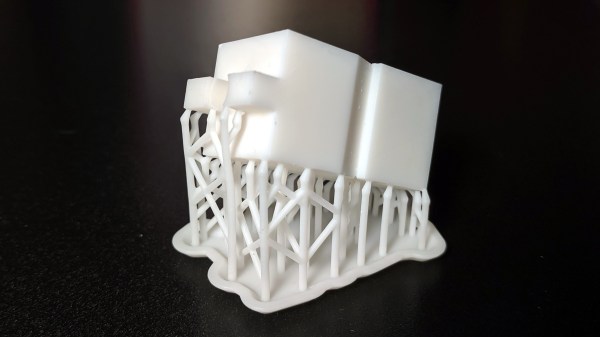
The belts used were common steel-core polyurethane GT2 belts, and the clamp design uses a short segment of the same belt to lock together both ends, as shown above. It’s a simple and effective design, but one that isn’t sustainable in the longer term.

The problem was that this design led to the plastic portion of the belt stretching out and sliding over the internal steel wires. The stretching of the polyurethane is clear in the image shown here, but any belt would have had the same problem in the clamp as it was designed. [Mark] realized it was a much better idea to use a design in which the belts fold over themselves, so the strain is more evenly distributed.

[Mark] has been sharing his experiences and design process when it comes to building 3D printers, so if you’re interested be sure to check out the UMMD and its monstrous 695 mm of Z travel.

Young Entrepreneurs Learn What Really Goes Into Making A Product

Just to be clear, the primary goal of the Papas Inventeurs (Inventor Dads) was to have the kids make something, have fun, and learn. In that light, they enjoyed a huge success. Four children designed, made, and sold laser-cut napkin rings from a booth at the Ottawa Maker Faire as a fun learning process (English translation, original link in French.) [pepelepoisson] documented the entire thing from beginning to end with plenty of photos. Things started at proof of concept, then design brainstorming, prototyping, manufacture, booth design, and finally sales. While adults were involved, every step was done by the kids themselves.

It all began when the kids were taken to a local fab lab at the École Polytechnique and made some laser-cut napkin holders from plywood for personal use. Later, they decided to design, manufacture, and sell them at the Ottawa Maker Faire. Money for the plywood came from piggy banks, 23 different designs made the cut, and a total of 103 rings were made. A display board and signs made from reclaimed materials rounded out the whole set.

In the end, about 20% of people who visited and showed interest made a purchase, and 60 of the 103 pieces were sold for a profit of $126. Of course, the whole process also involved about 100 hours of combined work between the kids and parents and use of a laser cutter, so it’s not exactly a recipe for easy wealth. But it was an incredibly enriching experience, at least figuratively, for everyone involved.

Possibly the biggest takeaway was the way manufacturing involved much more than just pressing “GO” on a laser cutter. Some pieces needed sanding after laser cutting, and each piece got two coats of varnish. If you missed it, [Bob Baddeley] showed how labor, and not materials, ends up being the most expensive part of a product.

Lessons Learned From A 1-Day RTL-SDR Enclosure Project

[ByTechLab] needed an enclosure for his R820T2 based RTL-SDR, which sports an SMA connector. Resolving to design and 3D print one in less than a day, he learned a few things about practical design for 3D printing and shared them online along with his CAD files.

The RTL-SDR is a family of economical software defined radio receivers, and [ByTechLab]’s’ enclosure (CAD files available on GrabCAD and STL on Thingiverse) is specific to his model. However, the lessons he learned are applicable to enclosure design in general, and a few of them specifically apply to 3D printing.

He started by making a basic model of the PCB and being sure to include all large components. With that, he could model the right voids inside the enclosure to ensure a minimum of wasted space. The PCB lacks any sort of mounting holes, so the model was also useful to choose where to place some tabs to hold the PCB in place. That took care of the enclosure design, but it also pays to be mindful of the manufacturing method so as to play to its strengths. For FDM 3D printing, that means most curved shapes and rounded edges are trivial. It also means that the biggest favor you can do yourself is to design parts so that they can be printed in a stable orientation without any supports.

This may be nothing that an experienced 3D printer and modeler doesn’t already know, but everyone is a novice at some point and learning from others’ experiences can be a real timesaver. For the more experienced, we covered a somewhat more in-depth guide to practical 3D printed enclosure design.

[ByTechLab]’s desire for a custom enclosure was partly because RTL-SDR devices come in many shapes and sizes, as you can see in this review of 19 different units (of which only 14 actually worked.)

A Cheat Sheet For Publishing Python Packages

[Brendan Herger] was warned that the process of publishing a Python package would be challenging. He relishes a challenge, however, and so he went at it with gusto. The exhausting process led him to share a cheat sheet for publishing Python packages with the goal of making the next time smoother, while also letting other people benefit from his experience and get a running start.

[Brendan] describes publishing a Python package as “tying together many different solutions with brittle interchanges.” His cheat sheet takes the form of an ordered workflow for getting everything in place, with some important decisions and suggestions about things like formatting and continuous integration (CI) made up-front.

The guide is brief, but [Brendan] has made errors and hit dead ends in the hopes that others won’t have to. The whole thing came about from his work in deep learning, and his desire to create a package that allows rapid building and iterating on deep learning models.

Deep learning is a type of machine learning that involves finding representations in large amounts of data. [Brendan] used it in a project to automatically decide whether a Reddit post contains Star Wars plot spoilers, and we recently saw it featured in a method of capturing video footage only if a hummingbird is present.

Spring-Loaded Bed For K40 Laser Acts As An Auto-Focus

Laser engraving and cutting has something in common with focusing the sun’s rays with a magnifying glass: good focus is critical to results. If materials of varying thicknesses are used, focus needs to be re-set every time the material changes, and manual focusing quickly becomes a chore. [Scorch Works] has a clever solution to avoid constant re-focusing that doesn’t involve sensors or motors of any sort. The result is a self-adjusting bed that compensates for material height changes, ensuring that the top surface of the material is always a fixed distance from the laser’s head.

The way [Scorch Works] has done this is to make two spring-loaded clamps from angle aluminum and a few pieces of hardware. When a sheet of material is placed into the machine, the edges get tucked underneath the aluminum “lips” while being pushed upward from beneath. By fixing the height of the top layer of angle aluminum, any sheet stock always ends up the same distance from the laser head regardless of the material’s thickness.

[Scorch Works] shows the assembly in action in the video embedded below, along with a few different ways to accommodate different materials and special cases, so be sure to check it out.

Continue reading “Spring-Loaded Bed For K40 Laser Acts As An Auto-Focus”

Tiny Drone Racing Gates Use Up Those Filament Scraps

Drone racing comes in different shapes and sizes, and some multirotor racers can be very small indeed. Racing means having gates to fly though, and here’s a clever DIY design by [Qgel] that uses a small 3D printed part and a segment of printer filament as the components for small-scale drone racing gates.

The base is 3D printed as a single piece and is not fussy about tolerances, meanwhile the gate itself is formed from a segment of printer filament. Size is easily adjusted, they disassemble readily, are cheap to produce, and take up very little space. In short, perfect for its intended purpose.

Races benefit from being able to measure lap time, and that led to DIY drone racing transponders, complete with a desktop client for managing the data. Not all flying is about racing, but pilots with racing skills were key to getting results in this Star Wars fan film that used drones. Finally, those who still feel that using the word “drone” to include even palm-sized racers is too broad of a use may be interested in [Brian Benchoff]’s research into the surprisingly long history of the word “drone” and its historically broad definition.