Teardown: VTech PreComputer 1000

Back in the days before kids could be placated with a $50 Android burner phone, many a youngster was gifted a so-called “educational computer” to keep them occupied. Invariably looking like a fever dream version of the real computer their parents didn’t want to let them use, these gadgets offered monochromatic exploits that would make Zork look like Fortnite. Due equally to their inherent hardware limitations and the premise of being an educational toy, the “games” on these computers often took the form of completing mathematical equations or answering history questions.

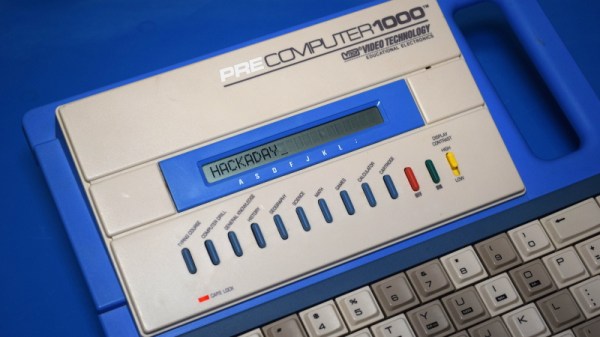
The VTech PreComputer 1000 is a perfect specimen of this particular style of educational toy. Released in 1988, it was advertised as a way for pre-teens to become more comfortable with operating a real computer; since at that point, it had become abundantly clear that the coming decade would see a beige box on every professional’s desk. Its full-size QWERTY keyboard was specifically mentioned in the product’s accompanying literature as a way to get young hands accustomed to the ways of touch typing.
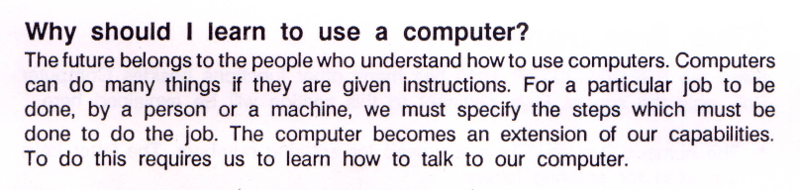
Words of wisdom from the PreComputer 1000’s manual.

By the mid-1990s these devices would have progressed far enough to include passable text-to-speech capabilities and primitive graphics, but the junior professional who found him or herself seated in front of the PreComputer 1000 was treated to a far more spartan experience. It’s perhaps just as well that this particular educational computer was listed as a training tool, because even in 1988, surely a session with this toy must have felt very much like work.

But that’s not to say the PreComputer 1000 is without its own unique charms. In an effort to help cement its role as a “trainer” for more conventional computers, VTech saw fit to equip the PreComputer with its own BASIC interpreter. They even included generous written documentation that walked young programmers through the various commands and functions. Even today, there’s something oddly appealing about a mobile device with a full keyboard that can run BASIC programs for better than 24 hours on batteries (even if they’re alkaline “C” cells).

Let’s take a look inside this more than 30 year old mobile device, and see how the designers managed to create a reasonable facsimile of actual computing on a kid-friendly budget.
Continue reading “Teardown: VTech PreComputer 1000”

Behind The Scenes Of The 2019 Superconference Badge

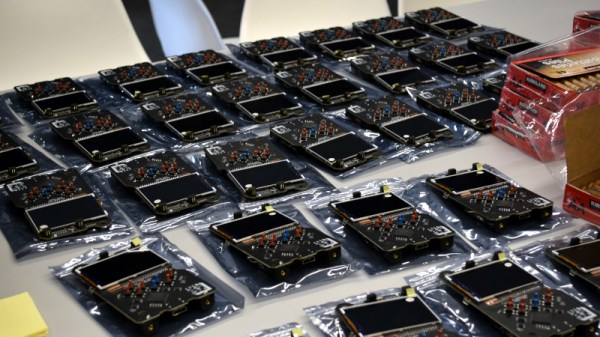
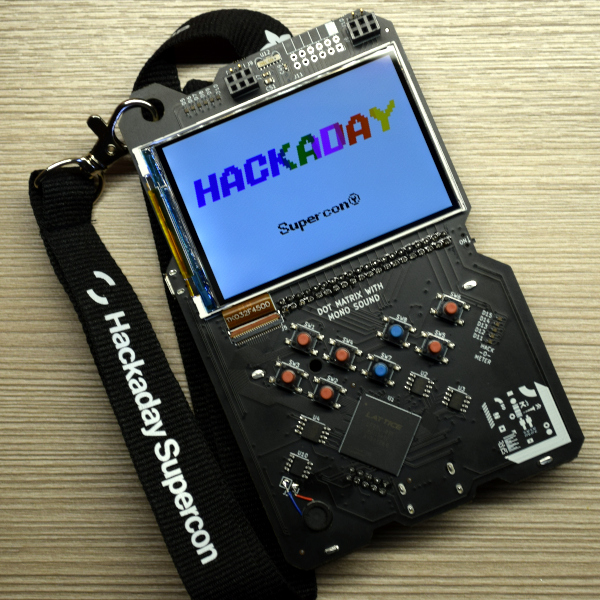
If you count yourself among the several hundred of our closest friends that have joined us at Supplyframe HQ for the 2019 Hackaday Superconference, then by now you’ll have your hands on one of this year’s incredible FPGA badges. It should come as no surprise that an incredible amount of time and effort went into developing and manufacturing this exceptionally unique piece of hardware; the slick gadget in your hands today took nearly an entire year to develop, and work continued on it until very literally the last possible moment.

Badge designer Jeroen Domburg (aka Sprite_TM), Hackaday staff, and a team of dedicated volunteers were still putting the final touches on these ambitious devices less than 24 hours before they were distributed to the first wave of Superconference attendees. Naturally, that’s not exactly how things were supposed to go. But when you’ve got a group of people that want to push the envelope and build something truly incredible, convincing them to actually stop working can be a challenge in itself.

In fact, development of the badge is still ongoing. Fixes and improvements are being made to the software even as you read this, and if you haven’t already, you should upgrade your badge to make sure you’ve got the latest and greatest from our international team of wizards. We all know that conference badges have an unfortunate habit of languishing on the shelf and collecting dust, but the 2019 Superconference badge was built to challenge you for longer than just one weekend. Consider yourself warned: for every Supercon badge that gets tossed in a drawer come Monday, Sprite_TM will shed a single tear.

After the break, come along as we turn back the clock and take a look at the last minute dash to get 500+ badges programmed and ready to go before the doors opened for the 2019 Hackaday Superconference.

Continue reading “Behind The Scenes Of The 2019 Superconference Badge”

2019 Superconference Is Streaming Live Right Now!

Perhaps Pasadena is a bit too far from home, or maybe you waited a few milliseconds longer than you should have and missed the tickets when they went on sale. Whatever the reason, the fact is that the vast majority of Hackaday readers won’t be able to join us at the 2019 Superconference. But thanks to the magic of the Internet, you’ll still be able to see the incredible talks we’ve got lined up.

Starting at 10 AM Pacific on both Saturday and Sunday, the live stream will allow you to virtually attend the ultimate hardware conference in glorious high definition. Many of the talks this year have a specific focus on FPGAs (and we’ve got an incredible badge to match), but you’ll also see presentations on subjects such as hacking quantum key distribution systems, the creation of free-form circuit sculptures, debugging PCBs with augmented reality, and using Peltier coolers for fermentation. Saturday evening we’ll reveal the winner of the Hackaday Prize live on stage, and come Sunday you can unwind with a look at the best and brightest badge hacks from the weekend.

We won’t lie to you, there’s more going on at Supercon than we can possibly fit into a live video stream. At an event where nearly every flat surface will be playing host to somebody fiddling with a piece of interesting hardware, there’s only so much you can do vicariously. If anyone knows how you can take part in the SMD Soldering Challenge over the Internet, we’re all ears. Whether you’ll be with us in corporeal form or otherwise, don’t forget to join the official 2019 Hackaday Superconference Chat and use the #supercon hashtag on your social media time sink of choice.

Upgrade Board Turns Typewriter Into A Teletype

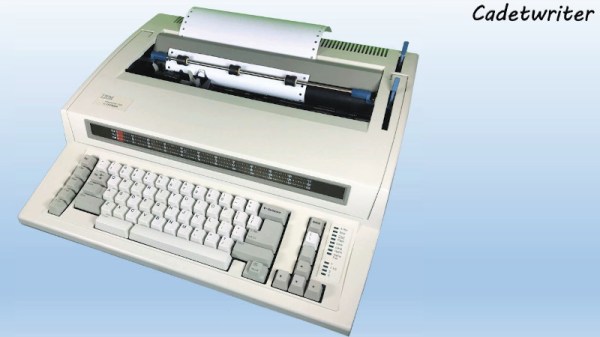
It may come as little surprise to find that Hackaday does not often play host to typewriter projects. While these iconic machines have their own particular charm, they generally don’t allow for much in the way of hardware modification. But then the IBM Wheelwriter 1000 isn’t exactly a traditional typewriter, which made its recent conversion to a fully functional computer terminal possible.

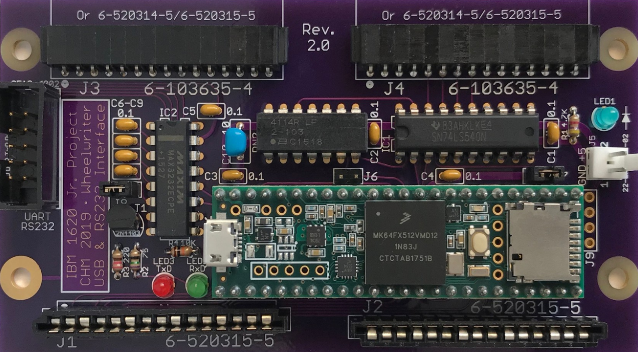
A product of the Computer History Museum’s [IBM 1620 Jr. Team], this modification takes the form of a serial interface board that can be built at home and installed into the Wheelwriter. The board allows the vintage electronic typewriter to speak RS-232 and USB, so it can be connected to whatever vintage (or not so vintage) computer you can imagine. The documentation for the project gives a rough cost of $150, though that does assume you’ve already got a Wheelwriter 1000 kicking around.

The GitHub repository includes everything you need to create your own board, and there’s even a highly detailed installation guide that goes over the case modifications necessary to get the new hardware installed. It also explains that you’ll want to get a new keycap set for your Wheelwriter if you perform this modification, as the original board doesn’t have all of the ASCII characters.

So why adapt an old electric typewriter to function as a teletype? As explained by the [IBM 1620 Jr. Team], there are projects out there looking to recreate authentic 1960s-era computing experiences that need a (relatively) affordable paper terminal. The originals are too rare to use in modern recreations, but with their adapter board, these slightly less archaic input devices can be used in their place.

Once you’ve built your new teletype, or in the somewhat unlikely event you already have one at the ready, we’ve seen a couple of projects that you might be interested in to put it to use.

Break The Caps Lock Habit With This Annoying Buzzer

The much-maligned Caps Lock key has been causing problems for decades, and its continued existence is controversial enough that Google decided to drop it all together in their Chromebooks. Until the rest of the industry decides to follow their lead, they’ll likely be no shortage of awkward emails or overly aggressive comments that are the direct result of this treacherous key.

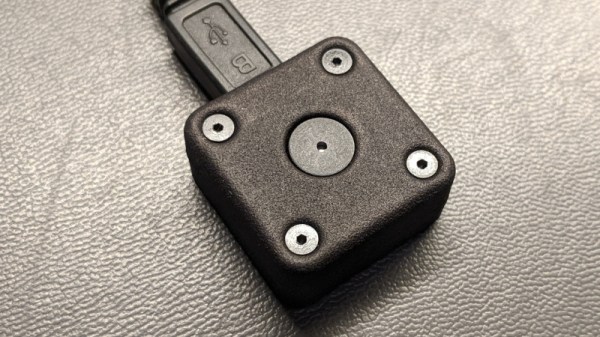
But [Glen Akins] thinks he has the solution. His creation is a tiny little USB notification device that has only one purpose: to make a terrible noise as long as the Caps Lock key is engaged. Think of it like the little indicator LED on your keyboard, but one that makes a terrible screeching noise that you simply can’t ignore. This is made possible by the fact that the Caps Lock status is handled at the OS level rather than the local input device.

The notifier is built around the PIC16F1459, as it allowed him to implement USB 2.0 while keeping the part count low. Beyond the PIC, the board uses a handful of passives and a transistor to drive the buzzer from a PWM signal. To avoid duplicated effort, everything was designed to fit inside the enclosure he already developed for his single-key keyboard that we covered last year. [Glen] and a fellow coworker from Keysight put together an excellent video on the creation and use of the buzzer that you can see after the break.

On the other end of the spectrum, and even smaller, is the “USB Capslocker” which is designed to weaponize this already troublesome feature of your keyboard.

Continue reading “Break The Caps Lock Habit With This Annoying Buzzer”

An Open Source Toolbox For Studying The Earth

Fully understanding the planet’s complex ecosystem takes data, and lots of it. Unfortunately, the ability to collect detailed environmental data on a large scale with any sort of accuracy has traditionally been something that only the government or well-funded institutions have been capable of. Building and deploying the sensors necessary to cover large areas or remote locations simply wasn’t something the individual could realistically do.

But by leveraging modular hardware and open source software, the FieldKit from [Conservify] hopes to even the scales a bit. With an array of standardized sensors and easy to use software tools for collating and visualizing collected data, the project aims to empower independent environmental monitoring systems that can scale from a handful of nodes up to several hundred.

We’ve all seen more than enough DIY environmental monitoring projects to know there’s nothing particularly new or exciting about stuffing a few cheap sensors into a plastic container. But putting high quality, reliable hardware into large scale production is another thing entirely. Especially when your target user may have limited technical knowledge.

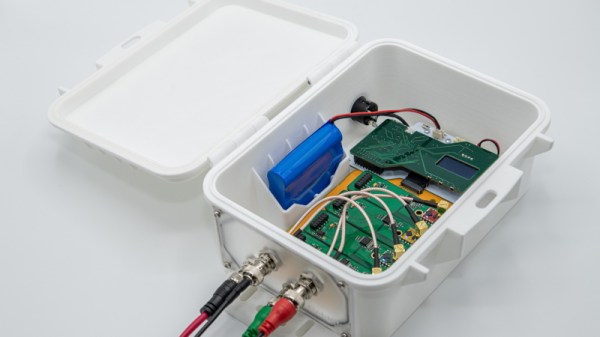
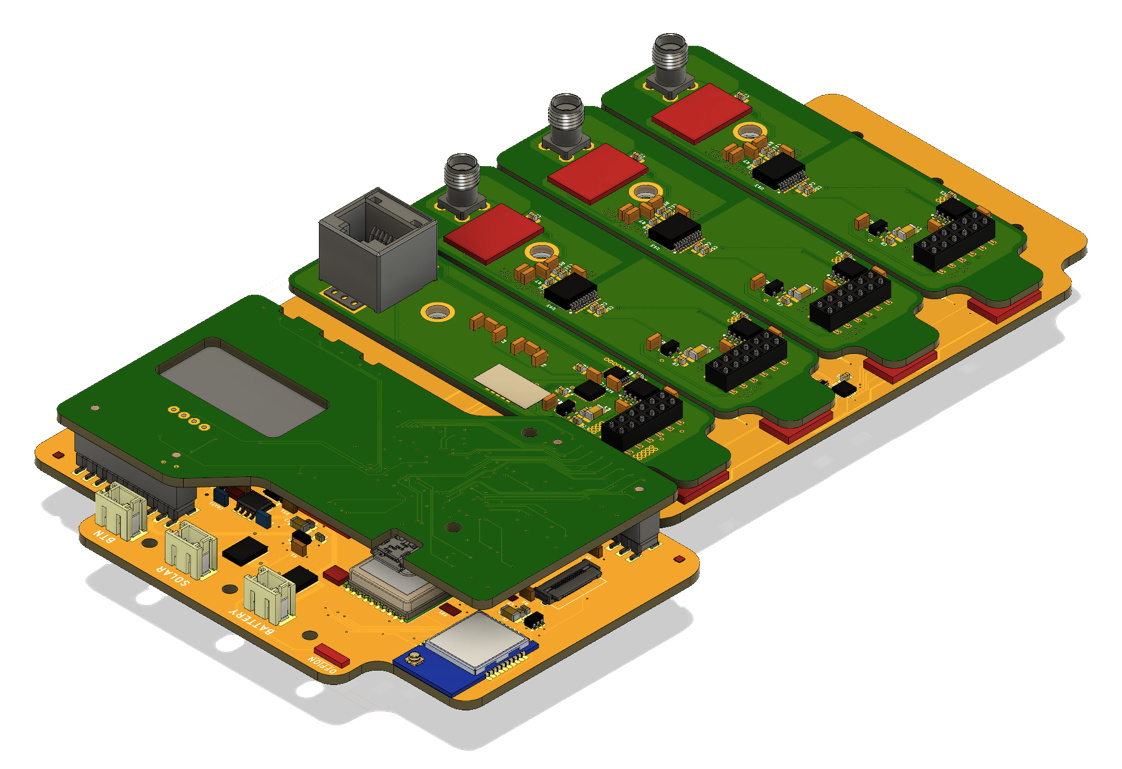
That’s why FieldKit is designed around a common backplane with modular sensors and add-on boards that can be plugged in and easily configured with a smartphone application. Whether the node is going to be mounted to a pole and powered by a solar panel, or attached to a buoy, most of the hardware stays the same.

While the electronics and the software interface are naturally the stars of the show here, we can’t help but also be impressed with the enclosure for the FieldKit. It seems a minor thing, but as we’ve seen from the projects that have come our way over the years, finding a box to put your hardware in that’s affordable, adaptable, and weatherproof is often a considerable challenge in itself. Rather than using something commercially available, [Conservify] has designed their own enclosure that’s inspired by the heavy duty (but prohibitively expensive) cases from Pelican. It features a replaceable panel on one side where the user can pop whatever holes will be necessary to wire up their particular project without compromising the case itself; just get a new panel when you want to reconfigure the FieldKit for some other task. Prototypes have already been 3D printed, and the team will be moving to injection molded versions in the near future.

As a finalist in the 2019 Hackaday Prize, FieldKit exemplifies everything we’re looking for this year: a clear forward progression from prototype to final hardware, an obvious need for mass production, and the documentation necessary to show why this project is deserving of the $125,000 grand prize up for grabs.

Continue reading “An Open Source Toolbox For Studying The Earth”

Improving Exposure On A Masked SLA Printer

It’s taken longer than some might have thought, but we’re finally at the point where you can pick up an SLA 3D printer for a few hundred bucks. These machines, which use light to cure a resin, are capable of far higher resolution than their more common FDM counterparts, though they do bring along their own unique issues and annoyances. Especially on the lower end of the price spectrum.

[FlorianH] recently picked up the $380 SparkMaker FHD, and while he’s happy with the printer overall, he’s identified a rather annoying design flaw. It seems that the upgraded UV backlight in the FHD version of the SparkMaker produces somewhat irregular light, which in turn manifests itself as artifacts on the final print. Due to hot spots on the panel, large objects printed on the SparkMaker show fairly obvious scarring.

Now you might expect the fix for this problem to be in the hardware, but he’s taken it in a different direction. These printers use an LCD panel to block off areas of the UV backlight, thereby controlling how much of the resin is exposed. This is technique is officially known as “masked SLA”, and is the technology used in most of these new entry level resin printers.

As luck would have it, the SparkMaker FHD allows showing various levels of grayscale on the LCD rather than a simple binary value for each pixel. At least in theory, this allows [FlorianH] to compensate for the irregular backlight by adjusting how much the UV is attenuated by the LCD panel. He’s focusing on the printer he personally owns, but the idea should work on any masked SLA printer that accepts grayscale values.

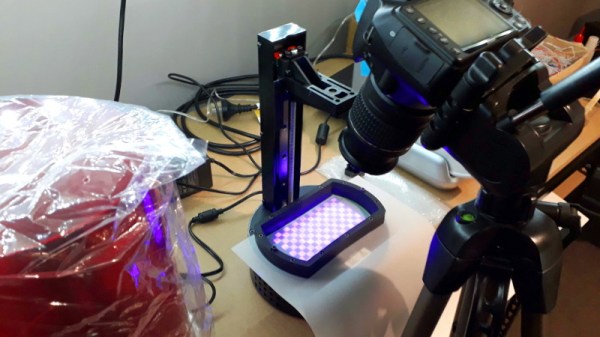
The first step was to map the backlight, which [FlorianH] did by soaking thin pieces of paper in a UV reactant chemical, and draping them over the backlight. He then photographed the illumination pattern, and came up with some OpenCV code that takes this images and uses the light intensity data to compensate for the local UV brightness underneath the sliced model.

So far, this method has allowed [FlorianH] to noticeably reduce the scarring, but he thinks it’s still possible to do better. He’s released the code for this backlight compensation script, and welcomes anyone who might wish to take a look at see how it could be improved.

An uneven backlight is just one of the potential new headaches these low-cost “masked” SLA printers give you. While they’re certainly very compelling, you should understand what you’re getting into before you pull the trigger on one.