You Wouldn’t Download A Nuclear Reactor, But Could You?

By pretty much any metric you care to use, the last couple of decades has been very good for the open source movement. There was plenty of pushback in the early days, back when the only people passionate about the idea were the Graybeards in the IT department. But as time went on, more and more developers and eventually companies saw the benefit of sharing what they were working on. Today, open source is effectively the law of the land in many fields, and you don’t have to look far to find the community openly denouncing groups who are keeping their source under lock and key.

The open source submarine that won 2017 Hackaday Prize.

In the last few years, we’ve even seen the idea gain traction in the hardware field. While it’s not nearly as prevalent as opening up the software side of things, today it’s not uncommon to see hardware schematics and PCB design files included in project documentation. So not only can you download an open source operating system, web browser, and office suite, but you can also pull down all the information you need to build everything from a handheld game system to an autonomous submarine.

With so many projects pulling back the curtain, it’s not unreasonable to wonder where the limits are. There’s understandably some concerns about the emerging field of biohacking, and anyone with a decent 3D printer can download the files necessary to produce a rudimentary firearm. Now that the open source genie is out of the bottle, it seems there’s precious little that you can’t download from your favorite repository.

Scratching an exceptionally surprising entry off that list is Transatomic, who late last year uploaded the design for their TAP-520 nuclear reactor to GitHub. That’s right, now anyone with git, some uranium, and a few billion dollars of seed money can have their very own Molten Salt Reactor (MSR). Well, that was the idea at least.

So six months after Transatomic dumped a little under 100 MB worth of reactor documentation on GitHub, is the world any closer to forkable nuclear power? Let’s find out.

Continue reading “You Wouldn’t Download A Nuclear Reactor, But Could You?”

Wireless Mouse Power-Up: Logitech MX Master Gets USB-C And Big Battery

When the internal rechargeable battery in his wireless mouse died, [cmot17] decided it was the perfect excuse for making a couple of modifications. The Logitech MX Master isn’t exactly a budget mouse to begin with, but that doesn’t mean there’s no room for improvement. With the addition of a larger battery and USB-C charging port, a very nice mouse just got even better.

As it turns out, there’s plenty of empty space inside the Logitech MX Master, which made it easy to add a larger battery. The original 500 mAh pack was replaced with a new 950 mAh one, which is often sold under the model number 603443. Realistically, if you wanted to go even bigger it looks like any three wire 3.7 V Li-Po pack would probably work in this application, but nearly doubling the capacity is already a pretty serious bump.

Adding the USB-C connector ended up being quite a bit trickier. [cmot17] ordered a breakout board from Adafruit that was just a little too large to fit inside the mouse. In the end, not only did some of the case need to get cut away internally, but the breakout PCB itself got a considerable trimming. Once it was shoehorned in there, a healthy dose of hot glue was used to make sure nothing shifts around.

Since [cmot17] didn’t change the mouse’s original electronics, the newly upgraded Logitech MX Master won’t actually benefit from the faster charging offered by USB-C. If anything, it’s actually going to charge slower thanks to the beefier battery. But considering how infrequently it will need to be charged with the upgraded capacity (Logitech advertised 40 days with the original 500 mAh battery), we don’t think it will be a problem.

Over the years, we’ve seen plenty of stuff crammed into the lowly mouse. Everything from a full computer, to malicious firmware code has been grafted onto that most ubiquitous of computer peripherals. So in the grand scheme of things, this is perhaps one of the most practical mouse modifications to ever grace these pages.

Simulating The Enigma’s Oddball Cousin

Even if you wouldn’t describe yourself as a history buff, you’re likely familiar with the Enigma machine from World War II. This early electromechanical encryption device was used extensively by Nazi Germany to confound Allied attempts to eavesdrop on their communications, and the incredible effort put in by cryptologists such as Alan Turing to crack the coded messages it created before the end of the War has been the inspiration for several books and movies. But did you know that there were actually several offshoots of the “standard” Enigma?

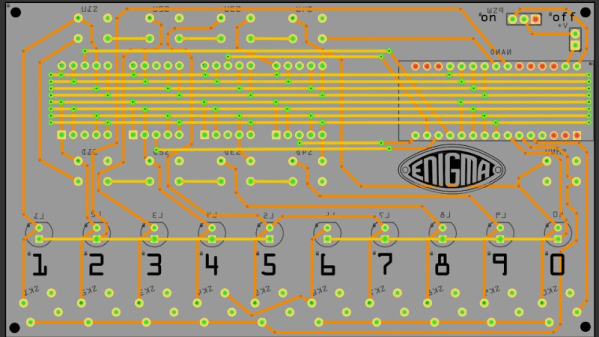
For their entry into the 2019 Hackaday Prize, [Arduino Enigma] is looking to shine a little light on one of these unusual variants, the Enigma Z30. This “Baby Enigma” was intended for situations where only numerical data needed to be encoded. Looking a bit like a mechanical calculator, it dropped the German QWERTZ keyboard, and instead had ten buttons and ten lights numbered 0 through 9. If all you needed to do was send off numerical codes, the Z30 was a (relatively) small and lightweight alternative for the full Enigma machine.

Creating an open source hardware simulator of the Z30 posses a rather unique challenge. While you can’t exactly order the standard Enigma from Digi-Key, there are at least enough surviving examples that they’ve been thoroughly documented. But nobody even knew the Z30 existed until 2004, and even then, it wasn’t until 2015 that a surviving unit was actually discovered in Stockholm.

Of course, [Arduino Enigma] does have some experience with such matters. By modifying the work that was already done for full-scale Enigma simulation on the Arduino, it only took a few hours to design a custom PCB to hold an Arduino Nano, ten buttons with matching LEDs, and of course the hardware necessary for the iconic rotors along the top.

The Z30 simulator looks like it will make a fantastic desk toy and a great way to help visualize how the full-scale Enigma machine worked. With parts for the first prototypes already on order, it shouldn’t be too long before we get our first good look at this very unique historical recreation.

Up Your Game With A Battle Tested Input Device

If you’re looking to add some realism to your flight setup without converting the guest bedroom into a full-scale cockpit simulator, you might be interested in the compromise [MelkorsGreatestHits] came up with. He bolted a genuine military keypad to his PC joystick and instantly added 100% more Top Gun to his desktop.

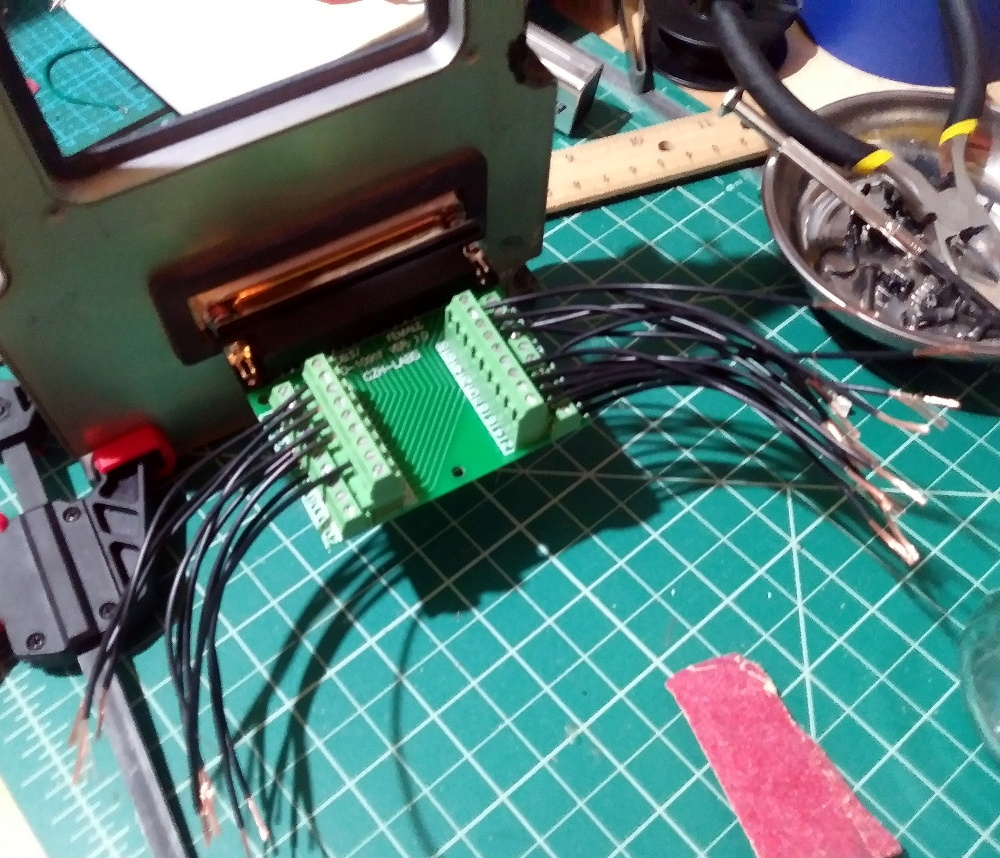
The Rockwell Collins manufactured keypad came from eBay, and appears to have been used in aircraft such as the EA-6B Prowler and Lockheed C-130 Hercules for data input. Each key on the pad is wired to the 37 pin connector on the rear, which [MelkorsGreatestHits] eventually mapped out after some painstaking work with a breakout board.

Once the matrix was figured out, he made up a cable that would go from the connector to a Teensy 2.0 microcontroller. The Teensy reads the keypad status and converts button presses over to standard USB HID that can be picked up in any game.

The joystick side of the build is a VKB Gunfighter, which is already a pretty nice piece of kit on its own. No modifications were necessary to the joystick itself, other than the fact that it’s now mounted to the top of a black project enclosure. It still connects directly to the computer via its original USB cable, as the keypad has its own separate connection. As luck would have it, the joystick is almost a perfect fit in the opening on the keypad, which presumably would have been for a small screen when installed in the aircraft.

Finding cockpit components from military aircraft on eBay is not as hard as you may think; something to keep in mind if you ever decide to tackle that custom flight simulator build.

IKEA Cloud Lamp Displays The Weather With An ESP8266

The IKEA DRÖMSYN is a wall mounted cloud night light that’s perfect for a kid’s room. For $10 USD, it’s just begging for somebody to cram some electronics in there and make it do something cool. Luckily for us, [Jodgson] decided to take on the challenge and turned this once simple lamp into a clever weather display. It even still works as an LED lamp, if you’re into that sort of thing.

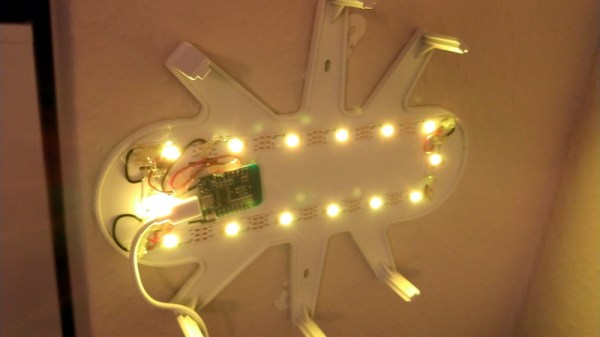
After stripping out the original hardware, [Jodgson] installed a Wemos D1 Mini and a string of fourteen SK6812 RGB LEDs that run down the length of the cloud’s internal structure. Weather data is pulled down with the OpenWeatherMap API, and conditions are displayed through various lighting colors and effects.

Sunny days are represented with a nice yellow glow, and a cloudy forecast looks like…well it’s already a white cloud so that one’s pretty easy. If rain is expected the cloud turns blue and the bottom LEDs flicker a bit to represent raindrops. When there’s a thunderstorm, the cloud will intermittently flash random LEDs on the strip a bit brighter than their peers; a really slick effect that gets the point across immediately.

This isn’t the first time we’ve seen somebody take a cheap light from IKEA and turn it into something much more impressive with the ESP8266. Just like with that previous project, we wouldn’t be surprised to see this particular modification popping up more in the future.

HestiaPi: A Stylish Open Hardware Thermostat

A common complaint about open hardware and software is that the aesthetic aspects of the projects often leave something to be desired. This isn’t wholly surprising, as the type of hackers who are building these things tend to be more concerned with how well they work than what they look like. But there’s certainly nothing wrong with putting a little polish on a well designed system, especially if you want “normal” people to get excited about it.

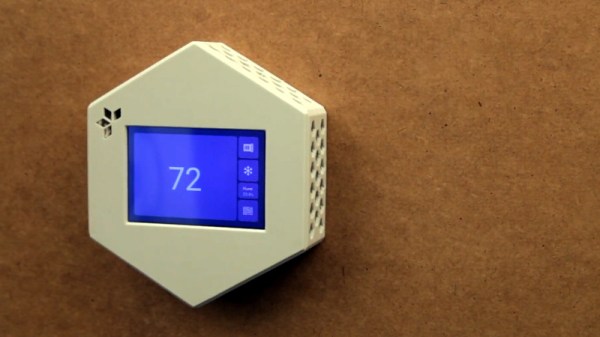
For a perfect example, look no further than the HestiaPi Touch. This entry into the 2019 Hackaday Prize promises to deliver all the home automation advantages of something like Google’s Nest “smart” thermostat without running the risk of your data being sold to the highest bidder. But even if we take our tinfoil hat out of the equation, it’s a very slick piece of hardware from a functional and visual standpoint.

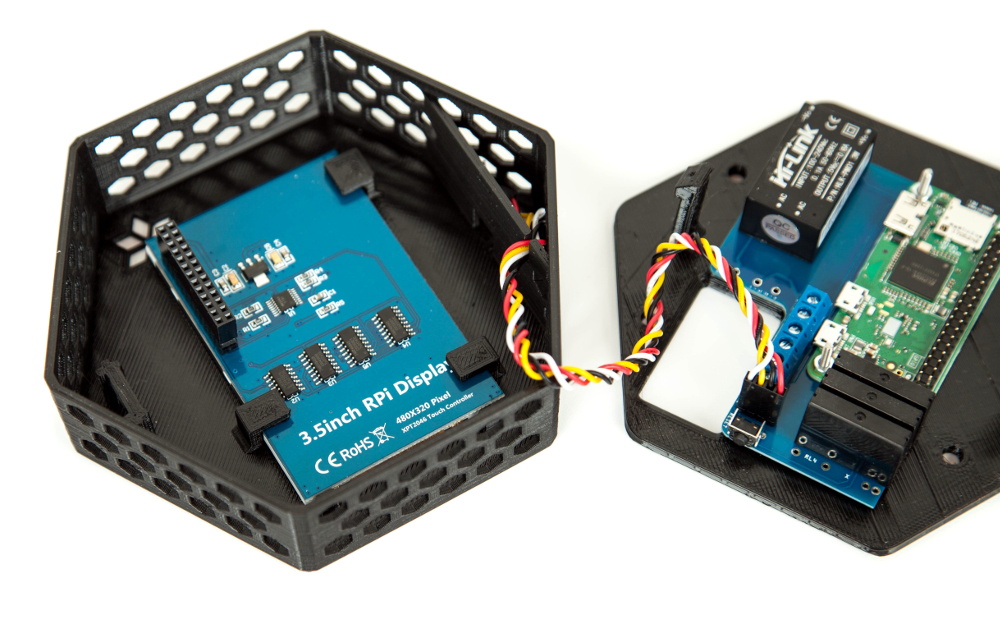
As you probably guessed from the name, the thermostat is powered by the Raspberry Pi Zero, which is connected to a custom PCB that includes a couple of relays and a connector for a BME280 environmental sensor. The clever design of the 3D printed case means that the 3.5 inch touch screen LCD on the front can connect directly to the Pi’s GPIO header when everything is buttoned up.

Of course, the hardware is only half the equation. To get the HestiaPi Touch talking to all the other smart gadgets in your life, it leverages the wildly popular OpenHAB platform. As demonstrated in the video after the break, this allows you to use the HestiaPi and its mobile companion application to not only control your home’s heating and air conditioning systems, but pretty much anything else you can think of.

The HestiaPi Touch has already blown past its funding goal on Crowd Supply, and the team is hard at work refining the hardware and software elements of the product; including looking at ways to utilize the unique honeycomb shape of the 3D printed enclosure to link it to other add-on modules.

Continue reading “HestiaPi: A Stylish Open Hardware Thermostat”

Smarten Up Your Air Conditioning With The ESP8266

If you’re looking for “smart” home appliances, there’s no shortage of options on the market. Even relatively low-end gadgets are jumping on the Internet of Things bandwagon these days (for better or for worse). But what if you’re not looking to purchase a brand new major appliance right now? In that case, you might be interested in seeing how [Giulio Pons] added some high-tech features to his existing air conditioner on the cheap.

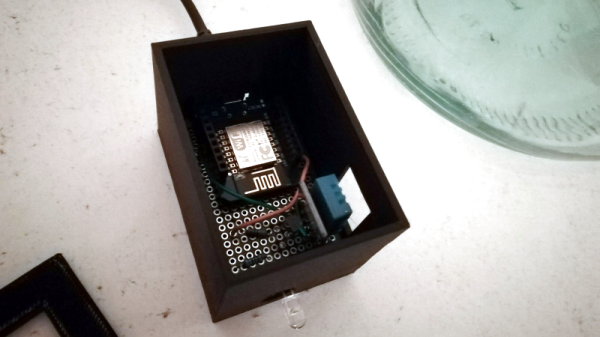
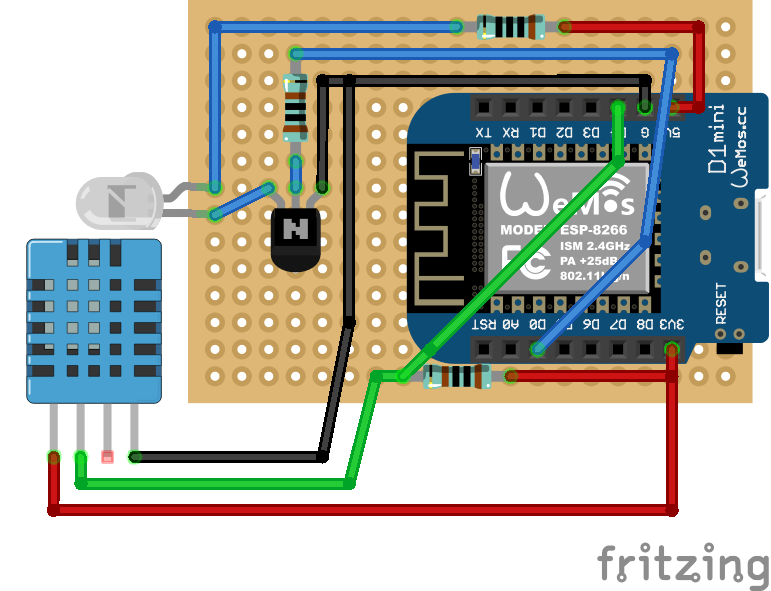
Since his AC unit had an infrared remote control, the first thing [Giulio] needed to do was come up with a way to emulate it. An easy enough project using the ESP8266 and an IR LED, especially when he found that somebody had already written a IR communications library for his particular brand of AC. From there, he could start tacking on sensors and functionality.

With the addition of a DHT11 sensor, [Giulio] can have the AC turn on and off based on the current room temperature. It also gives him an easy way to verify the AC is actually on and operating. By checking to see if the room starts cooling off after sending the IR command to start the AC, his software can determine whether it should try resending the code, or maybe send a notification to alert him that something doesn’t seem right. Of course, it wouldn’t be a proper ESP8266 project without some Internet connectivity, so he’s also created a smartphone application that lets him control the system while away from home.

Now admittedly nothing in this project is exactly new, we’ve seen plenty of hackers switch on their AC with the ESP8266 at this point. But what we particularly liked was how well thought out and documented the whole process was. The rationale behind each decision is explained, and he even documented things like his network topology to help illustrate how the whole system comes together. Even if the techniques are well known by many of us, this is the kind of project documentation that makes it accessible to newcomers. Our hats off to [Giulio] for going the extra mile.

In the past we’ve seen a similar project that allowed you to control your AC from Slack, and our very own [Maya Posch] took us on a whirlwind tour of the very impressive ESP8266-powered environmental monitoring system she helped develop.