Solving The Final Part Of The IClicker Puzzle

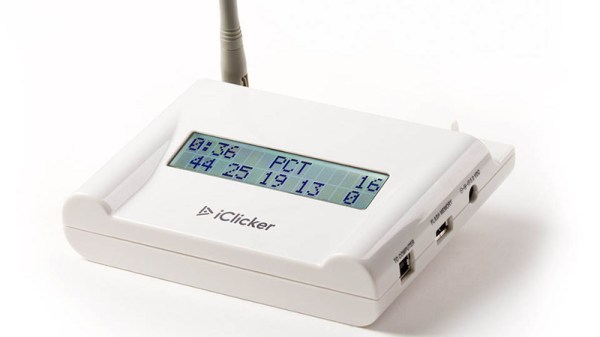
The regular Hackaday reader might remember the iClicker from our previous coverage of the classroom quiz device, or perhaps you even had some first hand experience with it during your university days. A number of hackers have worked to reverse engineer the devices over the years, and on the whole, it’s a fairly well understood system. But there are still a few gaps in the hacker’s map of the iClicker, and for some folks, that just won’t do.

[Ammar Askar] took it upon himself to further the state of the art for iClicker hacking, and has put together a very detailed account on his blog. While most efforts have focused on documenting and eventually recreating how the student remotes send their responses to the teacher’s base station, he was curious about looking at the system from the other side. Specifically, he wanted to know how the base station was able to push teacher-supplied welcome messages to the student units, and how it informed the clients that their answers had been acknowledged.
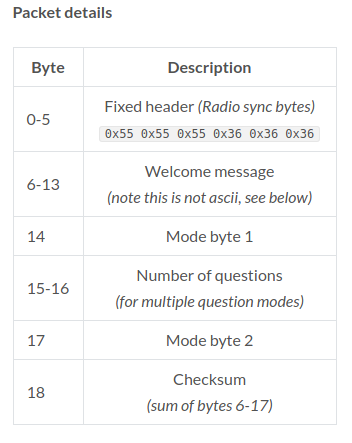
He started by looking through the base station’s software update tool to find out where it was downloading the firmware files from, a trick we’ve seen used to great effect in the past. With the firmware in hand, [Ammar] disassembled the AVR code in IDA and got to work piecing together how the hardware works. He knew from previous group’s exploration of the hardware that the base station’s Semtech XE1203F radio is connected to the processor via SPI, so he started searching for code which was interacting with the SPI control registers.

This line of logic uncovered how the radio is configured over SPI, and ultimately where the data intended for transmission is stored in memory. He then moved over to running the firmware image in simavr. Just like Firmadyne allows you to run ARM or MIPS firmware with an attached debugger, this tool allowed [Ammar] to poke around in memory and do things such as simulate when student responses were coming in over the radio link.

At that point, all he had to do was capture the bytes being sent out and decode what they actually meant. This process was complicated slightly by the fact the system uses to use its own custom encoding rather than ASCII for the messages, but by that point, [Ammar] was too close to let something like that deter him. Nearly a decade after first hearing that hackers had started poking around inside of them, it looks like we can finally close the case on the iClicker.
Bringing Battle Bots Into The Modern Classroom

With the wide array of digital entertainment that’s available to young students, it can be difficult for educators to capture their imagination. In decades past, a “volcano” made with baking soda and vinegar would’ve been enough to put a class of 5th graders on the edge of their seats, but those projects don’t pack quite the same punch on students who may have prefaced their school day with a battle royale match. Today’s educators are tasked with inspiring kids who already have the world at their fingertips.

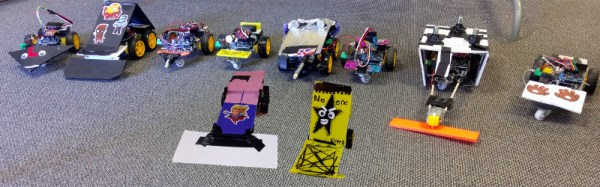
Hoping to rise to that challenge with her entry into the 2019 Hackaday Prize, [Misty Lackie] is putting together a kit which would allow elementary and middle school students to build their very own fighting robots. Thanks to the use of modular components, younger students don’t have to get bogged down with soldering or the intricacies of how all the hardware actually works. On the other hand, older kids will be able to extend the basic platform without having to start from scratch.

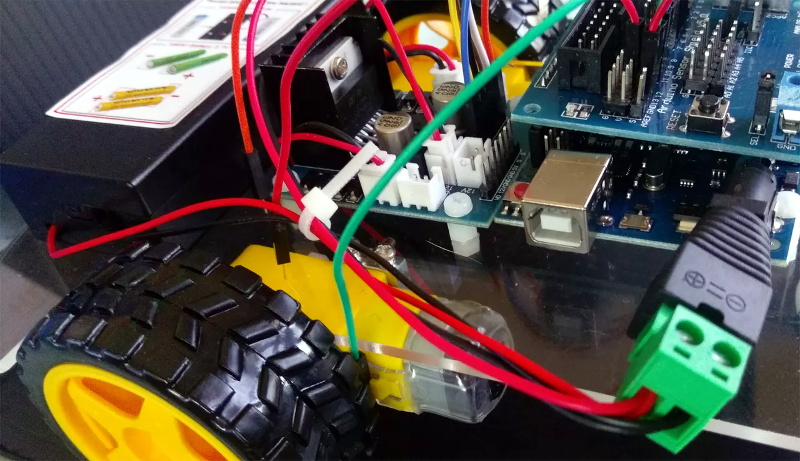
The electronics for the bot consist primarily of an Arduino Uno with Sensor Shield, a dual H-bridge motor controller, and a wireless receiver for a PS2 controller. This allows the students to control the bot’s dual drive motors with an input scheme that’s likely very familiar to them already. By mapping the controller’s face buttons to digital pins on the Arduino, additional functions such as the spinner seen in the bot after the break, easily be activated.

[Misty] has already done some test runs with an early version of the kit, and so far its been a huge success. Students were free to design their own bodies and add-ons for the remote controlled platform, and it’s fascinating to see how unique the final results turned out to be. We’ve seen in the past how excited students can be when tasked with customizing their own robots, so any entry into that field is a positive development in our book.

Continue reading “Bringing Battle Bots Into The Modern Classroom”

Tracking Stolen Bikes With Narrowband IoT

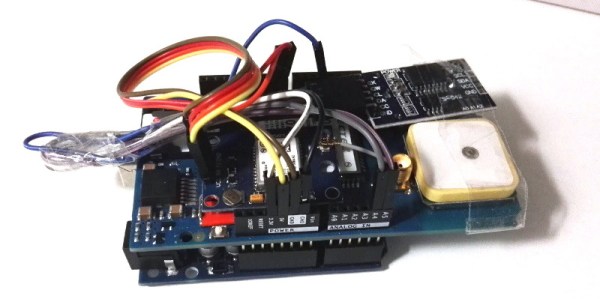
For his entry into the 2019 Hackaday Prize, [Marin Vukosav] is working on an ambitious project to create a small GPS tracking device which utilizes Narrowband IoT (NB-IoT) for long range communications. Rather than using a GSM modem which would suck the batteries dry in short order, NB-IoT can theoretically maintain a connection within a 10 to 15 kilometer range while keeping the energy consumption low enough that the tracker could go up to a year before needing to be recharged.

At this point, the hardware is still in the proof of concept phase. [Marin] is using an Arduino with a GPS shield and a SIM7000 NB-IoT module to experiment with the concept, but ultimately says he wants to shrink the hardware down to the point it could fit inside of a bike light. Looking even farther ahead, he’d like to make deals with bike manufacturers so the module could be integrated into the frame itself, where a thief wouldn’t be able to access it at all.

Of course, nothing says this technology has to be limited to bikes. If [Marin] can get it small enough, and reach even half of his goal battery life, he’d have a very compelling product on his hands. Who wouldn’t want to add something like this to their long-range drone in case it gets lost?

There’s still a long way to go on this project, and it’s not all hardware. [Marin] will also have to create the software side of things, a site where you can register your tracker and be able to view its near real-time position on the map. It’s a lot of work, especially if you’re planning on turning it into a commercial product, and we’re very interested to follow along and see where the project goes throughout the year.

Everything We Know About SpaceX’s Starlink Network

When it comes to SpaceX, or perhaps more accurately its somewhat eccentric founder and CEO Elon Musk, it can be difficult to separate fact from fiction. For as many incredible successes SpaceX has had, there’s an equal number of projects or ideas which get quietly delayed or shelved entirely once it becomes clear the technical challenges are greater than anticipated. There’s also Elon’s particular brand of humor to contend with; most people assumed his claim that the first Falcon Heavy payload would be his own personal Tesla Roadster was a joke until he Tweeted the first shots of it being installed inside the rocket’s fairing.

So a few years ago when Elon first mentioned Starlink, SpaceX’s plan for providing worldwide high-speed Internet access via a mega-constellation of as many as 12,000 individual satellites, it’s no surprise that many met the claims with a healthy dose of skepticism. The profitability of Starlink was intrinsically linked to SpaceX’s ability to substantially lower the cost of getting to orbit through reusable launch vehicles, a capability the company had yet to successfully demonstrate. It seemed like a classic cart before the horse scenario.

But today, not only has SpaceX begun regularly reusing the latest version of their Falcon 9 rocket, but Starlink satellites will soon be in orbit around the Earth. They’re early prototypes that aren’t as capable as the final production versions, and with only 60 of them on the first launch it’s still a far cry from thousands of satellites which would be required for the system to reach operational status, but there’s no question they’re real.

During a media call on May 15th, Elon Musk let slip more technical information about the Starlink satellites than we’ve ever had before, giving us the first solid details on the satellites themselves, what the company’s goals are, and even a rough idea when the network might become operational.

Continue reading “Everything We Know About SpaceX’s Starlink Network”

Desktop Weather Monitor Leaves Nothing To Chance

[Mirko Pavleski] has put together a little weather station for himself that combines Internet-sourced forecasts with physical sensor data to give him a complete view of his local conditions. There’s no shortage of weather applications for our smartphones and computers that will show us the current local conditions and the forecast for the next couple of days. It’s so easy to pull weather data from the various APIs out there that you even see the functionality “baked in” to different gadgets these days. Of course, you can dig through every weather API in the world and not find the temperature and humidity inside your office; for that, you need your own sensors.

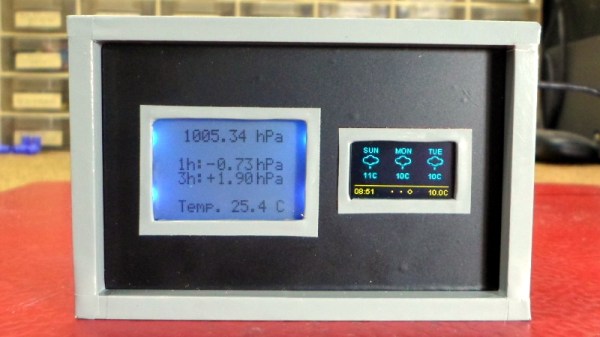
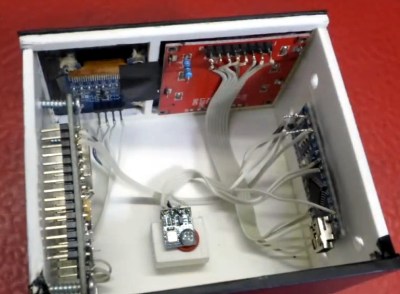
[Mirko] took a somewhat unconventional approach by essentially building two totally separate weather devices and packing them into one enclosure, which gives the final device a rather unique look thanks to the contrasting display technologies used.

Local conditions are detected by an Arduino Nano connected to a BMP180 sensor and displayed on a Nokia 5110 LCD. The screen shows not only real-time temperature and barometric pressure, but the change in pressure over the last several hours. The three-day forecast, on the other hand, is provided by a NodeMCU ESP8266 development board connected to the increasingly ubiquitous 0.96 inch OLED.

If you’re not into the whole duality thing and would rather do it all on the same device, you might be interested in one of the ESP8266 weather monitors we’ve seen in the past.

Not Happy With Smart Bulbs? Make Your Own

The idea of the so-called “smart bulb” sounds good; who wouldn’t want to be able to verify the porch light is on if you’re out of town for the night, or check to see if you left the bathroom lights on in your rush out the door in the morning? But in practice, it can be a nightmare. Each brand wants to push their own protocol. Even worse, it seems you can’t get anything done without signing up for three different services, each with its own application that needs to be installed on your phone. It’s a frustrating and often expensive mire to find yourself in.

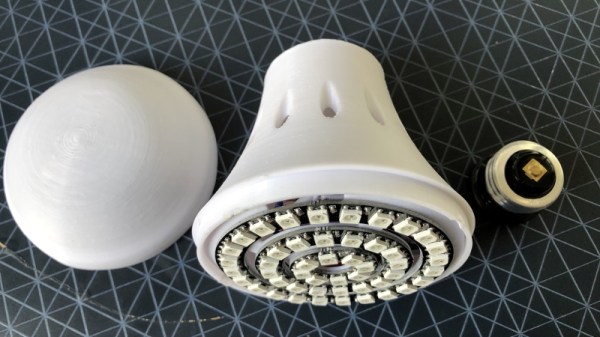
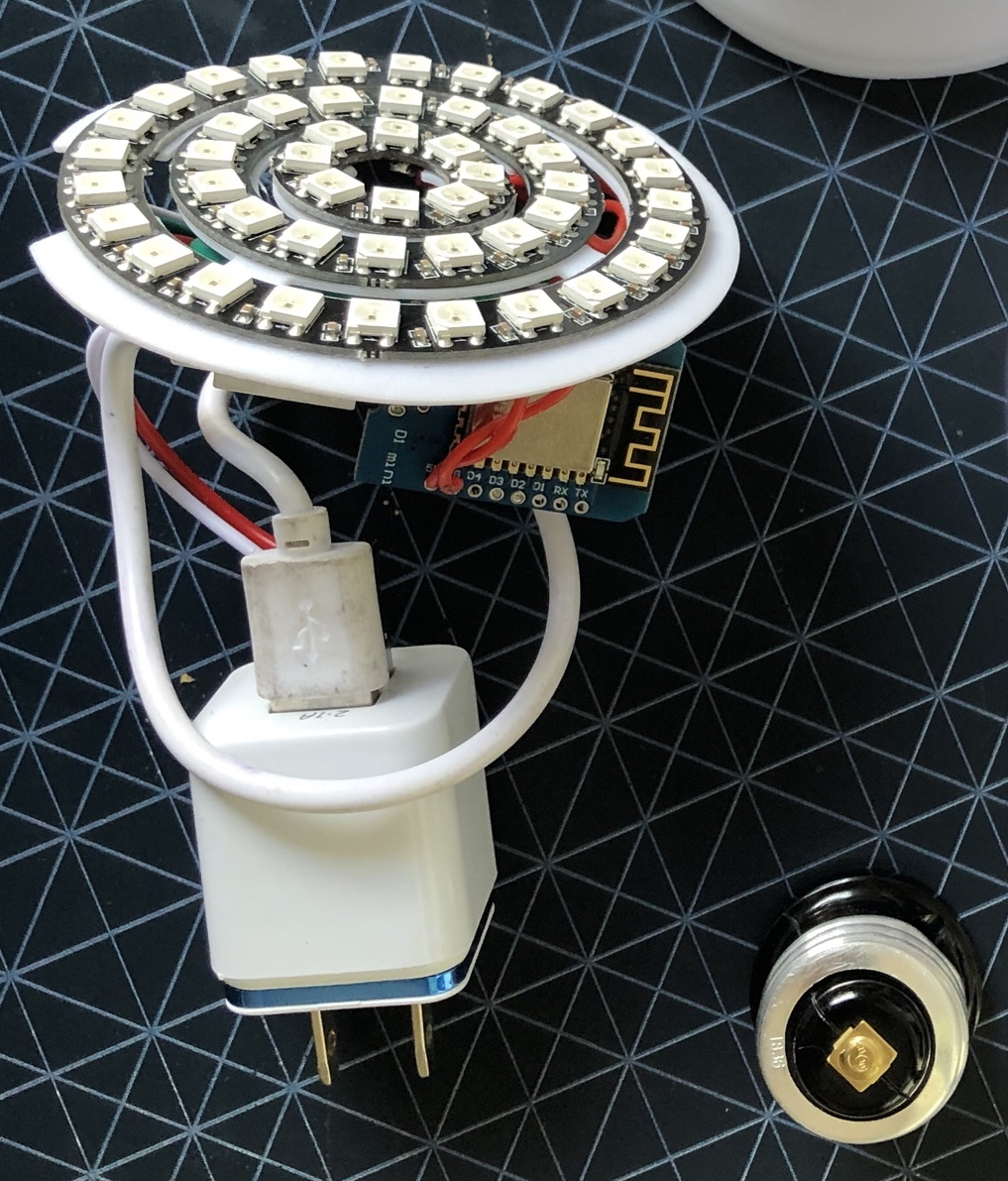
[Dom Gregori] liked the Hue bulbs offered by Philips, but didn’t want to buy into the whole ecosystem of phone apps and hardware hubs they require. So he decided to create his own open source version that would do everything he wanted, without any of the seemingly unavoidable baggage of the commercial offerings. The final result is a professional looking ESP8266 controlled RGB bulb that hooks into Home Assistant via MQTT.

Looking at his Bill of Materials, it’s actually pretty amazing to see how little it really takes to pull a project like this off. Outside of the Wemos D1 Mini board, [Dom] just needed a few concentric WS2812 rings, and a USB charger small enough to fit into the base of his 3D printed enclosure.

We especially like how he handled the socket-side of the bulb, as that’s the part that would have left us scratching our heads. Rather than trying to salvage the base from an existing bulb, or come up with his own printed piece to stick in the socket, he just used a cheap and readily available light socket adapter. The solution might be a little bulky, but we like how he’s deftly avoided having to handle any AC voltages in this project.

Over the last couple years, we’ve seen more and more smart bulb related content come our way. From the ever popular teardown of a new entry into the market to the sobering realization that your light bulbs might provide the key attackers need to access your network, it’s been fascinating to see the transformation of these once simple pieces of hardware into something far more complex.

Fallout Inspired Display Is Ready For The Apocalypse

We’ve seen more projects based on books, TV shows, movies, and video games than we could ever hope to count. Hackers and makers derive inspiration from what they see around them, and it turns out there’s considerable overlap between the folks who sit in their labs building stuff all day and the ones who spend their free time playing games or watching movies. Big surprise, right? But among them, few can match the influence of the Fallout franchise.

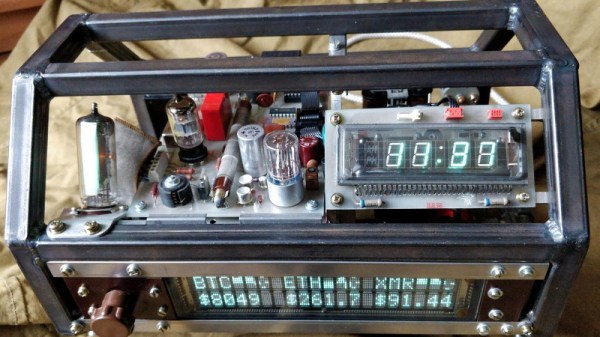
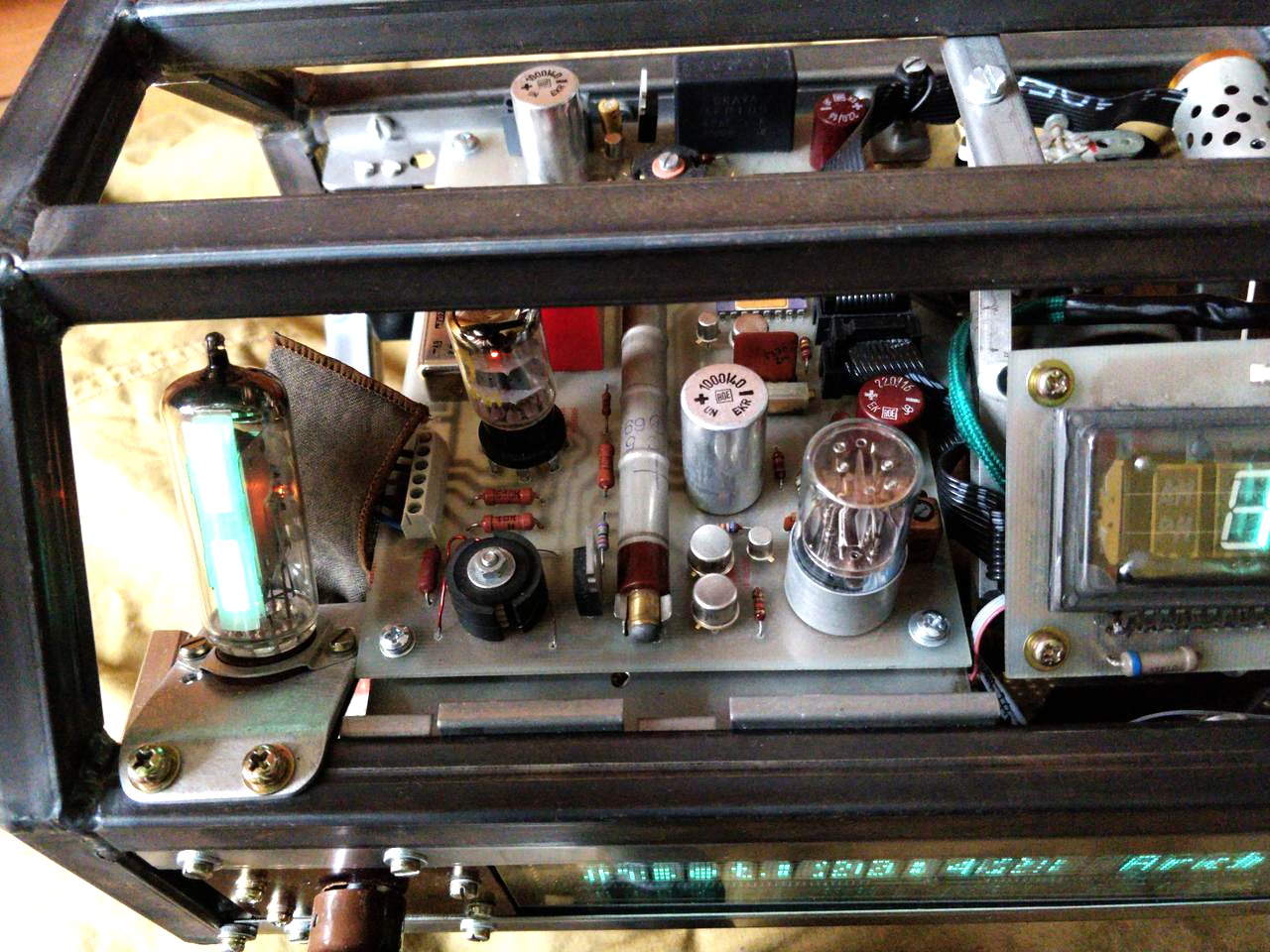
As the latest entry in a long line of incredible Fallout-inspired builds, we present the Octoglow VFD by [Michał Słomkowski]. While this build isn’t trying to replicate anything directly from the games, it captures all the hallmarks that make up the game’s distinctive post-apocalyptic chic : antiquated vintage components, exposed internals, and above all, a dirty, industrial look. It’s supposed to look like somebody built the stuff out of parts they found in the trash, primarily because that’s exactly what they would’ve needed to do.

So what is it? Well, that’s a little hard to nail down. Frankly we’d say it’s a little more like art than anything, but it does have some useful functions. Currently it shows the time, date, weather information, and various RSS feeds on its dual vacuum fluorescent displays. There’s also a real-life Geiger-Müller counter onboard, because what says Fallout more than a little radiation?

The build itself is absolutely fascinating, and [Michał] leaves no stone unturned in his comprehensive write-up. Every module of the Octoglow has its own page on his site, and each one is bristling with hardware details, schematics, and firmware documentation. Reading along you’ll run into all sorts of interesting side notes: like how he reverse engineered a wireless temperature sensor with his sound card, or devised his own ten-pin bus to interconnect all the modules.

If the Octoglow doesn’t quite scratch that Vault-Tec itch, there’s plenty more where that came from. How about this replica of the wall terminals from Fallout 4, or this radiation monitor perfect for roaming the wastelands? Don’t forget to bring along this 3D printed Thirst Zapper for protection.