Rat playing DOOM

Rats Learn To Play DOOM In This Automated VR Arena

When we run an article with “DOOM” in the title, it’s typically another example of getting the venerable game running on some minimalist platform. This DOOM-based VR rig for rats, though, is less about hacking DOOM, and more about hacking the rats.

What started as a side project for [Viktor Tóth] has evolved into quite a complex apparatus. At the center of the rig is an omnidirectional treadmill comprised of a polystyrene ball about the size of a bowling ball. The ball is free to rotate, with sensors detecting rotation in two axes — it’s basically a big electromechanical mouse upside down. The rat rides at the top of the ball, wearing a harness to keep it from slipping off. A large curved monitor sits right in front of the rat to display the virtual environment, which is a custom DOOM map.

With the VR rig built, [Viktor] worked on automating the training. A treat dispenser provides the proper motivation, while powered drive wheels engage with the ball to nudge the rat if it gets stuck in the virtual world. [Viktor] says he has trained three rats — [Romero], [Carmack], and [Tom] — to walk down a straight hallway using this automated method. As for the meat of the game — shooting monsters — [Viktor] has that covered too, with a sensor that detects when a rat rears up on its hind legs to register a shot.

Total training time to get the rats to the point seen in the video was about six weeks, and [Viktor] reports the whole thing cost him about $2000. That’s a lot of time and money, but the results are pretty interesting. If you’re more interested in minimalist DOOM builds, we understand — check out DOOM on a lightbulb, or a thermostat, or even a GPS.

Continue reading “Rats Learn To Play DOOM In This Automated VR Arena”

The Three Cent Motor Controller

If you follow the world of small microcontrollers you will certainly be familiar with the usual fare of Atmel, ARM Cortex, PIC, and others. But these aren’t the smallest or cheapest devices, below them is an entire category of grain-of-dust microcontrollers with minimal capabilities and at rock bottom prices. Maybe the most well known are the Padauk series of chips, whose PIC12-like architecture can be had for literal pennies. These are the famous 3 cent microcontrollers, but despite their fame they have a bit of a reputation in our community for being difficult to work with. [Ben Lim] dispels some of those ideas, by Padauk-enabling a motor and encoder from a printer to make a three cent motor controller.

The Padauk doesn’t have on-chip peripherals such as SPI, instead its IDE provides bit-banging code to do the job. This and some PID motor controller code makes for a straightforward task on the little chip, and with the help of a probably considerably more expensive MAX14870 it can drive the motor. For the curious, the code can be found in a Git Hub repository. There may be more accomplished motor controllers to be found, but we doubt you’ll find one with a cheaper microcontroller.

Want to know what the fuss is about with the Padauk? Our colleague [Maya Posch] has you covered.

The insides of a vacuum tube computer

1950s Vacuum Tube Computer Replica Communicates Through USB

When we talk about a “computer” today, we generally picture an electronic machine that can perform various kinds of mathematical operations, manage its program flow, move data from one place to another, and string all these functions together to perform some useful task. But once upon a time there were machines that could perform only a subset of these functions; these might be classified somewhere between computers and calculators.

One such machine was the Elektronensaldierer ES 24, built in 1955 by German computer pioneer Heinz Nixdorf. Its name translates as “electronic balancer”, with “balance” in the accounting sense meaning the difference of assets and liabilities. Designed to interface with a punch card machine from French manufacturer Bull, it contained several hundred vacuum tubes and could be used to add and subtract numbers stored on those punch cards.

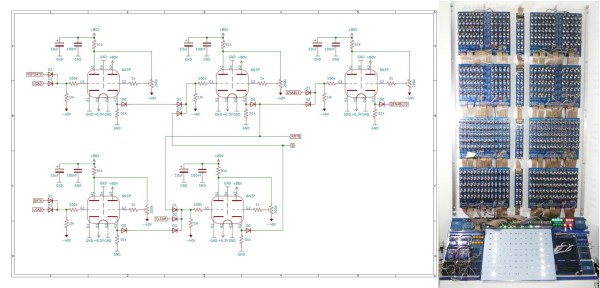
[Henry Westphal] decided to make a modern copy of the ES 24 (translated), based on Nixdorf’s original schematics, for display in the HNF computer museum in Paderborn. The result is a huge display containing 204 tubes as well as a massive power supply. Like the 1955 original it can add incoming numbers and output the result as a twelve-digit decimal number. To make its inner workings visible, [Henry] also added a status light to each tube, showing whether it is storing a “0” or a “1”. This makes for a beautiful Blinkenlights display that shows the bits moving through the machine’s inner circuits.

Continue reading “1950s Vacuum Tube Computer Replica Communicates Through USB”

UV Printing PCBs

We always enjoy [Thomas Sanladerer’s] 3D printing videos. But his latest isn’t only about 3D printing. He shows how he uses a DLP printer — which has UV light, after all — to expose PC board blanks with great results. Honestly, once we heard the idea, we immediately saw how that could work it is surprising more people aren’t taking advantage of their DLP printers like that. Of course, [Thomas] does his usual thorough treatment of the topic.

Really, this isn’t exactly 3D printing even though it uses a 3D printer. Exposing boards with UV light and artwork is an old process that has been around for years, usually using transparency film and a UV light source. With a printer, you can create artwork digitally and the UV light source is already there.

Continue reading “UV Printing PCBs”

A 1981 Centaur pinball table rebuilt into a coffee table.

Clear Off The Coffee Table, It’s Pinball Time

Like many of us, [BuildXYZ] has always wanted to own a pinball machine, but doesn’t have the space to justify buying such a big and heavy toy. But where there’s a will, there’s a way. [BuildXYZ] figured that if they could build a pinball machine into a coffee table form factor, they’d be at least halfway to justification.

[BuildXYZ] didn’t choose just any pin. After doing a bunch of research, they settled on 1981’s Bally Centaur because it’s an early solid-state machine, and it’s one of the best. It has no secondary playfield levels to deal with, making it much easier to do this project.

Where do we even start to describe this beautiful labor of love? There are too many details to list, but know that it seems to be equal amounts of restoration work and custom work that brought this table together. The build video after the break is definitely worth your time, and you’ll gain a much better appreciation of the amount of time that went into this, from the custom score decoder chip built on an FPGA to the 3D printed replacement drop targets and new acrylic bits to replace the yellowing ones from the playfield.

Continue reading “Clear Off The Coffee Table, It’s Pinball Time”

Enter The Matrix With This Custom PC Side Panel

With a new Matrix movie out now, it’s hardly a surprise that we’re starting to see more and more projects centered around the franchise’s iconic “Digital Rain” effect. A few particularly unique examples have floated to the top of this virtual tsunami of green-tinted sushi recipes, such as this very slick RGB LED PC side panel built by [Will Donaldson].

In place of the normal clear window in his PC case, [Will] has mounted a black acrylic sheet that has had all of the “code” characters laser-cut from it. Behind that is an array of WS2812B LED strips, nestled into vertically aligned channels that keep the light from bleeding out horizontally. A sheet of frosted plastic is sandwiched between the two, which helps diffuse the light so the individual LEDs aren’t as visible.

All of the LEDs are connected to a NodeMCU ESP8266 by way of a 74AHCT125 level-shifter, though [Will] notes you could certainly use a different microcontroller with some tweaks to the code. As it stands, the user selects from various lighting patterns using two potentiometers and a button that have been mounted next to the panel. But if you were so inclined, it certainly wouldn’t take much to adapt the firmware so that the lighting effects could be triggered from the PC.

The sticklers will note that this means the characters can’t actually change or move, but as you can see in the video below, it still looks quite impressive when the LEDs get going behind them. If you’re looking to recreate the look on a considerably smaller scale, check out this Arduino library that can make it rain on a TFT display with just a few lines of code.

Continue reading “Enter The Matrix With This Custom PC Side Panel”

DIY Infrared Calculator Printer

[Ziggurat29] had been playing around with infrared protocols, and realized he had a spare point-of-sale printer kicking around in his junk box. So he decided to whip up his own calculator infrared printer by bolting on an STM32 Blue Pill module and an IR receiver. [Ziggurat29] initially thought such a homemade printer would be cheaper than a commercial HP 82240 IR printer, even a used one. In hindsight, these point-of-sale printers can be pricey. If you don’t have one laying around, it may be cheaper to buy one, but not as fun as building it yourself.

It used to be commonplace for calculators to have a printing mechanism — even entirely mechanical adding machines often had them. As electronic calculators became the norm, the printer began to fade away. Back in 1987, HP introduced a portable calculator printer, the HP 82240A (see HP Journal Oct 1987). The calculator could print using a one-way infrared protocol which came to be known as Redeye. This made good sense, since not every one needs a printing calculator. As well, if you had one of these printers, it could be used with multiple calculators. Later in 1991, HP added a bi-directional infrared link called SIR beginning with the HP 48SX calculator (see HP Journal Jun 1991), allowing calculators to communicate with each other or with an IR-equipped PC. Finally HP and other companies teamed up in 1995 to create the IrDA standards you are probably more familiar with. But a bunch of Redeye and SIR devices are still floating around, and even some modern calculators like SwissMicros offerings can still output to these printers.

If you want to make your own IR printer, be sure to check out [ziggurat29]’s Hackaday.io project. Also [Martin Hepperle] has an excellent writeup on an Arduino-based project on his site. We also covered a reverse project way back in 2011, an adaptor that prints over IR from wired serial signals. Have you found a printing calculator, or a standalone printer like this, to be useful in your workflow? Let us know in the comments below.