IMac G4 Reborn With Intel NUC Transplant

Released in 2002, Apple’s iMac G4 was certainly a unique machine. Even today, its hemispherical case and integrated “gooseneck” display is unlike anything else on the market. Whether or not that’s a good thing is rather subjective of course, but there’s no denying it’s still an attention grabber nearly 20 years after its release. Unfortunately, it’s got less processing power than a modern burner phone.

Which is why [Tom Hightower] figured it was the perfect candidate for a retrofit. Rather than being little more than a display piece, this Intel NUC powered iMac is now able to run the latest version of Mac OS. He even went as far as replacing the display with a higher resolution panel, though it sounds like it was dead to begin with so he didn’t have much choice in the matter.

Somewhere, an early 2000s Apple engineer is screaming.

The retrofit starts off with a brief teardown, which is quite interesting in itself. [Tom] notes a number of unique design elements, chief among them the circular motherboard. The two banks of memory also use different form factors, and only one of them is easily accessible to the end user. Something to think about the next time somebody tells you that Apple’s “brave” hardware choices are only a modern phenomena.

There was plenty of room inside the iMac’s dome to fit the NUC motherboard, and some extension cables and hot glue got the computer’s rear panel suitably updated with the latest-and-greatest ports and connectors. But the conversion wasn’t a total cakewalk. That iconic “gooseneck” put up quite a fight when it was time to run the new wires up to the display. Between the proprietary screws that had to be coerced out with a Dremel to the massive spring that was determined to escape captivity, [Tom] recommends anyone else looking to perform a similar modification just leave the wires on the outside of the thing. That’s what he ended up doing with the power wires for the display inverter.

If you like the idea of reviving old Apple hardware but don’t want to anger the goose, you could start on something a little easier. Like putting an iPad inside of a Macintosh Classic shell.

Self-Shutting Face Mask Is Hacker’s Delight

Most of us currently have to deal with wearing face masks in our daily life. An experience that is not entirely pleasurable as it is more difficult to breathe under the mask and can become hot after a while. In addition, you have to take off the mask whenever you want to eat or drink. [DesignMaker] has attempted to solve these problems by creating a mask with an opening that shuts automatically when other people are nearby.

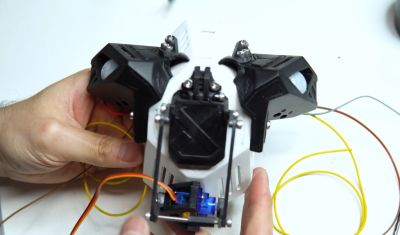
While homemade masks are usually made from fabric [DesignMaker]’s version is much more to a hacker’s taste and includes 3D-printed parts, an Arduino Nano, PIR sensors, an SG90 servo, and some Neopixels. [DesignMaker]’s background in industrial design certainly helped him when modeling the mask as it looks just plain awesome.
His goal was to use PIR sensors to detect when a person is moving nearby. The servo then shuts an opening located at the mouth part of the mask. However, he soon found out that the mask often shuts when nobody is around. The reason is that the sensor can be triggered by ambient IR radiation when it is moving by itself. In the end [DesignMaker] decided that having the mask shut when you are moving is not a bug, it’s a feature.

Of course, the mask is just a prop and should not be used as protective equipment. As shown in the video below, also the false triggering of the PIR sensors can be annoying at times. But [DesignMaker] is already thinking of improvements like having the mask properly sealed with fabric or replacing the PIR sensors by a camera with face detection.

If you want to learn how to sew a proper fabric face mask have a look here. It’s a lot less ridiculous, but a lot more effective. You can’t have everything.

Video after the break.

Continue reading “Self-Shutting Face Mask Is Hacker’s Delight”

Pinball Machine Needs No Wizard

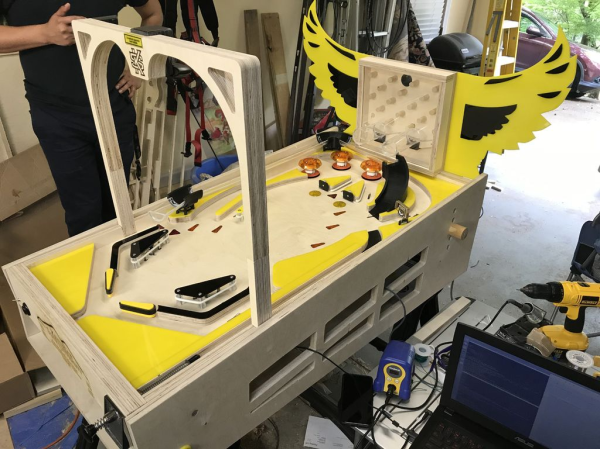
Ever since he was a young boy, [Tyler] has played the silver ball. And like us, he’s had a lifelong fascination with the intricate electromechanical beasts that surround them. In his recently-completed senior year of college, [Tyler] assembled a mechatronics dream team of [Kevin, Cody, and Omar] to help turn those visions into self-playing pinball reality.

You can indeed play the machine manually, and the Arduino Mega will keep track of your score just like a regular cabinet. If you need to scratch an itch, ignore a phone call, or just plain want to watch a pinball machine play itself, it can switch back and forth on the fly. The USB camera mounted over the playfield tracks the ball as it speeds around. Whenever it enters the flipper vectors, the appropriate flipper will engage automatically to bat the ball away.

Our favorite part of this build (aside from the fact that it can play itself) is the pachinko multi-ball feature that manages to squeeze in a second game and a second level. This project is wide open, and even if you’re not interested in replicating it, [Tyler] sprinkled a ton of good info and links to more throughout the build logs. Take a tour after the break while we have it set on free play.

[Tyler]’s machine uses actual pinball machine parts, which could quickly ramp up the cost. If you roll your own targets and get creative with solenoid sourcing, building a pinball machine doesn’t have to be a drain on your wallet.

Continue reading “Pinball Machine Needs No Wizard”

Piddler Illustrates Aliasing And The Z-Transform

One of the problems about learning too much control system theory is that you start to realize almost everything is some sort of control system. That’s the case with [Fernando Zigunov]. After observing a Rayleigh-Plateau instability in his kitchen sink, he decided to build a little display piece that shows water apparently defying gravity that he calls The Piddler.

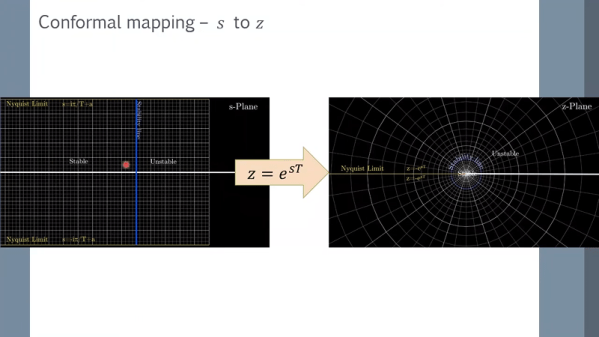
We’ve seen things like this before, of course. A coffee pump, a check valve, and a strobe lamp with a controller is all that it takes. What makes this project interesting is the over hour-long video lecture on the theory behind why this works and how it relates to aliasing and the z-transform. You can check out the video, below.

Continue reading “Piddler Illustrates Aliasing And The Z-Transform”

Whiteboard Plotter Rocks Three Colors And An Eraser

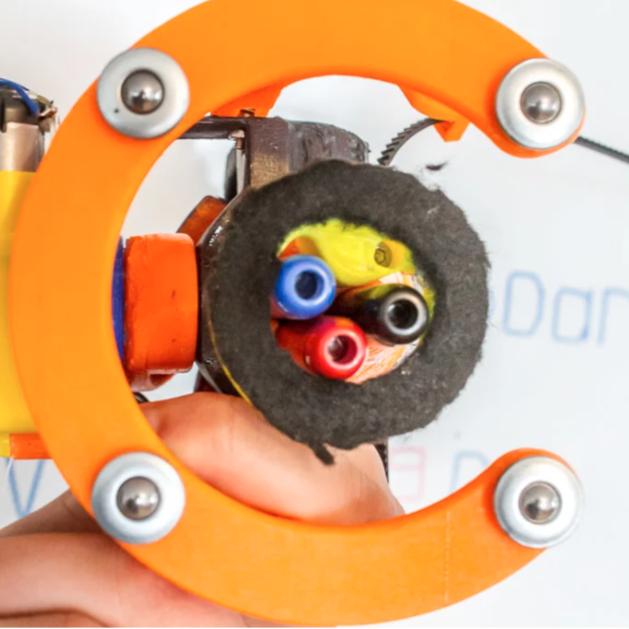
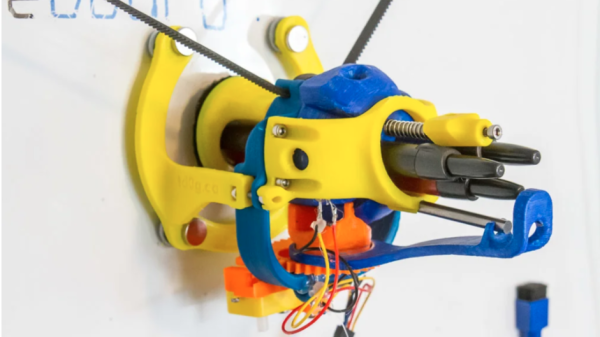
AutoWhiteboardBot’s business end, with three markers.

[td0g]’s AutoWhiteboardBot is not just any 3D printed whiteboard plotter, because it also sports a triple-marker carrier and on-board eraser! The device itself hangs from stepper motors, which take care of moving the plotter across the whiteboard, and the trick to making the three colors work was to incorporate retractable dry-erase markers. A spherical Geneva drive-based assembly on the plotter rotates the pen cartridge, and a plunger activates the chosen color. Erasing, arguably the easiest thing to do on a whiteboard, is done by a piece of felt. 3D printed parts are on Thingiverse and [td0g] says software is coming soon. It’s a clever device, especially the method of accommodating multiple colors with retractable markers.

AutoWhiteboardBot hangs from motors which pull it around, but we’ve also seen a SCARA-type robot writing away on a whiteboard. Watch the video embedded below, which begins with sped-up footage of AutoWhiteboardBot drawing in different colors as it slides across the board surface.

Continue reading “Whiteboard Plotter Rocks Three Colors And An Eraser”

Jumbo LED Matrix Brings Classic Sprites To Life

Despite all the incredible advancements made in video game technology over the last few decades, the 8-bit classics never seem to go out of style. Even if you weren’t old enough to experience these games when they were new, it’s impossible not to be impressed by what the early video game pioneers were able to do with such meager hardware. They’re a reminder of what can be accomplished with dedication and technical mastery.

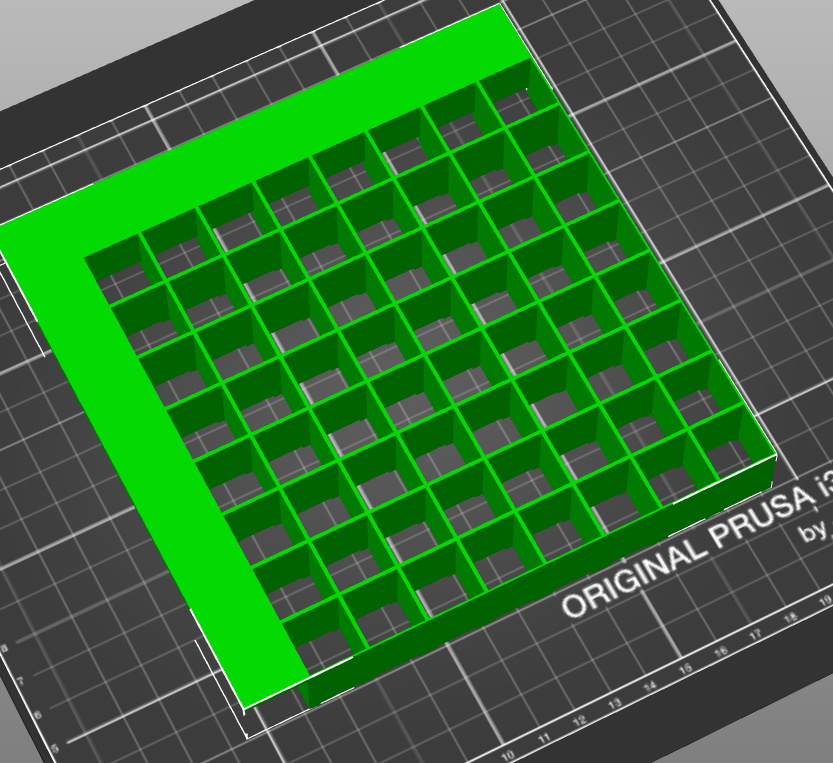
The grid has been split up for easier printing.

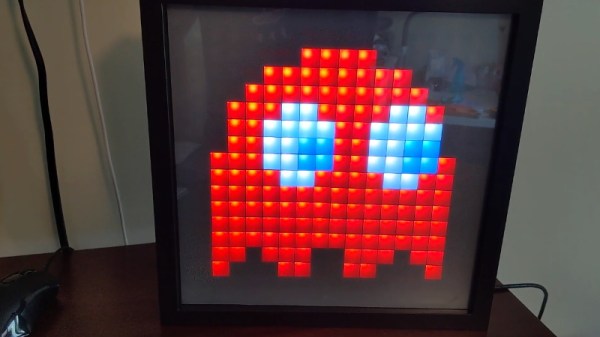
If you’d like to put a little retro inspiration on your desk, take a look at this fantastic 16 x 16 LED matrix put together by [Josh Gerdes]. While it’s obviously not the only thing you could use it for, the display certainly seems particularly adept at showing old school video game sprites in all their pixelated glory. There’s something about the internal 3D printed grid that gives the sprites a three dimensional look, while the diffused glow reminds us of nights spent hunched over a flickering CRT.

The best part might be how easy it is to put one of these together for yourself. You’ve probably got most of what you need in the parts bin; essentially it’s just a WS2812B strip long enough to liberate 256 LEDs from and a microcontroller to drive them. [Josh] used an Arduino Nano, but anything compatible with the FastLED library would be a drop-in replacement. You’ll also need a 3D printer to run off the grid, and something to put the whole thing into. The 12×12 shadowbox used here looks great, but we imagine clever folks such as yourselves could make do with whatever might be laying around if you can’t nip off to the arts and crafts store right now.

Beyond looking great, this project is a fantastic reminder of how incredibly handy WS2812 LEDs really are. Whether you’re recreating iconic game sprites or fashioning your own light-up sunglasses, it’s hard to imagine how we managed before these little wonders hit the scene.

Continue reading “Jumbo LED Matrix Brings Classic Sprites To Life”

A French Cleat Twist On Electronics Bench Organization

For some of us, our workbench is where organization goes to die. Getting ready to tackle a new project means sweeping away a pile of old projects, exposing exactly as much bench space needed to plop down the new parts. On the other end of the spectrum lie those for whom organization isn’t a means to an end, but an end itself. Their benches are spotless, ready to take on a new project at a moment’s notice.

[Eric Gunnerson]’s new French-cleat electronics bench is somewhere in between those two extremes, although nowhere near as over-organized as the woodworking organizer that inspired it. If you’ve never heard of a French cleat, Google around a bit and you’ll see some amazing shops where the system of wall-mounted, mitered cleats with mating parts on everything from shelves to cabinets are put to great use. A properly built French cleat can support tremendous loads; [Eric]’s system is scaled down a bit in deference to the lighter loads typically found in the electronics shop. His cleats are 2″ x 3″ pieces of pine, attached to a sheet of plywood that was then screwed to the wall. His first pass at fixtures for the cleats used a Shaper Origin CNC router, but when that proved to be slow he turned to laser-cut plywood. The summary video below shows a few of the fixtures he’s come up with so far; we particularly like the oscilloscope caddy, and the cable hangers are a neat trick too.

What we like about this is the flexibility it offers, since you can change things around as workflows develop or new instruments get added. Chalk one up for [Eric] for organization without overcomplication.

Continue reading “A French Cleat Twist On Electronics Bench Organization”