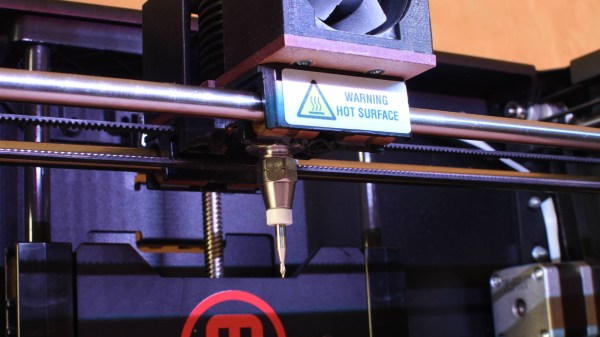
MakerbotCNC PCB etcher

Makerbot Printer Reborn As PCB Engraver

Makerbot 3D printers were among the first to hit the market, so it makes sense that old and broken ones now litter the shelves of hackerspaces and home workshops alike. Rather than throw his one out, [Foaly] saw an opportunity to convert it to some sort of CNC machine. Given its lack of inherent rigidity and relatively weak motors, he opted to make a low-impact circuit board engraver which he appropriately calls the MakerbotCNC. We like the thought he put into this project, and it was clearly backed by plenty of experience.
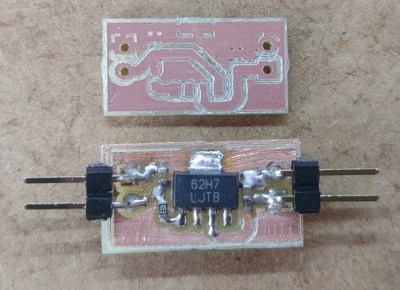
Circuit board etched using MakerbotCNC

Fortunately, his Makerbot Replicator 2 stemmed from a time when MakerBot was more open, meaning he could control the machine using a simple, open library. A little more open software handled his conversion of Gerber files to G-code. First tests drawing with a pen were successful, so he moved on to the carving head. He opted for an inrunner brushless motor to minimize dust getting into the motor but since these motors have a tendency to heat up he had to add fans to cool it. That still didn’t stop the heat from melting and bending his attempt at a 3D printed PLA carriage, so he switched it to a laser-cut MDF board to fix it. Finding the right collet proved tricky but eventually, he found the perfect fit was a collet clutch normally used to couple flex shafts to RC boat motors.

The result, as you can see was worth it. Using shallow passes, he can even cut carbon fiber parts.

While [Foaly] didn’t opt to replace more parts and go for a more powerful CNC, check out this 3D printer to CNC conversion which can cut wood, acrylic, and even aluminum.

Apple Coin Bank Plants The Seed Of Saving

Consider the piggy bank. Behind that innocent, docile expression is a capitalistic metaphor waiting to ruin your fond memories of saving for that BMX bike or whatever else it was that drove home the value of a dollar. As fun as it is to drop a coin in a slot, the act of saving your pennies and learning financial responsibility could be a bit more engaging.

It seems like [gzumwalt] feels the same way. He’s designed a coin bank for his grand-kids that takes a more active role in the deposit process—it straight up eats the things. Put a coin on the platform and the upper half of the apple’s face is pushed open by an arm that pulls the coin inside on its return path.

Continuing with the money-saving theme, [gzumwalt] didn’t use a micro or even a 555. No, the core of this project is a pair of micro lever switches, a small gear motor, and 4.5V DC. When a coin hits the platform, the first switch engages the motor. The motor drives a 3-D printed mechanism modeled after Hoeckens’ linkage, which converts rotational motion to (nearly) straight-line motion. The second switch stops the cycle. Confused? You can sink your teeth into it after the break.

Don’t worry, the kids don’t have to slice up the apple when it’s time to go to the candy store, ’cause there’s a screw-in hatch on the bottom. This is because [gzumwalt] is a wizard of 3-D printing and design. Not convinced? Check out his balloon-powered engine or his runs-on-air plane.

Continue reading “Apple Coin Bank Plants The Seed Of Saving”

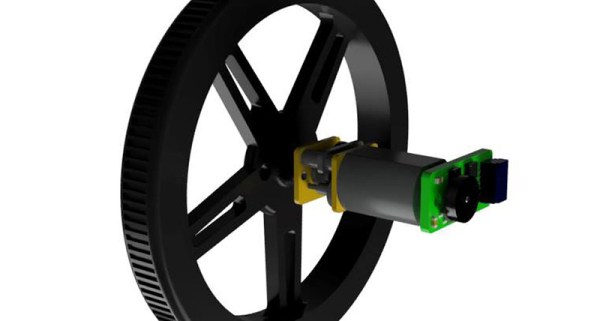
Adding Smarts To Dumb Brushed Motors

A big part of the Hackaday Prize this year is robotics modules, and already we’ve seen a lot of projects adding intelligence to motors. Whether that’s current sensing, RPM feedback, PID control, or adding an encoder, motors are getting smart. Usually, though, we’re talking about fancy brushless motors or steppers. The humble DC brushed motor is again left out in the cold.

This project is aiming to fix that. It’s a smart motor driver for dumb DC brushed motors. You know, the motors you can buy for pennies. The motors that are the cheapest way to add movement to any project. Those motors.

The Smart Motor Driver for Robotics allows a DC brushed motor to be controlled by a host microcontroller over I2C, and sends back the speed and direction of the motor. PID is implemented, and the motor can maintain its own speed, independently of a lot of difficult control on the host system.

The guts of this motor controller are made of a PIC 12F microcontroller, a H-bridge motor driver, a Hall-effect sensor, and a neat magnetic encoder disc. Ultimately, this project will simply bolt onto the back of a cheap brushed motor and give it the same capabilities as a fancy servo or stepper. It’s never going to have the same torque or power handling as a beefy NEMA 17 stepper, but sometimes you don’t need that, and a simple brushed motor will do. A great project, and an excellent entry for the Hackaday Prize.

A Real Time Data Compression Technique

With more and more embedded systems being connected, sending state information from one machine to another has become more common. However, sending large packets of data around on the network can be bad both for bandwidth consumption and for power usage. Sure, if you are talking between two PCs connected with a gigabit LAN and powered from the wall, just shoot that 100 Kbyte packet across the network 10 times a second. But if you want to be more efficient, you may find this trick useful.

As a thought experiment, I’m going to posit a system that has a database of state information that has 1,000 items in it. It looks like an array of RECORDs:

typedef struct
{
  short topic;
  int data;
} RECORD;

It doesn’t really matter what the topics and the data are. It doesn’t really matter if your state information looks like this at all, really. This is just an example. Given that it is state information, we are going to make an important assumption, though. Most of the data doesn’t change frequently. What most and frequently mean could be debated, of course. But the idea is that if I’m sending data every half second or whatever, that a large amount isn’t going to change between one send and the next.

Continue reading “A Real Time Data Compression Technique”

Dust To Dust And Jello To Jello: The Journey Of A Very Strange Knife

How do you feel about Jello? It’s alright tasting, but it’s much more about how jiggly it gets. Nobody — probably — would eat Jello if it was a hard candy. It would quickly become restricted to the bowl of strawberry candies that Grandma always seems to have. How do you feel about knives? We’re on Hackaday. Most everybody here has at least a couple in their toolbox. Some of them have more than a couple, including the whetstones to sharpen them. It’s safe to say they probably like the concept. Now, what if you could combine the two? Two favorites are always better than one. A Jello knife, while seemingly impossible, would be rather impressive, and [kiwami japan] does just that, as well as so much more.

He starts with a couple dozen adorable Jello snacks (Jellos?), and from the wiggliest of foundations, he builds a masterpiece. The first order of business is to eat a couple of the stragglers while he decides what to do with the rest. A bit of blue food coloring, some more gelatin, and the help of several cow shaped bowls and pitchers later, [kiwami japan] has melted the survivors down and gotten a flat sheet. Once sufficiently cooled, it makes a nice knife-shaped Jello blank.

Continue reading “Dust To Dust And Jello To Jello: The Journey Of A Very Strange Knife”

Lost In Space Gets 3D Printing Right

When it has become so common for movies and television to hyper-sensationalize engineering, and to just plain get things wrong, here’s a breath of fresh air. There’s a Sci-Fi show out right now that wove 3D printing into the story line in a way that is correct, unforced, and a fitting complement to that fictional world.

With the amount of original content Netflix is pumping out anymore, you may have missed the fact that they’ve recently released a reboot of the classic Lost in Space series from the 1960’s. Sorry LeBlanc fans, this new take on the space traveling Robinson family pretends the 1998 movie never happened, as have most people. It follows the family from their days on Earth until they get properly lost in space as the title would indicate, and is probably most notable for the exceptional art direction and special effects work that’s closer to Interstellar than the campy effects of yesteryear.

But fear not, Dear Reader. This is not a review of the show. To that end, I’ll come right out and say that Lost in Space is overall a rather mediocre show. It’s certainly gorgeous, but the story lines and dialog are like something out of a fan film. It’s overly drawn out, and in the end doesn’t progress the overarching story nearly as much as you’d expect. The robot is pretty sick, though.

No, this article is not about the show as a whole. It’s about one very specific element of the show that was so well done I’m still thinking about it a month later: its use of 3D printing. In Lost in Space, the 3D printer aboard the Jupiter 2 is almost a character itself. Nearly every member of the main cast has some kind of interaction with it, and it’s directly involved in several major plot developments during the season’s rather brisk ten episode run.

I’ve never seen a show or movie that not only featured 3D printing as such a major theme, but that also did it so well. It’s perhaps the most realistic portrayal of 3D printing to date, but it’s also a plausible depiction of what 3D printing could look like in the relatively near future. It’s not perfect by any means, but I’d be exceptionally interested to hear if anyone can point out anything better.

Continue reading “Lost In Space Gets 3D Printing Right”

SiFive Releases Smaller, Lower Power RISC-V Cores

Today, SiFive has released two new cores designed for the lower end of computing. This adds to the company’s existing portfolio of microcontrollers and SoCs based on the Open RISC-V ISA. Over the last two years, SiFive has introduced a number of cores based on the RISC-V ISA, an Open Architecture ISA that gives anyone to design and develop a microcontroller or microprocessor platform. These two new cores fill out the low-power end of SiFive’s core portfolio.

The two new cores included in the announcement are the SiFive E20 and E21, both meant for low-power applications, and according to SiFive presentations, they’re along the lines of an ARM Cortex-M0+ and ARM Cortex-M4. This is a core — it’s not a chip yet — but since the introduction of SiFive’s first microcontrollers, many companies have jumped on the RISC-V bandwagon. Western Digital, for example, has committed to using the RISC-V architecture in SoCs and as controllers for hard drive, SSDs, and NASes.

The first chip from SiFive was the HiFive 1, which was based on the SiFive E31 CPU. We got our hands on the HiFive 1 early last year, and it is a beast. With the standard complement of benchmarks, in terms of raw power, it’s approximately twice as fast as the Teensy 3.6, based on the Kinetis K66, a 180 MHz ARM Cortex-M4F. The SiFive E31 is about 1.5 times as fast as the Teensy 3.6 on a pure calculations per clock basis. This is remarkable because the Teensy 3.6 is our go-to standard for when you want to toggle pins really really fast with a cheap, readily available microcontroller platform.
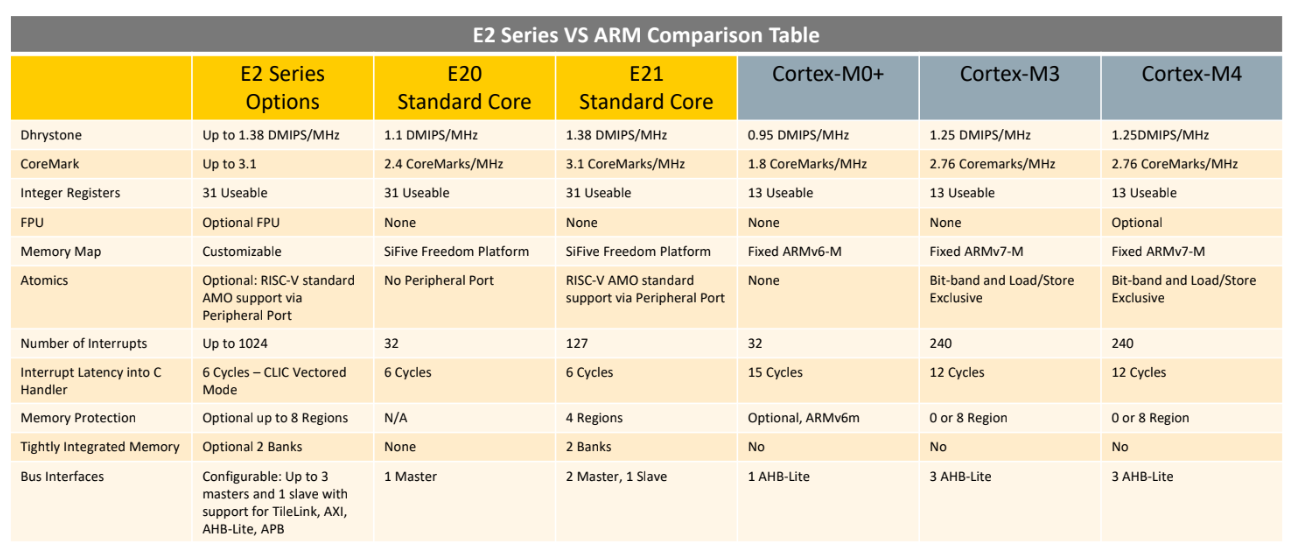
But sometimes you don’t need the fastest or best microcontroller. To that end, SiFive is looking toward a lower-power microcontroller based on the RISC-V core. The new offerings are built on the E2 Core IP series, with two standard cores. The E21 core provides mainstream performance for microcontrollers, and the E20 core is the most power-efficient core offered by SiFive. In effect, the E21 core is a replacement for the ARM Cortex-M3 and Cortex-M4, while the E20 is a replacement for the ARM Cortex-M0+.

Just a few months ago, SiFive released a gigantic, multicore, Linux-capable processor called the HiFive Unleashed. With support for DDR4 and Gigabit Ethernet, this chip would be more at home in a desktop than an Internet of Things thing. The most popular engine ever produced isn’t a seven-liter turbo diesel, it’s whatever goes into a Honda econobox; likewise, many more low-power microcontrollers like the Cortex-M0 and -M3 are sold than the newer, more powerful, and more expensive chips. Even though it’s not as exciting as a new workstation CPU, the world needs microcontrollers, and the more Open, the better.