Hacking A Very Special 486

It’s fair to say that Moore’s Law is not delivering on its promise of advancing semiconductor capabilities as fast as it used to, as the limits of current fabrication techniques are being met. Where this is being written for example there are two laptops, one from the last year and one that is 11 years old, and while the new one is undeniably faster it has not overtaken the other by as much as a ten year gap between 1990s machines would have revealed.

So with older laptops being still so relatively quick, what possible attraction could there be for working on a machine from the 1990s, when the Moore’s Law curve was steeper? It’s something [Jim W] is doing, with his HP Internet Advisor (J2522B), and when you see the machine in question perhaps you’ll understand why. The J2522B is a laptop, but it’s no ordinary ’90s road warrior’s status symbol. This 486-powered beast is a piece of test equipment, specifically one for examining Ethernet ports, thus it’s built like a tank and is mains powered only. It boasts a 486DX4, 16 MB of memory, a then-colossal 1.3 GB hard drive, and an ISA Fast Ethernet card. Oh, and WIndows 95, which with a couple of decades’ hindsight seems an amusing choice to power a piece of security test equipment.  Impressive specs for the day, but the $20,000 price tag would still have been steep compared to a comparable laptop.

[Jim]’s machine is destined for classic gaming, though with only the little HP pop-out mouse you saw on their Omnibook range at the time, he needed a PS/2 port. Some chipset hunting found that, but at the cost of accidentally frying a MOSFET when a screen connector was incorrectly re-inserted. We’re then treated to a guide to substituting older MOSFETs with modern parts, useful in itself, but followed by a marvelous piece of bodge work as an SOIC-8 part is placed on a DPAK footprint.

This is an interesting series of posts, partly from a retro angle as they deal with an interesting machine, but also from a hacking angle as he’s getting closer to the vintage PC hardware than most of us to. Keep an eye on it, there is sure to be more in the pipeline.


HOPE XIII: Oh The Fun You’ll Have With A Bit Of Social Engineering

I’ve been aware of the Social Engineering panels, talks, and villages at many conferences over the past few years. For some reason, be it the line to get in or conflicting schedules, I haven’t made it to one. Today was my day and I had a blast. The Social Engineering Panel at HOPE XIII is a great introduction to the dark(ish) art and a stroll through memory lane with some notables in the field.

Social Engineering (SE) is the pseudo-science of getting what you want by convincing people to share information, usually without them even knowing they’re doing so. This particular panel focused on over-the-phone SE and the four panel members began with a simple illustration. SE has changed over the years in large part because it is increasingly difficult to get a human on the phone. For about ten minutes an attempt was made to reach a person at Verizon, AT&T, and Spectrum Cable. With a two minute limit per phone number, all were fails.

But this didn’t derail the talk, which featured story time from Emmanuel GoldsteinAlexander J. Urbelis, Flyko, and Cheshire Catalyst. As phreakers back in the day, and tele-social engineers still, the stories were very entertaining. The panel was live streamed but doesn’t look like the video is available on demand yet so I’ll give you a quick and entertaining overview.

Continue reading “HOPE XIII: Oh The Fun You’ll Have With A Bit Of Social Engineering”

Measuring Web Latency In The Browser

We’ll go out on a limb and assume that anyone reading these words is probably familiar with the classic ping command. Depending on which operating system you worship the options might be slightly different, but every variation of this simple tool does the same thing: send an ICMP echo request and wait for a response. How long it takes to get a response from the target, if it gets one at all, is shown to the user. This if often the very first step to diagnosing network connectivity issues; if this doesn’t work, there’s an excellent chance the line is dead.

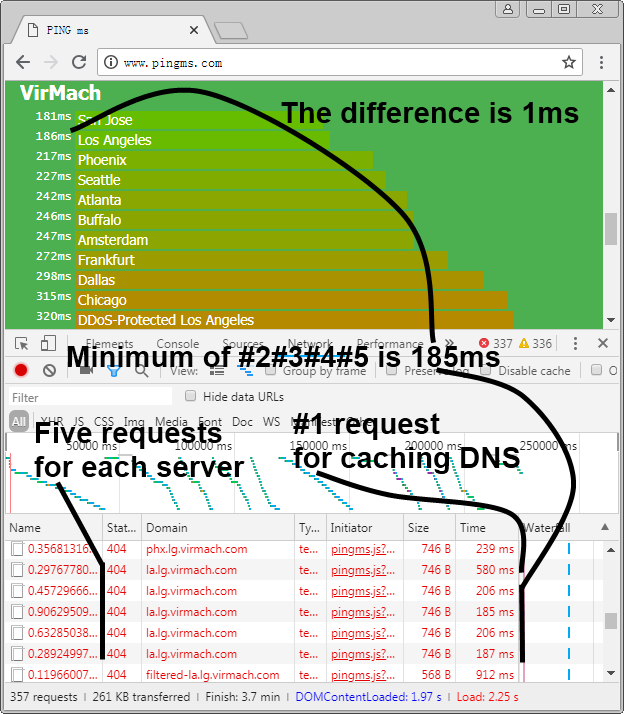
But in the modern web-centric view of networking, ping might not give us the whole picture. But nature it doesn’t take into account things like DNS lookups, and it certainly doesn’t help you determine what (if any) services the target has available to you. Accordingly, [Liu Zhiyong] has come up with a tool he calls “pingms”, which allows you to check web server latency right from your browser.

Rather than relying on ICMP, pingms performs a more realistic test. It takes the list of targets from the file “targets.js” and connects to each one over HTTP. How does it work? The code [Liu] has come up with will take each target domain name, append a random number to create a gibberish filename, and then calculate how long it takes to get a response when trying to download the file. Obviously it’s going to be getting a 404 response from the web server, but the important thing is simply that it gets the response.

With this data, [Liu] has come up with a simplistic but very slick interface which shows the user the collected data with easy to understand color-coded graphs. As interesting as it is to see how long it takes your favorite web sites or service providers to wake up and start talking, watching the colored bars hop up and down the list to sort themselves is easily our favorite part of pingms.

[Liu] has released pingms under the GPLv3 license, so if you’re looking to utilize the software for your own purposes you just need to provide a list of test targets. If you need to perform low-level diagnostics, check out this handy network tester you can build for cheap.

Digital Attenuator Goes From Manual To Arduino Control

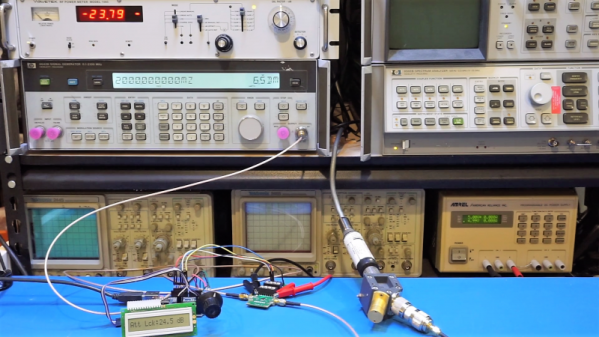
[Kerry Wong] comes across the coolest hardware, and always manages to do something interesting with it. His widget du jour is an old demo board for a digital RF attenuator chip, which can pad a signal in discrete steps according to the settings of some DIP switches. [Kerry]’s goal: forget the finger switch-flipping and bring the attenuator under Arduino control.

As usual with his videos, [Kerry] gives us a great rundown on the theory behind the hardware he’s working with. The chip in question is an interesting beast, an HMC624LP4E from Hittite, a company that was rolled into Analog Devices in 2014. The now-obsolete device is a monolithic microwave integrated circuit (MMIC) built on a gallium arsenide substrate rather than silicon, and attenuates DC to 6-GHz signals in 64 steps down to -31.5 dBm. After a functional check of the board using the DIP switches, he whipped up a quick Arduino project to control the chip with its built-in serial interface. It’s just a prototype for now, but spinning the encoder is a lot handier than flipping switches, and once this is boxed up it’ll make a great addition to [Kerry]’s RF bench.

If this video puts you in an RF state of mind, check out some of [Kerry]’s other videos, like this one about temperature-compensated crystal oscillators, or the mysteries of microwave electronics.

Continue reading “Digital Attenuator Goes From Manual To Arduino Control”

Open Source Laboratory Rocker Is Super Smooth

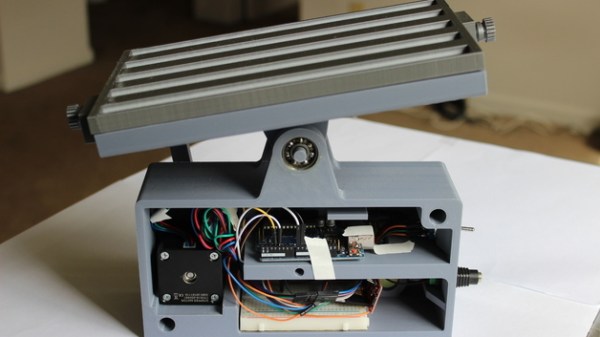
Lab equipment is often expensive, but budgets can be tight and not always up to getting small labs or researchers what they need. That’s why [akshay_d21] designed an Open Source Lab Rocker with a modular tray that uses commonly available hardware and 3D printed parts. The device generates precisely controlled, smooth motion to perform automated mild to moderately aggressive mixing of samples by tilting the attached tray in a see-saw motion. It can accommodate either a beaker or test tubes, but since the tray is modular, different trays can be designed to fit specific needs.

Source code and schematics are available from [akshay_d21]’s Google Drive and the 3D models are also available from the National Institute of Health’s 3D Print Exchange. A demonstration video is embedded below, in which you can see how smooth and controlled the motions are.

Continue reading “Open Source Laboratory Rocker Is Super Smooth”

Failed 3D Print Saved With Manual Coding

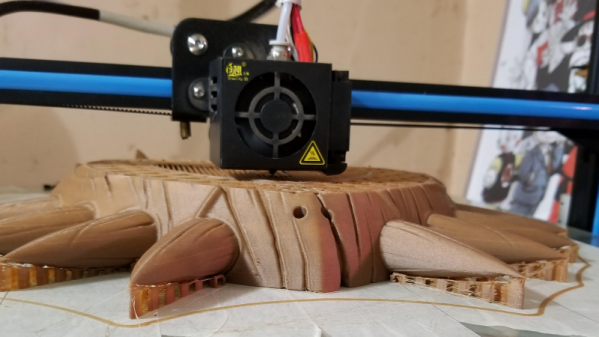
Toast falls face down. Your car always breaks after the warranty period. A 3D print only fails after it is has been printing for 12 hours. Those things might not always be true, but they are true often enough. Another pessimistic adage is “no good deed goes unpunished.” [Shippey123] did a good deed. He agreed to make a 3D printed mask for his friend to give as a gift. It was his first print he attempted for someone else after about four months’ experience printing at all. After 20 hours of printing, he noticed the head was moving around in the air doing nothing — a feeling most of us are all too familiar with. But he decided not to give up, but to recover the print.

Luckily, he’s a CNC machinist and is perfectly capable of reading G-code. The first thing he did was to shut everything down and clear the head. Then he rehomed the printer and used the head to determine what layer the printer had been working on when it failed. He did that by moving over a hidden part of the print and lowering the head by 100 microns. Then he’d move the head a few millimeters in the X direction to see if the head was touching.

Continue reading “Failed 3D Print Saved With Manual Coding”