Bootstrapping An MSDOS Assembler With Batch Files

You have a clean MSDOS system, and you need to write some software for it. What do you do? You could use debug, of course. But there are no labels so while you can get machine code from mnemonics, you’ll still need to figure out the addresses on your own. That wasn’t good enough for [mniip], who created an assembler using mostly batch files. There are a few .COM files and it looks as if the first time you use debug to create those, but there’s also source you can assemble on subsequent builds with the assembler.

Why? We aren’t entirely sure. But it is definitely a hack. The technique sort of reminded us of our own universal cross assembler — sort of.

Continue reading “Bootstrapping An MSDOS Assembler With Batch Files”

Magic Wand Learns Spells Through Machine Learning And An IMU

Jennifer Wang likes to dress up for cosplay and she’s a Harry Potter fan. Her wizarding skills are technological rather than magical but to the casual observer she’s managed to blur those lines. Having a lot of experience with different sensors, she decided to fuse all of this together to make a magic wand. The wand contains an inertial measurement unit (IMU) so it can detect gestures. Instead of hardcoding everything [Jennifer] used machine learning and presented her results at the Hackaday Superconference. Didn’t make it to Supercon? No worries, you can watch her talk on building IMU-based gesture recognition below, and grab the code from GitHub.

Naturally, we enjoyed seeing the technology parts of her project, and this is a great primer on applying machine learning to sensor data. But what we thought was really insightful was the discussions about the entire design lifecycle. Asking questions to scope the design space such as how much money can you spend, who will use the device, and where you will use it are often things we subconsciously answer but don’t make explicit. Failing to answer these questions at all increases the risk your project will fail or, at least, not be as successful as it could have been.

Continue reading “Magic Wand Learns Spells Through Machine Learning And An IMU”

Putting That Airplane On The Map – Live And With Python

Mankind’s fascination with airplanes is unbroken. Whether you’re outside with your camera, getting an actual glimpse of the aircraft, or sitting at home with your RTL-SDR dongle and have a look at them from a distance, tracking them is a fun pastime activity. Provided, of course, that you are living close by an airport or in an area with high enough air traffic. If not, well there’s always real-time tracking online to fall back to, and as [geomatics] will show you, you can build your own live flight tracking system with a few lines of Python.

As it’s usually the case with Python, a lot of functionality is implemented and readily available from external modules, which lets you focus on the actual application without having to worry too much about the details. Similarly, plenty of data can be requested from all sorts of publicly accessible APIs nowadays. If you are looking for a simple-enough example to get into both subjects with a real-world application, [geomatics]’ flight tracker uses cartopy to create a map using Open Street Map data, and retrieves the flight information from ADS-B Exchange‘s public API.

We have seen ADS-B Exchange mentioned a few times before, for example with this ESP8266 based plane spotter and its successor. And if you’re more curious about the air traffic in your direct surroundings, it’s probably time for a DVB USB dongle.

Packing Decimal Numbers Easily

While desktop computers have tons of computing power and storage, some small CPUs don’t have a lot of space to store things. What’s more is some CPUs don’t do multiplication and division very well. Same can be said for FPGAs. So suppose we are going to grab a bunch of three-digit decimal numbers from, say, a serial port. We want to store as many as we can, and we don’t want to do a lot of math because we can’t, it is slow, or perhaps it keeps our processor awake longer and we want to sleep to conserve power. We want a way to pack the numbers as close to the theoretical maximum as we can but with little or no math.

The simple approach is to store the numbers as ASCII. Great for processing since they are probably in ASCII already. If they aren’t, you just add 30 hex to each digit and you are done. That’s awful for storage space, though, since we can store 999 in 10 bits if it were binary and now we are using 24 bits! Storing in binary isn’t a good option, if you play by our rules, by the way. You need to multiply by 10 and 100 (or 10 twice) to get the encoding. Granted, you can change that to two shifts and an add (8x+2x=10x) but there’s no easy way to do the division you’ll have to do for the decode.

Of course, there’s no reason we can’t just store decimal digits. That’s call binary coded decimal or BCD and that has some advantages, too. It is pretty easy to do math on BCD numbers and you don’t get rounding problems. Some CPUs even have specific instructions for BCD manipulation. However, three digits will require 12 bits. That’s better than 24, we agree. But it isn’t as good as that theoretical maximum. After all, if you think about it, you could store 16 distinct codes in 4 bits, and we are storing only 10, so that 6 positions lost. Multiply that by 3 and you are wasting 18 codes.

But there is a way to hit that ten-bit target without doing any math. Its called DPD or densely packed decimal. You can convert three decimal digits into ten bits and then back again with no real math at all. You could implement it with a small lookup table or just do some very simple multiplexer-style logic which means it is cheap and easy to implement in software or onboard an FPGA.

Continue reading “Packing Decimal Numbers Easily”

Tiny Ray Tracer Fits In 64 Bytes

Throughout human history, people try to make the biggest, the fastest, and — sometimes — the smallest. [Hellmood] falls into the latter category and proves it with a 64 byte interactive 3D raycasting application for MSDOS.

Why MSDOS? We suppose why not? The .COM file format is lean, and you can take over everything without a lot of work. If the program were huge, it wouldn’t be very impressive. There are 64 shades of gray which is odd looking these days, however there are versions that use various color palettes and each one fits in 64 bytes or less. There’s even mouse control and you can see the results in the video below.

Continue reading “Tiny Ray Tracer Fits In 64 Bytes”

Jittery Back Off To Speed Up

In systems where there are multiple participants who need to interact with a shared resource some sort of concurrency protection is usually appropriate. The obvious technique is to use locking (and fun words like “mutex”) but this adds a constant performance hit as every participant needs to spend time interacting with the lock regardless of the number of other participants. It turns out this is actually a Big Problem that garners original research, but there are techniques that can yield great effect without a PhD. Years ago [Marc] posted a great walkthrough of one such method, exponential backoff with jitter, to Amazon’s AWS blog which is a great introduction to one such solution.

The blog post was written specifically to deal systems using a specific technique called optimistic concurrency control (OCC) but that doesn’t mean the advice isn’t generally applicable. OCC refers to a method where each writer checks for a write collision only after performing the write (but before committing it), which works well in scenarios where writes are relatively uncommon. [Marc] observed that even in systems where this is a safe assumption things bog down significantly when there are too many writers clamoring for attention all at once.

The traditional solution to such a problem is for each writer to pause for an exponentially increasing amount of time before trying again, but as writers come back in big groups the same problem can recur. He provides a discussion of simple modifications to that strategy which result in significantly reduced wait times for writers.

Problems like this are not especially relevant for single Arduino sensor networks, but even small groups of systems can have concurrency trouble and it’s nice to see such an accessible write up with solutions which are viable even for simple systems. Bonus points to [Marc] for posting source to his test tool online. It doesn’t require anything outside of your computer to run (no AWS required) so if you have any brainwaves about speeding up multi-writer environments it might make a nice test environment! Maybe don’t mention the blog post in your PhD applications though.

Mastering OpenSCAD Workflow

As you may have noticed in our coverage, we’re big fans of OpenSCAD around these parts. The fact that several of the Hackaday writers organically found and started using the parametric CAD package on their own is not only a testament to our carefully cultivated hive mind but also to the type of people it appeals to. Hackers love it because it allows you to model physical objects as if you were writing software: models are expressed in code, and its plain text source files can be managed with tools like git and make. If you’re a real Pinball Wizard you could design objects and export them to STL without ever using a graphical interface.
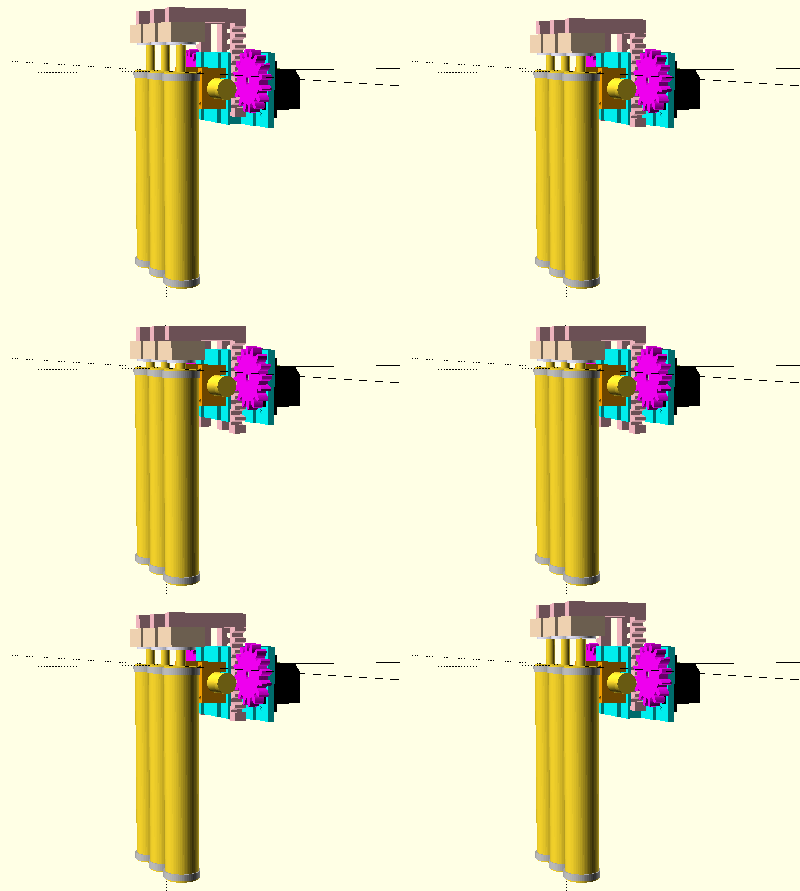
But as you might expect, with such power comes a considerable learning curve. OpenSCAD devotee [Uri Shaked] recently wrote in to share with us his workflow for designing complex interacting mechanisms, which serves as an excellent primer to the world of parametric design. From animating your models to recreating the “vitamins” of your build, his post contains plenty of tips that can help both new and veteran OpenSCAD users alike.

Perhaps the biggest takeaway from his post is that you should be thinking of your projects as a whole, rather than as individual models. [Uri] recalls his early attempts at designing mechanisms: designing each component individually, printing it out, and only then finding out if it fits together with the other pieces. This method of trial and error is probably familiar to anyone who’s designed their own 3D printed parts — but it’s slow and wastes materials. The alternative, as he explains it, is to design all of the pieces at the same time and “assemble” them virtually. This will allow you to check clearances and fitment without dedicating the time and materials to test it in the real world.

In fact, as [Uri] explains, you’re better off spending your time bringing real-world parts into OpenSCAD. By carefully measuring the hardware components you want to interact with (servos, gears, switches, etc), you can create facsimiles of them to use as a reference in your OpenSCAD project. As time goes on, you can build up your own library of drop-in reference models which will accelerate future designs.

He also spends a little time talking about something that doesn’t seem to be terribly well known even among the OpenSCAD converts: you don’t have to use the built-in editor if you don’t want to. Since OpenSCAD source code files are plain text, you can write them in whatever editor you like. The OpenSCAD model viewer even has an option specifically for this scenario, which will cause it to update the rendered preview as soon as it detects the source has been updated. For [Uri] this means he can create his designs in Visual Studio Code with a constantly updating preview in another window.

If you’re looking for examples of what the parametric capabilities of OpenSCAD can do for you, we’ve got no shortage of excellent examples. From creating customized computer cases to saving time by using mathematically derived components. Our very own [Elliot Williams] even has a write up about that most glorious of OpenSCAD commands: hull().