Sometime in the very distant future, the Universe will become the domain of black holes. Energy and entropy will be compressed into minuscule quantum fluctuations. Even in this domain of nothingness, there will still be one unassailable truth: you should not buy a 3D printer on Kickstarter.
We’re no strangers to failed 3D printer crowdfunding campaigns. Around this time last year, backers for the Peachy Printer, an inordinately innovative resin printer, found out they were getting a timeshare in Canada instead of a printer. This was unusual not because a crowdfunding campaign failed, but because we know what actually happened. It’s rare to get the inside story, and the Peachy Printer did not disappoint.
For the last few months, we’ve been watching another crowdfunding campaign on its long walk to the gallows. The Tiko 3D printer is another 3D printer that looks innovative, and at the time of the crowdfunding campaign, the price couldn’t be beat. For just $179 USD, the backers of the Tiko printer would receive a 3D printer. Keep in mind the Tiko launched nearly two years ago, when a bargain-basement printer still cost about $400. Fools and money, or something like that, and the Tiko 3D printer campaign garnered almost three million dollars in pledges.
Now, after almost two years of development, Tiko is closing up shop. In an update posted to the Tiko Kickstarter this week, Tiko announced they are laying off their team and winding down operations. It’s a sad but almost predictable end to a project that could have been cool. Unlike so many other failed crowdfunding campaigns, Tiko has given us a post-mortum on their campaign. This is how the Tiko became a standout success on Kickstarter, how it failed, and is an excellent example of the difference between building one of something and building ten thousand.
My phone can now understand me but it’s still an idiot when it comes to understanding what I want. We have both the hardware capacity and the software capacity to solve this right now. What we lack is the social capacity.
We are currently in a dumb state of personal automation. I have Google Now enabled on my phone. Every single month Google Now reminds me of bills coming due that I have already paid. It doesn’t see me pay them, it just sees the email I received and the due date. A creature of habit, I pay my bills on the last day of the month even though that may be weeks early. This is the easiest thing in the world for a computer to learn. But it’s an open loop system and so no learning can happen.
Earlier this month [Cameron Coward] wrote an outstanding pair or articles on AI research that helped shed some light on this problem. The correct term for this level of personal automation is “weak AI”. What I want is Artificial General Intelligence (AGI) on a personal level. But that’s not going to happen, and I am the problem. Here’s why.
There is an old saying: “In theory, theory and practice are the same. In practice, they are not.” We spend our time drawing on paper or a computer screen, perfect wires, ideal resistors, and flawless waveforms. Alas, the real world is not so kind. Components have all kinds of nasty parasitic effects and no signal looks like it does in the pages of a text book.
Consider the following problem. You have a sine wave input coming in that varies between 0 V and 5 V. You want to convert it to a square wave that is high when the sine wave is over 2.5 V. Simple, right? You could use a CMOS logic gate or a comparator. In theory…
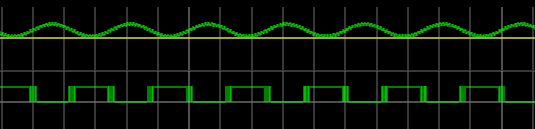
The problem is, the sine wave isn’t perfect. And the other components will have little issues. If you’ve ever tried this in real life, you’ll find that when the sine wave is right at the 2.5 V mark the output will probably swing back and forth before it settles down. This is exacerbated by any noise or stretching in the sine wave. You will wind up with something like this:
Notice how the edges of the square wave are a bit fat? That’s the output switching rapidly back and forth right at the comparator’s threshold.
Hysteresis
The answer is to not set the threshold at 2.5 V, or any other single value. Instead, impose a range outside of which it will switch, switching low when it leaves the low end of the range, and high when it exceeds the high end. That is, you want to introduce hysteresis. For example, if the 0 to 1 shift occurs at, say, 1.9 V and the 1 to 0 switch is at 0.5 V, you’ll get a clean signal because once a 0 to 1 transition happens at 1.9 V, it’ll take a lot of noise to flip it all the way back below 0.5 V.
You see the same effect in temperature controllers, for example. If you have a heater and a thermal probe, you can’t easily set a 100 degree set point by turning the heater off right away when you reach 100 and then back on again at 99.9999. You will usually use hysteresis in this case, too (if not something more sophisticated like a PID). You might turn the heater off at 99 degrees and back on again at 95 degrees, for example. Indeed, your thermostat at home is a prime example of a system with hysteresis — it has a dead-band of a few degrees so that it’s not constantly turning itself on and off.
Schmitt Triggers and How to Get One
A Schmitt Trigger is basically a comparator with hysteresis. Instead of comparing the incoming voltage with VCC / 2, as a simple comparator would, it incorporates a dead band to ensure that logic-level transitions occur only once even in the presence of a noisy input signal.
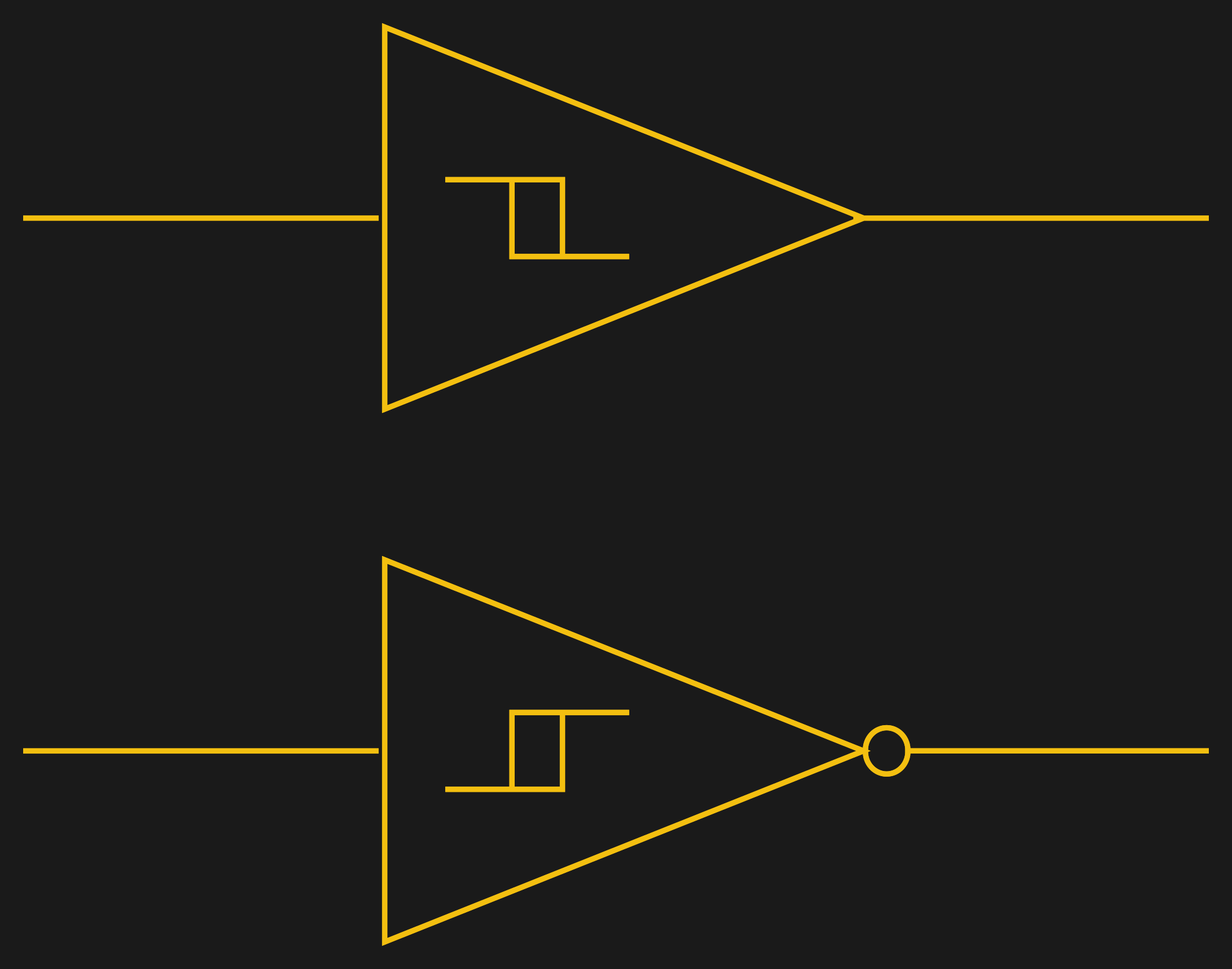
Assuming you want a Schmitt trigger in a circuit, you have plenty of options. There are ICs like the 74HC14 that include six (inverting) Schmitt triggers. On a schematic, each gate is represented by one of the symbols to the right; the little mark in the box is the hysteresis curve, and the little bubble on the output indicates logical negation when it’s an inverter.
You can also make them yourself out of transistors or even a 555 chip. But the easiest way by far is to introduce some feedback into a plain op amp comparator circuit.
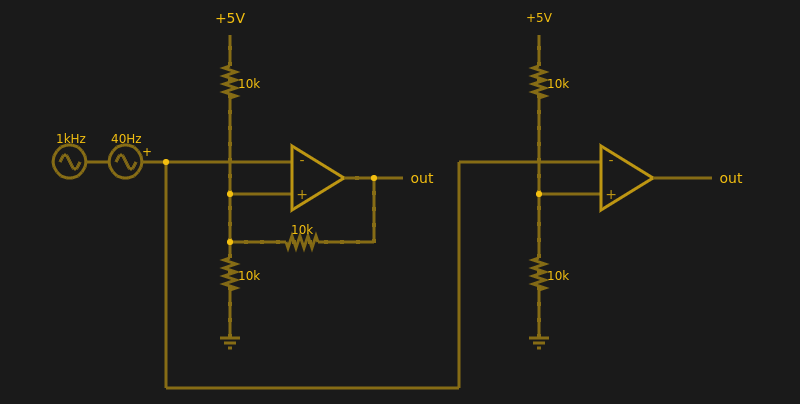
Below are two op amps, one with some positive feedback to make it act like a Schmitt trigger. The other is just a plain comparator. You can simulate the design online.
If you haven’t analyzed many op amp circuits, this is a good one to try. First, imagine an op amp has the following characteristics:
The inputs are totally open.
The output will do whatever it takes to make the inputs voltages the same, up to the power supply rails.
Neither of these are totally true (theory vs. practice, again), but they are close enough.
The comparator on the right doesn’t load the inputs at all, because the input pins are open circuit, and the output swings to either 0 V or 5 V to try, unsuccessfully, to make the inputs match. It can’t change the inputs because there is no feedback, but it does make a fine comparator. The voltage divider on the + pin provides a reference voltage. Anything under that voltage will swing the output one way. Over the voltage will swing it the other way. If the voltages are exactly the same? That’s one reason you need hysteresis.
The comparator’s voltage divider sets the + pin to 1/2 the supply voltage (2.5 V). Look at the Schmitt trigger (on top). If the output goes between 0 V and 5 V, then the voltage divider winds up with either the top or bottom resistor in parallel with the 10K feedback resistor. That is, the feedback resistor will either be connected to 5 V or ground.
Of course, two 10K resistors in parallel will effectively be 5K. So the voltage divider will be either 5000/15000 (1/3) or 10000/15000 (2/3) depending on the state of the output. Given the 5 V input to the divider, the threshold will be 5/3 V (1.67 V) or 10/3 V (3.33 V). You can, of course, alter the thresholds by changing the resistor values appropriately.
Practical Applications
Schmitt triggers are used in many applications where a noisy signal requires squaring up. Noisy sensors, like an IR sensor for example, can benefit from a Schmitt trigger. In addition, the defined output for all voltage ranges makes it handy when you are trying to “read” a capacitor being charged and discharged. You can use that principle to make a Schmitt trigger into an oscillator or use it to debounce switches.
If you want to see a practical project that uses a 555-based Schmitt, check out this light sensor. The Schmitt trigger is just one tool used to fight the imprecision of the real world and real components. Indeed, they’re nearly essential any time you want to directly convert an analog signal into a one-bit, on-off digital representation.
I’ve been soldering for a long time, and I take pride in my abilities. I won’t say that I’m the best solder-slinger around, but I’m pretty good at this essential shop skill — at least for through-hole and “traditional” soldering; I haven’t had much practice at SMD stuff yet. I’m confident that I could make a good, strong, stable joint that’s both electrically and mechanically sound in just about any kind of wire or conductor.
But like some many of us, I learned soldering as a practical skill; put solder and iron together, observe results, repeat the stuff that works and avoid the stuff that doesn’t. Seems like adding a little inside information might help me improve my skills, so I set about learning what’s going on mechanically and chemically inside a solder joint.
Wireless power transfer exists right now, but it’s not as cool as Tesla’s Wardenclyffe tower and it’s not as stupid as an OSHA-unapproved ultrasonic power transfer system. Wireless power transfer today is a Qi charger for your phone. It’s low power – just a few amps — and very short range. This makes sense; after all, we’re dealing with the inverse square law here, and wireless power transfer isn’t very efficient.
Now, suddenly, we can transfer nearly two kilowatts wirelessly to electronic baubles scattered all over a room. It’s a project from Disney Research, it’s coming out of Columbia University, it’s just been published in PLOS one, and inexplicably it’s also an Indiegogo campaign. Somehow or another, the stars have aligned and 2017 is the year of wirelessly powering your laptop.
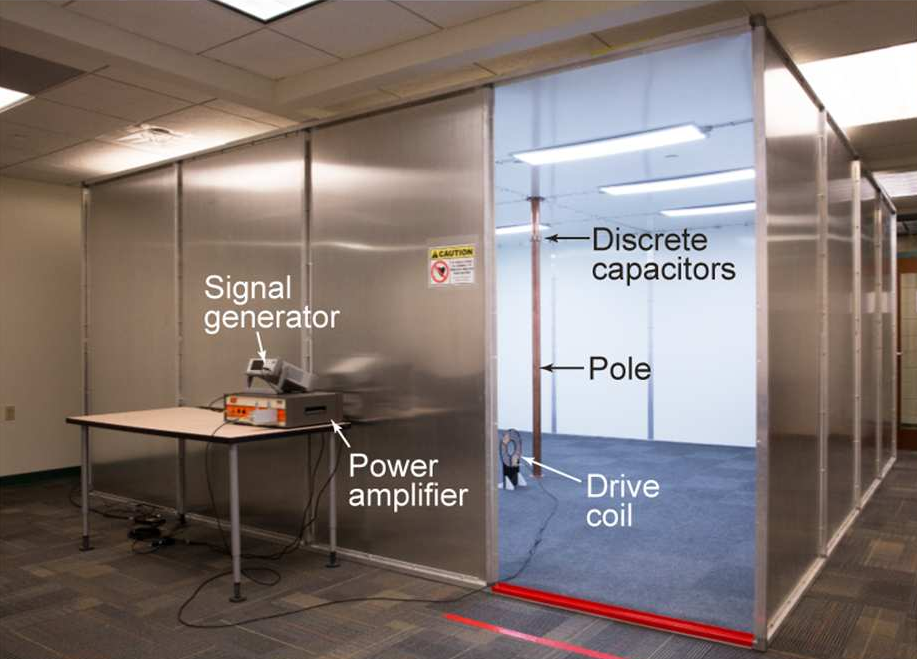
The first instance of wireless power transfer that’s more than just charging a phone comes from Disney Research. This paper describes quasistatic cavity resonance (QSCR) to transfer up to 1900 Watts to a coil across a room. In an experimental demonstration, this QSCR can power small receivers scattered around a 50 square meter room with efficiencies ranging from 40% to 95%. In short, the abstract for this paper promises a safe, efficient wireless power transfer that completely removes the need for wall outlets.
In practice, the QSCR from Disney Research takes the form of a copper pole situated in the center of a room with the walls, ceiling, and floor clad in aluminum. This copper pole isn’t continuous from floor to ceiling – it’s made of two segments, connected by capacitors. When enough RF energy is dumped into this pole, power can be extracted from a coil of wire. The video below does a good job of walking you through the setup.
As with all wireless power transmission schemes, there is the question of safety. Using finite element analysis, the Disney team found this room was safe, even for people with pacemakers and other implanted electronics. The team successfully installed lamps, fans, and a remote-controlled car in this room, all powered wirelessly with three coils oriented orthogonally to each other. The discussion goes on to mention this setup can be used to charge mobile phones, although we’re not sure if charging a phone in a Faraday cage makes sense.
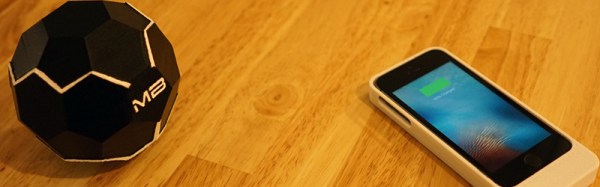
If the project from Disney research isn’t enough, here’s the MotherBox, a completely unrelated Indiegogo campaign that was launched this week. This isn’t just any crowdfunding campaign; this work comes straight out of Columbia University and has been certified by Arrow Electronics. This is, by all accounts, a legitimate thing.
The MotherBox crowdfunding campaign promises true wireless charging. They’re not going for a lot of power here – the campaign only promises enough to charge your phone – but it does it at a distance of up to twenty inches.
At the heart of the MotherBox is a set of three coils oriented perpendicular to each other. The argument, or sales pitch, says current wireless chargers only work because the magnetic fields are oriented to each other. The coil in the phone case is parallel to the coil in the charging mat, for instance. With three coils arranged perpendicular to each other, the MotherBox allows for ‘three-dimensional charging’.
Does the MotherBox work? Well, if you dump enough energy into a coil, something is going to happen. The data for the expected charging ranges versus power delivered is reasonably linear, although that doesn’t quite make sense in a three-dimensional universe.
Is it finally time to get rid of all those clumsy wall outlets? No, not quite yet. The system from Disney Research works, but you have to charge your phone in a Faraday cage. It would be a great environment to test autonomous quadcopters, though. For MotherBox, Ivy League engineers started a crowdfunding campaign instead of writing a paper or selling the idea to an established company. It may not be time to buy a phone case so you can charge your phone wirelessly at Starbucks, but at least people are working on the problem. This time around, some of the tech actually works.
You have a shoe box sized computer that you want to use in a Mars fly by. How do you communicate with it? The answer is a very clever set of antennas. I got to sit down with Nacer Chahat, one of the engineers on the Jet Propulsion Laboratory team responsible for antenna design on Mars Cube One (MarCO). Two of these CubeSats that will soon be used to help a lander reach Mars. We talked about the work that went into MarCO, the deployable radar antenna he’s worked on for the RainCube project, and the early progress on OMERA, the One Meter Reflectarray.
This is a fascinating discussion of dealing with a multitude of engineering challenges including lack of available space for the antenna components, and power and weight limitations. Check out the video interview to see how the people at JPL fit it all into this, and other tiny satellites, then join us below for more details.
3D printers are the single best example of what Open Hardware can be. They’re useful for prototyping, building jigs for other tools, and Lulzbot has proven desktop 3D printers can be used in industrial production. We endorse 3D printing as a viable tool as a matter of course around here, but that doesn’t mean we think every house should have a 3D printer.
Back when Bre was on Colbert and manufacturing was the next thing to be ‘disrupted’, the value proposition of 3D printing was this: everyone would want a 3D printer at home because you could print plastic trinkets. Look, a low-poly Bulbasaur. I made a T-rex skull. The front page of /r/3Dprinting. Needless to say, the average consumer doesn’t need to spend hundreds of dollars to make their own plastic baubles when WalMart and Target exist.
The value proposition of a 3D printer is an open question, but now there is some evidence a 3D printer provides a return on its investment. In a paper published this week, [Joshua Pearce] and an undergraduate at Michigan Tech found a 3D printer pays for itself within six months and can see an almost 1,000% return on investment within five years. Read on as I investigate this dubious claim.




 If the project from Disney research isn’t enough,