New Part Day: Lynxmotion Smart Servos

Anyone who shops for robotics kits would have come across a few designed by Lynxmotion. They’ve been helping people build robots since 1995, from robot arm kits to hexapod chassis and everything in between. We would expect these people know their motors, so when they launched their own line of servo motors called Lynxmotion Smart Servos (LSS), it is worth spending a bit of time to look over what they offer.

While these new devices have a PWM mode compatible with classic remote control servos, unleashing their full power requires bidirectional communication over a serial bus. We’ve previously given an overview of three serial bus servos already on the market for comparison. A quick look at the $68-$100 price tags listed on Lynxmotion’s parent company RobotShop made it clear they do not intend to compete on price, so what interesting features do these new kids on the block have?

Digging into product documentation found some great details. Acceleration and deceleration rates are adjustable, which can help with smoother robot movement. There’s also an adjustable level of “stiffness” that adds some “give” (compliance) so a robot won’t have to be as stiff as… well, a robot!

Mechanically, the most interesting internal component is the magnetic position sensor. They are far more precise than potentiometers, but more importantly, they allow positioning anywhere within full 360 degrees. Many other serial bus servos are constrained to positions within an arc less than 360 degrees leaving a blind spot.

An interesting quirk of the LSS offerings is that the serial communication protocol uses human-readable text characters, so sending a number 255 means transmitting a three byte string ‘2’, ‘5’, and ‘5’ instead of single byte 0xFF. This would make debugging our custom robot code far easier, at the cost of reduced bandwidth efficiency and loss of checksum for detecting communication errors. It’s a trade-off that some robot builders would be happy to make, but others might not.

Externally, these servos have bountiful mounting options including some we didn’t know to ask for. Historically Lynxmotion kits have used a wide variety of servo mounting brackets, so they are motivated to make mechanical integration easy. The most novel offering is the ability to bolt external gears to the servo body. A set of 1:3 gears allow for gearing the servo up or down, or you can use a set of 1:1 gears for a compact gripper.

As you’d expect of servos in this price range, they all have metal gears, but they also have the ability to power the motor directly from a battery pack (a 3 cell lithium polymer is recommended). There are additional features, like an RGB LED for visual feedback, which we didn’t cover here so dig into the documentation for more. We look forward to seeing how these interesting little actuators perform in future robotics projects.


Hackaday Podcast 017: Are Cheap Microcontrollers Worth It? Android On Your Bike. Plus Food Printers And Coffee Bots

Join Editors Mike Szczys and Elliot Williams as they recount a week of fascinating hacks. We take a good look at the PMS150C, a microcontroller that literally costs pennies but can only be flashed once. SNES emulators have a new trick up their sleeves to make low-def a lot less low, and you retro enthusiasts will either hate or love the NES zapper chandelier. Elliot’s enamored by a bike computer running Android core, and both Mike and Elliot delve into the food hacking scene, be it meat, chocolate, coffee, or of course frosting!

Take a look at the links below if you want to follow along, and as always, tell us what you think about this episode in the comments!

Take a look at the links below if you want to follow along, and as always, tell us what you think about this episode in the comments!

Direct download (60 MB or so.)

Continue reading “Hackaday Podcast 017: Are Cheap Microcontrollers Worth It? Android On Your Bike. Plus Food Printers And Coffee Bots”

How-To: Mapping Server Hits With ESP8266 And WS2812

It has never been easier to build displays for custom data visualization than it is right now. I just finished one for my office — as a security researcher I wanted a physical map that will show me from where on the planet my server is being attacked. But the same fabrication techniques, hardware, and network resources can be put to work for just about any other purpose. If you’re new to hardware, this is an easy to follow guide. If you’re new to server-side code, maybe you’ll find it equally interesting.

I used an ESP8266 module with a small 128×32 pixel OLED display connected via an SSD1306 controller. The map itself doesn’t have to be very accurate, roughly knowing the country would suffice, as it was more a decorative piece than a functional one. It’s a good excuse to put the 5 meter WS2812B LED strip I had on the shelf to use.

The project itself can be roughly divided into 3 parts:

  1. Physical and hardware build
  2. ESP8266 firmware
  3. Server-side code

It’s a relatively simple build that one can do over a weekend. It mashes together LED strips, ESP8266 wifi, OLED displays, server-side code, python, geoip location, scapy, and so on… you know, fun stuff.

Continue reading “How-To: Mapping Server Hits With ESP8266 And WS2812”

This Week In Security: Facebook Hacked Your Email, Cyber On The Power Grid, And A Nasty Zero-day

Ah, Facebook. Only you could mess up email verification this badly, and still get a million people to hand over their email address passwords. Yes, you read that right, Facebook’s email verification scheme was to ask users for their email address and email account password. During the verification, Facebook automatically downloaded the account’s contact list, with no warning and no way to opt out.

The amount of terrible here is mind-boggling, but perhaps we need a new security rule-of-thumb for these kind of situations. Don’t ever give an online service the password to a different service. In order to make use of a password in this case, it’s necessary to handle it in plain-text. It’s not certain how long Facebook stored these passwords, but they also recently disclosed that they have been storing millions of Facebook and Instagram passwords in plain-text internally.

This isn’t the first time Facebook has been called out for serious privacy shenanigans, either: In early 2018 it was revealed that the Facebook Android app had been uploading phone call records without informing users. Mark Zuckerberg has recently outlined his plan to give Facebook a new focus on privacy. Time will tell whether any real change will occur.

Cyber Can Mean Anything

Have you noticed that “cyber” has become a meaningless buzz-word, particularly when used by the usual suspects? The Department of Energy released a report that contained a vague but interesting sounding description of an event: “Cyber event that causes interruptions of electrical system operations.” This was noticed by news outlets, and people have been speculating ever since. What is frustrating about this is the wide range of meaning covered by the term “cyber event”. Was it an actual attack? Was Trinity shutting down the power stations, or did an intern trip over a power cord?
Continue reading “This Week In Security: Facebook Hacked Your Email, Cyber On The Power Grid, And A Nasty Zero-day”

KiCad Community Shines At First Ever KiCon

Last weekend was KiCon, a gathering of hardware developers from all over the world who use KiCad open source EDA software. This included many of the software engineers who drive development, people who use KiCad in their business, and those who simply love it for being a professional quality tool available for anyone to use.

From hardware show-and-tell, to the lineup of talks, and the social events each evening, there was so much packed into two (plus) days. Join me after the break for a whirlwind tour of the people and the hardware found at 2019 KiCon.

Continue reading “KiCad Community Shines At First Ever KiCon”

Ask Hackaday: Is USB Robust Enough?

Earlier this month a single person pleaded guilty to taking down some computer labs at a college in New York. This was not done by hacking into them remotely, but by plugging a USB Killer in one machine at a time. This malicious act caused around $58,000 in damage to 66 machines, using a device designed to overload the data pins on the USB ports with high-voltage. Similar damage could have been done with a ball-peen hammer (albeit much less discreetly), and we’re not here to debate the merits of the USB Killer devices. If you destroy property you don’t own you should be held accountable.

But the event did bring an interesting question to mind. How robust are USB ports? The USB Killer — which we’ve covered off and on through the years —  is billed as a “surge testing” device and operates by injecting -200 volts DC on the data lines of the USB connection. Many USB ports are not protected against this and the result is permanent damage to the computer hardware. Is protection for these levels of abuse necessary or would it needlessly add cost to our machines?

A chip like the TPD4S014 has ESD protection on the data lines that is rated up to +/- 1500 volts, clamping to ground to dissipate the energy. It’s a solution that should protect against repeated spikes on the data lines, as well as short circuits on the power lines and over/undervoltage situations.

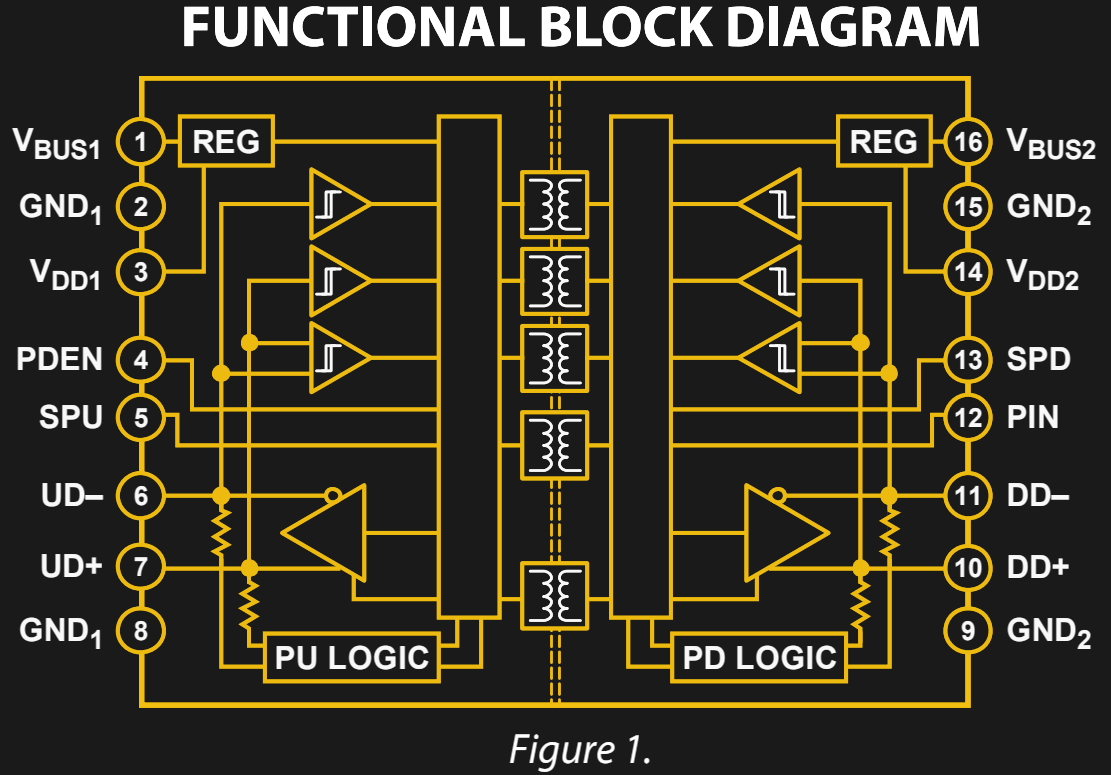
ADUM4160 Functional Diagram

The ADuM4160 is an interesting step up from this. It’s designed to provide isolation between a USB host and the device connected to it. Rather than relying on clamping, this chip implements isolation through air core transformers. Certainly this would be overkill to install in every product, but for those of use building and testing USB devices this would save you from “Oops, wrong USB cable” moments at the work bench.

Speaking of accidents at the bench, there is certainly a demand for USB isolation outside of what’s built into our computers. Earlier this year we saw a fantastic take on a properly-designed USB power strip. Among the goals were current limiting, undervoltage protection, and a proper power disconnect switch for each port. The very need to design your own reminds us that consumer manufacturers are often lazy in their USB design. “Use a USB hub” is bad advice for protection at the workbench since quality of design varies so wildly.

We would be interested in hearing from anyone who has insight on standards applying to equipment continuing to survive over current or over voltage events and remain functional. There are standards like UL-60950 that should apply to USB. But that standard includes language about failing safe for the operator, not necessarily remaining functional:

After abnormal operation or a single fault (see 1.4.14), the equipment shall remain safe for an OPERATOR in the meaning of this standard, but it is not required that the equipment should still be in full working order. It is permitted to use fusible links, THERMAL CUT-OUTS, overcurrent  protection devices and the like to provide adequate protection.

So, we’re here to ask you, the readers of Hackaday. Are our USB devices robust enough? Do you have a go-to USB protection chip, part, or other circuit you like to use? Have you ever accidentally killed a USB host device (if so, how)? Do you have special equipment that you depend on when developing projects involving USB? Let us know what you think in the comments below.

AI At The Edge Hack Chat

Join us Wednesday at noon Pacific time for the AI at the Edge Hack Chat with John Welsh from NVIDIA!

Machine learning was once the business of big iron like IBM’s Watson or the nearly limitless computing power of the cloud. But the power in AI is moving away from data centers to the edge, where IoT devices are doing things once unheard of. Embedded systems capable of running modern AI workloads are now cheap enough for almost any hacker to afford, opening the door to applications and capabilities that were once only science fiction dreams.

John Welsh is a Developer Technology Engineer with NVIDIA, a leading company in the Edge computing space. He’ll be dropping by the Hack Chat to discuss NVIDIA’s Edge offerings, like the Jetson Nano we recently reviewed. Join us as we discuss NVIDIA’s complete Jetson embedded AI product line up, getting started with Edge AI, and where Edge AI is headed.

join-hack-chat

Our Hack Chats are live community events in the Hackaday.io Hack Chat group messaging. This week we’ll be sitting down on Wednesday, May 1 at noon Pacific time. If time zones have got you down, we have a handy time zone converter.

Click that speech bubble to the right, and you’ll be taken directly to the Hack Chat group on Hackaday.io. You don’t have to wait until Wednesday; join whenever you want and you can see what the community is talking about.