3D Printering: Print Smoothing Tests With UV Resin

Smoothing the layer lines out of filament-based 3D prints is a common desire, and there are various methods for doing it. Besides good old sanding, another method is to apply a liquid coating of some kind that fills in irregularities and creates a smooth surface. There’s even a product specifically for this purpose: XTC-3D by Smooth-on. However, I happened to have access to the syrup-thick UV resin from an SLA printer and it occurred to me to see whether I could smooth a 3D print by brushing the resin on, then curing it. I didn’t see any reason it shouldn’t work, and it might even bring its own advantages. Filament printers and resin-based printers don’t normally have anything to do with one another, but since I had access to both I decided to cross the streams a little.

The UV-curable resin I tested is Clear Standard resin from a Formlabs printer. Other UV resins should work similarly from what I understand, but I haven’t tested them.

Continue reading “3D Printering: Print Smoothing Tests With UV Resin”

Look Out Nest — Here Comes The WIoT-2

[Dave] is an avid hacker and no stranger to Hackaday. When he decided to give his IoT weather display an upgrade, he pulled out all the stops.

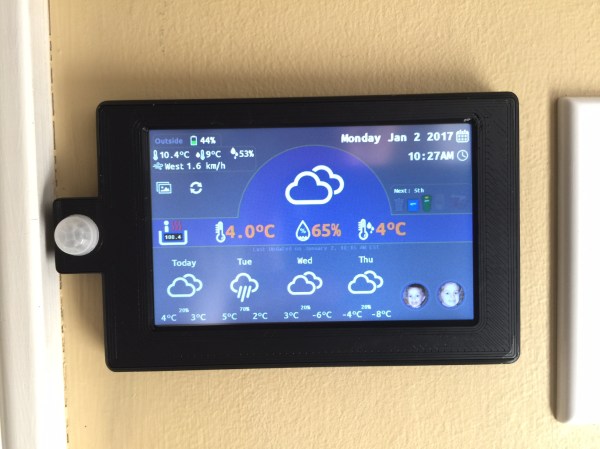
The WIoT-2 is less of a weather station and more of an info center for their house — conveniently located by their front door — for just about anything [Dave] or his partner need to know when entering or exiting their home. It displays indoor temperature and humidity, date, time, garbage collection schedule, currency exchange rates, whether the garage door is open or closed, the hot tub’s temperature, a check in for his kids, current weather data from a custom station [Dave] built outside his house, and the local forecast.

WIoT-2’s display is a Nextion TFT and the brains behind the operation is a NodeMCU 8266. He made extensive use of Blynk to handle monitoring of the various feeds, and will soon be integrating master control for all the networked outlets in the house into the system. He found setting up the hardware to be fairly clear-cut but notes that he cannot have the screen powered on when uploading sketches to the NodeMCU.  He circumvented the problem by adding a latching switch to the screen’s power line.

[Dave] curated a robust explanation of his build that includes tips, tricks, code — and a how-to to boot! If you’re not already starting your own build of this info suite, you may be tantalized by some of his other projects.

Continue reading “Look Out Nest — Here Comes The WIoT-2”

DIY Text-to-Speech With Raspberry Pi

We can almost count on our eyesight to fail with age, maybe even past the point of correction. It’s a pretty big flaw if you ask us. So, how can a person with aging eyes hope to continue reading the printed word?

There are plenty of commercial document readers available that convert text to speech, but they’re expensive. Most require a smart phone and/or an internet connection. That might not be as big of an issue for future generations of failing eyes, but we’re not there yet. In the meantime, we have small, cheap computers and plenty of open source software to turn them into document readers.

[rgrokett] built a RaspPi text reader to help an aging parent maintain their independence. In the process, he made a good soup-to-nuts guide to building one. It couldn’t be easier to use—just place the document under the camera and push the button. A Python script makes the Pi take a picture of the text. Then it uses Tesseract OCR to convert the image to plain text, and runs the text through a speech synthesis engine which reads it aloud. The reader is on as long as it’s plugged in, so it’s ready to work at the push of a button. We can probably all appreciate such a low-hassle design. Be sure to check out the demo after the break.

If you wanted to use this to read books, you’d still have to turn the pages yourself. Here’s a BrickPi reader that solves that one.

Continue reading “DIY Text-to-Speech With Raspberry Pi”

Lamp’s Ghostly Glow Benefits From Happy Mistake

[cyborgworkshop]’s youngest sister is a fan of a character in a popular video game (Thresh from League of Legends) who wields an iconic lantern with a mystical green glow. He resolved to make a replica of that lantern. Perhaps as a gift for the cherished family member? Certainly not! [cyborgworkshop]’s goal was the simple joy of having something “to lord over her.” Ah, ain’t siblings grand?

Why the glow powder turned pink in clear varnish is a bit of a mystery.

There were some interesting things learned in the process of making the ghostly green lamp. The first part of the build log is all about post-processing the lantern model, which was 3D printed at a chunky 0.48 mm layer height, but the rest is about getting the ghostly green glow to come out the way it did. [cyborgworkshop] used both glow in the dark paint and glow in the dark powder to really make the object pop, but the process involved some trial and error. Originally he mixed the glow powder into some clear varnish, and despite the mixture turning pink for some mysterious reason, a small sample spot appeared to turn out fine. However, after applying to the lantern and waiting, the varnish remained goopy and the glow powder settled out of the mixture. He ended up having to remove it as best he could and tried a heavy application of the glow paint instead. This ended up being a real blessing in disguise, because the combination resulted in a gritty stone-like texture that glowed brightly! As [cyborgworkshop] observes, sometimes mistakes end up being the highlight of a piece.

After more glow powder for highlighting, the finishing touches were a thin black wash to mute the powder’s whiteness, and a clear coat. The result looks great and a short video is embedded below. Oh, and if anyone has an idea why glow powder would turn pink when mixed into varnish, let us know in the comments!

Continue reading “Lamp’s Ghostly Glow Benefits From Happy Mistake”

DIY Peristaltic Pump Keeps The Booze Flowing

A few months ago we showed you a bar bot built by [GreatScott] that uses peristaltic pumps to food-safely move the various spirits and mixers around behind the curtain. The bar bot uses three of them, and at $30 each for pumps with decent flow rate, they added a lot to the parts bill. These pumps are pretty much the ideal choice for a bar bot, so what do you do? [GreatScott] decided to see if it was worth it to make them instead.

Peristaltic pumps are simple devices that pump liquids without touching them. A motor turns a set of rollers that push a flexible tube against a wall. As the motor turns, the rollers move liquid through the tube by squeezing it flat from the outside in turns. Typically, the more you pay for an off-the-shelf peristaltic, the higher the flow rate.

[GreatScott] figured it was cheaper to buy the motor and the control circuitry. He chose a NEMA-17 for their reputation and ubiquity and a DRV8825 controller to go with it. The pump is driven by an Arduino Nano and a pot controls the RPM. After trying to design the mechanical assembly from scratch, he found [Ralf]’s pump model on Thingiverse and modified it to fit a NEMA-17.

The verdict? DIY all the way, assuming you can print the parts. [GreatScott] was trying to beat the purchased pumps’ flow rate of 100mL/minute and ended up with 200mL/minute from his DIY pump. Squeeze past the break for the build video and demonstration.

Is there a bar bot build on your list? No? Is it because you’re more of a single-malt scotch guy? Build a peristaltic pachyderm to pour your potion.

Continue reading “DIY Peristaltic Pump Keeps The Booze Flowing”

Create A Discord Webhook With Python For Your Bot

Discord is an IRC-like chat platform that all the young cool kids are hanging out on. Originally intended as a way to communicate during online games, Discord has grown to the point that there are servers out there for nearly any topic imaginable. One of the reasons for this phenomenal growth is how easy it is to create and moderate your own Discord server: just hit the “+” icon on the website or in the mobile application, and away you go.

As a long-time IRC guy, I was initially unimpressed with Discord. It seemed like the same kind of stuff we’ve had for decades, but with an admittedly slick UI. After having used it for a few months now and joining servers dedicated to everything from gaming to rocket science, I can’t say that my initial impression of Discord is inaccurate: it’s definitely just a modern IRC. But I’ve also come to the realization that I’m OK with that.

But this isn’t a review of Discord or an invitation to join the server I’ve setup for my Battlefield platoon. In this article we’re going to look at how easy it is to create a simple “bot” that you can plug into a Discord server and do useful work with. Since anyone can create a persistent Discord server for free, it’s an interesting platform to use for IoT monitoring and logging by simply sending messages into the server.

Continue reading “Create A Discord Webhook With Python For Your Bot”

Zen And The Art Of Foam Core

Some of our pastimes are so deeply meditative that we lose ourselves for hours. Our hands seem to perform every step, and sequence like a pianist might recite her favorite song. If [Eric Strebel]’s voice and videos are any indications, working with foam core can have that effect.

Foam core is a staple of art stores, hobby stores, and office supply stores. It comes in different colors, but the universal trait is a sheet of foam sandwiched between a couple of layers of paper. This composition makes a versatile material which [Eric] demonstrates well in his advanced tutorial making a compound surface and later on a speaker mockup.

After the break, you can catch a couple of beginner tutorials which explain the differences between a slapdash foam core model, and one which will draw appreciation. Proper tools and thoughtful planning might be the biggest takeaways from the first two videos unless you count the Zen narration. The advanced videos, linked above, show some ingenious ways to use foam core like offset scoring, adjustable super-structures, and paper transfers.

Each video is less than ten minutes long, so if you just started your coffee break, you can complete a video right now. Or look at another 2D material turned into amazingness with a papercraft strandbeest, then step up your game with another look at vinyl cutters.
Continue reading “Zen And The Art Of Foam Core”